
Floyi 2.18.0
The Page Quality Scorecard now checks whether every section opens with its answer
AI search tools retrieve single sections of a page and quote them in their answers. A section that buries its answer under background is easy to pass over, even when the page as a whole is strong. The Quality tab now scores this section by section and shows you which openings to fix. Drafts are also written to lead with the answer, and articles on product and service brands are no longer judged as sales pages.
Also in this release: search demand for every topic in the Planner, counted across all of its keywords, and more than one Google Search Console account per workspace, so agencies can pull every client's data into one place. And you can now fix your Topical Map's structure right in the map, with AI Review pointing out misplaced and near-duplicate topics before they turn into briefs.
🎯 Page Quality Scorecard: Answer First (New)
Answer First is the sixth quality dimension. It checks whether the first sentence of each section directly answers the section heading, and the score is the share of sections that do.
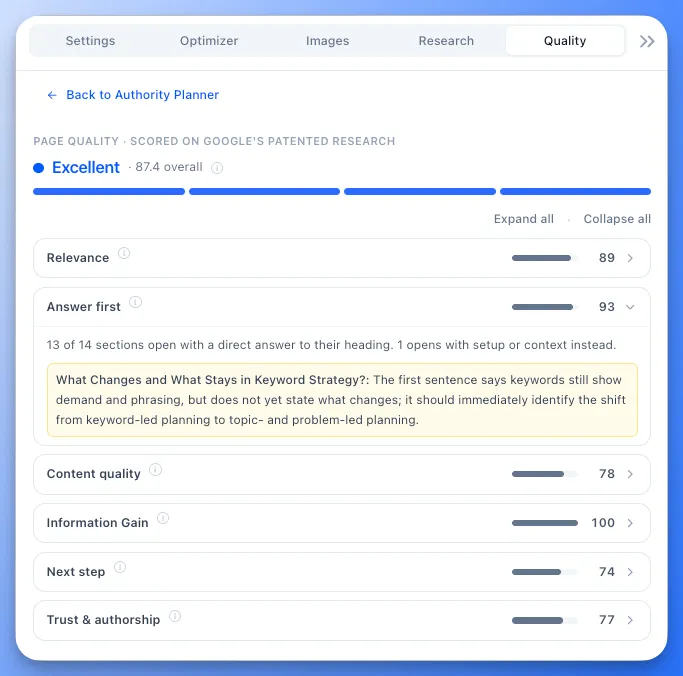
- See which sections to fix: every section that opens with setup instead of the answer is listed with a short note on what its first sentence should say. Click one to jump to that section in the editor.
- Headings that aren't questions count too: for a product name, a step or a label, the first sentence should state the section's key point.
- Only the sections that need it: the introduction, key takeaways, FAQ intro and conclusion aren't counted. Each FAQ question is.
📈 Topical Authority Planner: Search Demand for Every Topic (New)
One keyword's volume undersells a topic. The Planner now shows how many people search for each topic as a whole, so you can decide what to write first with numbers you can trust.
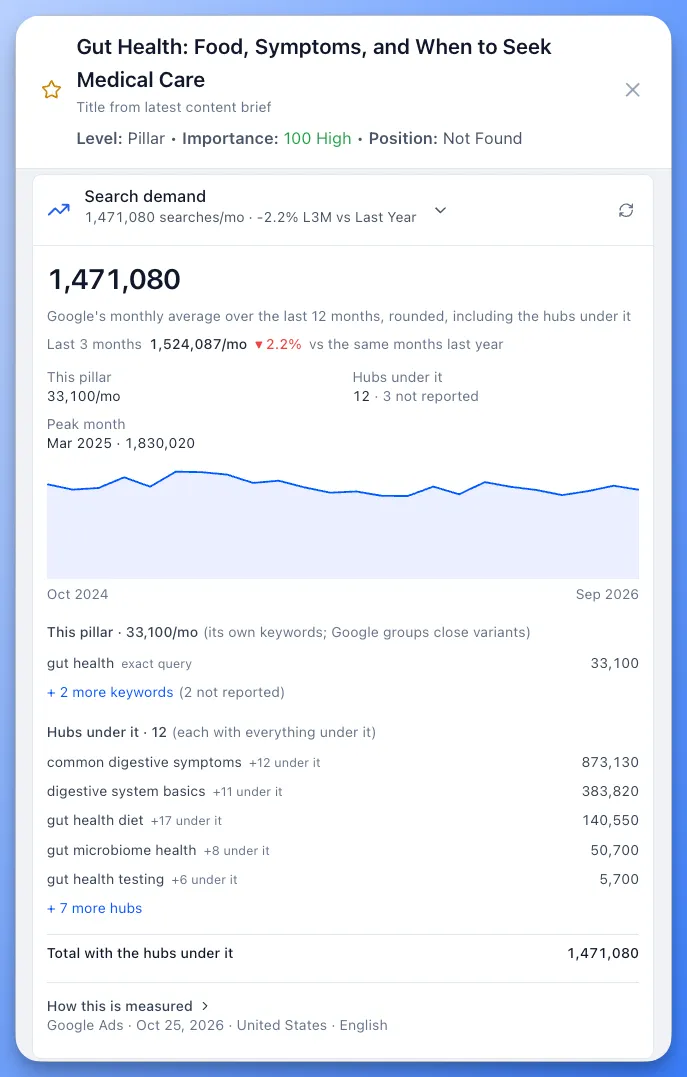
- Pick your next topic or silo with confidence: the new Demand column adds up every keyword in a topic, counting close variants once, and each pillar, hub and branch totals everything under it. Open a topic's Search demand section for a 24-month chart and every keyword behind the number.
- Write for demand that's growing: an up or down arrow compares the last 3 months with the same months last year, and seasonal topics show the months they peak, so your content is live before the searches arrive.
- Judge small topics by what you know: Google doesn't report search volume for keywords with fewer than 10 searches a month or for sensitive topics. A topic with no reported volume shows a dash marked Not reported instead of 0. Keyword tools don't capture every way people search, so a missing number doesn't mean no one is looking. You know your brand and audience, so you decide which topics matter to them.
- Count how your audience really searches: the Track button in a topic's Search Console section adds a query to the topic's Link Management & Keywords list. Its searches count toward the topic, and it's ready to use as anchor text when other pages link to the topic.
Filter the Planner by search demand range and export the numbers to CSV, Excel or Google Sheets. The MCP server and API show the same numbers, and Floyi refreshes them every 30 days at no cost.
🔌 Organic Audit: Multiple Google Search Console Accounts (New)
Client sites often live under different Google logins. You can now connect as many Google accounts as you need to one workspace and pick any of their properties when you fetch Search Console data.
- Add another account: connect a second, third or tenth Google login from the Audit tab or Settings > Integrations. Google's account chooser opens every time, so you can pick the right login.
- One searchable property list: properties from every account appear in one dropdown, grouped by Google account. Type part of a URL or an email to find the one you need.
- Each brand remembers its account: Floyi selects the account and property a brand last used, and the weekly refresh pulls from that same account.
- Shared with your team: accounts connected in a team workspace are available to every member, so your team can fetch client data without needing their own access to each client's Search Console. Owners and Admins add or remove accounts, and re-analyze, delete or manually match Search Console data.
- Reconnect in one click: if Google access for an account expires, it's flagged Reconnect needed instead of disappearing, and your brands keep using it once you reconnect.
Available on all paid plans. The Free plan includes one Google account per workspace.
🚀 Topical Map: Reorganize Your Map (New)
Briefs, internal links and drafts in Floyi all follow your map's structure, so a topic in the wrong place carries that mistake into everything built on it. You can now fix the structure right where you see it: move, rename, combine and add topics in the Silo and Outline views, and check every change before it's saved.
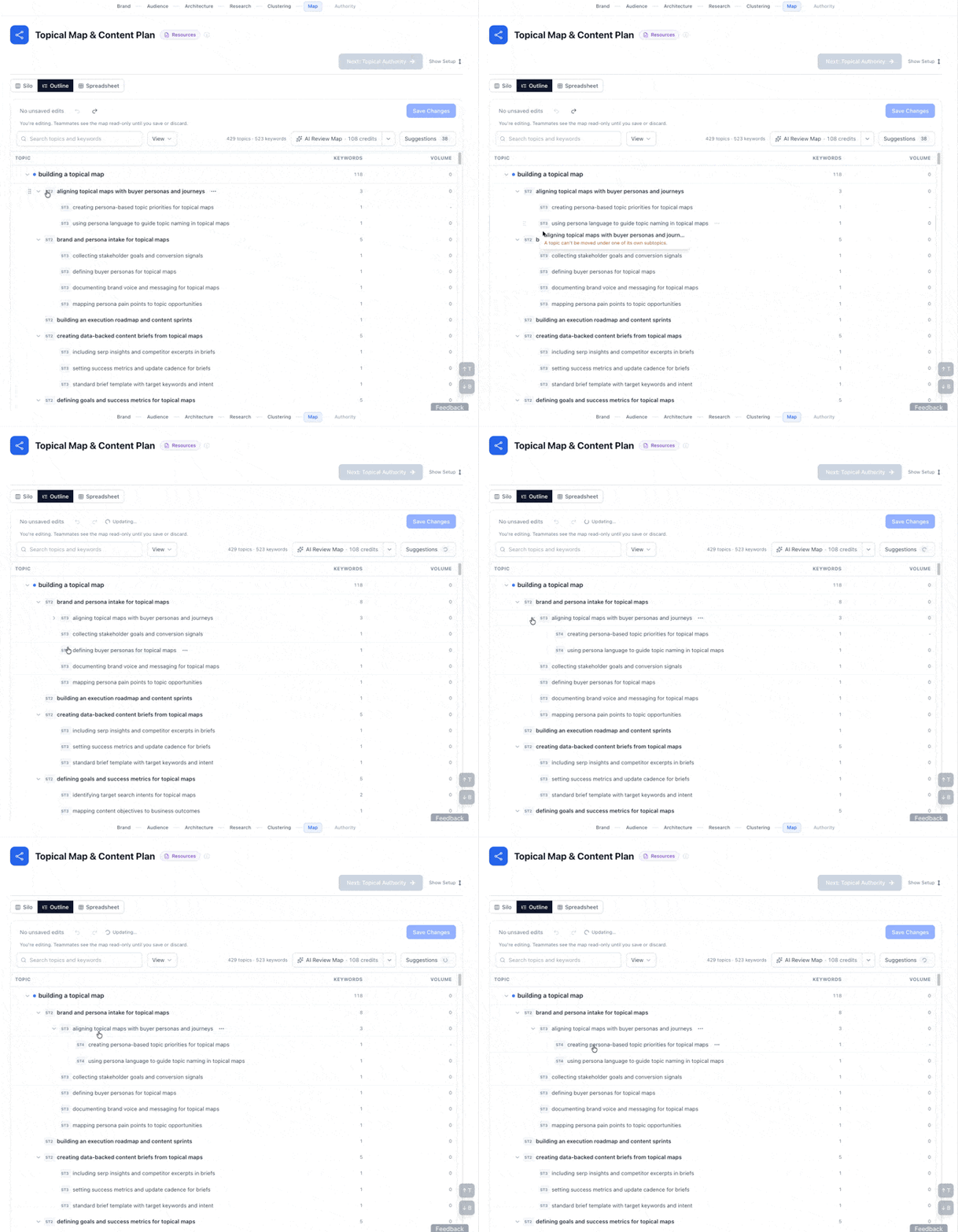
- Fix a topic the moment you spot it: drag it to a better parent in Outline, or use its menu in either view. The map now opens in Silo view, so you see the whole structure first.
- Try ideas without risk: every change waits in a draft until you save. Undo or revert any single edit, or discard the whole draft. When a move changes a page's place, you decide whether its URL slug follows, so URLs that match your live site can stay as they are.
- Never lose your work: leave the page or step away, and your edits are kept as a draft for 14 days. Restore all of them or just the ones you want.
- Problems are caught before they're saved: the new Must fix list shows structure problems with a fix for each, including problems that were already in the map. An edit that would break the structure can't be saved until it's fixed, so Topical Authority always starts from a sound map.
- Built for teams: one person edits at a time, so no one overwrites a teammate's changes. Team Owners and Admins can take over editing, and the previous editor's changes are kept as a draft.
🔍 Topical Map: AI Review (New)
Near-duplicate topics turn into two pages chasing the same search, and a topic under the wrong parent weakens its silo. Finding them by hand across hundreds of topics is slow, and it's easy to miss a few. AI Review reads your whole map, or one branch of it, and suggests where topics fit better: a better parent, near-duplicates to combine, a stronger name, or a keyword that deserves its own page. Nothing changes until you accept a suggestion.
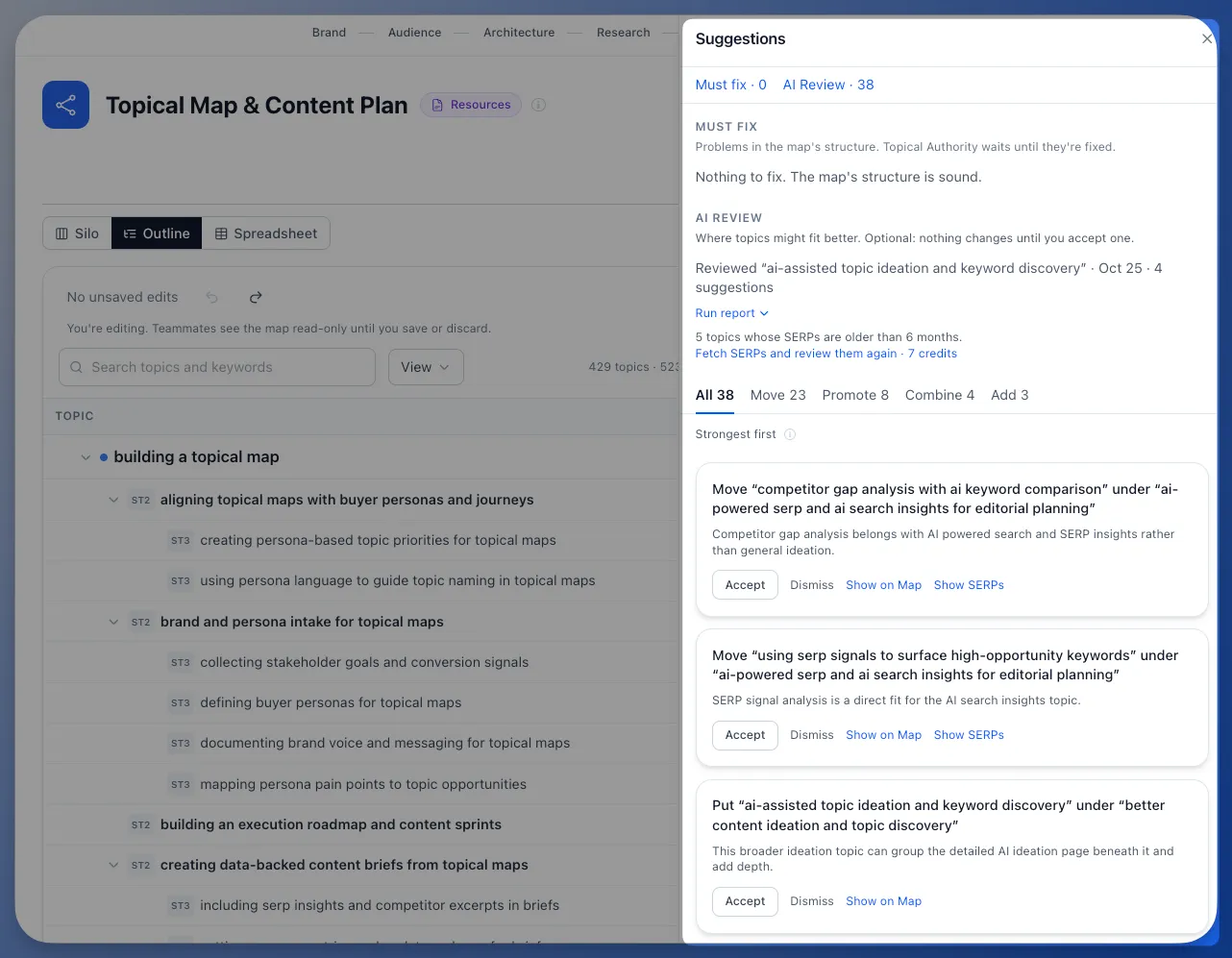
- See why before you accept: each suggestion explains its reasoning, and suggestions backed by SERPs let you open Show SERPs to check the pages Google ranks for yourself.
- Work through suggestions fast: suggestions are grouped by kind (Combine, Move, Rename, Split, Promote and Add), so you can review similar changes together and add a whole group to your draft with Accept all. Dismissed suggestions stay dismissed in later reviews, so you never judge the same one twice.
- Know the time and cost up front: before a review starts you see how many topics it covers, about how long it takes and what it costs. Topics it can't review are refunded.
- Better suggestions where your data is thin: topics with no stored SERPs, or SERPs older than 6 months, are judged by meaning alone. Tick one box to fetch fresh SERPs for just those topics before the review runs. Searches that come back empty are refunded.
- Keep working while it runs: edit the map during a review, and Floyi tells you when the suggestions are ready.
🛠️ Performance Improvements & Fixes
- Various performance improvements and bug fixes across the platform.