
Floyi 2.2.0
Better collaboration, faster production, and safer topic editing
Floyi v2.2 focuses on removing friction once your content system starts to scale. This release improves how teams collaborate, how drafts are produced in volume, and how complex topic structures are edited without breaking downstream work.
Here’s what’s new.
👥 Teams (Pro and Scale Plans)
Teams let multiple users collaborate using shared credits, without needing to share logins or lose ownership control. With Teams, you can:
- Invite teammates to your Team
- Assign role-based permissions
- Share projects securely across users
- Use Team credits across collaborative work
This makes it easier to onboard collaborators, keep projects organized, and protect sensitive brand and strategy assets as more people get involved.
Watch the Teams walkthrough:
📝 Content Creation Updates
Section Instructions
You can now add Section Instructions to guide what gets included in each section during content creation. Use Section Instructions to:
- Require specific elements in every section
- Enforce repeatable inclusions or constraints
- Add consistent guidance that applies across drafts
This works alongside Floyi’s existing strategic intent, giving you precise control over what content includes at the section level, without redefining voice or tone.
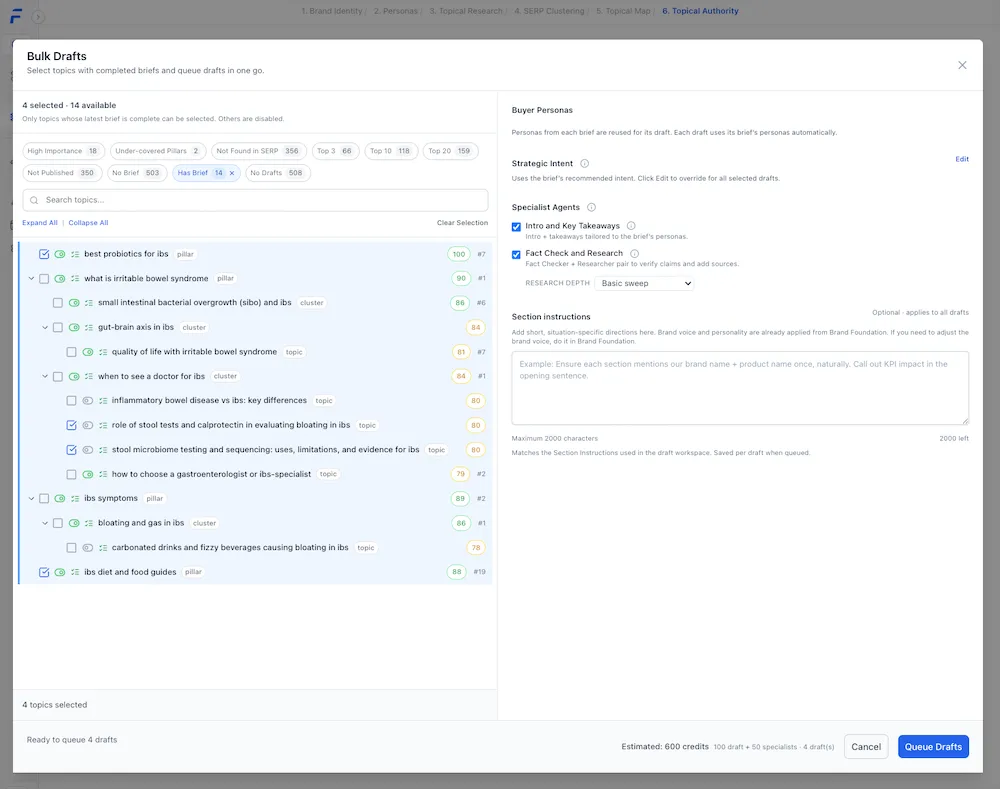
🚀 Bulk Drafts (Pro and Scale Plans)
Bulk Drafts let you generate multiple article drafts at once from strategy-aligned briefs, using the same topic structure and instructions. Built for scale, Bulk Drafts help you:
- Produce content across many topics faster
- Maintain consistency between drafts
- Reduce repetitive setup and cleanup work
This is designed for teams and agencies that need speed without sacrificing structure.
🗺️ Topic Editor Improvements
The Topic Editor has been upgraded to support faster and safer editing across both the Research View and Map View.
Inline Editing
You can now edit any cell directly in the table.
- No toggle buttons
- No modal dialogs
- Clear visual indicators for edited cells
- Automatic saving as you work
Managing topics now feels closer to a spreadsheet and far less interruptive.
Cascading Renames
When you rename a Main Topic, Subtopic 2, or Subtopic 3, Floyi automatically updates every matching value across your hierarchy. Before changes apply, you’ll see a confirmation showing exactly what will be updated, so you avoid broken connections and manual cleanup.
Edit Safeguards
As more people edit the same topic structures, v2.2 adds safeguards to prevent lost or conflicting changes. You’ll now see:
- A Pending Changes bar with commit or discard actions
- Highlighted modified cells so edits are easy to track
- Automatic handling of simultaneous edits in content briefs and article drafts
These safeguards make collaborative editing safer, especially when working within a Team.
Each update is designed to reduce friction upstream, so publishing strategy-aligned content downstream takes less time and less cleanup.