
Floyi 2.12.0
Entity Schema Markup — Knowledge Graph Disambiguation for Article Schema, plus an Editable Structured Data panel in WordPress
The Content Editor's Schema markup now links the entities in your article to the Knowledge Graph. Your Article JSON-LD gains mainEntity, about, and mentions — each entity connected to its canonical Wikipedia and Wikidata pages and its Google Knowledge Graph and Wikidata identifiers. This is the entity-disambiguation layer that dedicated entity-SEO tools charge a separate subscription for, built into Floyi's existing schema generator at no extra step.
🧠 Entity Schema Markup — Article JSON-LD
Search engines and AI answer engines rank entities, not just keywords. Floyi identifies the entities in your article, decides which one it's primarily about, and connects each to the Knowledge Graph — so Google and AI engines know exactly what your content covers.
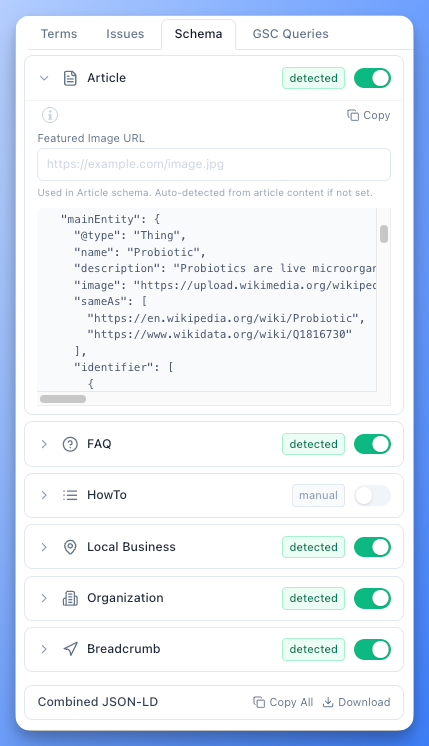
- mainEntity, about & mentions — Floyi marks the single primary subject your article is about (
mainEntity), its secondary subjects (about), and the supporting entities it references (mentions), and adds them to your Article schema. - Rich entity objects — every entity carries its canonical name, description, image, official URL, a specific schema.org type (Person, Organization, Diet, and so on),
sameAslinks to Wikipedia and Wikidata, andidentifiervalues for the Google Knowledge Graph MID and Wikidata QID. - AI-assisted subject detection — Floyi reads your title, topic, and the entities in your draft to pick the primary subject, expanding abbreviations to their canonical entity (e.g., an "IBS Guide" resolves to Irritable bowel syndrome) even when the full entity name isn't written out.
- Only what's actually in your article — entities are verified against your draft's body before they're included, so competitor-research terms that never made it into your content stay out of your schema.
- Exports everywhere — entity markup flows automatically into your WordPress and GitHub publishing and HTML copy through the existing Include Schema toggle. No separate step.
🔌 Edit Your Schema Right in WordPress
The Floyi Connect plugin (v1.2.0) adds a Structured Data panel to the WordPress editor, so your published schema is no longer a black box — you can see it, tweak it, and confirm it's valid without leaving WordPress.
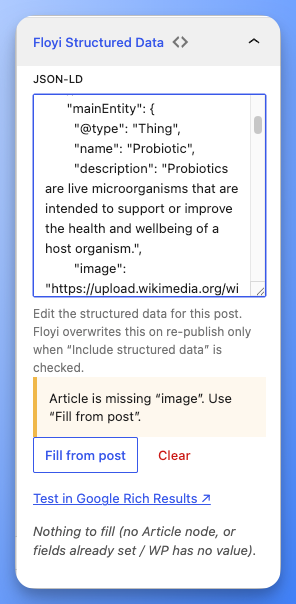
- See and edit your schema — a panel in the WordPress editor shows the exact JSON-LD on the page and lets you edit it directly, so last-minute corrections don't require a round-trip back to Floyi.
- Catch problems before Google does — the panel validates your schema as you type, flags missing recommended fields, and links straight to Google's Rich Results Test for the final check.
- One-click author & image fill — missing an author or featured image in your schema? Fill both from the WordPress post with a single click, so your Article markup is complete for search and AI.
- Your edits stay yours — leave "Include structured data" unchecked when you re-publish from Floyi and your WordPress schema edits are preserved; check it and Floyi takes over again. You decide who owns the schema.
- Complete author details — published Article schema now includes the author's profile URL automatically, closing a common Rich Results gap.
🛠️ Performance Improvements & Fixes
- Various performance improvements and bug fixes across the platform.