
Plan Your Site Structure.
In 60 Seconds.
Local business, service agency, SaaS product, or e-commerce store — paste your services, locations, features, categories, or integrations and map a complete site blueprint with clean URLs and proper hierarchy. Then generate content briefs for every page. No spreadsheets, no developers, no headaches.
Map Your Entire Site Structure Instantly
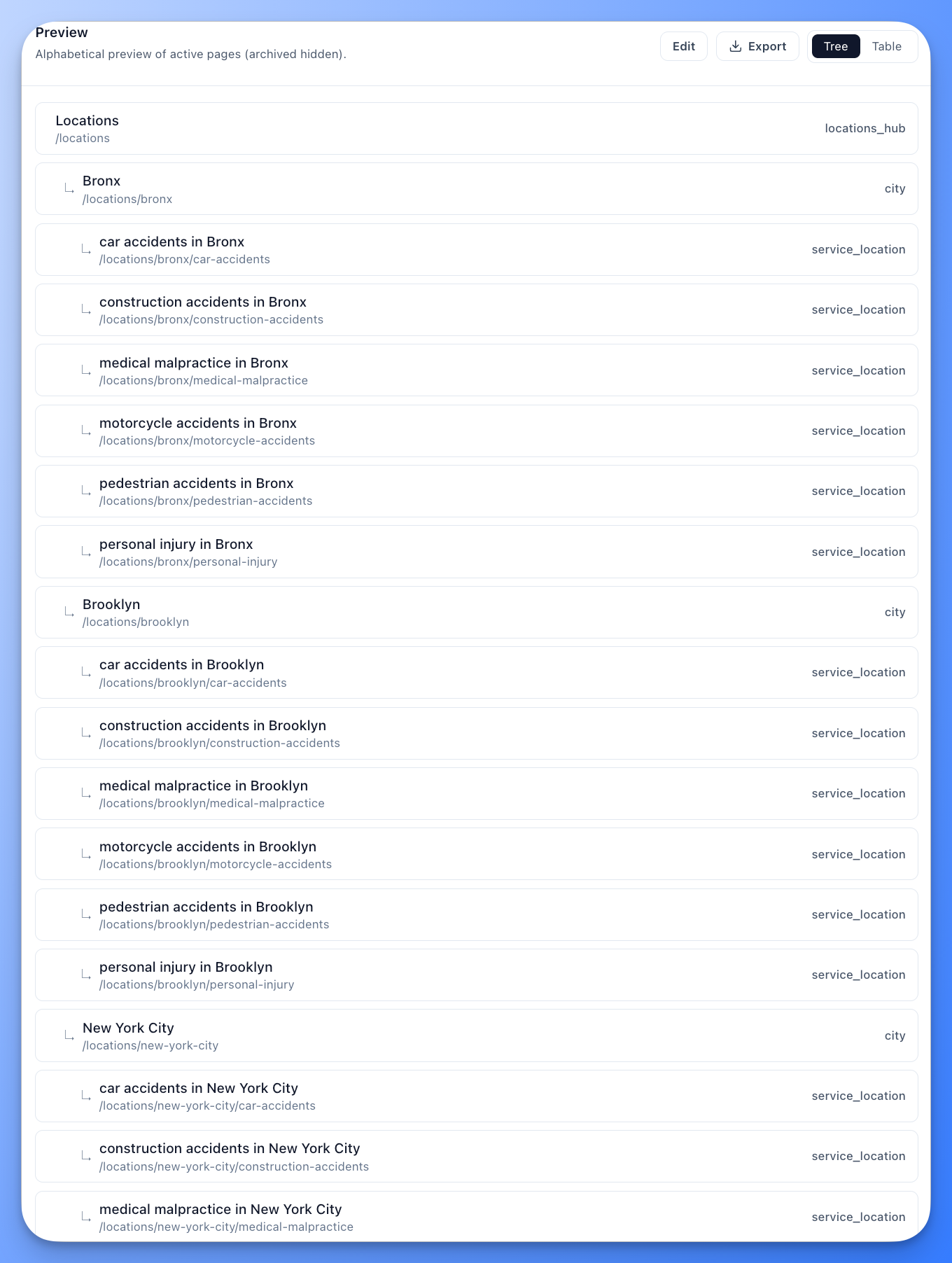
Enter your services, locations, industries, features, or integrations, click generate, and watch your complete URL blueprint appear. Tree view shows parent-child relationships. Table view lets you edit details. Then flow every page into content briefs and drafts.
Everything Local SEO, Agency, SaaS & E-commerce Teams Need
From service lists to complete site blueprint — then flow into content creation.
Four site types, one workflow
Local Business for multi-location businesses (services + locations). Service Agency for agencies, consultancies, and professional firms (services + industries + solutions). SaaS for software products (features + use cases + integrations + solutions). E-commerce for DTC stores and multi-brand marketplaces (categories + brands + collections + buying guides). Same clean workflow, different page structures.
Instant structure mapping
Turn a simple list of services and locations, services and industries, or features and integrations into a fully mapped website blueprint. What used to take weeks of spreadsheet planning now takes seconds.
Smart URL hierarchy
Clean URLs that both search engines and users love. Floyi enforces a maximum 4-level depth to keep your site crawlable and link equity strong.
Cross-product pages
Automatically generate pages for every combination. Local businesses get "Tree Trimming in Dallas" pages. Service agencies get "SEO for Healthcare" pages. SaaS products get "Reporting for E-Commerce" pages. Toggle on or off with one click.
Flexible location formats
Local Business sites support State > City > Neighborhood or City > Neighborhood hierarchies. Match your geographic footprint exactly.
40+ page types
Service, industry, solution, feature, use case, integration, category, brand, collection, buying guide, service+location, service+industry, feature+use case, category+brand, city, neighborhood, pricing, FAQ, reviews, case studies, and more. Each type triggers the right content brief template.
Agency, SaaS & E-commerce templates
Templates for service agencies (conversion-first, authority-first, specialist pages with B2B sections), SaaS products (hero + benefits, feature deep-dives, integration showcases, use-case stories with signup and demo CTAs), and e-commerce stores (category landing pages, brand storefronts, buying guides, comparison pages, collection pages with purchase CTAs).
Bulk import and export
Import existing page lists via CSV or Excel. Export complete blueprints to Google Sheets with one click. Hand off clean architecture specs to developers.
How It Works
From services list to complete blueprint to content briefs.
Step 1: Choose your site type and add your inputs
Select Local Business, Service Agency, SaaS, or E-commerce. Paste your services one per line, then add locations (for local businesses), industries and solutions (for agencies), features, use cases, and integrations (for SaaS products), or categories, brands, and collections (for e-commerce stores).
Step 2: Configure URL structure
Toggle hub folders on or off. Enable cross-product pages — service+location for local businesses, service+industry for agencies, feature+use case for SaaS, category+brand for e-commerce. See the page count estimate before mapping.
Step 3: Map and refine
Click generate and watch your blueprint appear. Switch between tree and table views. Edit titles, slugs, and types inline. Add or remove pages as needed. Your inputs are saved so you can adjust and regenerate anytime.
Step 4: Flow into content creation
Export blueprint to CSV, Excel, or Google Sheets for developer handoff. Then generate strategy-aligned content briefs for every page in your architecture.
Part of a Complete Content Strategy System
Site Architecture isn't just a mapping tool — it's part of a connected workflow where brand identity, site structure, and content strategy work together, whether you're a local business, a service agency, a SaaS product, or an e-commerce store.
Brand Foundation feeds Site Architecture
Your business info, service areas, and brand positioning inform the architecture you build — whether local pages, agency pages, or SaaS product pages.
Site Architecture feeds Content Briefs
Each page type triggers purpose-built brief templates — a Service page gets a different brief than a Service+Location page, a Service+Industry page, or a SaaS Feature page.
Topical Authority tracks every page
Architecture pages flow into Topical Authority with dedicated query strategies — location-based queries for local businesses, industry-based queries for agencies, and feature- and use-case-based queries for SaaS products.
Everything stays connected
Change your services, industries, locations, features, or integrations, regenerate your architecture, and your content briefs update accordingly. Your inputs are saved for easy adjustments.
SEO Teams Ship Faster
What used to take our team weeks of spreadsheet work now happens in a single client call. We generate the structure, show the tree view, and get approval on the spot.

Jessica Martinez
SEO Director, Home Services Agency
We expanded from 3 locations to 25 and needed pages for each service in each city. Site Architecture gave us the entire URL structure in under 10 minutes.

David Chen
VP Marketing, Multi-Location Dental Group
As a local SEO consultant, this tool has become essential for client onboarding. I can show them a complete site structure during our first meeting.

Amanda Rogers
Local SEO Consultant
We had 12 features and 8 integrations but no structured plan for the pages. Site Architecture mapped every feature page, integration page, and use-case combination in minutes — our product marketing site went from scattered to strategic overnight.

Ryan Patel
Product Marketing Manager, B2B SaaS
We run a multi-brand marketplace with 30 brands and dozens of product categories. Site Architecture mapped every category page, brand page, buying guide, and cross-product combination page in minutes. Our content team finally has a clear plan for what to publish.
Sarah Kim
Director of Content, Multi-Brand E-commerce
Frequently Asked Questions
What is Site Architecture in Floyi?
Site Architecture is a site planning tool that transforms lists of services, locations, industries, solutions, features, use cases, integrations, and product categories into a complete website structure blueprint. Choose your site type — Local Business, Service Agency, SaaS, or E-commerce — and Floyi generates the full page tree with proper URL hierarchy and page types, then flows every page into content brief generation.
What site types are supported?
Floyi supports four site types: Local Business (services + locations, ideal for multi-location businesses like dental groups, HVAC companies, and home services), Service Agency (services + industries + solutions, ideal for marketing agencies, IT consultancies, law firms, accounting practices, and staffing firms), SaaS (features + use cases + integrations + solutions, ideal for software products), and E-commerce (categories + brands + collections + buying guides, ideal for one-brand DTC stores and multi-brand marketplaces). Each type has its own page kinds, content templates, and search tracking patterns.
How many pages can I map at once?
There is no practical limit. Most teams map between 50 and 1,000 page URLs in a single run. For example, 10 services across 50 locations creates 500 service+location URLs instantly, plus all the hub and parent pages. For agencies, 4 services across 3 industries creates 12 cross-product pages automatically. For SaaS products, 8 features across 6 use cases creates 48 feature+use-case pages.
What are cross-product pages?
Cross-product pages combine two dimensions of your site to capture specific search intent. Local businesses get "Tree Trimming in Dallas" pages (service + location). Service agencies get "SEO for Healthcare" pages (service + industry). SaaS products get "Reporting for E-Commerce" pages (feature + use case). Toggle them on or off with one click.
What location formats are supported?
For Local Business sites, Floyi supports two formats: State > City > Neighborhood for multi-state businesses, and City > Neighborhood for single-state or metro-focused businesses. You can switch formats with a single toggle.
Can I import my existing page list?
Yes. You can import pages via CSV or Excel with automatic column mapping. Floyi recognizes Title, Slug, Type, and Parent columns automatically. You can also fetch locations from an existing URL on your website using AI extraction.
What page types are available?
Floyi includes 40+ page types across all four site types. Local Business pages include Services Hub, Service, Subservice, Locations Hub, State, City, Neighborhood, Market, and Service + Location. Service Agency pages include Industries Hub, Industry, Service + Industry, Solutions Hub, and Solution. SaaS pages include Features Hub, Feature, Use Cases Hub, Use Case, Integrations Hub, Integration, Solutions Hub, Solution, and Feature + Use Case. E-commerce pages include Categories Hub, Category, Brands Hub, Brand Page, Collections Hub, Collection, Buying Guide, Comparison, Product, and Category + Brand. All types share structural pages like Pricing, FAQ, Reviews, Case Studies, About, and Contact.
How does Site Architecture connect to content creation?
Every page you map flows into Floyi's content system. Pages can be tracked in the Topical Authority module, and each page type triggers purpose-built content briefs and templates — from local service pages to SaaS feature deep-dives. You export the blueprint to Google Sheets, CSV, or Excel for developer handoff, then generate content for every page. The Site Architecture documentation covers every generator and page type.
Related Tools
Briefs & Drafts
Generate strategy-aligned content for every page in your architecture.
Content Plans
Prioritize and sequence which architecture pages to create first.
Topical Authority
Track rankings and AI visibility for your architecture pages.
Brand Foundation
Define brand identity, voice, and positioning that feeds your architecture.
Topical Audit
Audit competitor site structures before planning your own.
AI Writing Assistant
Refine and optimize content for every page in your architecture.
Solutions & Resources
Local SEO & Multi-Location
How Site Architecture powers local SEO strategy.
For Agencies
Plan agency sites with service, industry, and solution pages built for B2B.
For SaaS Products
Map feature, integration, and use-case pages that drive signups and demos.
For E-commerce
Map category, brand, collection, and buying guide pages for online stores.
Documentation
Complete guide to using Site Architecture.
Your site blueprint is one click away.
Map your entire site structure — local business, service agency, SaaS product, or e-commerce store — then generate content for every page. No spreadsheets required.