
Your Brand. Every AI Answer.
One Report.
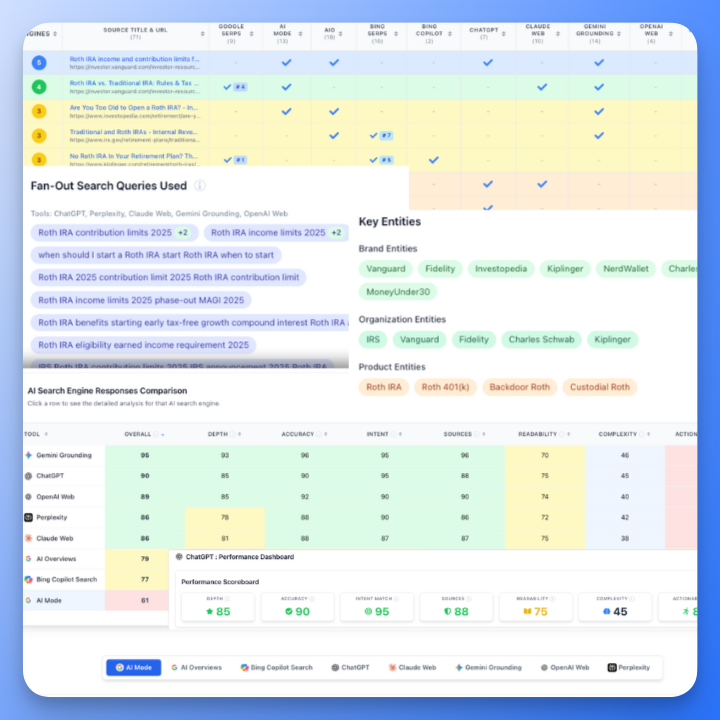
See every citation and every miss across 9 AI engines and classic SERPs in a single report. AIRS turns those answers into a prioritized content blueprint and one unified brief your team can publish from.
See Your AI Search Visibility
See where your brand appears across Google AI Mode, Google AI Overviews, Bing Copilot, ChatGPT, OpenAI Web, Perplexity, Claude, Gemini, and Grok, plus traditional Google and Bing search. One report shows every citation and every gap by topic, entity, and competitor.
Right now AI might be quoting your competitors when people ask about your space. AIRS shows you exactly when and where that happens.
Mentioned or only cited
See whether an engine writes your brand into its answer or quietly uses your page as a source without ever saying your name. Two very different visibility gaps, tracked separately for every engine, with each mention highlighted in the answer itself.
Topic and entity coverage
Map citations to topics, entities, and intent. See where answers already match your positioning and where they describe your niche without you.
Gaps and risks
Find topics where rivals are credited as the experts. Identify zones where you need content and outreach before those narratives stick.
Brand Mentions
Mentioned, Cited, Or Missing Entirely
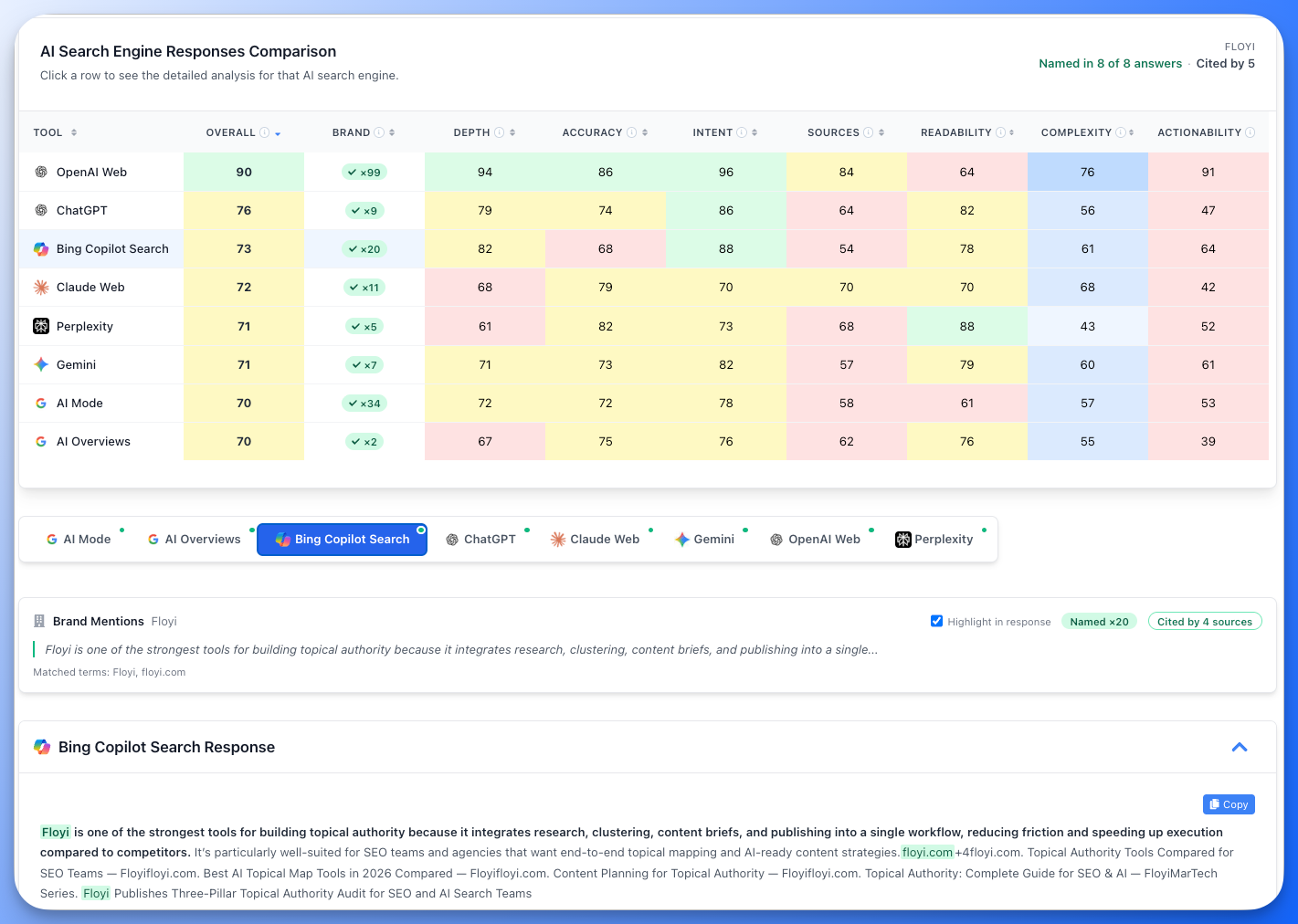
Know Which Engines Actually Say Your Name
Ranking well and being quoted are no longer the same thing. AIRS shows you exactly which engines write your brand into the answer, which quietly use your pages without the credit, and which leave you out completely.Two signals, never merged
An engine can pull an answer straight from your page and still credit someone else. AIRS counts being named in the answer separately from being cited as a source, because they are different problems with different fixes.
Counted per engine
Every engine shows whether it named you, how many times, and how many of your pages it cited. One line at the top of the report tells you the score across all of them.
Highlighted in the answer
Mentions are highlighted directly inside each AI response, so you can scan a long answer and see every one instantly instead of hunting for your own name.
Brand & Entity Landscape
See Every Brand The Answers Name, Not Just Yours
The Competitive Picture, Straight From The Answers
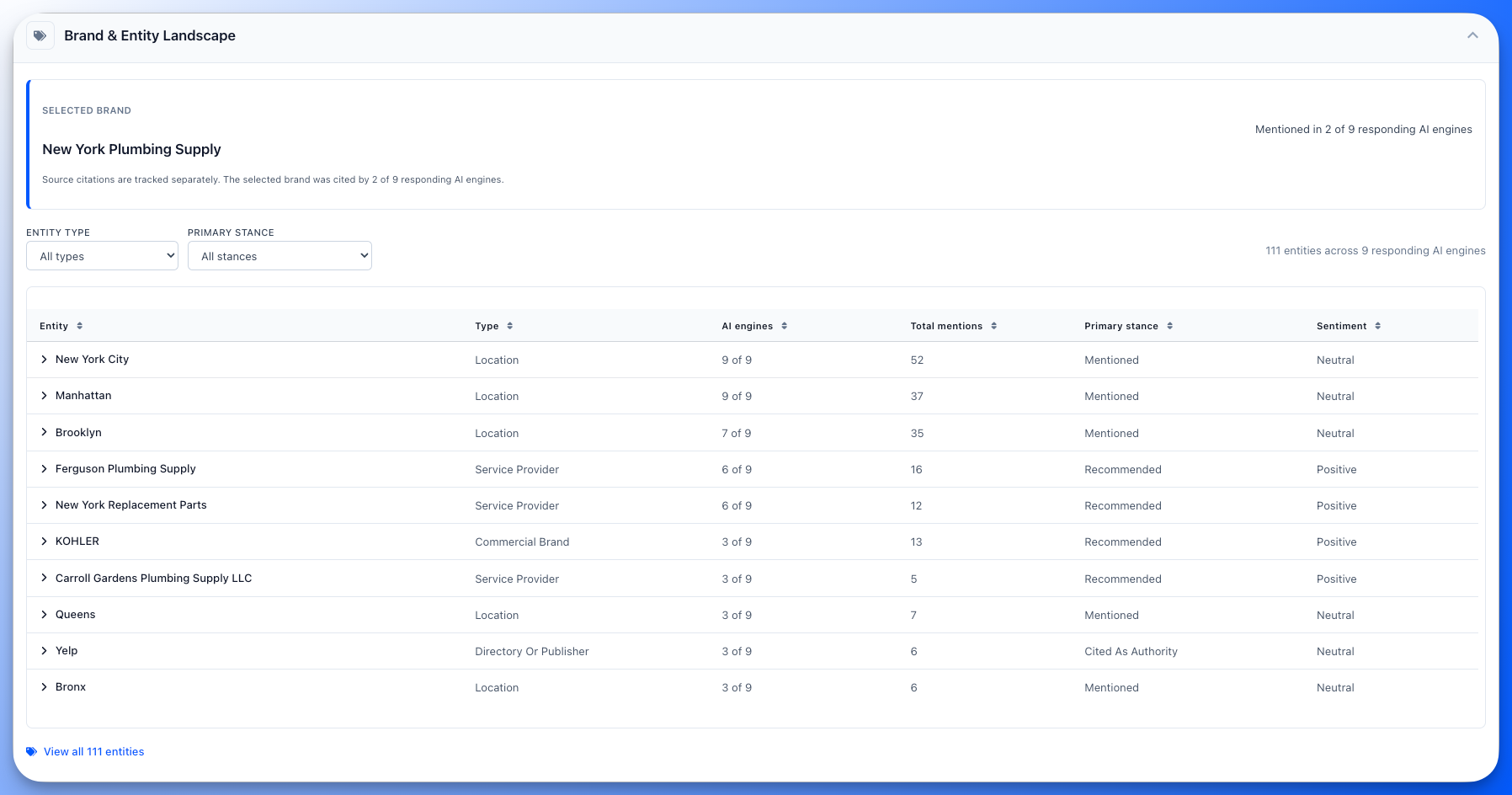
Knowing you are absent is half the story. The other half is who took your place, how the engine framed them, and what it said. AIRS puts every named entity in one sortable table so the gap between you and the brand being recommended is a row apart, with the quote attached.Who the engines actually talk about
AIRS reads every AI answer and pulls out each brand, company, product, person and publisher it names, then ranks them by how many engines named them. Your brand sits in that same table, so your position is measured against the field instead of on its own.
Recommended, compared, or just mentioned
Each entity carries the stance the answer took toward it and the sentiment behind it, tracked separately. An engine can name you warmly and still recommend a competitor, and that is a different problem from being ignored.
Evidence you can quote back
Open any entity and you get one card per engine: its stance, its sentiment with a confidence figure, how many times it said the name, and the line from its answer that proves it. Nothing in the table is a claim you cannot trace.
Every Major AI Engine, One Dashboard
AIRS Analyzer blends AI engines and classic SERPs into one view so you can see how both machines and people see your brand.
Unlike simple screenshot tools, AIRS connects every citation to topics, entities, and competitor domains so you know exactly what to fix.
Google AI Overviews & AI Mode
See where your brand appears in AI generated summaries and Google AI Mode responses at the top of search results. Track citation frequency and positions.
Bing Copilot
Monitor mentions in Microsoft AI experiences across search, Edge, and Windows. Watch share of voice shift over time.
ChatGPT Search
Track when OpenAI web search and browsing experiences cite your content. See which topics trigger your site as a source.
Perplexity AI
Understand how often Perplexity relies on your pages when answering user questions. Identify high citation topics and blind spots.
Claude, Gemini & Grok
See mentions across Anthropic Claude, Google Gemini, and xAI Grok. Understand how different LLMs perceive your authority.
Traditional SERPs
Compare AI visibility side by side with classic Google and Bing rankings. Connect the dots between traditional SEO gains and AI search gains.
Action Ready Strategic Report
AIRS turns raw AI and SERP data into a three part playbook and one master brief you can ship the same day. When people ask questions in your space, the goal is simple. The answers should point to you.
Strategic summary
Get a one page view of your biggest wins, gaps, and risks in plain language. See which topics need attention and what it means for your brand.
Content blueprints
Turn visibility insights into titles, entities, and link suggestions ready to ship. Plan content that improves both AI citations and traditional rankings.
Competitive gaps
See which rivals are winning citations and where you are not. Every entity the answers name, ranked by engine coverage, with the stance each engine took toward it.
Citation patterns and openings
Recurring patterns in what the engines cite, each written as the pattern, what it means for your strategy, and the action to take, tagged with the engines that support it.
Unified briefing package
Pull strategic summary, topic insights, and SERP evidence into one master brief for your team. One link for writers and editors, no hunting through exports, screenshots, or spreadsheets.
Trusted By Forward Thinking Teams
AIRS Analyzer showed us we were invisible in AI search despite ranking well in Google. We adjusted our content strategy and tripled our AI citations in two months.

David Park
VP Marketing, Tech Startup
Finally, a way to see AI search performance clearly. The competitive analysis is eye opening. We went from guessing to knowing exactly which topics we had to win.

Lisa Thompson
SEO Director, Enterprise
We run AIRS monthly to check our GEO performance. It is the only tool that covers all the major AI engines and ties them back to topics we care about.

James Miller
Content Strategist, Agency
Frequently Asked Questions
What is AIRS Analyzer?
AIRS Analyzer goes beyond simple AI mention checking. It shows where every major AI engine and classic SERP cite or ignore your brand, then turns that insight into a prioritized content blueprint. It gives you a complete view of your visibility across AI search and traditional SEO.
Which AI search engines does AIRS cover?
AIRS analyzes nine AI engines: Google AI Mode, Google AI Overviews, Bing Copilot, Claude, Gemini, Grok, OpenAI Web, Perplexity, and ChatGPT. It also covers traditional Google and Bing SERPs, for eleven surfaces in one report. New engines and surfaces are added as they roll out.
How does this help my SEO and content strategy?
AIRS helps you spot missing citations, tune pages for AI visibility, and win mentions in both high intent SERPs and AI answers. More visibility in AI search often correlates with higher domain authority and stronger organic performance.
What is the difference between GEO, LEO, and AEO here?
GEO stands for Generative Engine Optimization, LEO for Large Language Model Engine Optimization, and AEO for Answer Engine Optimization. AIRS covers all three by analyzing how AI assistants, LLMs, and classic SERPs reference your brand.
Does AIRS tell me if an engine recommends me or just mentions me?
Yes. Every entity in the report carries a stance and a sentiment, tracked separately. Stance is how the answer positioned it: recommended, conditionally recommended, compared against others, mentioned in passing, cited as an authority, or criticized. Sentiment is the tone. An engine can describe you warmly and still recommend someone else, so AIRS never infers one from the other, and it never treats repetition as proof of quality.
Can I analyze competitor citations?
Yes, in two ways. Every report lists every domain the AI engines cite, so you can see which competitors are credited as the source. The Brand & Entity Landscape goes further and lists every brand the answers actually name, ranked by how many engines named it, with the stance each engine took. Select your brand before running and AIRS marks your own pages and your own row, so the gap between you and the brand being recommended is one row apart.
Can I try AIRS before I pay?
Yes. Every account, free ones included, can open a complete demo report and read a full eleven-surface analysis end to end, so you can see exactly what you would get before spending anything. Running your own queries is a Pro and Scale feature. The 14-day Pro trial is $7 and comes with 5,000 credits, enough for several reports on your main product line and its key competitors.
How often should I run AIRS reports?
Most teams run reports monthly or before major campaigns, launches, or site changes. AI answers shift week to week, so re-running the same query over time is the clearest way to see whether your visibility is actually improving. Usage details are in the AIRS Analyzer docs.
Does AIRS provide API access?
Yes. AIRS is available through Floyi MCP on the Pro and Scale plans, so you can start reports and pull results from Claude or any MCP client. If you need AIRS data in an internal dashboard, contact [support@floyi.com](mailto:support@floyi.com) with your use case so we can prioritize the right integrations.
Your AI Visibility Is One Click Away.
Open the demo report on any account and read a full eleven-surface analysis before you spend anything. When you want to run your own queries, AIRS is on Pro and Scale, and the 14-day Pro trial is $7 with 5,000 credits.