
Floyi 2.9
–
Floyi 2.9.8 – May 21, 2026
E-commerce Site Architecture, Content Editor Research Tab, Enhanced Internal Linking, WordPress 7.0 Compatibility
Online stores can now build full site architectures in Floyi — category pages, brand pages, buying guides, and cross-product pages — with dedicated e-commerce brief and draft agents that understand buyer intent and conversion patterns. The Content Editor gains a new Research tab that surfaces every research input used during content creation, and internal link suggestions now appear across the Planner, Brief Generator, and Editor so your content stays connected from strategy to publish.
🛒 E-commerce Site Architecture
Site Architecture now supports e-commerce stores alongside local businesses, service agencies, and SaaS products. Whether you run a single-brand DTC store or a multi-brand marketplace, Floyi generates a complete page hierarchy with buyer-focused URLs — ready for brief and draft generation.
- Two store models — choose between a one-brand DTC store (your products, your categories) or a multi-brand store (multiple brands across shared categories). Each model generates the right page structure for your business.
- 11 e-commerce page types — category pages, brand pages, collection pages, buying guides, comparison pages, product pages, and four hub pages, plus Category × Brand cross-product pages for multi-brand stores (e.g., "Nike Running Shoes" under the Running Shoes category).
- 12 conversion-focused templates — each page type has its own content template built for e-commerce: product claims require specs or prices (no vague "premium quality"), inline CTAs appear mid-page for longer content, and internal links connect categories to products, guides, and brands naturally.
- E-commerce brief and draft agents — eight dedicated brief agents and four draft agents write for buyer intent: product benefits, pricing transparency, comparison criteria, and purchase CTAs instead of generic informational content.
- Automatic URL hierarchy — enter your categories, brands, collections, and guides as simple lists. Floyi generates clean, evergreen URL slugs organized under customizable hub paths like
/shop/,/brands/, and/guides/. - Cross-product pages — toggle on Category × Brand pages to automatically generate pages for every category-brand combination, capped at 200 pages to keep your site manageable.
- E-commerce query strategy — Topical Authority settings now include e-commerce-specific query patterns and trackable page types, so you can monitor organic visibility for category, brand, and guide pages alongside your editorial content.
🔬 Content Editor — Research Tab
A new Research tab in the Content Editor makes the research behind your content visible and actionable. Instead of wondering what the AI agents used to write your brief and draft, you can now see every input in one place — and use it to strengthen your content.
- Internal Link Suggestions — live recommendations from your topical map, grouped by relation type: parent topics, sibling topics, and subtopics. Each link shows its publication status, URL slug, and suggested anchor texts sourced from your research agents. Links already placed in your article are marked with a check, and unplaced links sort to the top so you always see what's missing.
- Researcher Agent Queries — the exact search queries your Research Agents used during draft generation to gather evidence, verify claims, and enrich your article with real-world data. Copy individual queries or export them all at once for your own research.
- Top SERP Competitors — the competitor URLs selected and analyzed during brief and draft generation, so you know exactly which pages the AI agents studied. Open any competitor in a new tab or copy all URLs for further analysis.
🔗 Improved Internal Linking — Planner, Briefs & Editor
Internal link suggestions now follow your content from strategy through writing. The Planner shows more linking opportunities per topic, the Brief Generator includes them as part of the brief metadata, and the Content Editor's new Research tab lets you place them with the right anchor text.
- More suggestions in the Planner — the topic details drawer now surfaces parent, sibling, and child topic links with their publication status, giving you a clearer picture of your internal linking opportunities before you start writing.
- Anchor text recommendations — each internal link suggestion includes AI-generated anchor text options tagged by source (Map, AI, or custom), so you can pick the most natural phrasing for each link.
- Real-time placement tracking — as you add internal links in the editor, the Research tab updates instantly to show which suggestions you've placed and which anchor text you used.
🔌 WordPress Plugin 1.1.1 — WordPress 7.0 Compatibility
The Floyi Connect WordPress plugin is updated to version 1.1.1 with full compatibility for WordPress 7.0.
- WordPress 7.0 support — updated JSON-LD rendering to use WordPress 7.0's required
wp_print_inline_script_tag()function, resolving plugin check warnings for unescaped output. - Continued backwards compatibility — the plugin remains compatible with WordPress 5.8+ and PHP 7.4+.
🛠️ Performance Improvements & Fixes
- Adjustable Content Editor sidebar — the right-side settings panel in the Content Editor is now resizable, giving you more room for the editor or the optimizer as needed.
- Various performance improvements and bug fixes across the platform.
Floyi 2.9.7 – May 17, 2026
SaaS Site Architecture, AIRS Analyzer Demo
SaaS companies can now build full site architectures in Floyi — feature pages, use-case pages, integration pages, and solution pages — with dedicated brief and draft agents that understand SaaS conversion patterns. Plus, every user can now explore a live AIRS Analyzer demo report to see how Floyi tracks brand visibility across ChatGPT, Google AI Mode, and Bing Copilot.
🏗️ SaaS Site Architecture
Site Architecture now supports SaaS products alongside local businesses and service agencies. Define your product's features, use cases, and integrations, and Floyi generates a complete page hierarchy with conversion-focused URLs — ready for brief and draft generation.
- SaaS-specific page types — feature pages, use-case pages, integration pages, solution pages, and cross-product feature + use-case pages, each with its own hub structure.
- Automatic URL hierarchy — enter your features, use cases, and integrations as simple lists. Floyi generates clean, evergreen URL slugs organized under customizable hub paths like
/features/,/use-cases/, and/integrations/. - SaaS-tuned briefs and drafts — dedicated brief and draft agents write for SaaS conversion: product value propositions, feature benefits, competitive differentiation, and signup/demo CTAs instead of generic informational content.
- SaaS template library — page templates tailored to SaaS patterns (hero + benefits, feature deep-dives, integration showcases, use-case stories) give the draft agents a structural starting point that matches how top SaaS sites convert visitors.
- Query strategy for SaaS tracking — Topical Authority settings now include SaaS-specific query patterns and trackable page types, so you can monitor organic visibility for feature, use-case, and integration pages alongside your editorial content.
📊 AIRS Analyzer Demo Report
- Explore AIRS before running your own — every user can now view a full demo AIRS Analyzer report to see how Floyi tracks your brand's visibility across AI search engines like ChatGPT, Google AI Mode, and Bing Copilot before committing credits to their own analysis.
- Improved AI engine logos — updated Bing Copilot and AI Mode icons for clearer identification across the AIRS report and export formats.
🛠️ Performance Improvements & Bug Fixes
- Various performance improvements and bug fixes across the platform.
Floyi 2.9.6 – May 4, 2026
Search Console By Page Tab, GSC Performance in the Planner, GSC Query Coverage in the Optimizer
Floyi's Search Console Audit has always shown GSC performance grouped by topic. Now you can see it by page too, the Planner pulls GSC performance directly into every topic, and the Content Optimizer shows which Search Console queries your draft already covers — so the data follows you from analysis to writing without ever switching tabs.
📄 New By Page Tab in Search Console Audit
- See your data from the page angle — clicks, impressions, position, and queries grouped by URL instead of topic. Spot underperformers, refresh candidates, and quick wins at a glance.
- Drill into any URL — expand a row to see exactly which queries drive that page and how it ranks for each.
- Sort and search instantly — sort by clicks, impressions, position, or alphabetical; filter by URL substring to zero in on the section you care about.
📊 Search Console Performance in the Planner
- GSC data inside every topic — open any topic in the Planner and see its real Search Console performance side-by-side with strategy. Clicks, impressions, average position, and the queries driving the topic.
- Trend sparklines — at-a-glance line charts show whether each topic is gaining, holding, or fading over time.
- One less tab switch — review strategy, content, and performance for a topic in a single place instead of bouncing between Planner and Audit.
🔗 URL ↔ Topic Matching
- Fix mismatches in one click — when Floyi attaches the wrong URL to a topic, reassign it from the topic details drawer in the Planner.
- Keep your URL slugs in sync — when you match a URL to a topic, optionally update the topic's planned URL slug so your strategy reflects what's actually live.
- Clean unmatch, no manual cleanup — removing a manual match that previously updated the slug offers a one-click "Unmatch and revert slug" action, so you don't have to remember and re-enter the old slug by hand.
✅ GSC Query Coverage in the Content Optimizer
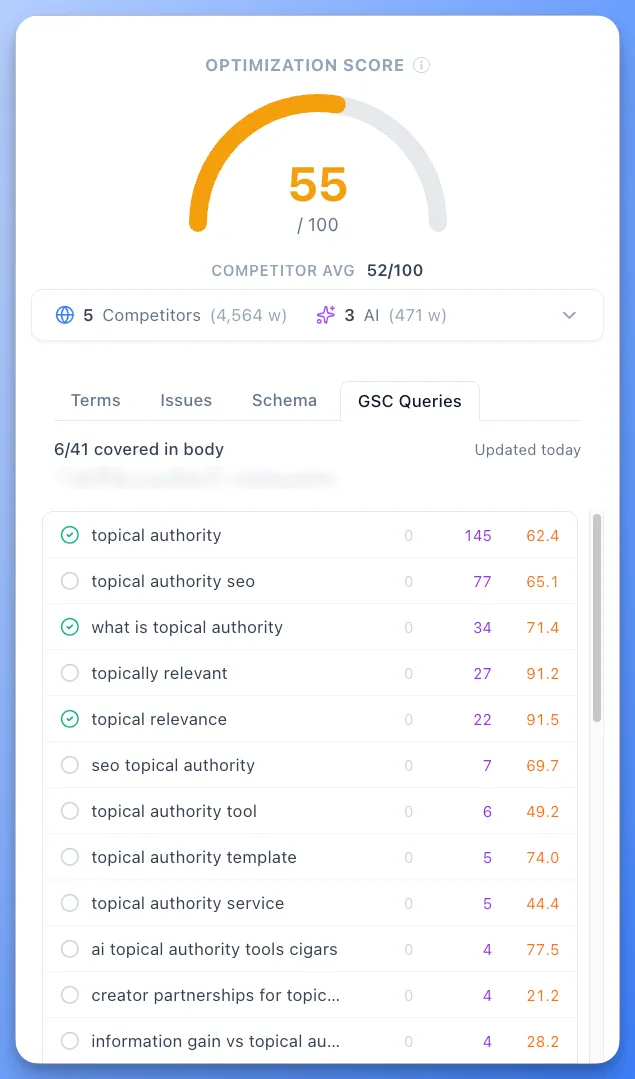
- Write toward the queries Google already associates with your URL — the Content Optimizer now lists every Search Console query for the page you're editing, so you stop guessing what to cover.
- Green checks for covered queries — the same coverage UI as the Terms list. Each query gets a green check when your draft already mentions it, so missing queries jump out at a glance.
- Refresh and rank-recovery work, made obvious — for existing pages, you can see exactly which ranking queries you've drifted away from and patch them in the same editor.
Floyi 2.9.5 – April 24, 2026
AI Search Gaps, Competitor-Based Optimizer Usage Targets, PAA Explorer
Your topical research now has a blind-spot detector. AI Search Gaps queries ChatGPT, Google Gemini, and Google AI Mode as your buyer personas, extracts every topic from their responses, and matches them against your existing topical research. The result: a curated list of gap topics you can review and add to your research with one click. Plus, a new PAA Explorer lets you recursively expand People Also Ask questions into a visual tree, and PAA data is now surfaced directly across Topical Authority and content workflows.
🔍 AI Search Gaps — Topical Research
AI search engines recommend topics and concepts that traditional keyword research misses. AI Search Gaps surfaces these blind spots by running your buyer personas' real questions through the same AI engines your audience uses, then comparing what comes back against what you already cover.
- Multi-engine querying — select one, two, or all three AI search engines (ChatGPT, Google Gemini, Google AI Mode) per run. Each engine surfaces different topics and perspectives, so running all three gives you the widest coverage.
- Persona-driven prompts — Floyi generates natural, conversational questions tailored to your buyer persona's role, pain points, goals, and expertise level. These are the questions your audience is actually asking AI assistants.
- Automatic gap classification — every extracted topic is classified as a gap (not in your research), matched (already covered), or not relevant (outside your brand's scope). Gap topics include a suggested parent topic and hierarchy level.
- Smart hierarchy placement — gap topics are placed at the right level (ST2, ST3, or ST4) under the most specific matching parent in your research.
- Pay only for what you discover — each run uses credits to query live AI engines and analyze their responses. You control costs by choosing how many engines to include per run. AI Gap runs are separate from the included topical research runs that are part of your plan.
📊 Content Optimizer — Competitor-Based Usage Targets
Most content optimizers score you on a simple keyword count. Floyi goes deeper. Your optimization score factors in how relevant each term is to your core topic, whether your content structure is easy for AI to cite, how your readability compares to what ranks, and whether you're covering the high-priority terms that competitors consistently include. The result is a score that reflects real content quality, not just term stuffing and manipulation.
- Usage targets from competitors — each term now shows your count vs. the target partly derived from top competitor content (e.g., "5/23"), so you always know the natural range for your topic.
- Color-coded feedback — green when you're within range, yellow when you're slightly over, red when you're over. No more guessing whether a term count is too high.
- Terms and Entities — the optimizer is now organized as Terms (shown first) and Entities, better reflecting the mix of topical phrases, concepts, and named entities that make up comprehensive coverage.
❓ People Also Ask — Deeper Integration Across Floyi
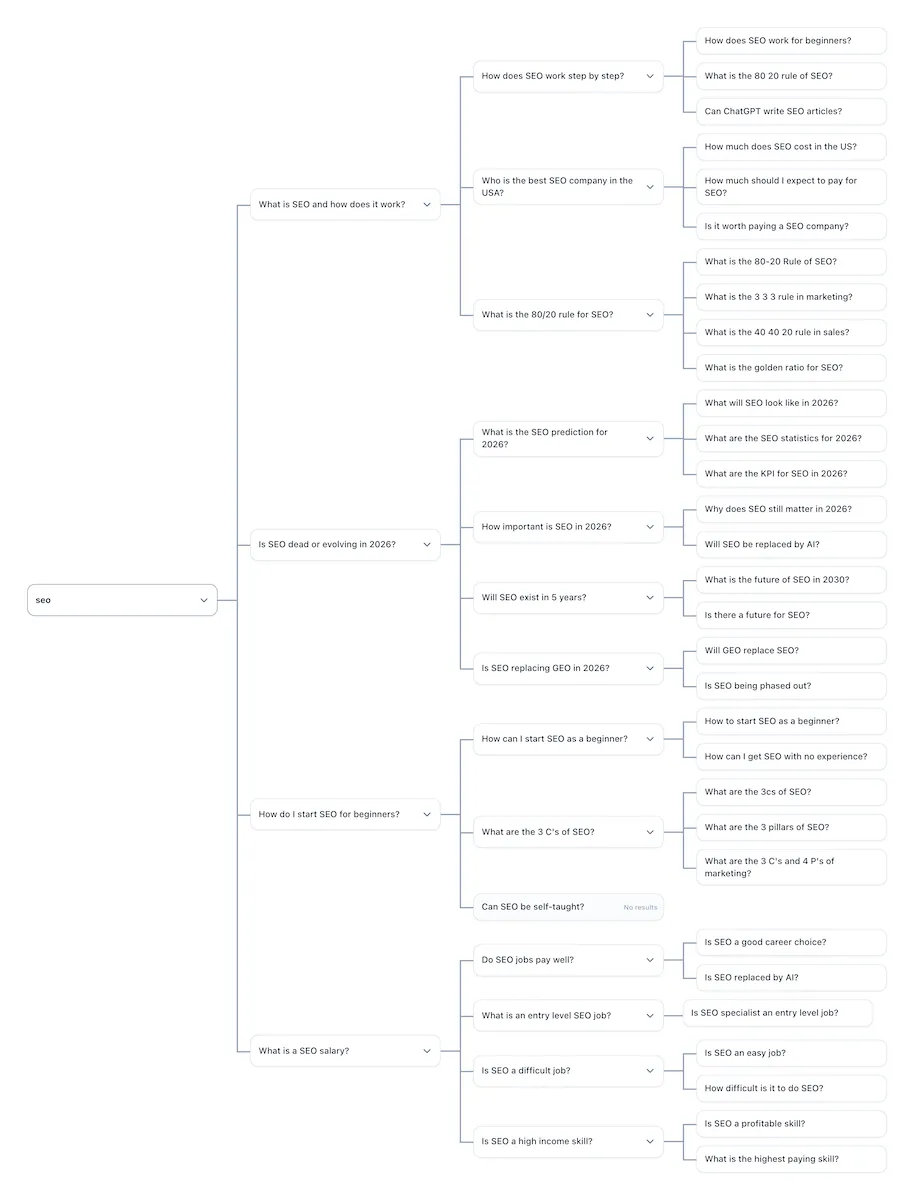
People Also Ask (PAA) boxes appear in 65-85% of Google searches, making them one of the most common SERP features. Each PAA question is a window into what real users ask next, revealing search intent, content gaps, and topical relationships that keyword tools alone miss. Floyi has always used PAA data behind the scenes in content briefs and drafts. Now we're surfacing it directly and giving you a dedicated tool to explore it.
- PAA Explorer (new tool) — enter any seed query and Floyi recursively expands PAA questions into a visual tree, up to 5 levels deep with configurable branching. A single seed query can surface 50-200+ unique questions, mirroring how Google connects questions around related themes. The tree is pannable, zoomable, and exportable to PNG, Excel, CSV, or Google Sheets.
- Topic Details Sidebar — the sidebar in Authority Planner and Topical Research now displays PAA questions and answer snippets directly from SERP data, so you can see what follow-up questions Google associates with each of your topics without leaving the Planner.
- Content Briefs and Drafts — PAA data continues to feed into brief generation and draft creation, where the brief agent uses related questions to shape heading structure, FAQ sections, and content depth recommendations.
Floyi 2.9.4 – April 17, 2026
GitHub Publishing for Static Sites, Live Google and YouTube Autocomplete in Topical Research
If your site runs on Astro, Next.js, Hugo, Jekyll, Docusaurus, or any other static site generator, you can now publish content directly from Floyi to your GitHub repository. Your articles arrive as properly formatted Markdown or MDX files with frontmatter, images, and schema markup — ready for your build pipeline to deploy automatically.
🚀 GitHub Publishing — Publish to Any Static Site
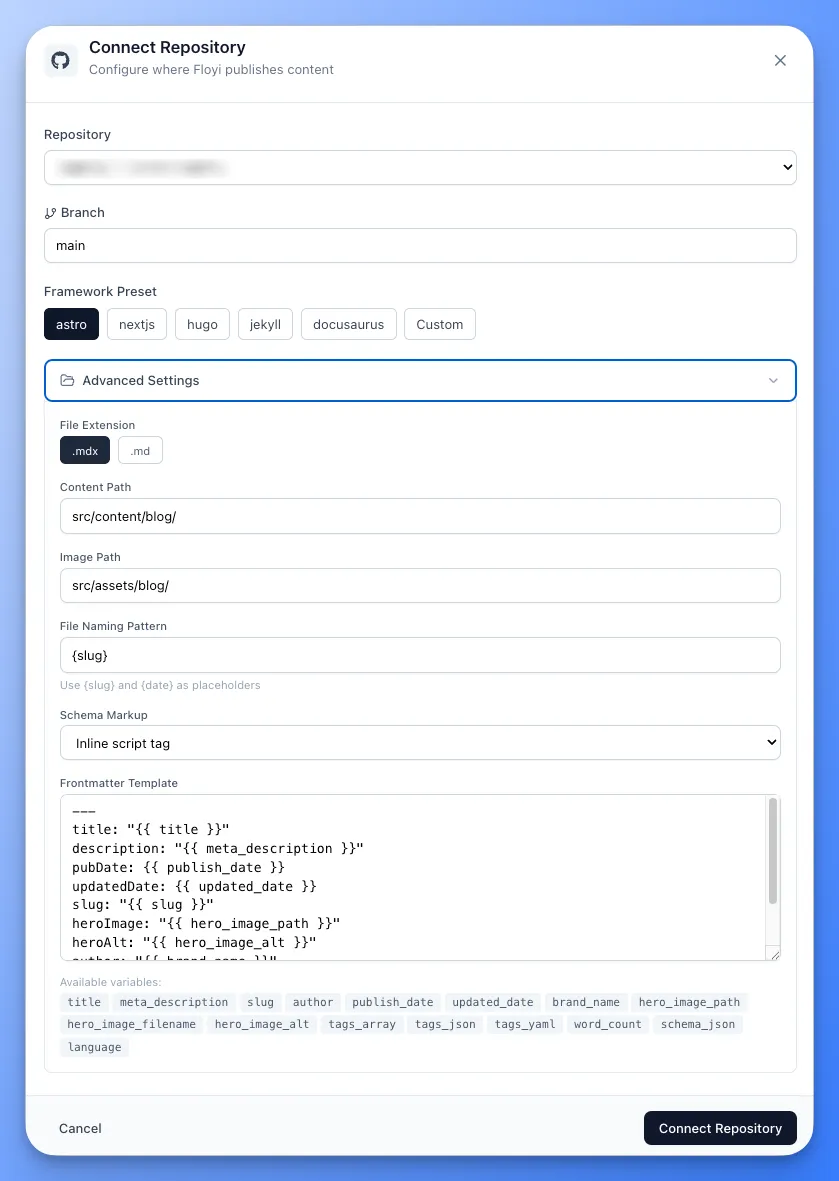
The second publishing integration joins WordPress. Connect your GitHub repos and go from finished draft to deployed site in a single click — no copy-pasting, no manual file creation, no switching between tools.
- One-click connection — install the Floyi GitHub App on your GitHub account or organization, choose which repositories to grant access, and you're connected. The entire setup takes under a minute.
- Framework presets — select Astro, Next.js, Hugo, Jekyll, or Docusaurus and Floyi pre-fills your file paths, naming conventions, and frontmatter structure. Or start from scratch for any other framework.
- Your frontmatter, your way — every static site has its own content schema. Write your frontmatter template once with variables like title, description, tags, and author, and Floyi fills them in from your article data every time you publish.
- Images included — article images are committed alongside the content file in a single operation, with paths automatically rewritten to match your repo structure. All article images retain their alt text through the Markdown conversion and into the published files.
- Schema markup — optionally include JSON-LD structured data in your published files, either as a script tag or as a frontmatter field.
- Override per publish — change the branch, file path, frontmatter, or image settings for a specific publish without modifying your saved defaults.
- Shared publishing limits — WordPress and GitHub connections share a single "Publishing Sites" limit per plan, so you can mix and match however you need.
🔍 Topical Research — Live Google and YouTube Autocomplete
Topic generation is now grounded in real search behavior. During subtopic generation, Floyi queries Google and YouTube autocomplete behind the scenes, so your topic map reflects what people are actually searching for — not just what the AI model learned during training.
- Google Web autocomplete — surfaces commercial, tool, and product search patterns that reveal how users explore your topic in Google.
- YouTube autocomplete — adds a second intent layer with tutorial demand, audience segments (e.g., "for musicians", "for ecommerce"), and comparison queries that don't appear in web search.
- Fully automatic — the AI decides which queries to run, fetches results from both sources in parallel, and uses them to improve its output. No manual steps required.
Floyi 2.9.3 – April 10, 2026
Organic Audit (GSC Integration), Brief Generation URLs, Search Intent and Funnel Stages in Planner, Email Change
The Audit tab in Topical Authority now connects to Google Search Console to show how Google actually sees your content. Brief generation from the Authority Planner gains URL inputs and the Planner now displays search intent and funnel stage per topic. Account settings now support email address changes.
🔍 Organic Audit — Topical Authority
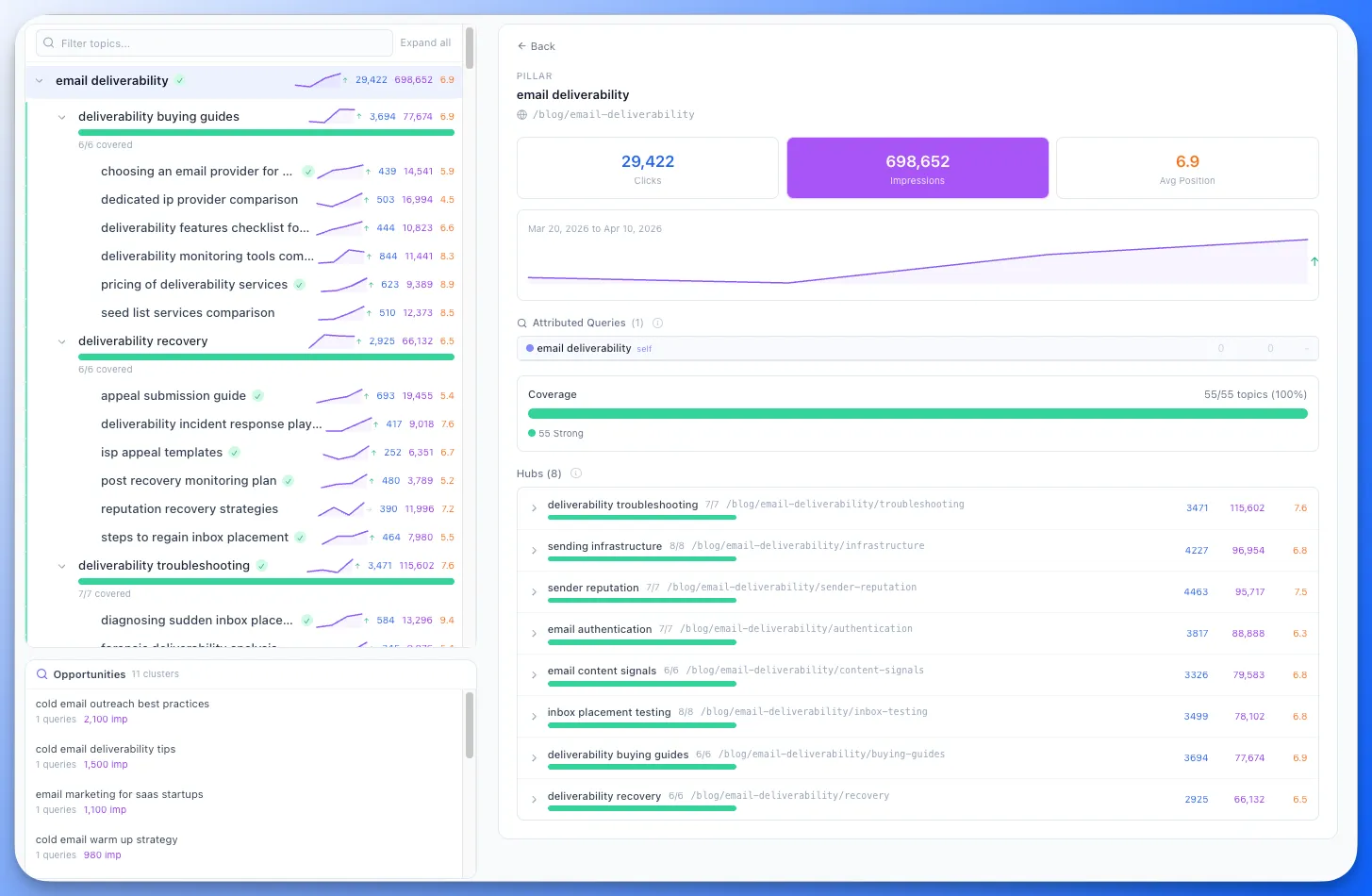
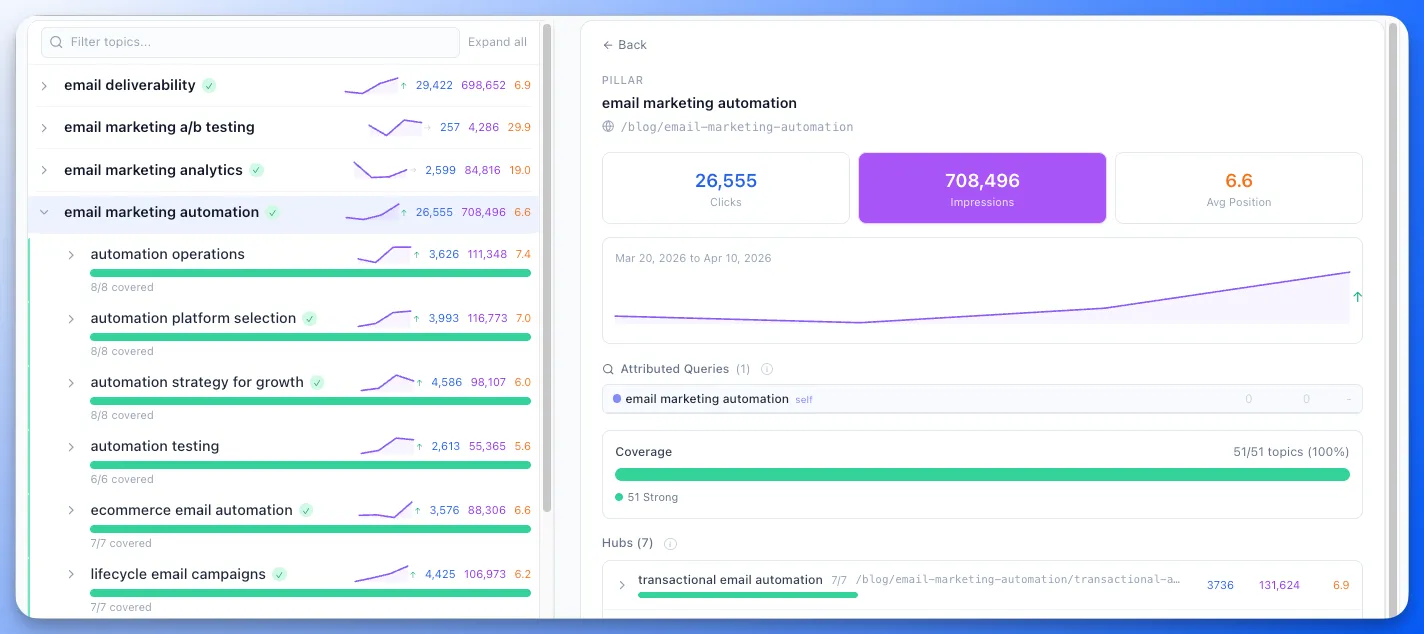
Connect your Google Search Console account and see which topics earn organic traffic and which are invisible to Google. The attribution engine maps GSC queries to your topical map using keyword matching and semantic embeddings.
- GSC OAuth connection — connect your Google Search Console account with read-only access. Select your property and date range, then fetch data in one click.
- Smart query matching — queries are matched to your topical map nodes via exact keyword match, word form variants, and semantic matching for conceptually related queries.
- Two-panel hierarchy view — browse your topical hierarchy on the left with per-node clicks, impressions, and coverage bars. Click any node for detailed query lists, landing pages, and match confidence scores on the right.
- Performance classifications — every topic is classified as Strong, Emerging, Broad Reach, or Weak Signal based on match confidence and search volume. Filter the tree by classification to focus on what matters.
- Opportunity clusters — unmatched queries are grouped into clusters that suggest new topics for your map. Add them directly with the "Add as New Topic" button.
- Sparkline trends — run multiple imports over time to see per-topic impression trends at a glance.
- Export — download query-level and page-level attribution data to Excel, CSV and Google Sheets.
📋 Brief Generation URLs — Authority Planner
Content brief generation from the Authority Planner now supports adding competitor and reference URLs, matching the standalone Content Brief page workflow.
- Add URLs — include specific competitor pages or reference URLs when generating briefs directly from the Planner, so the brief agent analyzes them alongside SERP competitor data.
🎯 Search Intent and Funnel Stages — Authority Planner
The Planner now shows search intent and funnel stage for each topic, making it easier to prioritize content by where it sits in the buyer journey.
- Search intent — see whether each topic is informational, navigational, commercial, transactional, or generative at a glance.
- Funnel stage — topics display their funnel position (TOFU, MOFU, BOFU) so you can balance your content pipeline across stages.
✉️ Email Address Change — Account Settings
You can now change the email address associated with your Floyi account directly from Account Settings.
Floyi 2.9.2 – April 3, 2026
AI-Generated Content Guides, Service Agency Site Architecture, Gemini Tracking, URL Search in Planner, Custom Brief Instructions, My Brand Chart, and New API Endpoints
This release adds AI-powered Content Guide generation, category selection in Knowledge Base uploads, a new service agency site architecture with dedicated templates, Google Gemini as the fourth tracked AI search engine, URL-based search in the Planner, custom instructions for content briefs, a My Brand chart mode, and five new API endpoint groups for developers.
📝 AI-Generated Content Guides — Brand Foundation
Your Content Guide now has an AI generation option to give you a head start. Instead of filling in every section manually, Floyi reads your Brand Foundation — voice, positioning, competitors, audience — and generates intelligent entries across all five Content Guide sections.
- One-click generation — click Generate with AI and Floyi creates entries for terminology, compliance rules, competitor policies, brand messaging, and boilerplate snippets based on your brand profile.
- Brand-aware output — generated entries reflect your actual brand voice, industry, and positioning. A legal SaaS brand gets different terminology rules than a fitness e-commerce brand.
- Edit after generation — every generated entry is fully editable. Use the AI output as a starting point and refine to match your exact standards.
📂 Knowledge Base: Category Selection in Upload
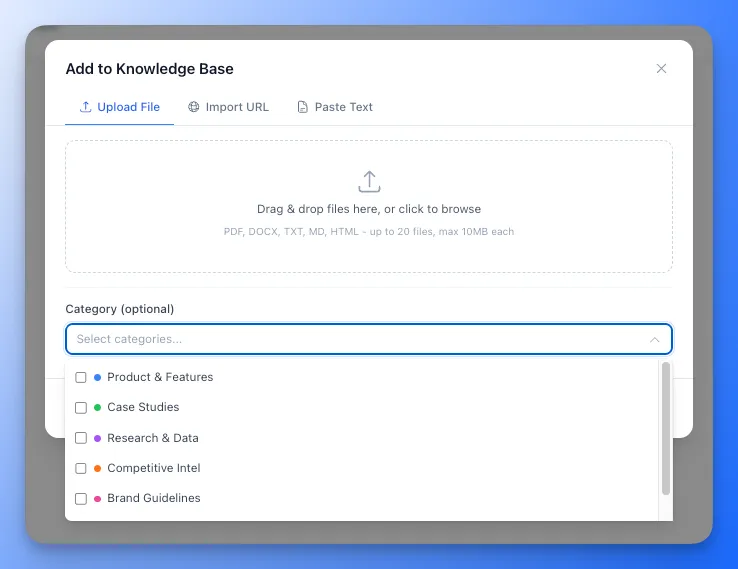
The document upload popup now lets you assign categories to files at upload time. No more uploading first and categorizing later — choose your categories directly in the upload modal for a cleaner, faster workflow.
- Multi-select categories — select one or more categories from a dropdown while uploading files, URLs, or pasted content.
- Applies to all upload types — category selection works across file upload, URL import, and paste-as-document tabs.
🏗️ Service Agency Site Architecture
A new "Service Agency" site type in Site Architecture, built for agencies and B2B service businesses — marketing agencies, IT consultancies, law firms, accounting practices, staffing firms, and similar organizations that sell services to specific industries.
- Service pages — define the services you offer (e.g., SEO, PPC, Content Marketing) with optional sub-services. Floyi generates a services hub and individual service pages.
- Industry pages — define the industries you serve (e.g., Healthcare, Financial, Legal). Floyi generates an industries hub and individual industry pages.
- Service + Industry cross-product pages — toggle on to automatically generate pages for every service-industry combination (e.g., "SEO for Healthcare", "PPC for Financial"). Great for agencies that tailor their services by vertical.
- Solution pages — define solutions or use cases (e.g., Growth Marketing, Digital Transformation, Rebranding) with an optional solutions hub.
- Agency content templates — eight templates covering service pages (conversion-first, authority-first, specialist/niche, productized, retainer), industry pages (solution mapping, authority/thought leadership), and solution/use-case pages.
- B2B-appropriate sections — templates include methodology, deliverables, client logos, case studies, and consultation CTAs instead of geo-modifiers and NAP blocks.
- Services Query Strategy — a dedicated query pattern in Topical Authority settings lets you define how cross-product pages are tracked in search (e.g., "{service} for {industry}"). Service, industry, and solution pages are tracked by their own name automatically.

🔍 Gemini Tracking — Topical Authority
Google Gemini joins AI Overviews, AI Mode, and ChatGPT as the fourth AI search engine tracked in Topical Authority. See whether your topics are being mentioned and cited in Gemini responses alongside your existing tracking.
- Enable in settings — toggle Gemini tracking on or off in the Topical Authority settings modal, just like AI Mode and ChatGPT.
- Mentions and citations — Floyi tracks both Gemini mentions (your domain referenced in a response) and citations (your URL linked as a source).
- Full integration — Gemini data appears across the Scorecard, Planner, Competitors chart, Silo Analysis, and all export views wherever AI search metrics are shown.
- Credit cost — Gemini tracking costs 1 credit per topic per refresh, consistent with AI Mode and ChatGPT pricing.
🔗 URL Search in Planner — Topical Authority
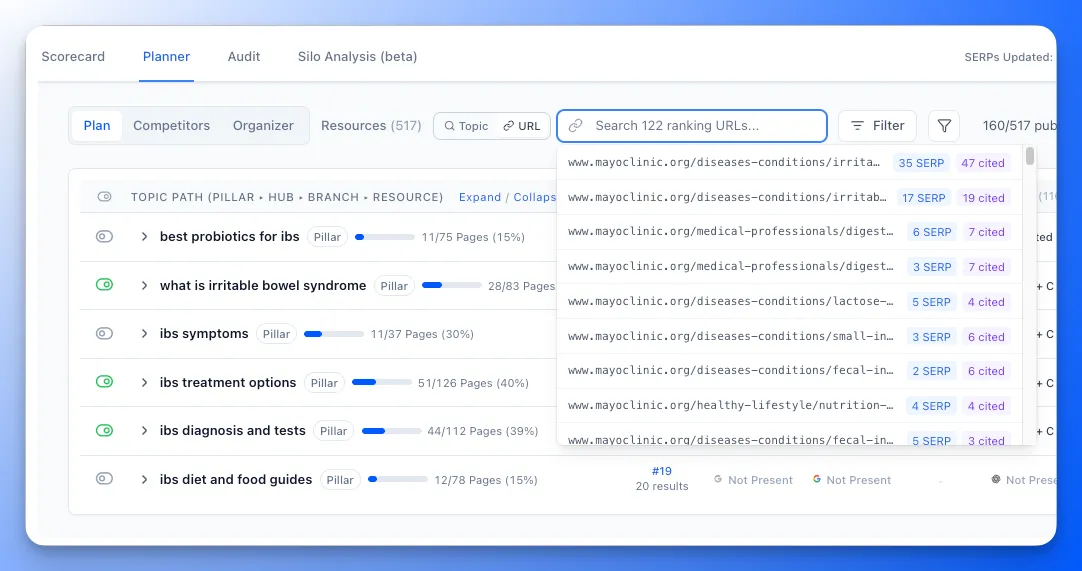
The Planner tab now lets you search by URL to see which topics a specific page ranks for and where it appears in AI search citations. Switch between topic search and URL search to explore your content from a different angle.
- URL search mode — toggle between "Topic" and "URL" search modes in the Planner. URL mode shows a dropdown of all ranking and cited URLs with topic counts.
- Exact path matching — search matches by URL path, stripping protocol and domain so you can paste full URLs or just the path.
- Ranking and citation counts — each URL in the dropdown shows how many topics it ranks for and how many AI search citations reference it.
📊 My Brand Chart — Topical Authority
The Competitors chart now has a "My Brand" mode that shows your own brand's metrics over time instead of comparing multiple domains. Switch between the two modes to analyze competitors or drill into your own performance trends.
- Multi-metric view — select multiple metrics at once (Topics, Visibility, Share of Voice, Traffic, AIO, AI Mode, Gemini, ChatGPT mentions and citations) using checkboxes to overlay trends on a single chart.
- Dual Y-axis — count-based metrics (topics, traffic, mentions) use the left axis while percentage metrics (visibility, share of voice) use the right axis for readable scale.
- Toggle between modes — switch between "Competitors" (multi-domain, single metric) and "My Brand" (single domain, multi-metric) without losing your chart settings.
✍️ Custom Instructions — Content Briefs
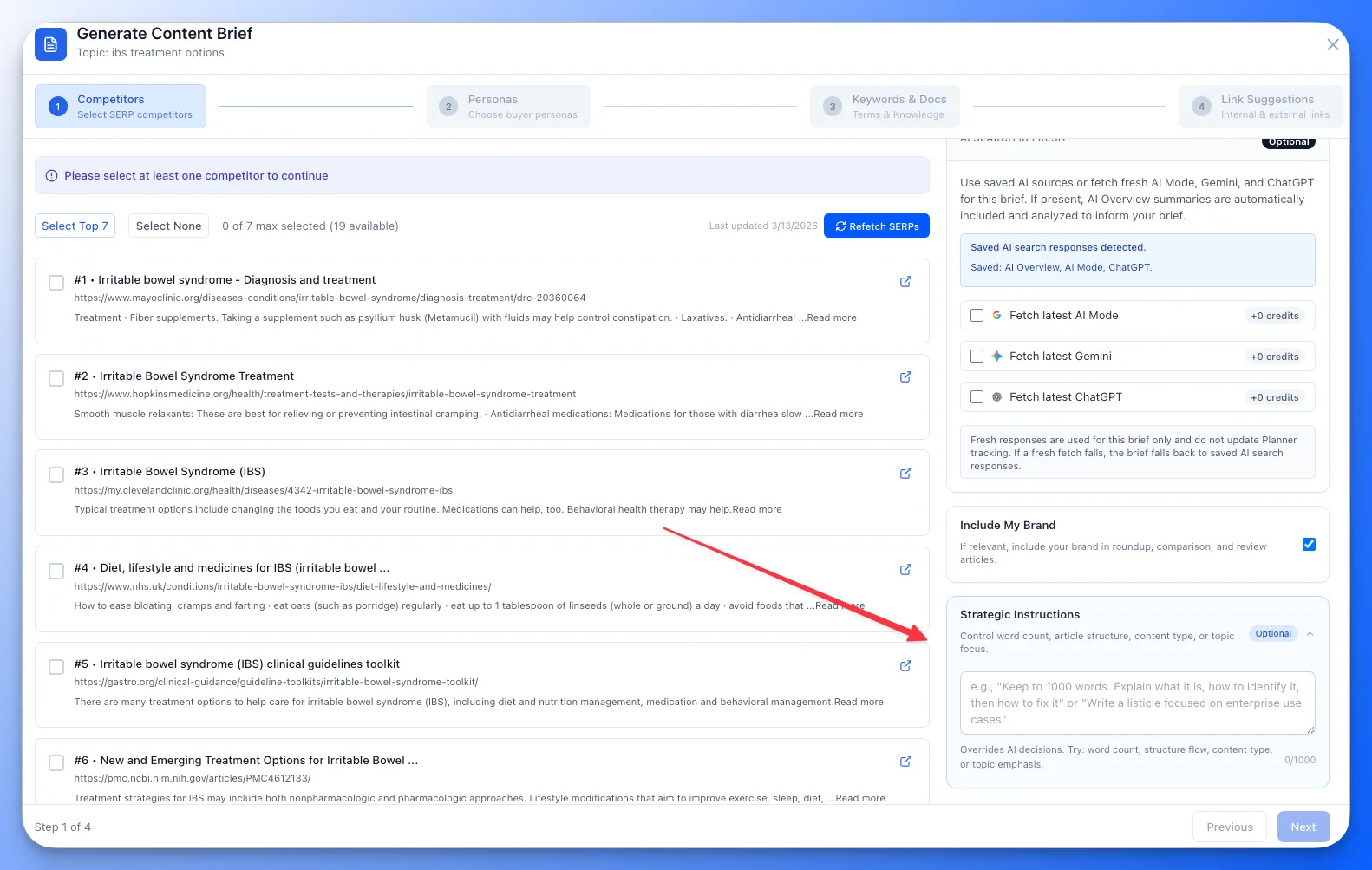
You can now add custom instructions when generating a content brief to tell the Agents exactly what type of content you want. If competitors are split between a comprehensive guide and a listicle, you no longer have to hope the AI picks the right one — just tell it.
- Strategic override — type instructions like "write this as a listicle" or "focus on beginner audiences" and the Brief Agents will follow your direction instead of defaulting to competitor patterns.
- Works everywhere — custom instructions are available in both standalone brief generation and Topical Authority brief generation.
🔌 Developer API: New Endpoint Groups
Five new API endpoint groups for developers building integrations with Floyi.
- Image Generation API — list images, analyze placement suggestions, generate images, and check generation status for any article.
- WordPress Publishing API — list connections, publish articles, bulk publish, and check task status for WordPress integrations.
- Content Guide API — read, create, update, and delete entries across all five Content Guide sections (terminology, compliance, competitor policies, messaging, boilerplate).
- Topical Authority Organizer API — full CRUD for organizer nodes including bulk operations, hierarchy management, and map snapshots.
- Keyword Editing API — view and update tracking keywords for individual topics in Topical Authority, including bulk keyword updates.
Floyi 2.9.1 – March 24, 2026
AI Image Generation, Brand Visual Style Analysis, Silo Analysis for Topical Authority, Topical Map Silo & Outline Views
This release brings AI-powered image generation directly into the content editor, brand visual style analysis for consistent imagery, per-silo competitive intelligence for Topical Authority, and new visualization modes for your Topical Map.
🖼️ AI Image Generation — Content Editor
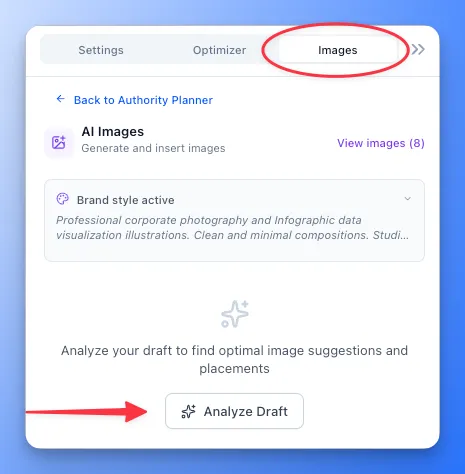
Generate and insert AI images directly inside the content editor without leaving Floyi. No more switching to Canva, DALL-E, or Midjourney mid-draft. Floyi analyzes your article structure, suggests optimal placements, generates images, and inserts them inline — all in one workflow.
- Free featured image — every article gets one free AI-generated image, typically used for the featured/cover image. Additional images cost credits.
- Draft-driven placement — click Analyze Draft and Floyi scans your H2 sections to suggest where images should go, with AI-generated prompts and alt text for each placement.
- High-quality generation — powered by Nano Banana 2 with excellent text rendering, wide aspect ratio support, and consistent quality across all image types.
- Aspect ratio control — select from 16:9, 3:2, 4:3, 1:1, 9:16, and more. Default is 16:9 landscape, which fits naturally in article content.
- Editable prompts — every AI-generated prompt is a starting point. Edit before generating to fine-tune the exact image you want.
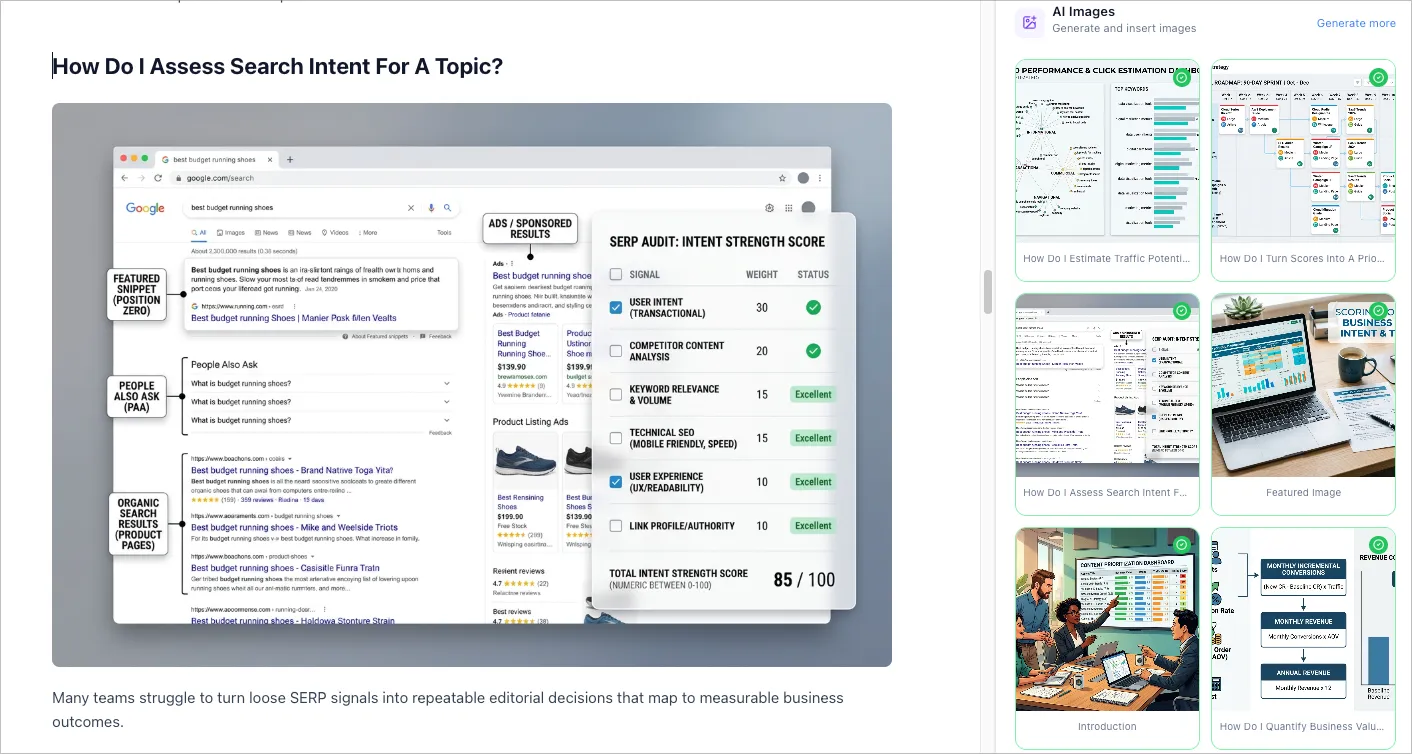
- Lightbox preview — click any generated thumbnail to preview full-size with keyboard navigation (arrow keys, Escape to close). Insert individual images or batch-insert all at once.
- Persistent images — generated images are stored on Floyi's CDN and linked to your article. Return to the Images tab anytime to see previous generations without regenerating.
- Real-time sync — the sidebar tracks which images are in your article in real time. Delete an image from the editor and the sidebar updates instantly so you can re-insert it.
🎨 Brand Visual Style Analysis — Brand Foundation
Your Brand Foundation now includes visual style analysis. Floyi examines your website's design language — colors, typography, imagery style, composition patterns — and creates a visual style profile that guides AI image generation.
- Automatic analysis — when you set up or refresh your Brand Foundation, Floyi analyzes your site's visual identity alongside your brand voice and messaging.
- Style-aware generation — image prompts are automatically enhanced with your brand's visual style, so generated images match your aesthetic without manual prompt engineering.
- Consistent imagery — whether you generate one image or fifty, they maintain a cohesive look that aligns with your brand's visual language.

📊 Silo Analysis — Topical Authority
A new tab in Topical Authority that breaks down your competitive position by silo (main topic pillar). Instead of looking at one flat list of 300+ topics, you can now see which silos need the most investment and drill into the exact content gaps within each hub.
- Summary Strip — every silo classified as Leading, Contested, or Trailing with a segmented bar and strategy tooltips per tier.
- Silo Scorecard — your TAS, coverage, and visibility broken down per silo at a glance.
- Investment Priority — silos ranked by the gap between you and your top competitor, with topic counts and sortable columns so you know where to invest next.
- Competitive Landscape — a silo × competitor heatmap for both SERP rankings and AI search presence (AI Overviews, AI Mode, ChatGPT), with row leaders highlighted.
- Silo Deep Dive — select any silo to see a competitor leaderboard, hub breakdown with every topic (ranked and unranked), brand and competitor positions, content status, and action buttons to create briefs or drafts directly.
- Fast recalculate — when you change your competitor list, Floyi skips the full visibility rebuild and recalculates only competitor-affected metrics.
- Background prefetch — silo drill-down data loads in the background so switching between silos is instant.
🗺️ Topical Map — Silo & Outline Views
Two new ways to visualize your topical map, in addition to the existing spreadsheet view.
- Silo View — displays your topical map organized by silo (main topic pillar) with a column-based layout. Each silo is a column showing its hub and branch hierarchy, making it easy to see the structure and balance of your content pillars.
- Outline View — a collapsible tree outline of your entire topical map. Expand and collapse pillars, hubs, and branches to navigate large maps quickly. Shows topic counts and hierarchy depth at each level.
Floyi 2.9.0 – March 20, 2026
Strategy Essentials Are Now Free, Add Topic Silo, Included Topical Research, Content Type Templates, Structured Data (Schema), and Topical Authority Delta Indicators
We restructured how Floyi charges for actions. Strategy essentials — brand, personas, topic hierarchy, URL slugs, scorecard, and anchor texts — are now free with every plan. Topical research is included monthly. Plus: expand your topical map with Add Topic Silo, auto-generate JSON-LD structured data, track authority score trends with delta indicators, and choose whether to include your brand in article drafts.
✨ Strategy Essentials — Free With Every Plan
The actions that build your strategic foundation no longer cost credits. Set up your brand, research your market, and plan your content strategy without watching your credit balance.
- Brand Foundation — create and regenerate your brand profile, including URL scraping and voice analysis.
- Buyer Personas — generate audience personas for your brand.
- Topic Hierarchy — build your topical map structure (standard and AI-powered).
- URL Slugs — generate SEO-friendly URLs for your topics.
- Scorecard & Planner — calculate and track your topical authority. Scoring is free; refreshing SERP rankings costs 1 credit per topic, plus 1 credit per topic each for AI Mode and ChatGPT tracking if enabled.
- Anchor Texts — generate internal linking suggestions.
🔬 Included Topical Research
Each plan now includes a monthly allocation of topical research runs. Use them to explore new markets or expand existing maps without spending credits.
- Pro — 5 included research runs per month.
- Scale — 15 included research runs per month.
- Per-brand tracking — one allocation slot per new brand. Regenerating research on the same brand is always free within the billing cycle.
- After your allocation — additional research runs use credits from your balance at the normal rate. No blocking, no upsell gates.
🧩 Add Topic Silo
Expand your topical authority coverage without creating a separate project. Add a new main topic pillar directly from the Organizer in the Planner — it goes through full research, clustering, and map merge.
- Guided flow — enter a Main Topic and optional seed keywords, review research results, review clusters, preview the hierarchy, and merge into your existing map.
- Familiar editing — each stage uses the same views you already know (Silo/Outline/Spreadsheet for research, clustering table, Organizer Table/Columns/Tree for map preview).
- Safe merge — Floyi snapshots your map before appending, so you can roll back if needed.
- Resume capable — navigate away or refresh the page and pick up where you left off. Running tasks continue in the background.
📝 Content Types: Outline Templates & Better Detection
Content types now have dedicated outline templates and reviewer rules so briefs and drafts match the format your topic needs. Floyi supports 24 content types across list-based, informational, commercial, strategic, and news categories.
- Type-aware outlines — each content type generates a structure tailored to its format (e.g., product criteria for roundups, step-by-step for how-to guides, term definitions for glossaries).
- Automatic detection — during brief generation, Floyi analyzes competitor content types, SERP features, and query patterns to suggest the best content type. You can accept or override the suggestion.
- Include My Brand — a toggle in the Topical Authority brief modal that adds your brand to roundup, comparison, and review articles. On by default for commercial content types where featuring your product fits naturally.
🏗️ Content Creation: Structured Data / Schema Markup
Floyi now auto-generates JSON-LD structured data from your existing article, brief, and brand data — no AI credits required. A new Schema tab in the Optimizer Panel lets you toggle schema types on or off and preview the combined JSON-LD before exporting or publishing.
- Six schema types — Article, FAQ, HowTo, LocalBusiness, Organization, and BreadcrumbList. Five are auto-detected from your content and brand data; HowTo is manual — you define steps yourself for full control.
- Toggle and preview — enable or disable individual schema types. Each card shows a status badge (detected, manual, or not detected) and expandable JSON-LD preview.
- HowTo step editor — define step-by-step instructions directly in the Schema tab. Add, edit, or remove steps with titles and descriptions. Saving steps auto-enables the schema.
- SEO plugin conflict warning — the Schema tab always shows a note about potential duplicate schema if your site uses Yoast, Rank Math, or another SEO plugin. Disable overlapping types to avoid conflicts.
- Included in all exports — schema is embedded in DOCX, HTML, Markdown, TXT, Google Docs, and clipboard copy exports. HTML exports include proper
<script type="application/ld+json">tags. - Regenerate on demand — click Regenerate to rebuild all schemas from the latest article content and brand data while preserving your toggle states and manual overrides.
🔌 WordPress Publishing: Schema Markup Integration
When you publish to WordPress, Floyi's structured data is automatically included in the page's <head> as <script type="application/ld+json"> tags — one per schema type for maximum compatibility with Google's rich results.
- Automatic on publish — schema is regenerated fresh every time you publish or update, so it always reflects the latest content.
- Toggle in publish modal — an "Include structured data" checkbox in the WordPress Publish modal lets you opt out if needed.
- Viewable in WordPress — the JSON-LD is visible in the Custom Fields panel in the WordPress block editor, so you can inspect or manually edit it if needed.
- Floyi Connect plugin v1.1.0 — the WordPress plugin now renders JSON-LD in
wp_headand supports the_floyi_json_ldmeta field.
📊 Topical Authority: Delta Indicators
The Topical Authority Scorecard now shows how your scores have changed since the last SERPs and AI search results update. At a glance, see which topics are gaining ground and which need attention.
- Delta arrows and values — each score in the scorecard shows an up/down arrow with the numeric change since the previous update.
- Color-coded trends — green for improvements, red for declines, and neutral gray for unchanged scores.
- SERP and AI result deltas — track movement across both traditional search rankings and AI search citations separately.
🛠️ Improvements & Fixes
- Brief SERP fetching is now free — credits are only charged when you generate the brief (AI Mode/ChatGPT tracking still costs 5 credits per engine).
- Plans page redesigned with strategy essentials, included research, and clearer credit breakdowns.
- Settings credits overview now shows included topical research usage with progress bar.
- Free plan users get 1 lifetime research run (limited to 3 levels — no ST4).
- Fixed topical authority SERPs refresh error for large projects with page parser overrides.