
Floyi 2.10.0
Organic Audit — Visual Map with Competitor Comparison, Priority View, Interactive Trend Charts, Action Recommendations
The Organic Audit in Topical Authority adds two major new views.
The Visual Map is an interactive visualization of your entire topical map overlaid with actual GSC results — see your brand at the center with pillars, hubs, and topics radiating outward, color-coded by position, impressions, clicks, or AI search presence. Compare your map side-by-side with any competitor or switch to the
Gap Overlay to see exactly where you outrank them, where they outrank you, and where neither of you ranks — on a single color-coded map.
The Priority view surfaces the most actionable signals from your GSC data: winners & losers, below-average CTR topics, and topics missing from AI search — each with direct action buttons. Plus: interactive trend charts, contextual action recommendation cards, and a ranked priority actions queue.
Visual Map
See your entire topical map visually overlaid with actual GSC results. Your brand sits at the center with pillars, hubs, branches, and resources radiating outward — sized by importance and color-coded by the metric you choose.
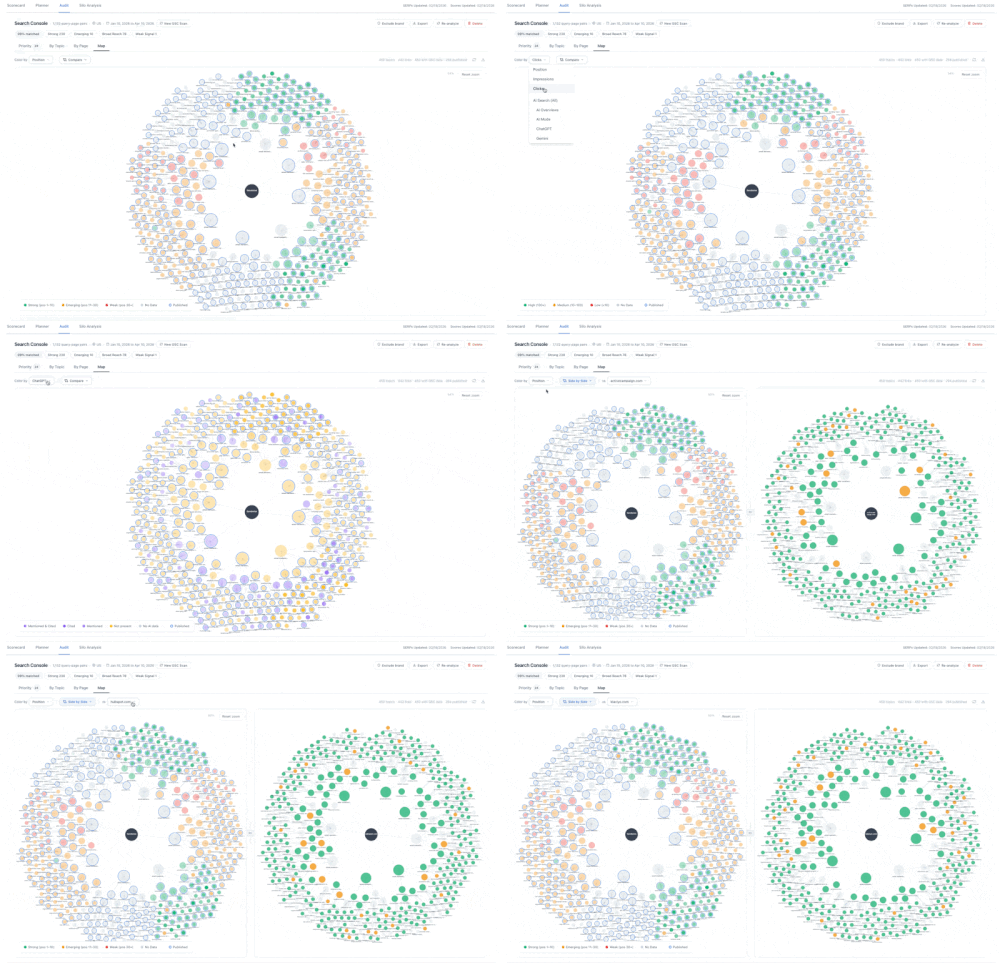
- Color by Position, Impressions, Clicks, or AI Search — switch modes to instantly see ranking health (green/amber/red), traffic volume, click performance, or AI surface presence (cited/mentioned/not present) across every topic.
- Published rings — published topics display a blue ring so you can see execution progress at a glance across the entire map.
- Interactive legend — click any legend swatch to filter the map to that category. Click again to clear.
- Click, double-click, drag, zoom — click to highlight a node and its connections, double-click to jump to that topic in the Planner, drag to rearrange, scroll to zoom, and drag the background to pan.
- One-click refresh — re-fetch GSC summary data and remount the map with fresh published status, positions, and AI search data.
Competitor Comparison on the Visual Map
Pick any competitor and see how their SERP positions and AI search presence compare to yours across your entire topical map. Two view modes let you choose the right lens for the question you're asking.
- Side-by-side view — your brand's map on the left, the competitor's data on the right, using the same node positions so you can visually scan across. Both panels share the same "Color by" mode — switch to Position to compare rankings, or any AI search engine to compare citation presence.
- Gap Overlay — a single map colored by the difference between you and the selected competitor. Green where you rank better, red where they rank better, blue for tied or contested topics, indigo where only you are present, amber where only they are present, and gray where neither ranks. Works for both SERP position and AI search status across all four tracked engines.
- Synced zoom with link/unlink toggle — in side-by-side mode, both panels zoom and pan together by default. Click the link icon in the divider to unlock the right panel for independent navigation, then click again to re-sync.
- Competitor tooltip — hover any node on the competitor panel to see their best SERP position and AI search status across AIO, AI Mode, ChatGPT, and Gemini for that topic.
- Gap legend — the legend automatically switches to show gap colors (you rank better, they rank better, contested, only you, only them, neither) when the Gap Overlay is active.
- PNG export — download the Visual Map as a PNG image. In side-by-side mode, both panels are stitched into a single image for presentations and reports.
Priority View
The fastest path from GSC data to action. The Priority view surfaces the most actionable signals so you can act without digging through the full hierarchy.
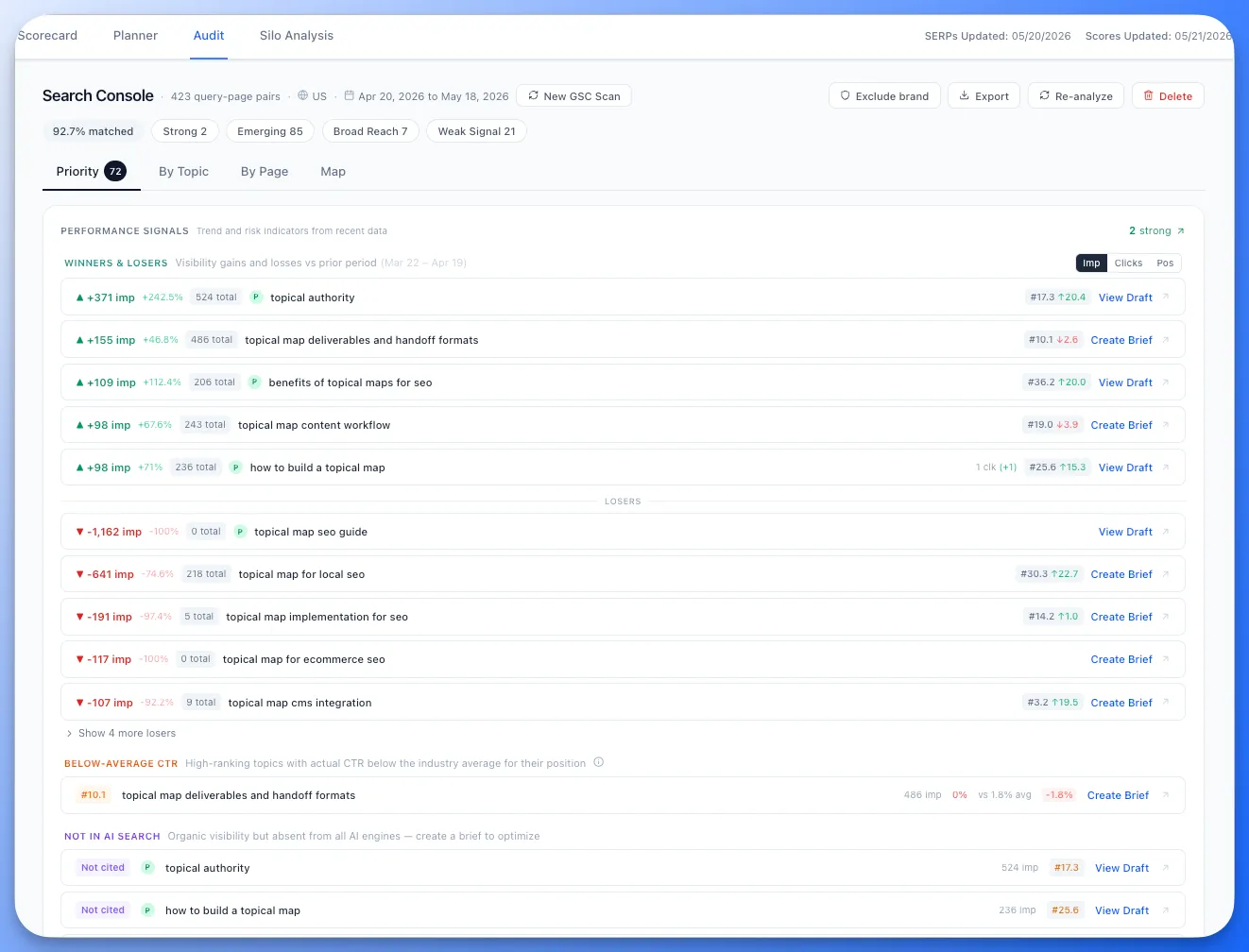
- Winners & Losers — topics with the largest impression gains or losses compared to the prior period, with absolute and percentage deltas. Toggle between impressions, clicks, and position.
- Below-Average CTR — high-ranking topics where actual click-through rate falls below the industry average for their position. These are topics where your snippet or title needs work.
- Not in AI Search — topics with organic visibility (ranking in Google) but absent from all AI search engines (AIO, AI Mode, ChatGPT, Gemini). Opportunities to optimize for AI citation.
- Direct action buttons — every row has a one-click action: View Draft, Create Brief, or Continue Draft depending on the topic's current state.
The Organic Audit now has four views you can toggle between: Priority, By Topic, By Page, and Map.
Interactive Trend Charts
- X-axis date labels — smart formatting shows daily dates for short ranges and monthly labels for longer periods, so you always know when changes happened.
- Crosshair hover — mouse over the chart to see a vertical guide line with colored dots on each metric line and a tooltip showing the exact date, clicks, impressions, and average position for that data point.
- Taller chart area — expanded from 48px to 130px with subtle grid lines for better readability and trend visualization.
Action Recommendation Cards
Every detail panel now shows a contextual recommendation based on the node's performance classification:
- Maintain (Strong) — build supporting subtopics to deepen cluster authority.
- Promote (Emerging) — drive impressions through internal linking, content refreshes, or schema.
- Tighten (Broad Reach) — create focused content to convert loose impressions into targeted clicks.
- Evaluate (Weak Signal) — consider consolidating or deprioritizing low-signal topics.
- Create (Gap) — publish content and build internal links for uncovered topics.
- Consolidate (Cannibalization) — redirect competing pages to concentrate authority.
Hub and pillar views analyze their child topic distribution to surface the most impactful action — showing specific counts like "3 of 8 topics are gaps" or "2 topics have cannibalization issues."
Priority Actions Queue
The default overview panel (before selecting any node) now shows a ranked list of up to 8 priority actions sorted by estimated impact:
- Cannibalization fixes — ranked by impressions at stake across competing pages.
- Gap opportunities — estimated potential based on sibling topic averages within each hub.
- Broad reach tightening — high-impression topics with loosely matched queries.
- Emerging promotions — well-matched topics worth driving more traffic to.
Each action card is clickable, taking you directly to the relevant hub or topic detail view.
🛠️ Performance Improvements & Fixes
- Attributed queries sections in hub and pillar views now show all queries with a "Show all / Show less" toggle instead of hard-capping at 10.
- Consistent "Show less" label across all expandable lists in the Organic Audit tab.
- Various performance improvements and bug fixes across the platform.