
How AI Identifies Search Intent and How to Check Your Pages
See how AI search reads the intent behind a query, then use a copyable prompt to check whether your page matches it and verify the answer in the live SERP.
Your page targets a query, but an AI label alone can’t tell you whether the page matches what searchers see. AI systems infer search intent from wording, context and patterns. The live SERP, not a model’s confidence score, is the check.
Google AI Overviews, AI Mode and chatbot follow-ups show how systems interpret a request, including the related questions that query fan-out creates. To identify search intent with AI for one page, give the model evidence instead of a bare keyword. That means the exact query, a dated snapshot of the top 10 results, SERP features, AI answers, and your page content. Then verify its claims against that evidence before you change anything.
Identifying Search Intent with AI Key Takeaways
- AI search systems infer a query’s likely goal from wording and context, not from direct access to a searcher’s thoughts.
- Search intent has five types: Informational, Navigational, Commercial, Transactional, and Generative.
- Follow-ups and query fan-out can signal a changing task, but they are hypotheses to check against live results.
- Record the exact query, market, language, device, date, and top 10 organic results.
- Give the model your page content, SERP features and saved AI answers as evidence.
- Verify the model’s cited results and page-fit claims against your snapshot before editing.
- End each check with a verdict and review date, then rerun the prompt on a fresh snapshot after changes.
How Do AI Search Systems Interpret Intent?
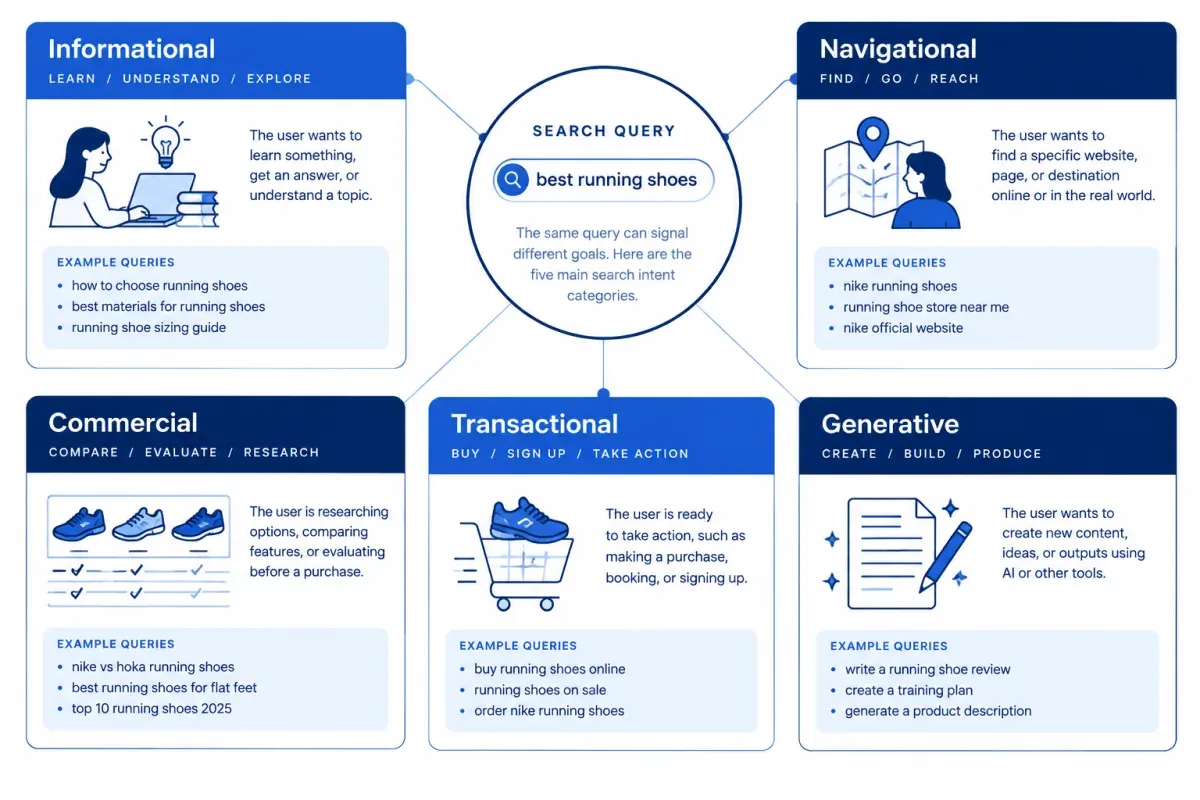
AI search systems infer a query’s likely goal from its meaning, context and phrasing, not just its exact keywords. Natural language processing, large language models and semantic analysis help them read grammar and the relationships between words. That is how AI interprets search intent. The output is still an interpretation of evidence, because no system has direct access to a searcher’s thoughts.
Semantic models such as BERT, MUM and embedding models represent words in context. That supports semantic matching between “purchase” and “buy,” and it helps separate Apple the company from the fruit. Language models can also parse conversational phrasing and modifiers such as “cheap” or “how to.” Surrounding words and sentence structure narrow the meaning, but they don’t guarantee a single reading.
The five search intent categories give the rest of this check a shared vocabulary. Treat them as working labels, not exclusive boxes:
- Informational: Learn something or get an answer.
- Navigational: Reach a specific brand, site or page.
- Commercial: Compare options before deciding.
- Transactional: Buy, sign up, book, or download.
- Generative: Ask an AI system to create, write, plan, or code something.
A local need such as “near me” modifies these types rather than adding a sixth. For full definitions and search intent examples, see the five types of search intent.
Search intent modifiers are clues, not proof. “How,” “what” and “why” often point to informational search intent. Brand names and URL-seeking queries suggest navigational search intent. “Best,” “review” and “vs.” usually signal comparison, while “buy,” “order,” “pricing,” and “coupon” signal action. “Near me” adds a local layer, but its meaning depends on the full query.
Search intent describes what a query appears to seek. User intent belongs to the person typing it, including context the query never states. Search history, location and device can change how a system reads an ambiguous phrase. “Apple support” may mean a phone repair for one person and a billing question for another. That gap is where user intent diverges from search intent, and it is why query-level conclusions stay provisional.
Mixed needs are common. “Best plumber near me” combines commercial comparison with local transactional intent. Wording can also mislead: “is egg salad healthy” names a dish but seeks health information, not a recipe. Treat any AI classification as a hypothesis until the live results, including relevant AI answers, support it.
How Do Follow-Ups and Query Fan-Out Change the Need?
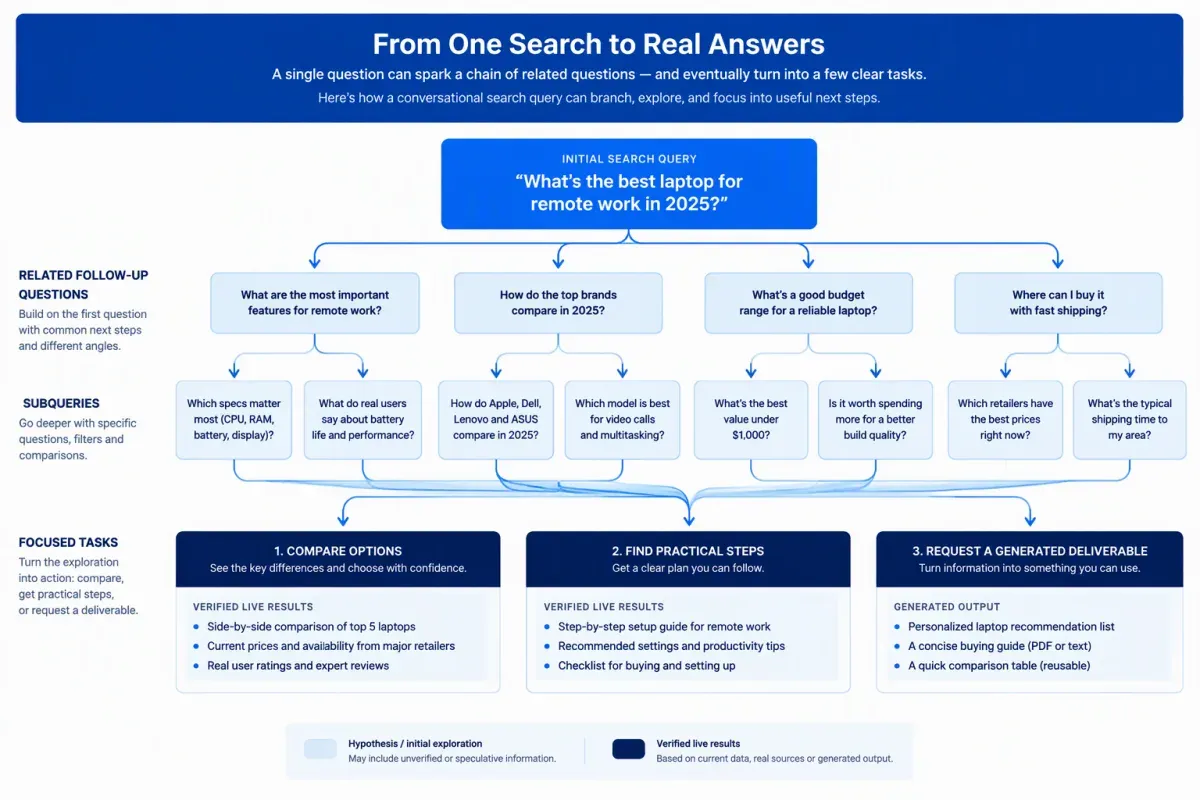
Follow-up queries and query fan-out can signal a changing need, but neither proves what an individual searcher intends. Read each turn in context, then check whether live results and AI answers support that reading.
A follow-up may continue the original task or change it. Asking for more sources signals a need for evidence. Asking about price moves the conversation toward comparing value or buying. The surrounding turns show whether someone is defining a need, checking trust, weighing options, or trying to avoid a bad choice.
Query fan-out is the set of related searches or subquestions an AI system may generate from one prompt. A broad request can branch into comparisons, practical steps and supporting facts. Those branches can surface unstated needs, but they are hypotheses, not proof of separate intents. Several subquestions often feed one answer, and they don’t all deserve equal space on a page.
In conversational AI search, intent also shows up in the format a person asks for. A prompt may call for a short fact, a multi-step guide or a generated deliverable such as code or a summary. Moving from “what does this term mean” to “give me a checklist” keeps the topic but makes the task more applied.
Some systems also score several intents at once. “Running shoes for flat feet” might get one score for commercial research and another for transactional readiness. Any such score is a model estimate, not a measurement of one person’s goal.
Aggregate behavior is another clue, not a verdict. Which results people click and what they search next may help systems learn which results satisfy people. If searchers using a vague term keep choosing product pages, that pattern suggests commercial interest. It could also reflect weak results or mixed motives, so any trend signal remains an inference.
Before acting on a shift, compare the original query, the follow-ups and the likely fan-out questions. Decide whether the task changed or only the requested format did. Then confirm the pattern in the live SERP.
What Live SERP Evidence Should You Capture First?
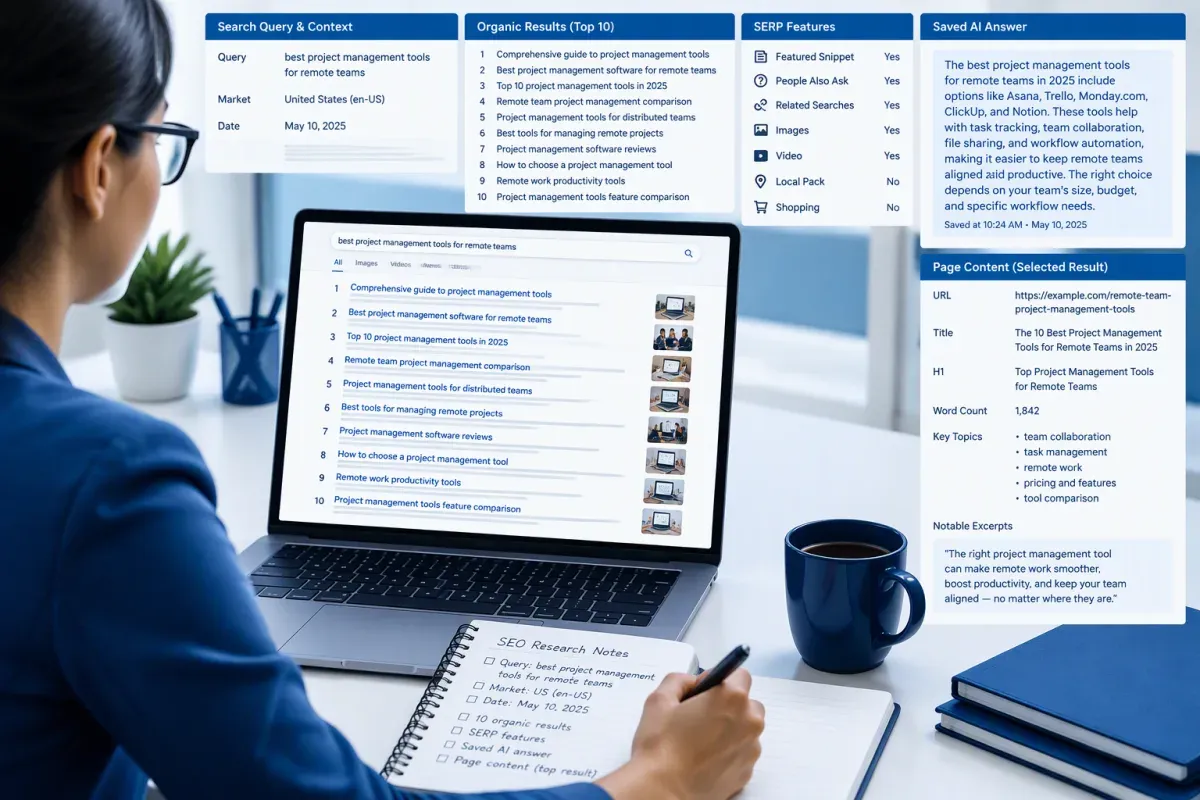
Capture the live SERP for the exact query before you ask an AI model anything. Without that evidence, a chatbot infers intent from wording and training data, and its label can miss what searchers actually see. A dated snapshot gives your search intent analysis a fixed record to check the model against.
Search the exact query in the target market, language and device, and record the date. Keep the wording unchanged in your notes. For each of the top 10 organic results, capture the title, URL, page type, and format. Page types include guides, comparisons, product pages, service pages, tools, and brand pages. Formats include step-by-step instructions, lists, tables, and calculators.
Top-ranking results show which content types appear to fit the query, but they don’t settle intent alone. Several formats can serve different needs, and location or freshness can change what ranks. Flag those uncertainties instead of forcing an early label.
Record the SERP features and AI responses too:
- SERP features: Note whether the results include an AI Overview, People Also Ask, videos, a local pack, or shopping results.
- AI responses: Save any Google AI Overviews, Google AI Mode answers or chatbot answers, with their cited sources. Their coverage and AI search citations hint at how each system read the query. They are not an intent label.
- Your page: Capture its title, headings, opening paragraph, main calls to action, and format. If the AI system can’t fetch the URL, paste this content into the prompt so the assessment reflects the page itself.
A manual search and saved notes are enough for a single page check.
What Prompt Should You Use to Check a Page’s Intent?
A ChatGPT search intent prompt should compare one page with one query, using evidence from your saved SERP snapshot, and make its reasoning checkable. This is a focused page assessment, not a way to label a keyword list.
Copy the prompt and replace each field with evidence from your snapshot:
You are checking whether one page matches the search intent of one query.
Query: Paste the exact query as searchedMarket, language and device: For example, United States, English, mobileDate collected: Enter the date you captured the resultsLive results: For each of the top 10 organic results, provide the title, URL, page type, and formatSERP features: Include features such as an AI Overview, People Also Ask, videos, or a local packAI answers: Paste the AI Overview or AI Mode answer and its cited sources, if anyMy page: Provide the title, headings, opening paragraph, main calls to action, and format
Tasks:1. State the primary intent as Informational, Navigational, Commercial, Transactional, or Generative. Add a secondary intent only if the live results clearly serve a second need.2. Name the dominant page type and format among the live results. Quote the results that support your conclusion.3. Assess whether my page matches the intent, format and task. List specific gaps.4. Rate confidence as high, medium or low. Flag anything ambiguous for manual review.
Rules: Use only the evidence above. If information is missing, say so instead of guessing. Return a table with these columns: query, primary intent, secondary intent, evidence, dominant format, page fit, gaps, confidence, flags.
The exact query keeps the modifiers that change the task, such as a product name, location or comparison phrase. Market, language, device, and collection date explain why results may differ on a later check.
Live results and AI answers give the model evidence instead of leaving it to general knowledge. Your page content lets it judge what the page says and asks visitors to do, rather than guess from the URL. Labeling a whole keyword list is a separate job. When you need to classify every keyword by intent, use a workflow built for lists rather than this page check.
The output table is only useful when its evidence is specific. Check the quoted results against your snapshot, then use the confidence rating and flags to find rows that need manual review. The gaps column points to a possible fix, such as a clearer answer, a different format or a closer match to the dominant task. Confirm the gap in the live SERP first, then follow the ordered steps to fix pages that miss intent.
The prompt works in general-purpose AI assistants, but responses vary between models and runs. Keep the saved snapshot next to the AI’s table so every claim stays traceable. AI-powered search intent analysis can organize evidence for an SEO review and flag likely mismatches. It cannot replace the check in the next section.
How Do You Verify the AI’s Findings Against the SERP?
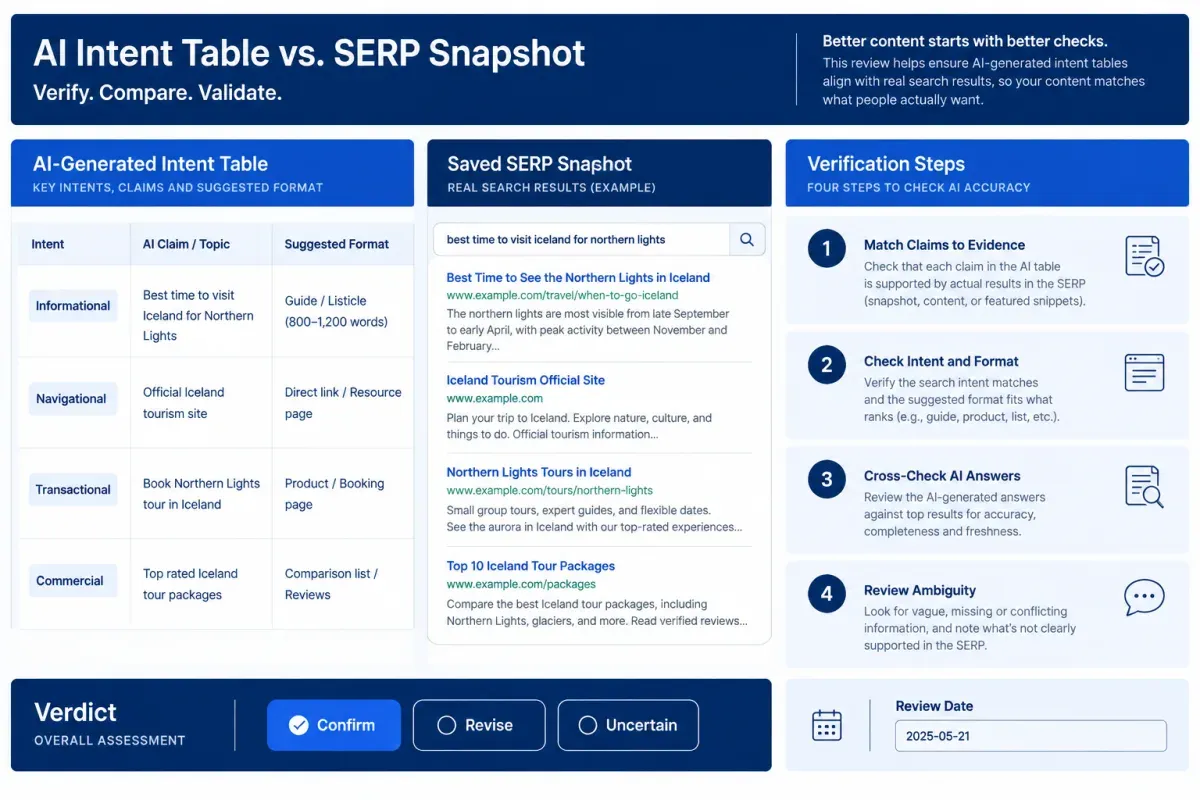
Check the AI’s table row by row against the saved SERP and AI answers, starting with its cited evidence. A plausible intent label can still arrive with the wrong format or an unsupported claim. Use this four-step check for each page:
-
Match claims to the snapshot. Place the AI output beside the saved SERP. Check every cited result, feature and page detail against the material you provided. If the model cites evidence that isn’t in the snapshot, or describes your page in a way its content doesn’t support, mark the row unsupported. Fix the input or rerun the analysis before relying on it.
-
Check intent and format in live results. Compare the proposed intent and dominant format with the ranking pages themselves, not just titles and snippets. Open two or three representative pages and note what they help visitors do. Intent can be right while format is wrong. Searchers may see step-by-step guides while your page offers a short definition. Good SERP intent analysis checks both the task and the format that serves it.
-
Cross-check saved AI answers. Compare the AI Overview or AI Mode answer with the organic results. A follow-up question or format that appears only in the AI answer may point to a gap worth testing. It is not an automatic reason to rewrite. If the sources suggest different needs, mark the reading uncertain. The AI answer can reveal another angle, but it doesn’t establish what searchers need.
-
Review ambiguity and context. Send low-confidence and flagged rows to manual review instead of forcing one label. Rerun the search when location, device or freshness could change the results. Search personalization means a saved snapshot records one observation, not every user’s experience.
End each check with a one-line verdict: confirm the classification, revise it or mark it uncertain. Add the review date and the evidence behind the decision. For example: “Revise, Oct. 18: ranking pages give step-by-step instructions, while this page only defines the topic.”
How Do You Respond to an Intent Mismatch?
A verified intent mismatch is a page-purpose problem, not necessarily weak writing. The page may serve a different task or use a format the live results don’t favor.
When the gap is format or angle, revise the page to match what the results support. When the page serves a distinct need, keep it and point it at a better-fitting query. You can also move the material to a page built for that need and link the two.
Commercial and transactional intent are easy to blur. A comparison or buying guide serves the first. A product, pricing or sign-up page serves the second. In an SEO content strategy, search intent alignment starts with the right page type. Rewriting copy rarely rescues a page built for the other one.
After a change, run the same prompt against a fresh snapshot and compare the verdicts. Treat intent as a recurring planning input, not a permanent label.
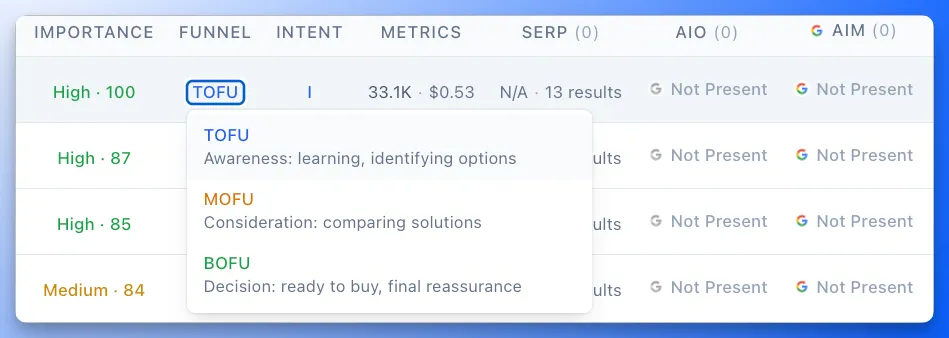
In Floyi’s Authority Planner, each topic shows its search intent and funnel stage (TOFU, MOFU or BOFU). Click either value to change it, and the values you set stay put through automatic re-labeling. The Planner turns Topical Authority Scorecard signals from Google and AI search into a prioritized plan, so a corrected label feeds the next content decisions. Review intent labels in the Authority Planner and recheck the topic after the next Scorecard refresh.
Identifying Search Intent with AI FAQs
These questions cover what AI can tell you about search intent, how to read an AI Overview and how far to trust a model’s confidence rating.
1. Can ChatGPT Identify Search Intent Without Seeing the SERP?
Only as a guess. ChatGPT can infer search intent from a query’s wording and modifiers, but that reflects learned language patterns, not what ranks in your market. Its web search may also return different results from Google. For a checkable answer, paste a dated SERP snapshot and any AI Overview or AI Mode answer into the prompt. Then ask ChatGPT to cite that evidence when it assesses intent.
2. Does an AI Overview Show How Google Reads a Query’s Intent?
Partly. Google AI Overviews offer evidence of how Google interpreted a query at that moment. The answer, follow-up questions and cited sources can indicate the need and format its systems inferred, but Google doesn’t publish an intent label. Treat what an Overview implies about intent as a clue, not a classification to copy.
Compare the Overview with the organic results. When both point to the same need and format, your reading has stronger support. If they differ, mark the finding uncertain and check again later. An Overview can change or disappear for the same query.
3. Can AI Intent Analysis Differ Across Search Engines?
Yes. Search engines and AI assistants draw on different context, evidence and search intent classification approaches, so they can read the same query differently. One system may split intent into fine-grained labels, while another groups the same signals into broader categories. Compare their readings with the query’s wording. Then use current Google results, ranking pages and SERP features as the practical verification source before you change a page.
4. Should You Trust the Confidence Score an AI Gives You?
Treat an AI confidence score as a triage signal, not a measured probability. A chatbot’s high, medium or low rating reflects its own judgment, and confident wording doesn’t confirm that its cited evidence appears in your snapshot. Weigh the evidence over the score. A high-confidence call without quoted results needs review, while a low-confidence call backed by mixed results signals real uncertainty. Start manual SERP checks with low-confidence and flagged rows.
About the author

Yoyao Hsueh
Yoyao Hsueh is the founder and CEO of Floyi, the topical authority platform, and the founder of Main Heading, an SEO and AI search agency. He is an expert in topical authority and topical mapping. He created Topical Maps Unlocked, a course studied by thousands of SEOs, content strategists and digital marketers, founded TopicalMap.com, a done-for-you topical mapping service for agencies and enterprise teams, and publishes the weekly Digital Surfer newsletter on SEO, content strategy and AI search.
About Floyi
Floyi is a closed loop system for strategic content. It connects brand foundations, audience insights, topical research, maps, briefs, and publishing so every new article builds real topical authority.
See the Floyi workflow