
How to Map Answer Types and SERP Features to Page Formats
Map answer types and SERP features to page formats: read the live SERP, match each answer type to an intent and record the evidence before you brief a page.
SERP features don’t tell you which page format to publish. They show how Google presents an answer, while the answer type defines the response a page must provide. Treating an AI Overview or featured snippet as a template can produce a brief that copies a result block but misses the query’s intent.
Google’s rater guidelines also split Know Simple queries from broader Know queries. A fact lookup may need a direct answer within a broader resource, while an exploratory query can support a definition-led explainer, a step sequence or a comparison. The reference table below pairs each answer type with common features, likely intent and a page format.
Poor format choices create unnecessary scope, thin answers and mismatched briefs. Record the live SERP by locale, device and date. Then choose the format that serves the dominant answer type and validate it against leading organic pages.
Answer Types and SERP Features Key Takeaways
- An answer type defines the response a searcher needs from a page.
- SERP features show how Google presents answers, not the format to copy.
- Pair the answer type with Informational, Navigational, Commercial, Transactional, or Generative intent.
- Know Simple queries often need direct answers, while broader Know queries need context.
- Review live SERPs by location, language, device, and date before selecting a format.
- Use a hybrid page only when two answer needs genuinely coexist.
- Record SERP evidence and leading organic formats before creating the brief.
How Do Answer Types Differ From SERP Features?
An answer type is the shape of the answer a searcher needs: a definition, a list, steps, a comparison, a single fact or number, a local result, or a product. A SERP feature is a result-page element beyond the standard organic links that Google uses to present or support that answer, sometimes resolving the query without a click. A visible feature is evidence of the answer type, not the answer type itself.
Search intent sits between the two. It explains why the person searches, and it comes in five types: Informational, Navigational, Commercial, Transactional, and Generative. The answer type is the form that satisfies that intent, and the page format is what you publish in response. For example, “what is a content brief” has Informational intent, needs a definition answer type and fits a definition-led explainer.
Google’s Search Quality Rater Guidelines treat Know Simple queries as a special type of Know query. A Know Simple query has a correct, complete answer that most people would agree on. That answer fits in one or two sentences or a short list, as with “what country is Mount Fuji in.” A broader Know query needs exploration and context. The distinction helps avoid a common brief error: publishing a full guide for a fact lookup, or a thin answer for an exploratory topic.
Answer-type analysis decides what the page must deliver, which keeps the content aligned with search intent. SERP-feature analysis shows how Google currently packages that answer and which page format fits. Treat this check as one step in opportunity research for AI search, the wider process of deciding what to publish next.
Map Answer Types to SERP Features, Intent and Page Formats
Each answer type maps to the SERP features that signal it, a likely intent and a page format to brief. Start with the answer type and use the features as evidence, because a result block reflects how Google may interpret the query, not a page format to recreate.
Use this table as the reference for the rest of the article. Each row reads left to right, and the mappings are observed patterns, not rules, because the features shown vary by query, location and device.
| Answer Type | SERP Features That Signal It | Likely Intent | Page Format |
|---|---|---|---|
| Definition | Featured snippet (paragraph), People Also Ask, AI Overview, Knowledge Panel for named entities | Informational | Definition-led explainer or glossary entry that answers in the opening paragraph |
| List | Featured snippet (bulleted or numbered list), People Also Ask, AI Overview | Informational or Commercial | List post or Best Post with one subheading per item |
| Steps | Featured snippet (numbered list), video results, People Also Ask, AI Overview | Informational | How-To Guide with prerequisites, numbered steps and the expected outcome |
| Comparison | Featured snippet (table), People Also Ask, AI Overview, shopping results when products are compared | Commercial | Head-to-Head Comparison or roundup with a comparison table and stated criteria |
| Single fact or number | Knowledge Panel, featured snippet, AI Overview | Informational | A short, direct answer inside a broader resource rather than a standalone page, because the results page may answer it in full without a click |
| Local | Local pack (map plus nearby business listings), local organic results | Commercial or Transactional | Location or service page backed by an accurate business profile |
| Product | Shopping results, product grids, ads, review snippets | Commercial or Transactional | Product page, Product Review or Best Post |
Generative intent reads differently. A query such as “draft a content brief outline for a dental clinic” asks an AI engine to produce an output. The AI answer may carry most of the response. A template or worked example is the closest page format because it gives the reader something to adapt.
The same answer need can surface as a featured snippet, a People Also Ask answer, a Knowledge Panel, or an AI Overview. AI Overviews synthesize information from multiple sources, so a complex informational query may show an AI summary alongside the organic results. Publish the format that satisfies the answer type and structure it so the answer is easy to extract.
A featured snippet’s shape is formatting evidence. A paragraph snippet points to a direct answer under a matching question heading. A list snippet points to genuinely grouped or sequential items, and a table snippet points to a clean HTML table. Clear headings and concise answers make extraction easier, but they don’t promise placement.
Use a hybrid page only when two needs genuinely coexist. A definition-led guide can include a comparison table when the searcher also needs selection criteria. Forced combinations make the primary answer harder to extract.
SERP Features That Signal Each Answer Type
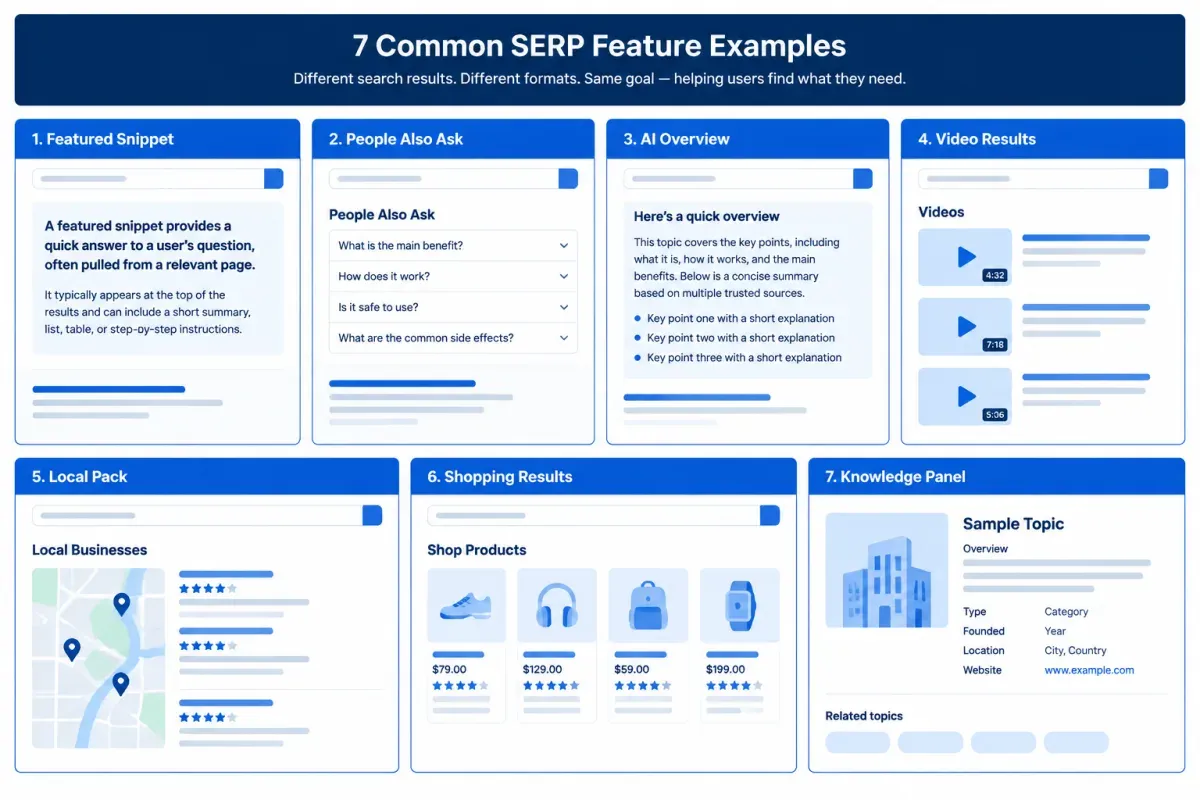
Seven common Google SERP features point to specific answer types. Each entry below says what the feature shows and which row of the table it points to.
- Featured snippet: Also called Position Zero, it is an extract from one page shown near the top of the results as a paragraph, list or table. Its shape signals a definition, steps, a list, or a comparison answer.
- People Also Ask: Expandable related questions with answers drawn from webpages. PAA questions usually signal exploratory informational demand and the sub-questions a page should answer under clear subheadings, not a need for a standalone FAQ page. They are also a source of related queries for long-tail keyword discovery with AI.
- AI Overview: An AI-generated summary that can link to the sources behind its answer. Its paragraph, list, steps, or table format hints at the expected answer shape, and its presence often marks a query with several connected parts.
- Video results: A video carousel or individual video listings, sometimes with key moments. They signal a demonstration or how-to answer, though clear written steps can still meet the need when visual proof isn’t required.
- Local pack: Also called the map pack, it shows a map with nearby business listings, ratings and contact details. It signals a local answer for searchers who want to visit, call or get directions.
- Shopping results: Listings with product images, prices and sellers. They point to a product-selection or purchase answer with Commercial or Transactional intent.
- Knowledge Panel: An entity box for a person, organization, place, or product, often drawn from the Google Knowledge Graph. It usually signals a single fact or a definition about a named entity, so treat it as context rather than something a new article can create.
Related searches, sitelinks, ads, and Top Stories add context but carry less weight when choosing an answer type. Which queries belong in your plan at all is a separate decision, covered in keyword strategy after AI search.
How to Identify a Query’s Answer Type
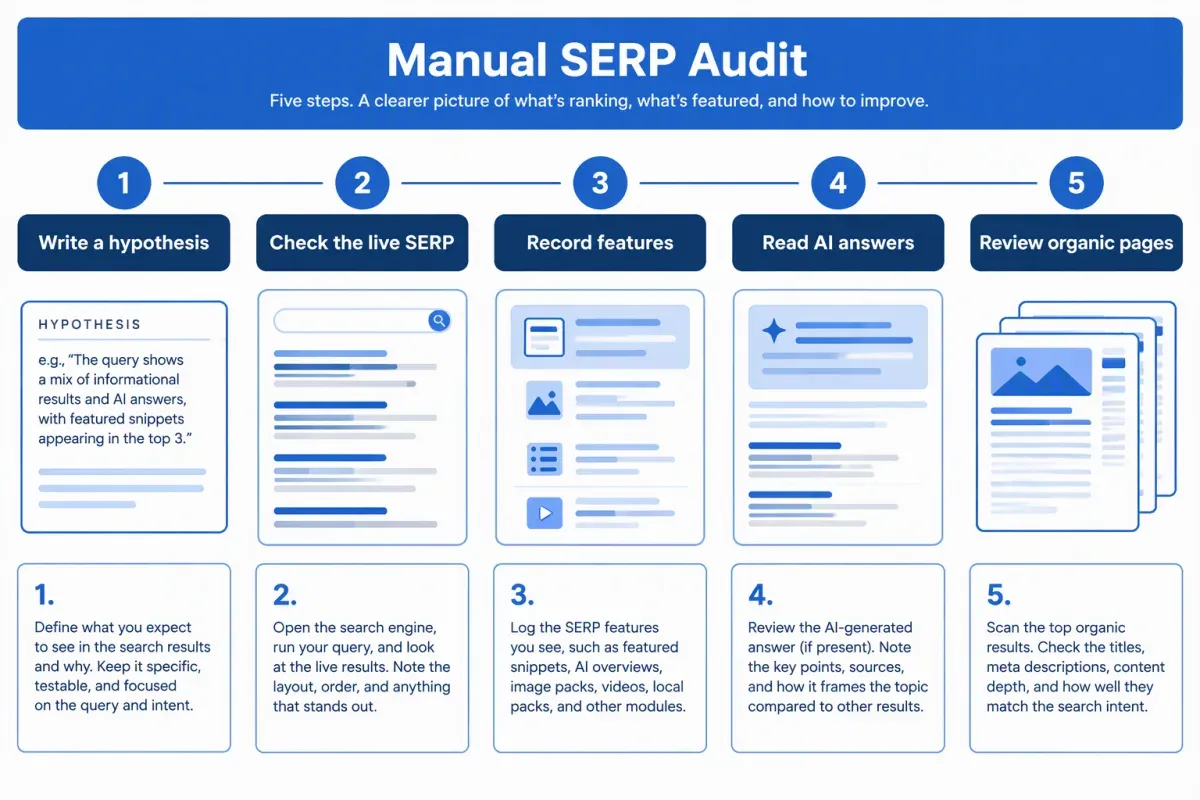
The five-step Answer-Type Check turns a manual read of the live SERP into a repeatable page-format decision. It keeps searcher intent separate from the features on the page, so a video carousel or rich result never becomes a proxy for intent.
-
Write a hypothesis: Before searching, name the likely answer type from the table and the likely intent: Informational, Navigational, Commercial, Transactional, or Generative. For an ambiguous query, note the main and secondary interpretations instead of trusting the keyword wording alone.
-
Check the live SERP in your market: Set the country, the language, the city where local context matters, and the device your audience uses. A logged-out or private window reduces personalization but doesn’t remove variation, so record the date, location and device with your notes.
-
Record the features in page order: Note which features from the table appear, where they sit and whether each answers the query directly or sends the searcher to another page. Compare what you see with your hypothesis, especially when a result block and an organic page meet the same need in different ways.
-
Read the AI answers: Check the AI Overview when present and, where you can, AI Mode, ChatGPT and Gemini. Note whether each answer is a definition, a list, numbered steps, or a comparison table, and which sub-questions it covers. Treat the shape as one more clue to the answer type, not as proof of how AI engines choose sources.
-
Review the top organic pages and choose the format: Compare page type, heading structure, depth, and unanswered questions to find the prevailing format. A Know Simple query may need a direct-answer section with concise context, while a broader query may support a fuller guide. Pick the format from the table that serves the dominant interpretation, not the one that mirrors the most visible feature.
Two supplements help you decide which queries to check first. Keyword research tools that list the SERP features shown for each keyword reveal recurring patterns across many queries. Search Console performance reports show the search appearances your existing pages already earn, such as videos and review snippets. Neither replaces live SERP analysis for the market and device you’re planning around.
Turn SERP Evidence Into a Page Brief
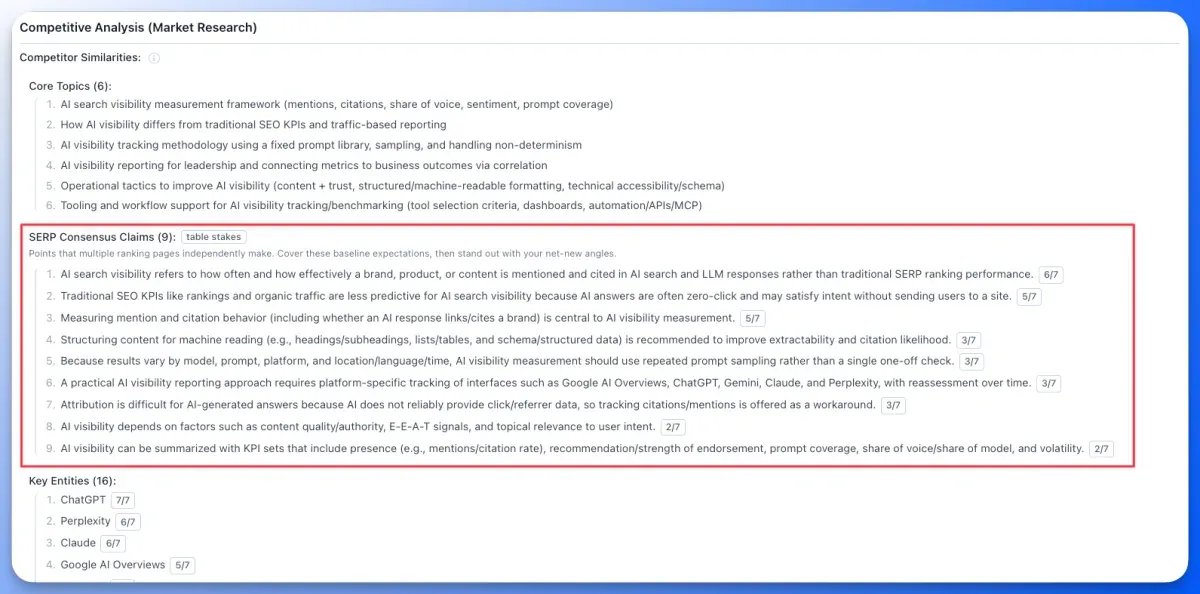
An evidence record turns the live review into a brief decision you can defend. Use the same fields for every query so the reasoning holds up in review and handoff:
- Query: The exact search phrase.
- Answer type and intent: The answer needed, such as a definition, a comparison, a local service, or a purchase, paired with one of the five intents.
- SERP evidence: The review date, location and device, plus the features you observed.
- AI answer shape: Whether each AI answer defines, lists, gives steps, or compares options.
- Organic pattern and page format: The prevailing organic format, then the page format you chose.
Example: “best SEO tools” has a comparison answer type and Commercial intent. Suppose the check shows an AI Overview, review results and discussions, and the top pages are list-led comparisons. The chosen format is a roundup with stated criteria and a scannable evaluation table. The table serves the reader’s decision. It isn’t a promise of SERP visibility in an AI Overview or a rich result.
Not every feature is a realistic target. Organic results, featured snippets, videos, and images are placements a page can earn. Some rich snippets, such as review snippets, also depend on structured data the page supplies. Knowledge Panels, ads and much of the local pack draw on Google’s own data or business profiles. Record which features the page can realistically earn, and never turn a SERP appearance into a ranking promise.
Before drafting starts, put the chosen format, the answer the page gives first and the sub-questions it must cover at the top of the brief. An editor can then check the format against the SERP before anyone writes.
Floyi reads the same SERP evidence during brief generation. It detects one of 24 content types, such as How-To Guide, Head-to-Head Comparison, Best Post, and Product Review, and applies a matching outline template. Its SERP Consensus Claims list the points two or more ranking pages agree on, so the brief covers the baseline. To keep the chosen format, the SERP evidence and the outline in one place, turn your evidence into a Floyi brief.
Answer Types and SERP Features FAQs
These FAQs cover the edge cases that come up when you read a live SERP for its answer type and choose a page format.
1. Can One Query Have Multiple Answer Types?
Yes. A budget laptop search can combine model comparisons, prices, reviews, and recommendations, blending research with a purchase-oriented need. Choose the page format around the dominant answer need in the live SERP, then meet reasonable secondary needs inside it. When comparison leads, one comparison page can carry price context, review evidence, recommendation criteria, and next steps.
2. Do SERP Features Vary by Location?
Yes. SERP features can differ by country, city, language, device, and time. Queries with an in-person need show it most plainly: a local pack for “coffee shops near me” can look different, or disappear, for a searcher in another city.
Check results from the market and device your audience uses before choosing a page format. A local pack seen from another city isn’t evidence of what your audience sees, and one check is a snapshot of one set of conditions.
3. What If a SERP Shows Few or No Features?
A results page with few features still points to an answer type. Read the prevailing format of the top organic pages, whether guides, lists, comparisons, or product pages, and the shape of the AI answers for the same query. Then pick the page format from the table. When related searches are the only module, they list adjacent questions the page may answer without pulling it away from its primary intent.
4. Do AI Answers Show the Same Answer Type as the SERP?
Often, but not always. An AI answer can present the same need in a different shape, such as a summary table where the SERP shows separate snippets and list-style guides. AI engines don’t publish rules for how they shape answers, so treat what you observe as evidence, not a fixed template.
When the shapes differ, build the page around the dominant answer type and add the other shape inside it. A guide, for example, can carry a short comparison table near the top without changing the rest of the page.
About the author

Yoyao Hsueh
Yoyao Hsueh is the founder and CEO of Floyi, the topical authority platform, and the founder of Main Heading, an SEO and AI search agency. He is an expert in topical authority and topical mapping. He created Topical Maps Unlocked, a course studied by thousands of SEOs, content strategists and digital marketers, founded TopicalMap.com, a done-for-you topical mapping service for agencies and enterprise teams, and publishes the weekly Digital Surfer newsletter on SEO, content strategy and AI search.
About Floyi
Floyi is a closed loop system for strategic content. It connects brand foundations, audience insights, topical research, maps, briefs, and publishing so every new article builds real topical authority.
See the Floyi workflow