
How to Classify Keywords by Search Intent (5 Types + Examples)
Classify keywords by search intent across all five types, check each label against the live SERP and use it to set page type, funnel stage and hierarchy.
A keyword modifier can make an intent label look obvious, but it’s only a clue. To classify keywords by search intent, give each one of five types (Informational, Navigational, Commercial, Transactional, or Generative), then check whether the live SERP supports that label.
For a full keyword list or topical map, the label has to drive a page decision, not sit alone in a spreadsheet. The five-intent table below pairs query clues with SERP signals and page formats to test. The validation steps then resolve mixed intent before you map each topic to a page type, funnel stage and Pillar > Hub > Branch > Resource position.
Keyword Intent Classification Key Takeaways
- Classify each keyword or map topic as Informational, Navigational, Commercial, Transactional, or Generative.
- Treat keyword modifiers as clues, then confirm provisional labels against the live SERP.
- Record observed result formats, SERP features, market, date, and final label.
- For mixed intent keywords, list the plausible readings and record a primary intent plus any meaningful secondary intent.
- Let validated intent and result formats decide the page type and whether a topic needs its own URL.
- Track funnel stage separately from intent because the two labels describe different decisions.
- Place topics in the Pillar > Hub > Branch > Resource hierarchy and recheck labels when results change.
How Do You Prepare a Keyword List for Classification?
Prepare the list by deciding what each row represents, pulling phrases from the sources you already use and adding the fields a reviewer needs to confirm each label. Search intent is the goal behind a query, and each row will end up with one of the five labels.
For what search intent is and how the SERP reveals it, read how search intent works. For how the searcher’s own context, such as location or past searches, can change what a query needs, see how search intent differs from user intent.
For a raw keyword list, create one row per phrase. For a topical map, create one row per topic and use its main query as the phrase you check. That keeps the label attached to the topic as it moves into planning.
Pull phrases from Search Console, Google Keyword Planner and your keyword research exports. Note the source of each so you can trace and refresh it later. Search Console is especially useful here because it shows the long-tail keywords your pages already appear for.
Add these columns so your keyword intent spreadsheet supports review and page mapping:
- Source: Where you found the phrase, such as Search Console or a keyword research export.
- Phrase: The exact query, or the topic’s main query when you classify a topical map.
- Search volume: The volume figure, when the source provides one.
- Ranking URL: The page that currently appears for the query. Leave it blank if no page ranks. Similar queries pointing to different URLs can reveal two pages serving the same need.
- Modifier: A clue such as “how to,” “best,” “vs,” “buy,” “template,” “near me,” or “login.”
- Provisional intent: Your first label, to be checked against the live SERP.
- Brand status and topic group: Mark each phrase as branded or non-branded, then group related topics for filtering.
Modifiers help you sort the list, but they don’t settle intent on their own. A query with “best” may suggest comparison, yet the live results can show a different dominant need. Flag ambiguous keywords now so the review can resolve them before you map labels to pages, funnel stages and hierarchy.
How Do You Classify Keywords with a Five-Intent Table?
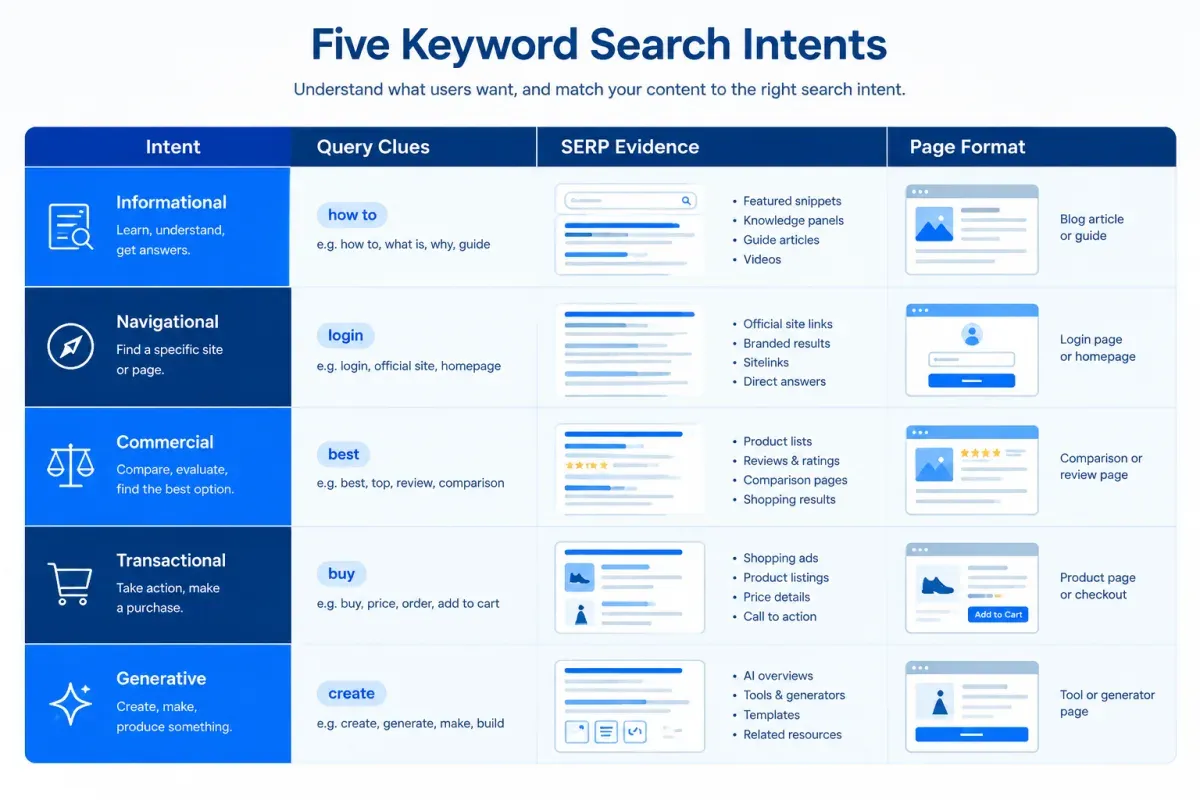
Classify the list in a first pass with a five-intent table that puts query clues beside the SERP signals that confirm them and the page format to test. Many guides stop at four types of search intent. This table adds Generative and pairs every clue with SERP evidence, so no label rests on a modifier alone.
| Intent | What the searcher wants | Clues in the query | SERP signal that confirms it | Page format to test |
|---|---|---|---|---|
| Informational | Learn something or get an answer. | “How to,” “what is,” “why,” “guide,” or “tutorial.” | Guides, featured snippets and People Also Ask results. | In-depth guide, tutorial or explainer. |
| Navigational | Reach a known website or destination. | A brand name with “login,” “support,” “official site,” “portal,” or “app.” | The brand’s own pages fill the top results. | Homepage, login page or support page. |
| Commercial | Compare options before choosing. | “Best,” “top,” “review,” “vs,” or “alternatives.” | Roundups, listicles, reviews, and comparison pages. | Comparison page or buyer’s guide. |
| Transactional | Complete an action. | “Buy,” “price,” “discount,” “sign up,” or “download.” | Product, category or pricing pages, sometimes with shopping results. | Product, pricing or signup page. |
| Generative | Have something produced for them, such as a plan, draft or template. | “Template,” “generator,” “plan for,” “create,” or a request tied to the searcher’s situation. | Templates, tools or AI answers that return a finished table, plan or draft. | Template, tool or worked example. |
Use the table as a set of keyword intent examples, not a rulebook. Informational keywords can call for an FAQ, a glossary entry or a step-by-step tutorial, depending on the question. Navigational keywords usually need the exact destination, such as the brand’s login or support page. Commercial keywords need a page that compares real options, and Transactional keywords need a page where the action can happen.
For Generative intent, try adding “build me” or “create” to the front of the query. If it still reads naturally, the searcher likely wants a finished output. Generative intent as a fifth type covers the category in more detail.
Similar wording can hide different needs. “Best” usually points to Commercial intent, but “best content plan for a two-person team” may call for a tailored plan instead. If a query fits two rows, send it to the mixed-intent review rather than forcing one label.
In the spreadsheet or map, record the likely intent and the clue behind it. Each label stays a hypothesis until the live results confirm it.
How Do You Validate Labels Against Live SERPs?
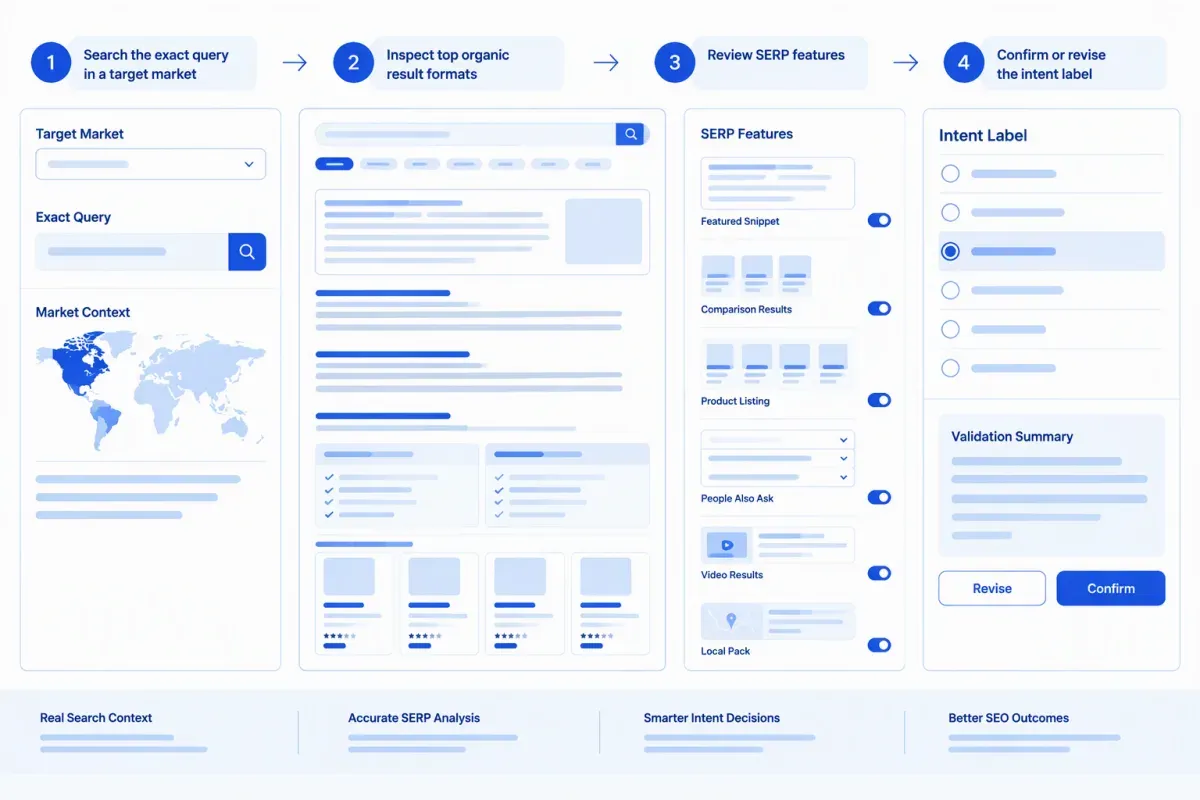
Validate each provisional label with live SERP analysis. Search the exact query in its target market and check whether the formats that rank support it. Treat the wording as the hypothesis and the results as the evidence.
Use this validation pass:
-
Search the target market. Enter the exact phrase in Google with the intended country and language. For a local query, set the relevant city, since location changes which businesses or meanings appear. Record the market and date so someone else can repeat the check.
-
Read the top results. Review the top five to ten organic results and note each one’s page type. Typical types are a guide, product page, category page, brand homepage, review, or comparison. Look for the recurring pattern rather than letting one prominent result set the label. If most results are how-to guides, Informational intent is likely. If the query sounds educational but reviews and comparisons keep appearing, Commercial intent fits better.
-
Read the SERP features. Result features add a second signal. Featured snippets, People Also Ask boxes and quick-answer blocks usually support Informational intent. A brand homepage or login page in the top spot points to Navigational intent. “Best X” roundups and comparison pages signal Commercial intent, while category pages, direct pricing and shopping results support Transactional intent. An AI Overview that returns a finished table, plan or checklist is a Generative signal worth recording.
-
Reconcile the evidence. Keep the label when the repeated formats support it, and revise it when the pattern points elsewhere. When results split across reasonable intents, move the query to the mixed-intent review.
-
Use AI as a second opinion. Ask an AI assistant whether the query calls for an explanation, a comparison or a finished deliverable. Its answer may surface Generative intent the results don’t show yet, but the live results stay the tiebreaker. For a fuller method, learn how to check intent with an AI prompt.
Keep the provisional label, observed formats, SERP features, market, date checked, and final label in the same row. That record makes the search intent analysis repeatable when results shift.
How Do You Resolve Mixed or Ambiguous Intent?
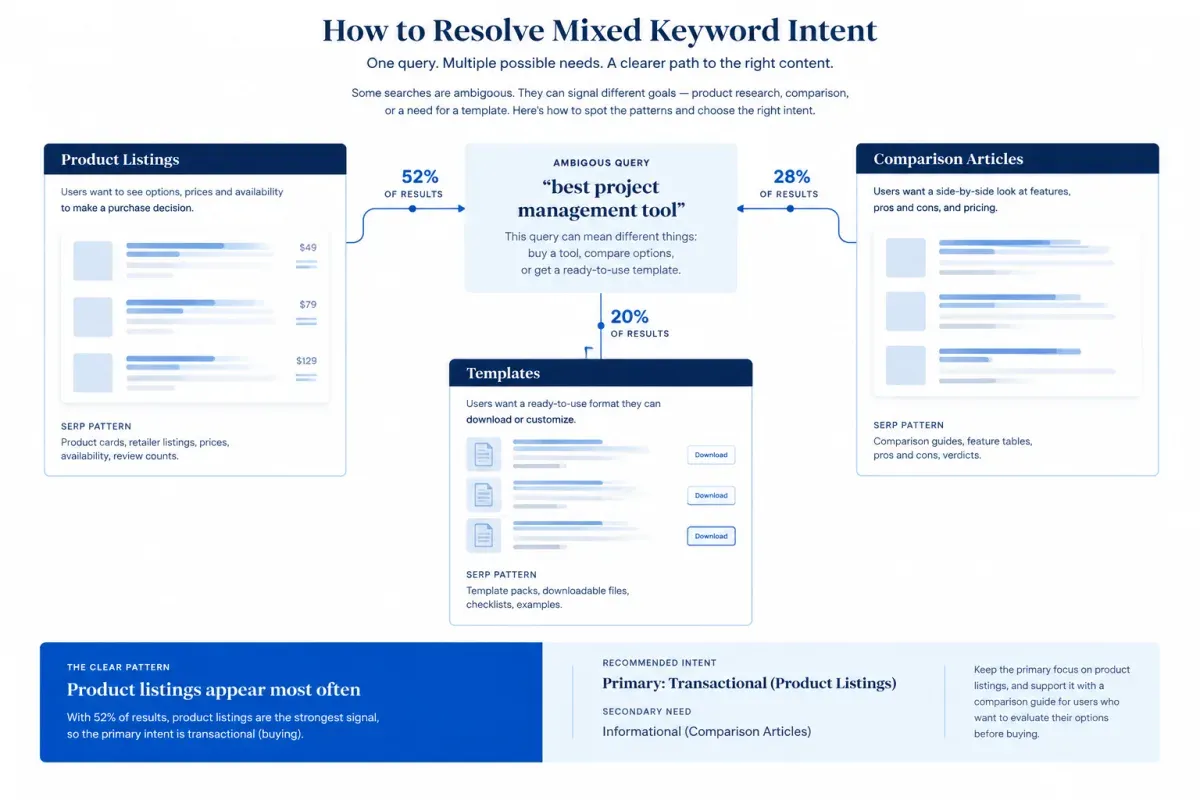
Resolve mixed or ambiguous intent by testing each plausible reading against the live results, then recording the strongest reading as primary and any recurring need as secondary. Keep two judgments apart. A query interpretation is what the words may refer to. Query intent is what the searcher wants to get done, and one interpretation can carry several goals.
The Google Search Quality Evaluator Guidelines draw the same line. They ask raters to separate a query’s dominant interpretation from its common and minor ones, then judge what a searcher with each meaning would want.
For a short head term such as “running shoes,” list the reasonable possibilities before you check the results:
- The searcher wants advice on choosing shoes.
- The searcher is comparing brands or models.
- The searcher is ready to buy.
A modifier narrows the field without fixing the label. “Notion pricing” may signal a purchase decision, while “Notion pricing review” points to evaluation. Read the full query before deciding.
Then test each reading against the results. Product listings and retailer pages support a buying reading. Reviews and comparison articles point to evaluation. Templates and tools suggest the searcher wants something produced. If the results contradict a modifier’s usual signal, revise the hypothesis.
Primary and secondary search intent often sit together. A “content calendar template” query may be both Generative and Informational, because the searcher wants a usable asset and wants to understand the format. Record the intent that decides the page format as primary. Add a secondary intent only when it recurs and adds a real need.
A SERP shows mixed search intent when different result types repeatedly serve distinct needs, such as product listings beside comparison articles. One odd result is an outlier, not a pattern. Use a mixed label only when neither reading clearly leads.
Location can change meaning too. A brand or service name may refer to different things in different markets. Check the results for your audience’s location when the difference affects page format.
Record the primary intent, any secondary or mixed label and a one-line rationale that names the query clue and result pattern behind it. The next reviewer can then judge whether a changed SERP warrants a new label.
How Do You Map Intent to Pages and Topical Hierarchy?
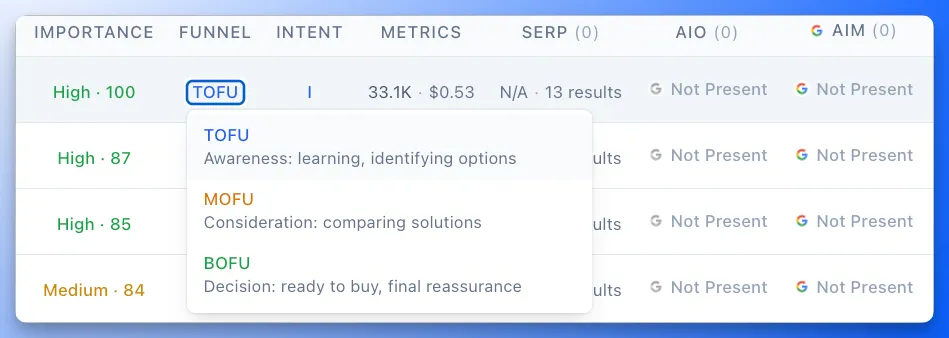
Map intent to pages by grouping the queries one page can serve, giving each group one target URL and then placing that page in the hierarchy with a funnel stage. When live results for two queries consistently favor different page formats, they need separate pages. Don’t place a keyword on the nearest existing page just because the subject overlaps.
Keyword clustering by SERP overlap is a fast way to find the queries that can share one page. Check existing URLs before creating anything. Improve a page that already meets the need, and create a new one only when the need or expected format differs. This one-group, one-URL rule keeps the map focused on distinct needs and helps avoid keyword cannibalization.
Keep intent and funnel stage in separate fields, because intent alone doesn’t place the reader in the marketing funnel. Informational queries often sit at TOFU, Commercial queries at MOFU and Transactional queries at BOFU. But a how-to for people already using a product category may belong at MOFU. Navigational and Generative queries need context about who is searching and why.
The hierarchy gives each page a role in a Pillar > Hub > Branch > Resource map. Broad or mixed head terms often anchor hubs, with narrower needs beneath them. Specific how-to and Generative queries usually fit as branch or resource pages, while Commercial comparisons sit beside the topics they compare. Navigational and Transactional queries for your own brand, such as login or pricing searches, belong on site pages outside the content map.
The example below shows how keyword research queries map to page types:
| Keyword | Primary intent (secondary) | Page type | Funnel stage | Hierarchy placement |
|---|---|---|---|---|
| “what is keyword research” | Informational | Explainer | TOFU | Hub |
| “how to do keyword research” | Informational | Step-by-step tutorial | TOFU | Branch under the hub |
| “keyword research template” | Generative (Informational) | Template with walkthrough | MOFU | Resource under the tutorial |
| “best keyword research tools” | Commercial | Roundup | MOFU | Branch |
| “your brand pricing” | Transactional | Pricing page | BOFU | Site page outside the content map |
| “your brand login” | Navigational | Login page | Not a content topic | Site page |
In the template row, the usable template decides the page format, so Generative leads and a short walkthrough covers the Informational need.
In Floyi’s Authority Planner, every topic shows its search intent and funnel stage in the hierarchy, and a topic can carry up to two intents. You can change either value when your SERP review calls for it. Values you set survive automatic re-labeling, and the brief you generate from the Planner follows them.
How Do You Keep Intent Labels Consistent Across a Whole Map?
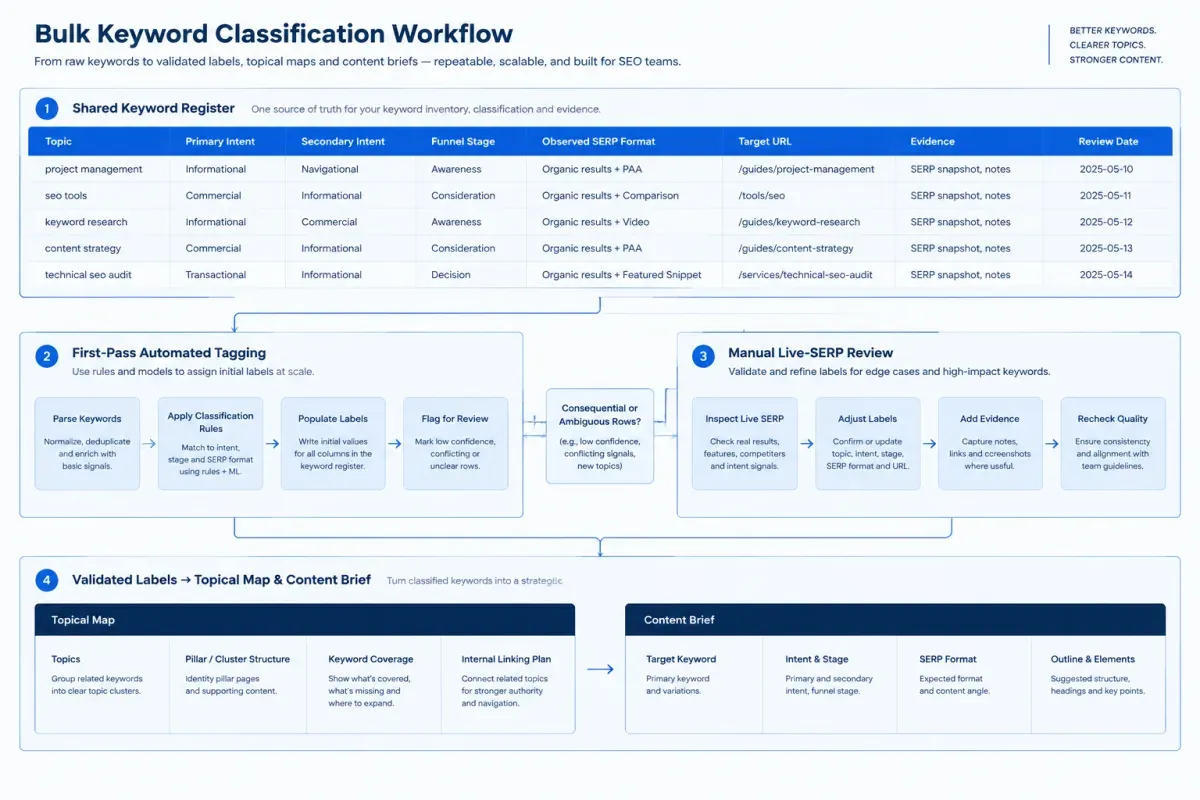
Keep labels consistent across a whole map with one shared register, a rules-first pass over the full list and manual SERP checks for the decisions that matter. That makes SEO keyword classification repeatable without treating automated tags as final answers.
Keep the register in the working keyword list or map, not a side document. Track the keyword or topic, primary and secondary intent, modifier, funnel stage, observed SERP format, target URL, evidence, date checked, and next action. When teammates disagree, they resolve the label from the same evidence.
Use this two-pass workflow for bulk keyword classification:
-
Apply rules across the full list. Use spreadsheet filters or your keyword tool’s automated keyword intent tagging to assign provisional labels. “How” and “guide” often signal Informational intent. “Best” and “vs” suggest Commercial intent, and “buy” or “price” may indicate Transactional intent. “Template,” “generator” and “plan for” can point to Generative intent.
-
Check the consequential rows against live results. Prioritize ambiguous queries and any label that could change the target URL, page format or funnel stage. A “price” query, for example, may call for a pricing page or an explanatory resource depending on what ranks.
For sibling topics with similar modifiers but different labels, compare both SERPs. Either align the labels or note the evidence for treating them differently.
Carry each topic’s intent and funnel stage into its place in the hierarchy, then into its brief and draft. The page you publish then matches the label you confirmed.
Recheck a label when the dominant result format shifts, a launch changes the query’s meaning or a ranking page starts losing clicks. Change labels and placement only when new evidence supports it, then review the affected URLs against the register.
To keep intent, funnel stage and hierarchy in one place, set intent and funnel stage in the Planner and generate briefs that follow them.
Keyword Intent Classification FAQs
These FAQs cover branded keywords, funnel stage, zero-volume keywords, and People Also Ask questions.
1. How Should You Classify Branded Keywords?
Classify branded keywords by the action or destination in the query, not by the brand name alone. A brand paired with “login,” “website,” “official site,” “portal,” “dashboard,” “support,” or “app” usually signals Navigational intent. Map it to the homepage, login page or support page the searcher wants to reach.
Other modifiers change the label. “Compare,” “review” and “versus” point to Commercial intent, while “buy,” “discount” and “deal” suggest Transactional intent. A branded review query fits review content, and a purchase query belongs on a product page. When the modifier is unclear or missing, check the live SERP first.
2. Is Informational Intent Always Top of the Funnel?
No. Informational intent describes what the searcher wants from the query, while funnel stage reflects how close they are to a decision. Informational queries often map to TOFU. But someone searching how to migrate between tools may already be choosing a replacement, which puts the topic at MOFU or BOFU. Set the stage by who is searching and what they’re likely to decide next.
3. Do Zero-Volume Keywords Need Intent Labels?
Yes. Label a zero-volume keyword when it fits a hub’s topical scope or signals a distinct audience need. Missing volume data says nothing about intent. Read the likely need from the wording and confirm it against the live SERP before choosing the page that should serve it.
Keep the label even when the term isn’t urgent. Intent decides page fit. Priority comes later and rests on persona need and business value, with volume only ordering topics of equal priority.
4. How Do You Classify People Also Ask Questions?
Treat People Also Ask entries as question keywords, then check whether each one belongs to a topic you already cover. Most are Informational follow-ups. Questions that want a short, specific answer, which Google’s rater guidelines call Know Simple queries, belong in an H2 or FAQ on the parent page rather than a separate URL. Give a question its own page only when its live SERP shows different results and formats from the parent topic. A request for a finished asset, such as a template, may carry Generative intent and earn a dedicated resource page.
About the author

Yoyao Hsueh
Yoyao Hsueh is the founder and CEO of Floyi, the topical authority platform, and the founder of Main Heading, an SEO and AI search agency. He is an expert in topical authority and topical mapping. He created Topical Maps Unlocked, a course studied by thousands of SEOs, content strategists and digital marketers, founded TopicalMap.com, a done-for-you topical mapping service for agencies and enterprise teams, and publishes the weekly Digital Surfer newsletter on SEO, content strategy and AI search.
About Floyi
Floyi is a closed loop system for strategic content. It connects brand foundations, audience insights, topical research, maps, briefs, and publishing so every new article builds real topical authority.
See the Floyi workflow