
How to Cluster Keywords Into Topics With SERP Data
Cluster keywords with SERP data using the Shared-URL Method. Compare top-10 overlap, set thresholds, check intent, and map clusters to pages in six steps.
You can cluster keywords into topics by comparing the top 10 organic URLs for each keyword and grouping the ones that share enough of them. If the same guides rank for “SEO” and “what is SEO,” the search engine already treats both as one intent, so one page can serve them.
Wording alone won’t tell you that. Semantic keyword clustering groups terms that sound alike, but similar phrases can still need different pages. The six steps below show how to cluster keywords using SERP data, from fetching results to mapping each cluster to a page.
Get the threshold wrong and it costs you either way. Too loose, and one page tries to serve two intents. Too tight, and your own pages cannibalize each other.
SERP Clustering Key Takeaways
- The Shared-URL Method groups keywords whose top-10 organic results overlap enough that one page can target the group.
- Fetch every keyword with the same country, language, device and date so overlap scores stay comparable.
- Normalize URLs and match at the URL level, not the domain level.
- Overlap is the number of shared top-10 URLs divided by 10, so four matches means 40%.
- Start at a 40 to 50% threshold. Raise it for oversized clusters and lower it for tiny ones.
- Check the page types that rank, and split any cluster that lands on a mixed-intent SERP.
- Measure every keyword against the cluster’s centroid, then check Google Search Console for cannibalization after you publish.
What Is The Shared-URL Method for Clustering Keywords?
The Shared-URL Method groups keywords whose top-10 organic results overlap enough that one page can target the whole group. The search engine has already decided they share an intent, so you’re reading its answer instead of guessing.
Here’s the mechanic. Pull the top 10 organic results for each keyword, then count the URLs that appear in both lists. The running example is “SEO” and “what is SEO.” If several of the same guides rank for both, their SERP overlap is high and one page likely fits both.
SERP keyword clustering and semantic keyword clustering answer different questions:
| Approach | What it compares | What it tells you | Where it fails |
|---|---|---|---|
| SERP clustering | Ranking URLs | Whether one page can rank for both keywords | Mixed-intent SERPs and generic pages that rank for everything |
| Semantic clustering | Similarity of wording | Whether terms sound related | Similar words that need different pages, or different words that share one page |
That’s why it pays to cluster keywords using search results rather than phrasing. The decision rule is short. Substantial overlap means one page can target the group, which cuts unnecessary pages and helps prevent keyword cannibalization. Little or no overlap marks the queries as separate pages, and Step 4 sets the numbers.
Overlap is evidence. It isn’t proof. A homepage, marketplace or directory can rank across unrelated queries and fake a match, so Step 5 adds an intent check before you assign pages. Once the groups hold up, you can turn clusters into a topical map for the whole site.
Steps 1 and 2: How Do You Build and Fetch Your SERP Set?
Build a focused keyword list for one topic area, then fetch the top 10 organic results for every keyword under identical settings. That’s all the method needs.
Step 1: Build a focused keyword set. Work on one pillar or hub at a time, using the Pillar, Hub, Branch and Resource hierarchy to set the scope. Pull terms from your keyword research exports or Google Search Console queries, and keep search volume where you have it.
Then clean the list:
- Remove duplicates.
- Drop branded and navigational terms.
- Cut clearly off-topic queries.
- Keep borderline commercial terms, such as price queries.
Price terms stay because the SERPs decide what belongs together. A “cost” query might join a larger group or earn its own page. Filter lightly, since heavy pruning hides relationships between topics.
Step 2: Fix one fetch context. Use the same country, language, optional city, device and fetch window for every keyword. Pull the top 10 organic results for each one. Mixed depths or locales make overlap scores incomparable.
A SERP data API can feed a spreadsheet or a short script, or a clustering tool can fetch the results for you. Either way, record:
- Per keyword: The query, country, language, device and fetch date.
- Per result: Its position and URL.
Store one row per keyword and result in a spreadsheet or CSV. Step 3 reads that table, and you’ll reuse it when you refresh.
Step 3: How Do You Compare URL Overlap Pairwise?
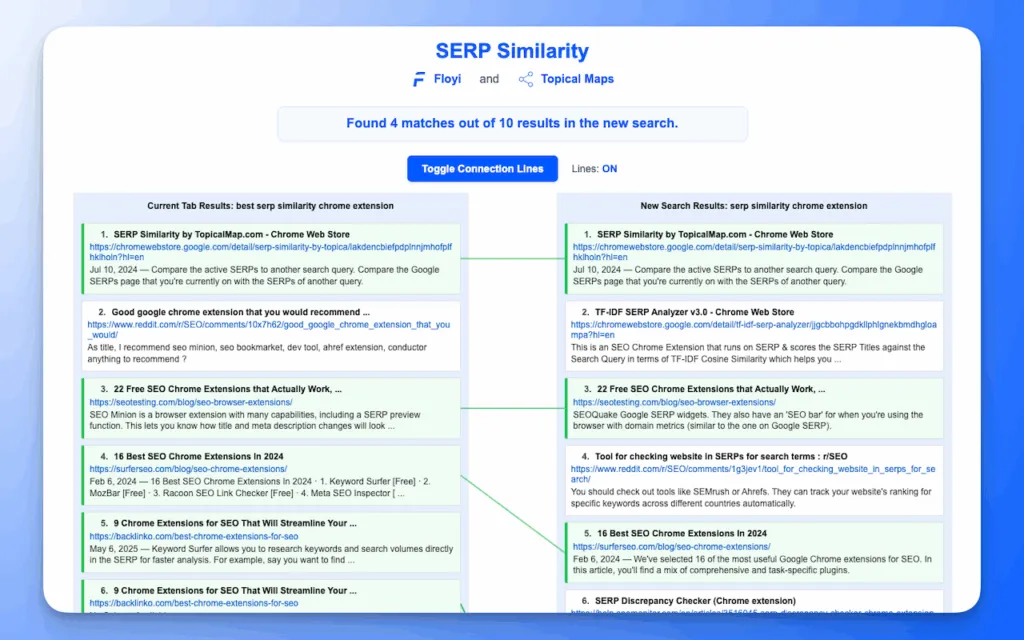
Give every keyword pair an overlap percentage: the number of top-10 URLs both keywords rank with, divided by 10. The figure won’t hold up unless the URLs are clean.
Normalize before you compare. Strip tracking parameters and fragments, standardize trailing slashes and resolve canonicals where you can, so two versions of one page count once. Leave ads, shopping blocks, video carousels and other SERP features out of the organic 10. Keep the cleaned URL in a helper column next to the raw one.
- Before:
https://example.com/what-is-seo/?utm_source=x#history - After:
https://example.com/what-is-seo
Here’s the worked example for “what is SEO” and “SEO,” with matches marked:
| Rank | “what is SEO” | “SEO” | Match |
|---|---|---|---|
| 1 | a.com/seo-guide | a.com/seo-guide | Yes |
| 2 | b.com/what-is-seo | c.com/seo | No |
| 3 | d.com/learn-seo | d.com/learn-seo | Yes |
| 4 | e.com/seo-basics | f.com/seo-tips | No |
| 5 | g.com/what-is-seo | g.com/what-is-seo | Yes |
| 6 | h.com/seo-explained | i.com/seo-tools | No |
| 7 | j.com/seo-101 | j.com/seo-101 | Yes |
| 8 | k.com/seo-definition | l.com/seo-checklist | No |
| 9 | m.com/seo-intro | n.com/seo-news | No |
| 10 | o.com/seo-overview | p.com/seo-agency | No |
Four matches out of 10 means 40% overlap. In a spreadsheet, put one keyword’s URLs in B2:B11 and the other’s in C2:C11, then use =SUMPRODUCT(COUNTIF(B2:B11,C2:C11))/10. It counts how many URLs in column C also appear in column B.
Jaccard similarity (matches divided by all unique URLs across both lists) helps when list lengths differ. With fixed lists of 10, the simple percentage does the job. If a SERP shows fewer than 10 organic results, divide by the shorter list’s length instead.
Match at the URL level, not the domain level. One domain can rank different pages for unrelated queries, so domain matching inflates SERP similarity and merges keywords that need separate pages.
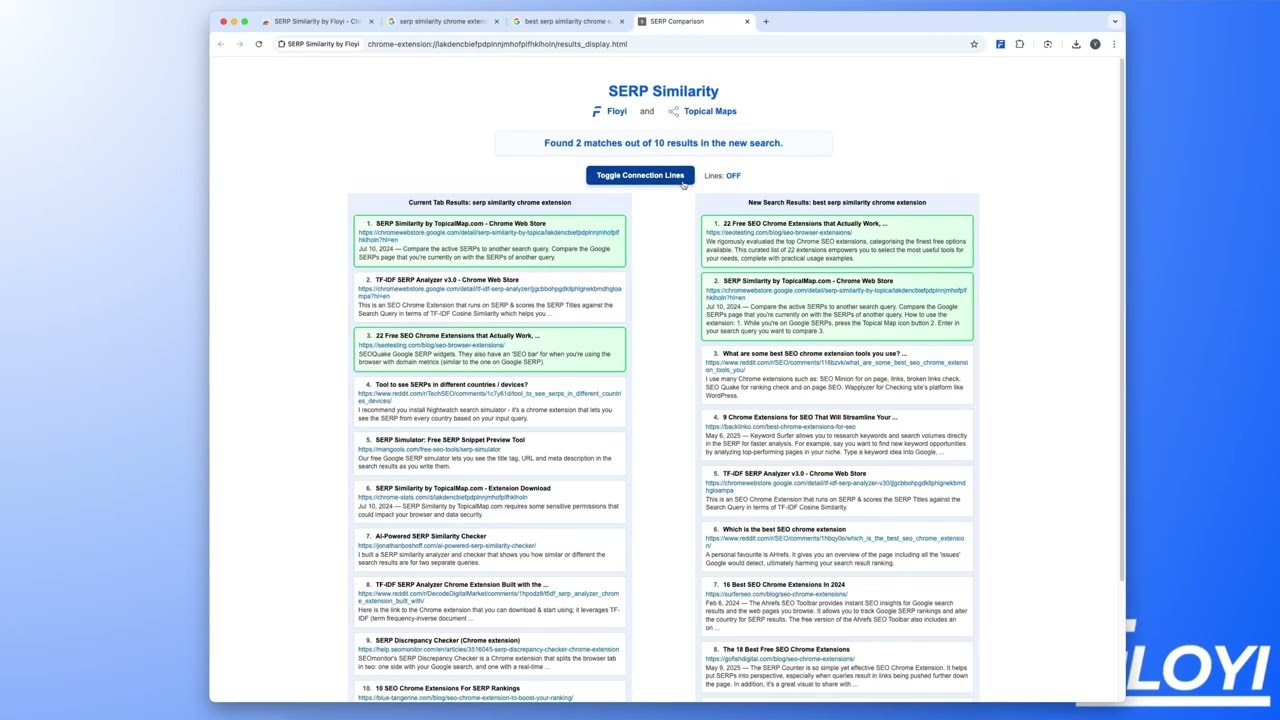
To check a single pair by eye, the free SERP Similarity extension shows two result pages side by side. Then carry every pair’s percentage into Step 4.
Steps 4 and 5: How Do You Set Thresholds and Check Intent?
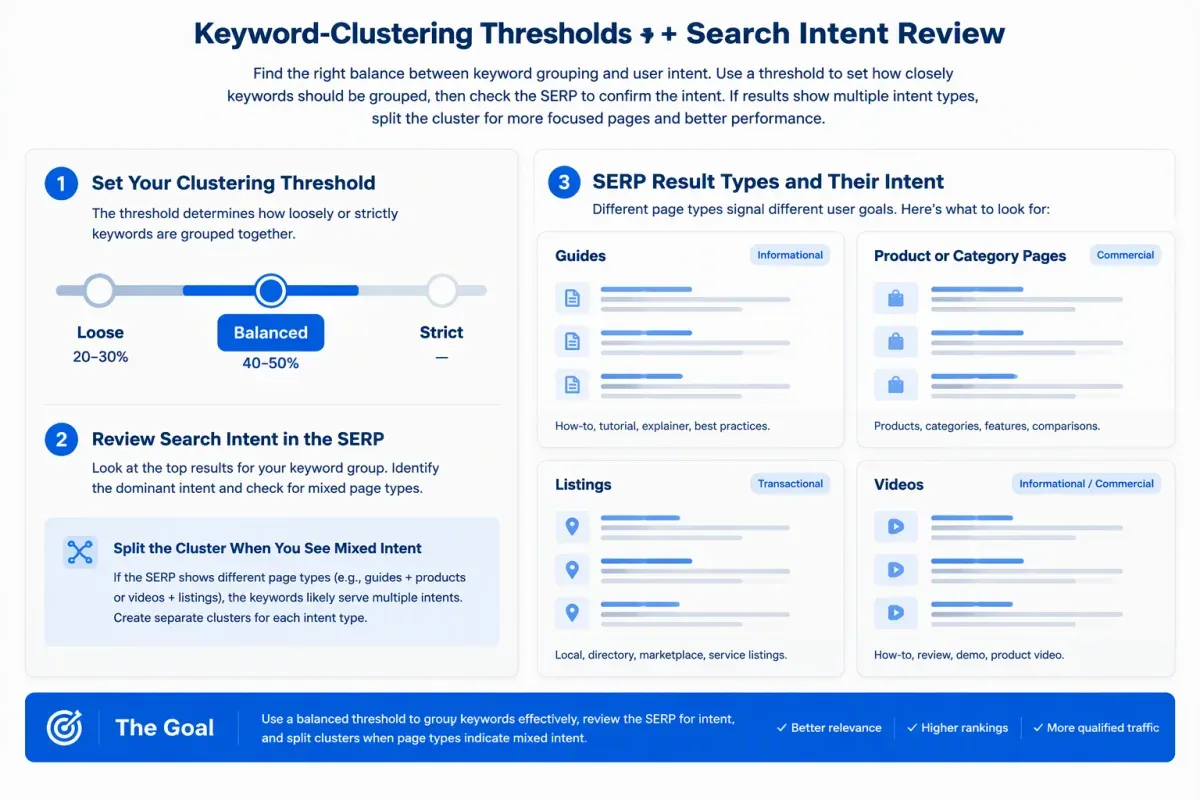
Start in the balanced threshold band and adjust it for your niche, then confirm each cluster by checking which page types rank. Step 4 sets the number, and Step 5 tests it against intent.
Step 4: Pick a threshold band. A stricter keyword clustering threshold suits precise page mapping. A looser one finds broad parent topics but risks blending intents.
| Band | Share of top-10 URLs | Best for |
|---|---|---|
| Loose | 20 to 30% | Broad keyword clusters for discovery |
| Balanced | 40 to 50% | The usual starting point for page planning |
| Tight | 60 to 70% | Tight keyword clusters for specific pages |
| Near-identical | 80 to 90% | Only SERPs that are almost the same |
These bands are starting points, not rules. Test them on a few clusters you already know in your niche before you trust them.
The 40% pair from Step 3 sits at the bottom of the balanced band, which makes it a sensible first cutoff.
Next, give each cluster a centroid keyword. It’s the keyword whose SERP best represents the group, and it becomes the cluster’s primary keyword and the page’s working name.
Then fix the shape:
- Oversized cluster: Dozens of keywords in one group means the threshold’s too loose. Raise it and re-cluster.
- Lots of tiny clusters: The threshold’s too tight. Lower it.
- Singleton: A keyword whose SERP overlaps with nothing usually earns its own page.
Step 5: Check intent. Open the overlapping results and confirm the page types match, whether they’re guides, product or category pages, listings or videos. Note which SERP features appear. If the types differ, you’re looking at a mixed-intent SERP, so split the cluster. That’s how you cluster keywords by search intent, not by percentage alone.
Review branded versus unbranded and informational versus commercial pairs by hand instead of auto-merging them. One or two shared URLs is weak evidence, and zero usually means separate targets. The page type you confirm here also shapes how you brief each cluster page later.
Step 6: How Do You Turn Clusters Into Pages?
Each cluster becomes one page, and its centroid becomes that page’s primary keyword. That’s the keyword-to-page mapping the whole method has been building toward.
Watch for chained keyword clusters first. If keyword A overlaps B and B overlaps C, connected-component grouping can put all three together even when A and C share nothing. The fix is to require every keyword to meet the threshold against the centroid, not against one neighbor.
Then finish each cluster before anyone writes:
- Confirm the centroid as the cluster’s primary keyword.
- List the supporting keywords.
- Confirm the intent matches across the group.
- Assign a target URL, either an existing page to update or a new planned page.
Supporting and long-tail keywords become sections, subtopics or FAQs on that page.
Next, place each page in the hierarchy so your pillar pages and topic clusters line up:
- Pillar: The broadest groups.
- Hubs: Mid-level groups.
- Branches: Tighter sub-intent groups.
- Resources: Narrow questions or guides.
This is where keyword clusters stop being a spreadsheet and become a content strategy. Each primary keyword gets exactly one target page. Resources and Branches link up to their Hub, and Hubs link up to the Pillar. Use the same structure for internal links within a cluster, so the links mirror the map.
Fold singletons in as Resources or into the nearest cluster. Split oversized or mixed-intent clusters instead of forcing them onto one page, because a page built for two intents rarely serves either well.
Should You Cluster in a Spreadsheet or in Floyi?
Use a spreadsheet for small, one-off lists and Floyi for repeat jobs. The method doesn’t change, so the choice comes down to list size, repeatability and how much setup you want to own.
The DIY route starts with a SERP data API that pulls top-10 results into Google Sheets or a short script. You compute overlap, apply your threshold and group keywords yourself. You get full control, but you also maintain the pipeline, so it suits lists you want to inspect row by row.
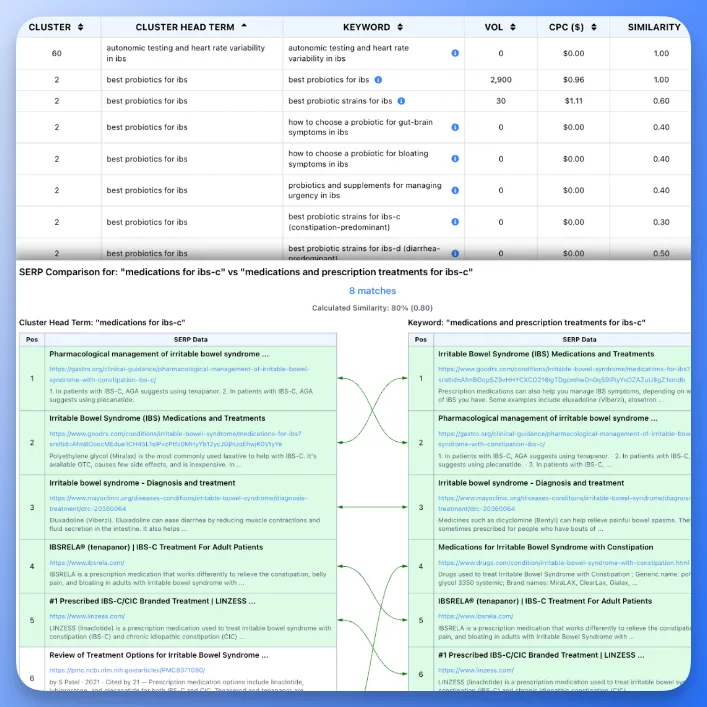
Floyi’s SERP Clustering runs that pipeline for you. It compares the top 10 results for each keyword, and you set an overlap threshold from 20% to 90%, with 40-50% recommended. Results show a Cluster Head Term and a Similarity column, plus Volume, CPC and Competition, and they export to XLSX.
Fetching costs 1 credit per keyword, and a report holds up to 1,000 keywords. Reclustering at a different threshold is free because it reuses the SERPs you’ve already fetched.
Embeddings are optional in either setup. A hybrid keyword clustering workflow uses semantic grouping to cut a huge raw list into candidate topic areas before you fetch SERPs. The cluster decision still comes from overlapping URLs, the same check that anchors automating topical mapping end to end.
How Do You Measure Whether Your Clusters Work?
Clusters work when each page ranks for its cluster’s keywords and no two of your pages compete for the same query. You’ll check that twice, once before publishing and once after.
Before publishing, run three checks:
- Intent label: Tag each cluster as informational, commercial investigation, transactional or navigational. Give any cluster on a mixed-intent SERP a manual read before you commit it to one page.
- Deduplicated volume: Remove repeated keywords before you sum search volume per cluster, or the cluster looks bigger than it is.
- Pivot table: Build one by cluster to spot oversized or thin groups.
After publishing, check for keyword cannibalization in Google Search Console. Filter the Performance report by a cluster’s primary keyword and open the Pages tab. If two of your URLs split impressions for that query, merge them or retarget one. Track those pages over time to see whether the map is working.
Re-fetch SERPs quarterly, and again after a major algorithm update or a move into a new market. Keep the country, language, device and depth the same each time. Re-cluster at the same threshold, compare with the previous run and reassign any keyword that moved.
Run SERP Clustering on your next keyword list, then repeat the Search Console check a month after the pages go live.
Clustering Keywords With SERP Data FAQs
These questions come up once teams start topic clustering by URL overlap. Each answer stays short and ties back to the steps above.
1. How Many Keywords Can You Cluster At Once?
The method doesn’t have a fixed ceiling, but the math gets heavy fast. Comparing 10,000 keywords pairwise means almost 50 million pairs. In practice, you’ll work one topic area at a time, in batches of a few hundred up to about 1,000 keywords.
For bigger lists, pre-group keywords by broad topic and compare only plausible pairs. You can also build an index from each URL to the keywords that rank for it, so you only compare keywords that rank with at least one common URL. Cache your SERP data, and fetch reordered variants with identical SERPs once.
2. Can You Cluster Keywords With A Python Script?
Yes. Python SERP clustering starts with a CSV of organic results, one row per result, with keyword, position and URL columns. Use pandas to load the file, validate the rows and trim each keyword to its top 10.
Normalize the URLs so trivial variants count as one page. Then compare each keyword’s URL set pairwise and build a graph that links keywords with enough matches. NetworkX can pull out connected groups or run community detection. If you’d rather skip the code, a dedicated tool does the same job.
3. How Often Should You Refresh Your SERP Data?
Refresh whenever rankings or your planning context may have changed, such as a new market, a shifted locale, a major algorithm update or a quarterly review. A quarterly revisit is a practical default. Keep country, language, device and depth identical across every keyword in a run, because mixed contexts make overlap scores incomparable.
You can also cut collection costs. Store every fetched SERP so re-clustering at a new threshold doesn’t need a new fetch. When reordered variants like “running shoes men” and “men running shoes” return identical SERPs, fetch them once.
4. Does SERP Location Change Your Clustering Results?
Yes. Country, language, device and timing can each change which URLs rank for the same keyword, so the overlap behind your clusters shifts with them. Fix one target market (country, language and optionally a city) and one device for every keyword in a run. Mixing locales creates false splits and false merges.
Compare the top 10 organic results for each keyword and keep that depth identical across the set. When you refresh, reuse the same settings so any change in overlap reflects real SERP movement, not a settings mismatch.
About the author

Yoyao Hsueh
Yoyao Hsueh is the founder and CEO of Floyi, the topical authority platform, and the founder of Main Heading, an SEO and AI search agency. He is an expert in topical authority and topical mapping. He created Topical Maps Unlocked, a course studied by thousands of SEOs, content strategists and digital marketers, founded TopicalMap.com, a done-for-you topical mapping service for agencies and enterprise teams, and publishes the weekly Digital Surfer newsletter on SEO, content strategy and AI search.
About Floyi
Floyi is a closed loop system for strategic content. It connects brand foundations, audience insights, topical research, maps, briefs, and publishing so every new article builds real topical authority.
See the Floyi workflow