
How to Build a Topical Map for SEO in 8 Steps
Build a topical map for SEO in 8 steps. Pick your authority anchor, cluster by SERP overlap, set a four-level hierarchy, then write briefs and measure results.
Here’s how to build a topical map for SEO. Set your authority anchor first, research the scope inside it and group keywords by shared search results. Then give every page a level, a parent and a job. A map that starts from a keyword export covers whatever the tool surfaced. One that starts from the brand covers what the business needs to be trusted on.
That order is what separates SEO topical mapping from a keyword list. The eight steps below start with brand and persona intake and end with measurement. In between sit research, clustering, the Pillar > Hub > Branch > Resource hierarchy, slugs and links, prioritization and briefs. A decision table then compares a spreadsheet, a clustering tool and Floyi.
Skip the sequence and you publish scattered pages that compete with each other. Follow it and you get what the topical map definition promises: a structured plan where every page supports a broader parent.
Topical Map Key Takeaways
- Set your authority anchor, revenue model, and at least two personas before any keyword research.
- Research topics before keywords, and screen each candidate for persona fit and expertise.
- Keywords share a page only when Google ranks largely the same URLs for both.
- Organize pages as Pillar > Hub > Branch > Resource so every page has one parent.
- Give each node a level, parent, primary keyword, intent, flat slug, and internal links.
- Prioritize by persona fit, authority gap, and business value, and publish parents before children.
- Track planned versus shipped coverage, Search Console data, and AI search citations at each review.
How Do You Build a Topical Map for SEO?
A topical map covers a site’s topics, pages and internal links, and this article covers the build. Each step hands its output to the next, so run them in order:
- Set your anchor, revenue model and personas.
- Research your topical scope.
- Cluster keywords by shared search results.
- Build the four-level hierarchy.
- Assign intent, slugs and links to every node.
- Prioritize what ships first.
- Turn nodes into briefs and drafts.
- Measure and maintain the map.

Step 1: What Should You Decide Before Keyword Research?
Decide three things before you open a keyword tool: your authority anchor, how the business makes money, and who the map serves. These inputs shape your SEO content strategy, and they decide which topics earn a place on the map.
Start with the revenue model. A services firm needs pages that book consultations, and a SaaS company needs pages that move readers toward trials. An affiliate or ad site needs pages that earn clicks. A lead generation map weights decision-stage topics heavily, while a traffic map leans toward early questions. Name the pages that must convert before you name a single topic, because those are the business goals your SEO content has to serve.
Next, define at least two personas. Give each a role, pain points, objections and the questions they’d ask before buying. Personas filter out subjects your audience doesn’t care about, and tying each topic to a persona keeps every later step anchored to a real reader.
Then set the authority anchor, the focused niche you want to own. A broad niche like fitness is too large. A narrower anchor like strength training for seniors is ownable, and it defines your Pillar pages. Depth on one focused subject is how topical authority works, so test the anchor with one question: can you cover it in depth with the expertise and resources you have?
Write the topical scope as a boundary with three buckets:
- In scope: Topics that serve the anchor, the personas and the revenue goal directly.
- Adjacent and parked: Related topics you’ll revisit once the core Hubs are live.
- Out of scope: Topics that pull you toward the whole industry instead of your anchor.
Record the anchor, personas, revenue goal and scope in one short document. Step 2 research stays inside it.
Step 2: How Do You Research Your Topical Scope?
With your anchor, personas and scope documented, research topics before keywords. You need to see the whole scope before you chase individual queries. Aim for roughly five to ten major subtopics under your anchor. A running site might land on shoes, training, injuries and recovery, nutrition and race preparation, each distinct enough to hold its own group of pages.
Start with first-party data. Pull the queries already earning impressions in Google Search Console, then add language from sales calls, support tickets and community threads. Buyers use words your competitors can’t see.
Next, work through Google’s search features and log each finding under its parent topic in a spreadsheet:
- Google Autocomplete: Type the anchor and note the suggested completions.
- People Also Ask: Capture the questions, then expand a few to surface follow-ups.
- Related Searches: Copy the terms at the bottom of the results page.
- Google Trends related topics: Switch the filter from rising to top so you get staples, not fads.
Then run SEO keyword research for each subtopic. A keyword tool returns related queries and long-tail variations you can slot under the right parent. Use it to widen coverage, not to decide scope.
Competitor content analysis fills in what’s left. Review how the pages ranking for your anchor group their topics, then scan Reddit threads and Wikipedia contents pages for questions and entities you missed.
Use AI assistants as a gap check, not the primary source. Paste in your finished research and ask for missing child topics and entities. Then check how AI search answers the questions your personas would ask. A topic those answers cover is a candidate for scope if it passes the screen below.
Screen every candidate before it enters the map. Keep it only if a persona would search for it and it fits the business and your expertise. Park or cut the rest. Search volume isn’t the screen. A low-volume question your buyer raises on every sales call beats a high-volume one they’d never tie to your offer.
Step 3: How Do You Cluster Keywords by SERP Overlap?
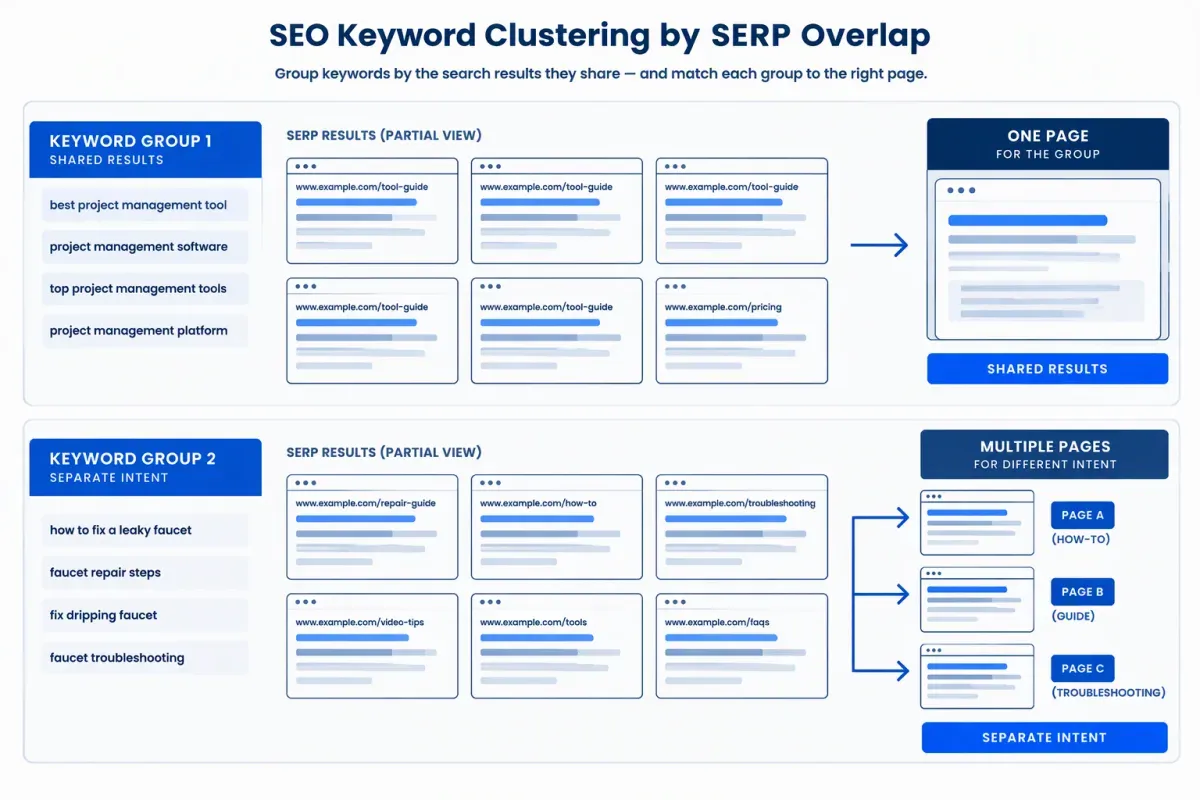
Two keywords belong on the same page when Google ranks largely the same URLs for both. Compare the top 10 results, not the wording.
Start with a first pass by search intent categories: informational, commercial investigation, transactional and navigational. The same pass maps to the funnel. Top-of-funnel keywords ask educational questions, middle-of-funnel keywords compare options, and bottom-of-funnel keywords name a product or service. Treat this pass as a draft. It sorts the list, but it doesn’t settle anything.
Then validate each group by searching Google and reading what ranks. Keywords that share many ranking URLs merge into one page. Keywords that return different result types, such as guides, marketplaces or product pages, split, even when the phrasing is close.
Rowing machines show the split clearly. “Used rowing machines” returns marketplaces and listings. “How to buy a used rowing machine” returns guides and a video. The wording overlaps but the results don’t, so they need separate pages.
Page granularity follows the same test:
- Model-specific reviews rank: Each rower model gets its own page.
- Only roundups rank: Fold the models into one review page.
One page per intent prevents cannibalization, because two pages chasing the same results compete with each other.
Finally, label each of your keyword clusters. Pick a head keyword that makes the shared intent obvious, then map the cluster to one primary URL. Comparing results by hand works for a small keyword set and slows down fast as the list grows. That’s where tools for clustering keywords by shared SERP results earn their place, running the overlap check across hundreds of terms.
Test it this week: pull 20 keywords, compare their top 10 results, and count how many share a URL set and how many split.
Step 4: How Do You Build the Pillar, Hub, Branch, Resource Hierarchy?
Once your clusters are validated, a four-level hierarchy gives every page one job and one parent: Pillar > Hub > Branch > Resource. A Pillar is the broad topic you want to own, often a main navigation item one click from the home page. A Hub groups one major facet of that Pillar, and a Branch covers a specific aspect inside a Hub. A Resource is a single page answering one query.
On a smart home site, the levels look like this:
- Pillar: Smart thermostats.
- Hub: Google Nest.
- Branch: The Nest Learning Thermostat.
- Resource: How to reset the Nest Learning Thermostat.
A two-level model of pillars and topic clusters works for a small set of articles. Once a Pillar holds dozens of pages, though, every page hangs off one parent, and the SEO content hierarchy stops showing which pages are broader. Hubs and Branches add the middle layers so related pages group under a shared parent. That’s a structural point about depth, not a verdict on any tool.
Place each cluster by scope, not volume. The broadest-scope cluster becomes the parent of its narrower variants. “Best dry dog food” becomes a Branch, and variants for specific health conditions sit beneath it as Resources.
Four levels is a ceiling, not a quota. Some Resources sit directly under a Hub, and depth varies by niche. A Pillar page can double as a Hub, such as a marathon training guide with nutrition and injury Hubs beneath it. Pillars link down to their children and receive links back. The rules for how to structure a topical hierarchy apply at every level: each page needs a broader parent it supports.
Sort your validated clusters by scope, assign each a level, and count how many Resources land directly under a Hub.
Step 5: How Do You Assign Intent, Slugs and Internal Links?
Every node needs a defined job, a URL and a place in the link structure. Start with an audit of what already exists. Pull your URLs from Google Search Console or a crawl, then look for overlapping topics, orphan pages and strong pages that can anchor a Hub.
Match each current URL to a node and decide whether to keep, rewrite, merge or remove it. When two pages compete for the same intent, merge them and 301 redirect the weaker URL to the survivor.
Then build the inventory, which is where mapping topics to URLs happens. Each node gets these columns:
- Level: Pillar, Hub, Branch or Resource.
- Parent: The node one level above it.
- Primary keyword: One per page, with secondary keywords beside it so no two pages chase the same query.
- Page intent: Set from the search results, not the keyword alone.
- Funnel stage: Awareness, consideration or decision.
- Flat slug: Short and unnested.
- Status: Existing, rewrite, merge or new.
Intent comes from what Google returns, not from how a keyword reads. “Old rowing machines” and “rowing machines for older people” look alike, but Google returns different results for each. Each one gets its own intent and its own page.
Keep URL slugs short and flat, such as /blog/topical-map-internal-linking/. Don’t nest folders to mirror the hierarchy. The hierarchy lives in internal links and breadcrumbs, so a page can move between Hubs later without a URL change. Never rename a published slug without a 301 redirect.
Your SEO internal linking strategy follows one pattern. Parents link down to their children, children link back to their parent, and related siblings link to each other. Stay one level at a time, because jumping from a Branch straight to the home page skips the structure.
Set anchor text rules before anyone writes a link:
- Write contextual internal links with descriptive anchors drawn from the map.
- Vary anchors across pages.
- Never point two pages at the same target with the same anchor.
- Skip “click here.”
- Link informational pages to conversion pages only where it reads naturally.
Add a link column to the inventory, then spot-check ten published pages against it for orphans and repeated anchors.
Step 6: How Do You Prioritize Which Pages to Build First?
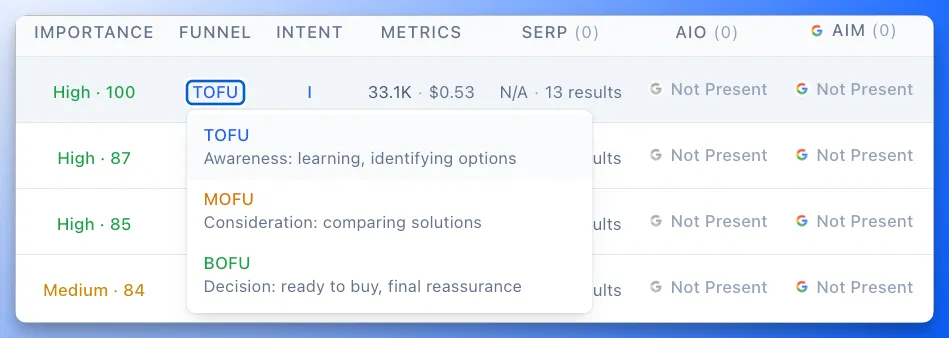
With every node holding a level, slug and links, build first what your personas most need answered and where your authority gap is widest. Search volume and keyword difficulty don’t set the order. They only break ties between pages that otherwise score the same.
Score each planned page from 1 to 5 on three factors. Treat the scores as a planning aid for SEO content prioritization, not a Google ranking formula:
- Persona intent fit: Would a target persona search for this at a stage that matters to the business?
- Authority gap: Do competitors cover it while you don’t, or is the Hub thin?
- Business value: Does the page lead to one that converts?
The authority gap score is a quick content gap analysis. You don’t establish topical authority by publishing the most pages. You establish it by answering a subject’s questions in depth.
Low-volume pages often earn an early slot. A question buyers raise on sales calls can matter more than a broad head term, and filling a gap inside a Hub strengthens the whole Hub.
The sequencing rule:
- Publish Pillar pages first.
- Publish core Hubs next.
- Publish high-value Branches and Resources last.
Write parents before children so every child page can link up the moment it goes live. Finish one Hub before you start the next, because jumping between silos blurs what your site is about. Long-tail keywords and deep variations can wait until the core set is live. On a new site, start with narrow, winnable topics inside your anchor and skip the broadest head terms until the Hub has depth.
Sort your page list by the three scores, then use demand data only where two pages tie. Track progress by counting how many pages in your first Hub are published and linked.
Step 7: How Do You Turn the Map Into Briefs and Drafts?
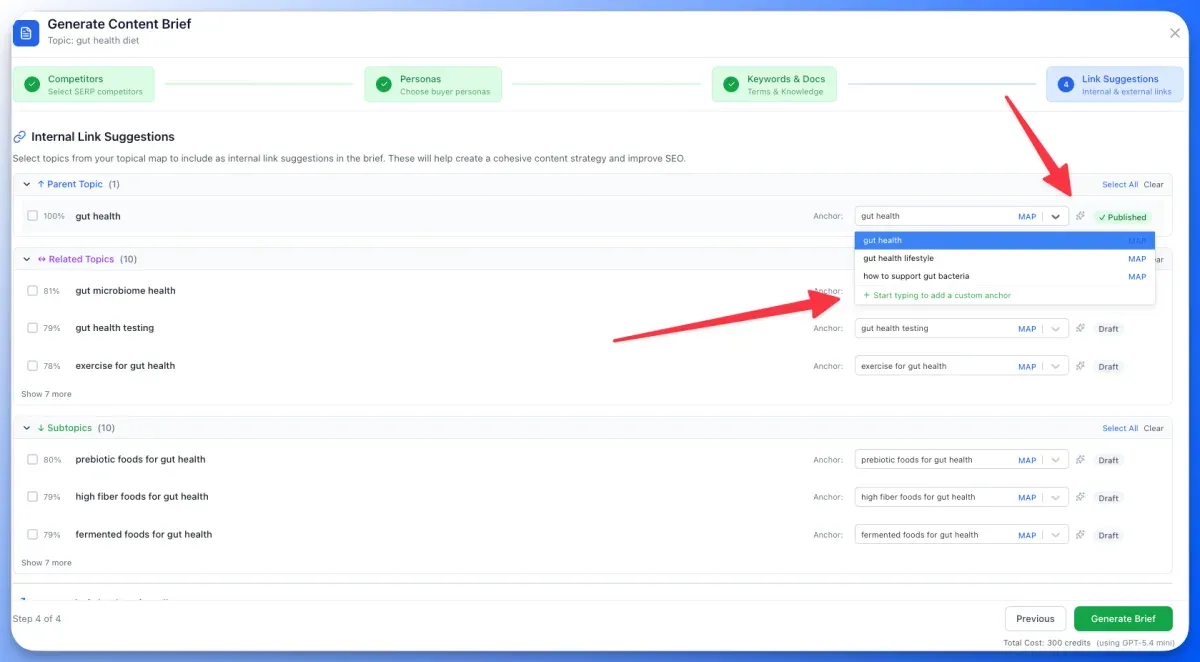
Each prioritized node becomes one brief, and that brief carries the node’s intent, persona, funnel stage, parent page, slug and links unchanged. Writers then execute the map instead of reinventing it. Floyi’s Planner can generate topic-anchored briefs from map nodes, so the strategy stays attached to every page. Either way, turning map nodes into content briefs is mostly discipline about what goes in.
Every brief needs these fields:
- Working title: Drafted from what ranks for the node.
- Target intent: The search intent you assigned in Step 5.
- Persona and their question: The one reader this page answers.
- Keywords: One primary term and a few supporting ones.
- Outline: Headings that match what ranking pages cover.
- Internal links and anchors: Pulled from Step 5 and set at brief creation, not bolted on after drafting.
Match the format to the dominant format in the search results. If the top results are comparisons, don’t brief a guide. A list, a tool page and a how-to each need a different outline shape.
The briefs also set your content production plan. Stage drafts instead of publishing everything at once:
- Write Pillars first.
- Move to high-priority Hubs and Resources.
- Finish one silo before starting the next.
Publishing one or two easy articles in every silo spreads your authority thin. Add internal links as each page goes live, so earlier pages point to new ones right away.
Before a draft goes out, run a handoff check. Confirm the brief’s slug, parent link and anchors match the map exactly, then mark the node’s status in the map. Step 8 measures shipped work, so an unmarked node counts as unshipped.
Step 8: How Do You Measure and Maintain the Map?
A topical map is a living plan, because demand, products and competitors keep moving after you publish. Run it as a loop: measure, diagnose, update, republish. The full maintenance routine covers the review cadence and the signals behind each change.
Start with coverage. Count how much of the planned map is published and indexed, Pillars and Hubs first. Keep planned coverage and shipped coverage as two separate numbers, because a big plan can hide thin execution if you blend them.
Next, track performance per URL. Google Search Console gives you rankings, impressions, clicks and indexing status, and your analytics platform gives you conversions. In GA4, create content groups for each Pillar and Hub so you can compare silos side by side.
Then add AI search. For each topic, check whether Google AI Overviews, AI Mode, ChatGPT and Gemini mention or cite your pages for the questions your personas ask.
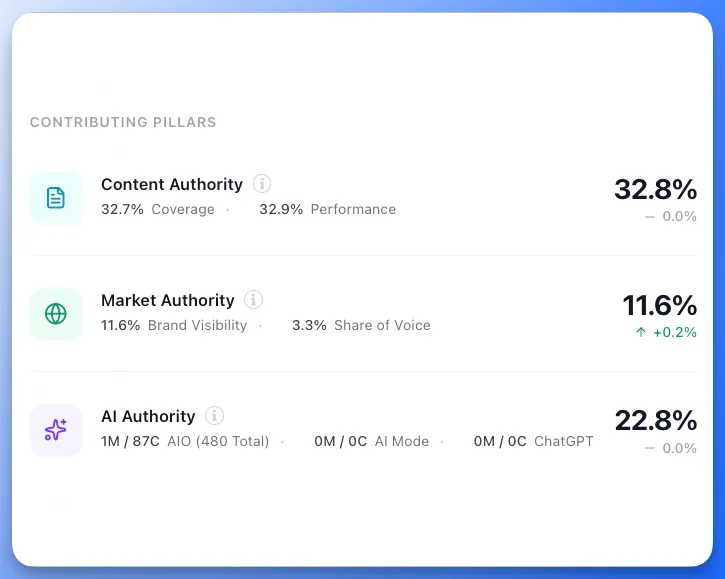
Floyi’s Topical Authority Score rolls these signals into three parts:
- Content Authority: Coverage and rank performance.
- Market Authority: Your share of voice against competitors.
- AI Authority: Mentions and citations across AI search.
Whatever tool handles your SEO performance measurement, set targets before you read the numbers, and tie your topical map goals and metrics to the revenue goal from Step 1.
Hold a fixed review rhythm and sort every finding into one of three buckets:
- Updates: Impressions are holding, but clicks or positions are falling.
- Gaps: New queries or product changes have no page.
- Overlaps: Two pages split the same intent.
Two Floyi features do the sorting work. The Organic Audit shows per-URL Search Console data mapped to topics. The Topical Audit rates Topic Strength and names the topic a weak one competes with, so you see which pages are fighting before you write another.
Close each review by giving every flagged page one decision: update it, consolidate it into its stronger twin, or retire it. Then feed the findings back into the plan. Gaps go into the next Step 2 scope pass, and updates and overlaps go into the Step 6 queue. That loop keeps the map current instead of letting it drift.
Manual Spreadsheet, Clustering Tool or Floyi: Which Should You Use?
Pick by how far the map has to travel. A spreadsheet works for a small single-site map, and a clustering tool helps once the keyword list makes manual grouping slow. A platform pays off when the map has to feed briefs and measurement.
| Hierarchy depth | Intent grouping | Brand and persona input | Links and slugs | Measurement | |
|---|---|---|---|---|---|
| Manual spreadsheet | As deep as you build it by hand | Manual checks of search results | Only if you document it yourself | Typed per row | Search Console exports |
| Keyword clustering tool | Usually nothing above the cluster | Automatic keyword grouping | Usually none | Usually no slug or link plan | Usually no authority measurement |
| Floyi | Four levels: Pillar > Hub > Branch > Resource | SERP Clustering groups keywords by top-10 result overlap | Brand Foundation and Audience Insights feed the map | URL slugs, page intent and internal linking guidance | Topical Authority Score tracks Content, Market and AI Authority |
A Google Sheets topical map is the classic SEO content planning spreadsheet. It gives you full control, but every update is manual. Excel and Airtable work the same way, and mind-mapping tools like Miro or Whimsical turn it into a visual topical map. For a topical map template, use one row per planned or existing page, with columns for parent topic, keywords, intent, URL, priority, internal links and status.
A clustering tool groups keywords automatically, then usually stops. You still build the hierarchy, slugs and linking plan yourself.
Floyi covers that gap with a four-level map, built-in persona input and a score that tracks AI search authority alongside Content and Market.
The decision rule:
- Under a few dozen pages on one site: Use a spreadsheet.
- A keyword list too big to group by hand: Add a clustering tool.
- A map that must carry persona input into briefs and be measured afterward: Use Floyi.
The table’s five columns double as a checklist when you compare topical map tools. Run your current map against the rule this week, and note which column costs you the most manual hours.
What Should You Do Next?
Write down your authority anchor, two buyer personas and your topical scope before you open a keyword tool. Then research and cluster one Pillar, and leave the rest of the map alone until that Pillar is done.
Once the first Hub is live, open Google Search Console and check two things:
- Impressions: Its pages should earn impressions for the queries in that Hub’s clusters.
- Index share: The share of the Pillar that’s published and indexed should be rising.
If both numbers move, the structure is working. If they stall, fix the Hub before you add another.
To see how your current pages already group into topics, run an SEO content audit with the free Content Audit tool. It returns a Coverage Map of any domain without an account, so you can start from what’s already published.
Topical Map FAQs
Practitioners ask the same handful of questions when they build a topical map, from setting topical scope to structuring hubs and measuring results. The answers below are short enough to check mid-project, so you can settle a decision and get back to the map.
1. How Many Articles Does a Topical Map Need?
There’s no fixed article quota for an SEO topical map. The count follows from your topical scope, what your personas need answered, and how much coverage helps before pages start repeating each other. Size the map to the authority anchor, not to a target number.
Start by splitting the anchor into roughly five to ten major subtopics. Each one should be distinct enough to hold its own group of pages. The total page count falls out of that structure.
2. Can a New Website Build a Topical Map?
Yes, a new site can build a topical map, and the process is the same as for an established one. The only difference is that you have no traffic history or existing content to audit. Start with one narrow authority anchor and a single Pillar. “Strength training for seniors” gives you a workable map, while “fitness” doesn’t.
Filter every candidate topic for persona fit, business relevance and real expertise. With no authority yet, favor narrow, winnable topics inside the anchor over broad head terms. Build the Pillar and its core Hubs first, then finish one Hub before you start the next.
3. How Long Does Building a Topical Map Take?
Build time depends on three things: the size of your site, how deep your research goes, and whether you have to audit existing content first. An established site needs extra time to match its current pages to the map. A fixed turnaround can’t account for those variables.
Build in stages. Finish one Pillar and its Hubs, publish them, then expand to the next. Because the research happens upfront, later work is mostly updates, not rebuilds.
4. How Often Should You Update a Topical Map?
Treat your topical map as a living plan and review it quarterly instead of building it once and shelving it. Pull impressions, clicks, and rankings from Google Search Console, then check conversions by silo in your analytics platform. Those two sources show which topics earn traffic and which earn revenue.
Update before the next review when a trigger appears: rankings or traffic drop, demand shifts, products or priorities change, or two pages compete for the same query. Revise the page, merge it into the stronger one with a 301 redirect, or remove it. Then update that node’s status in the map.
About the author

Yoyao Hsueh
Yoyao Hsueh is the founder and CEO of Floyi, the topical authority platform, and the founder of Main Heading, an SEO and AI search agency. He is an expert in topical authority and topical mapping. He created Topical Maps Unlocked, a course studied by thousands of SEOs, content strategists and digital marketers, founded TopicalMap.com, a done-for-you topical mapping service for agencies and enterprise teams, and publishes the weekly Digital Surfer newsletter on SEO, content strategy and AI search.
About Floyi
Floyi is a closed loop system for strategic content. It connects brand foundations, audience insights, topical research, maps, briefs, and publishing so every new article builds real topical authority.
See the Floyi workflow