
How to Optimize Existing Content for Search Intent
Fix existing pages that miss search intent: spot the mismatch in Search Console and the SERP, make fixes in the right order and check that they worked.
A page can rank for the right keywords and still miss what searchers want. Optimizing content for search intent closes that gap without starting over. To optimize an existing webpage for search intent, compare its purpose and format with the exact queries it receives and the current search results. Then fix the clearest mismatch first.
Search Console impressions without clicks can point to a weak title or snippet, but they don’t prove the page itself is wrong. Check the top three to five organic results for recurring formats and audience angles. Then use the mismatch-to-fix table below to choose a focused edit and measure it against your baseline.
Search Intent Optimization Key Takeaways
- Compare each Search Console query with the page it surfaces and the page’s intended job.
- Review the top three to five organic results for recurring formats, topics and audience angles.
- Treat impressions without clicks as a signal to investigate, not proof of an intent mismatch.
- Correct page type or format before polishing headings, titles or supporting copy.
- Put the main answer or decision near the top of the page.
- Split or consolidate pages only when one page can’t serve the distinct search needs.
- Compare equivalent date ranges and query segments against your baseline after edits.
How Do You Diagnose an Intent Mismatch?
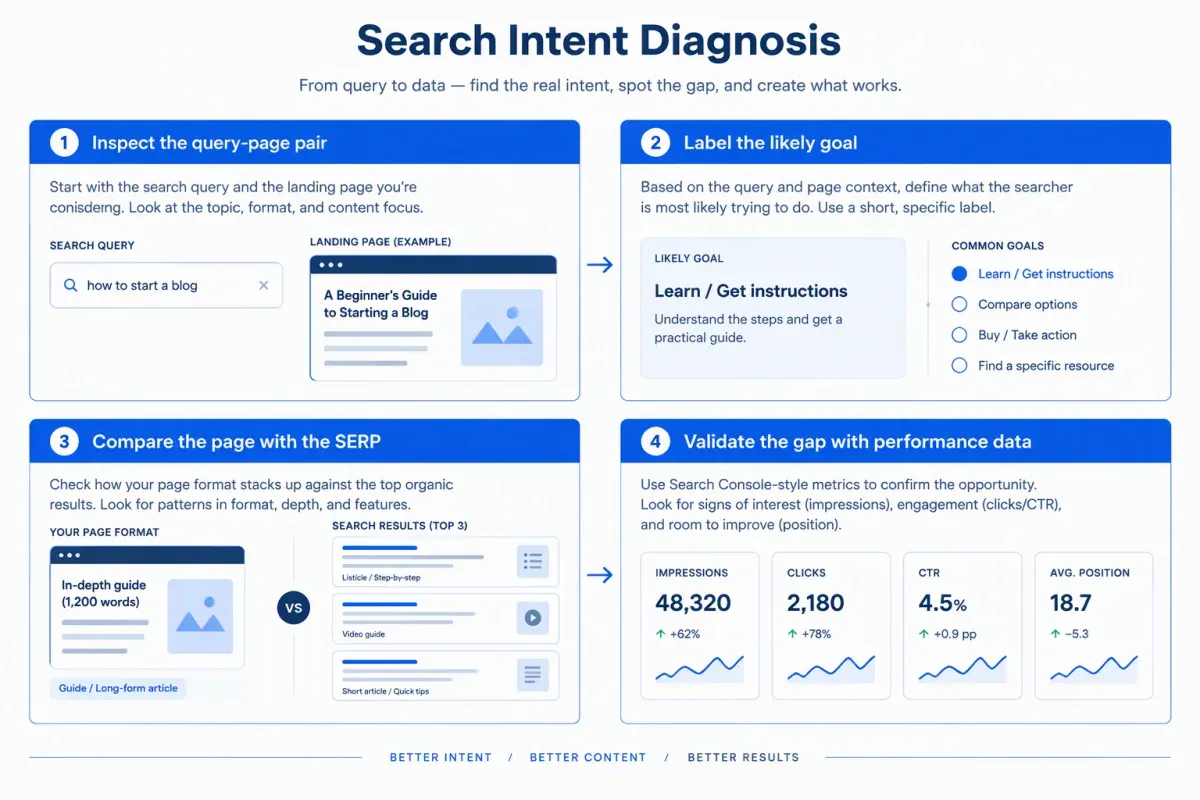
Diagnose an intent mismatch by comparing the exact query and page with the live search results, then checking whether performance data supports the gap. A search intent mismatch happens when a page’s purpose or format conflicts with what searchers appear to expect.
The search intent analysis below runs in four steps: inspect the query-page pair, label the likely goal, compare the page with the SERP, and validate the gap with performance data. Our guide to search intent basics covers the broader concept. This workflow decides whether an existing page needs a retrofit.
-
Start with the query-page pair. Find the exact query in the Search Console Performance report and open the page it surfaces. Look closely at search intent modifiers. “How” often signals a need for instructions. “Best” or “review” can suggest comparison, and “near me” points toward local options. These modifiers are clues, not verdicts. Commercial search intent may fit a comparison page, but the page and the results give stronger evidence than one word in the query.
-
Label the likely query goal. Choose the dominant category from the five types of search intent: Informational, Navigational, Commercial, Transactional, or Generative. Generative intent means the searcher wants an AI system to produce or synthesize something. The full classification method, with intent labels for your keyword list, lives in its own guide. Keep the label brief here. The real question is whether the page does the query’s apparent task.
-
Compare the page with the top-ranking pages. Analyze the SERP for the exact query by reviewing the top three to five organic results. Record recurring page types, formats, topics, and audience angles rather than relying on one competitor. A beginner guide, an enterprise resource and a budget comparison can cover the same topic for different readers. Repeated patterns are stronger evidence than an outlier.
A focused SERP analysis captures these signals:
- Page type and format: Product page, category page, guide, comparison, video, or another format.
- Topics and coverage: Questions addressed, depth of detail and subjects that recur across results.
- Audience angle: Whether results target beginners, enterprise buyers, budget-conscious readers, or another audience.
SERP features add context. Featured Snippets and People Also Ask may signal demand for direct answers or related questions. Video carousels may favor visual instruction, while Shopping Ads can point to product discovery. These features can reveal a format gap, but they don’t automatically mean you need a separate page.
- Check the answer and validate the gap. Keyword overlap alone doesn’t show that a page satisfies a query. A page targeting “is egg salad healthy” needs to answer the nutrition question, not offer a recipe. Location and freshness matter too. A service page for the wrong region, or a page about an outdated product model, can miss the need while matching the subject.
Compare Search Console and analytics signals where you have them. Search Console reports queries, impressions, clicks, click-through rate, and average position. Analytics adds engagement, conversions, bounce rate, and time on page. Impressions without clicks usually point to the title, snippet and SERP presentation. Traffic with weak engagement or conversions also merits a look, but no single metric proves a mismatch. A short visit may mean the page answered a simple question fast.
Judge the page against the query’s dominant goal, not one searcher’s situation. A qualifier can narrow the reasonable answer, so don’t broaden a page’s target just because it shares keywords with a query. When the results point to several plausible tasks, you’re looking at mixed search intent, not a single page-format problem.
Before choosing an edit, write a short diagnosis. Name the likely intent category, the recurring SERP format and audience angle, the conflicting page element, and the supporting performance signal. Note whether the evidence points to a mismatched page or a query with several plausible readings.
The table below captures the evidence to compare with your page:
| Evidence | What to record |
|---|---|
| Query and page | The exact query, its qualifiers and the page receiving impressions or clicks. |
| Organic results | Recurring page types, formats, topics, and audience angles across the top three to five results. |
| SERP features | Featured Snippets, People Also Ask, video carousels, or Shopping Ads that add clues about expectations. |
| Performance signals | Search Console queries, impressions, clicks, click-through rate, and average position, plus any engagement and conversion data. |
| Diagnosis | The page element that conflicts with the evidence, and whether the query has several plausible readings. |
Which Intent Fixes Should You Make First?
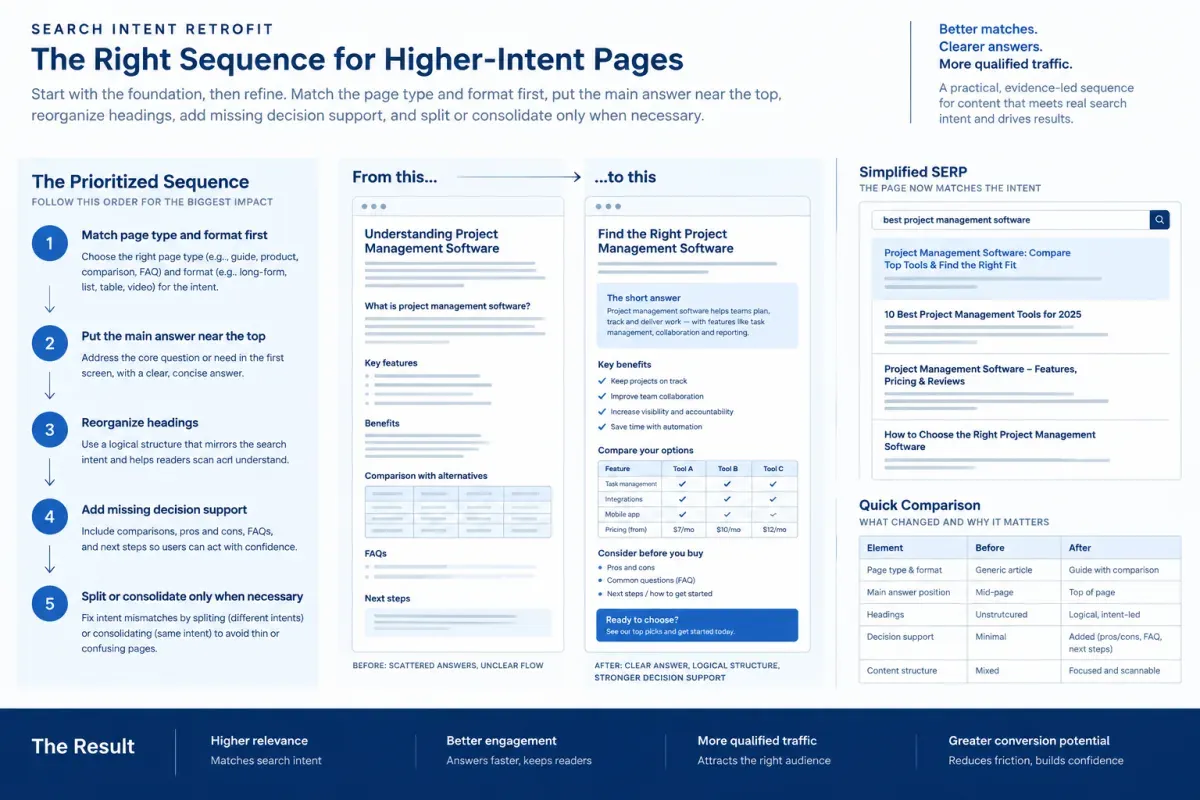
Fix the page type or format first, because copy edits can’t turn a sales page into a useful tutorial. Then work down the order below, starting with the conflict your diagnosis recorded, and stop once the page meets the need the top-ranking pages reflect.
The searcher’s context shapes that need too. The same query can come from someone researching, comparing options or ready to act, which is why search intent versus user intent matters when you judge a page.
Use this sequence to align content with search intent without defaulting to a full rewrite. It’s on-page SEO work, and the order holds for a blog post or a product page.
- Correct the page type or format. Match content format to search intent by comparing your page with the format that dominates the results. Content formats for search intent usually break down like this:
- Informational search intent: Tutorials, guides and explainers.
- Navigational search intent: A brand homepage, login page or dedicated contact page.
- Commercial search intent: Comparisons, reviews, rankings, and buying guides.
- Transactional search intent: Product, service, pricing, booking, or category pages with a clear path to act.
- Generative search intent: The searcher asks an AI system to produce or synthesize something, so the useful page gives that system clear answers to draw on.
Don’t force a sales page onto results led by a step-by-step tutorial.
Query wording can point to different needs. “Backlink checker” may return tools for checking links, while “best backlink checker” may bring up comparison pages. Confirm the pattern across the results before you retrofit. If formats vary or shift with context, check the SERP again before changing the format.
-
Put the main answer first. On an informational page, lead with a concise answer or definition, then expand. On a comparison or transactional page, bring the options, decision criteria and next action near the top. Readers comparing tools shouldn’t have to read a long explanation before they see what they’re choosing between.
-
Reorder headings and sections around the main question. Build the outline around the query’s central need, then cover the secondary keywords and subtopics: subquestions, objections, examples, and next steps. Logical H2 and H3 headings help readers scan, and bullets or numbered steps make processes easier to follow. Use People Also Ask questions as clues, not a checklist. More headings won’t help if the answer stays buried.
-
Add missing decision support. Compare several ranking pages to find elements they consistently include and your page lacks. That might be a comparison table, numbered steps, pricing details, or a worked example. Add only material that supports the page’s main job. Copying sections from one competitor can bring in details that distract from the query.
-
Split or consolidate only when reshaping one page won’t work. Split a page that tries to serve two goals the SERP treats separately. Consolidate when two of your URLs compete for queries that return the same results. This is the last repair, not the default response to a weak opening or unclear structure.
These are example patterns, not rules. Let your diagnosis and the live results decide:
| Mismatch signal | What it usually means | First fix |
|---|---|---|
| A sales or product page appears where results favor how-to guides | The query has an informational need | Rework the page as a guide, or publish a guide that links to the product page. |
| A long guide appears where results favor tools or product pages | Searchers want to complete a task or consider a purchase | Lead with the tool, product or action, then move the explanation below. |
| A single-product page appears where results favor “best” lists | Searchers need comparison content | Add a useful comparison section or build a separate comparison page. |
| A broad overview appears where results favor step-by-step tutorials | Searchers want a process they can follow | Restructure the content into numbered steps. |
| Impressions are high but click-through rate is low | The title or snippet may miss the query’s angle | Rewrite the title and meta description to reflect the page’s actual value. |
| Clicks are followed by quick exits | The opening may not deliver the expected answer | Move the answer to the top and make the page’s purpose clear. |
| The page is outdated while results favor more recent content | Facts or examples may no longer fit the query | Update the relevant facts and examples. |
A title change won’t fix the wrong page type, and a full rewrite is overkill when only the opening misses the expected answer. When you optimize content for search intent, start with the conflict in your diagnosis, make one focused repair and measure it before you expand the work.
How Do You Check Whether the Fix Worked?
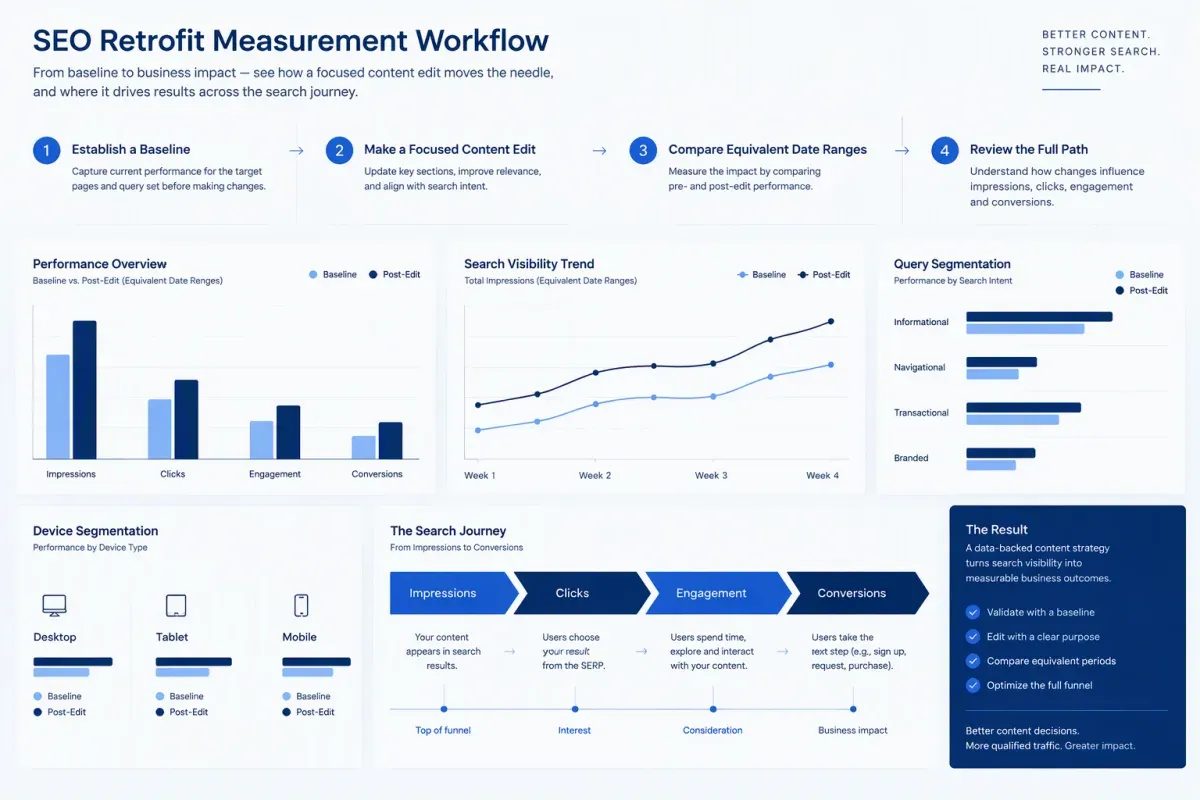
A retrofit works when the page attracts relevant searchers and helps them take the next step, not only when its rankings rise. To measure SEO performance after the change, compare Search Console and analytics data with the live SERP. Check whether visibility, clicks, engagement, and conversions move together.
Record a baseline before you change the page. In Search Console, capture impressions, clicks, CTR, and average position for the page and its target queries. In analytics, note organic landing-page engagement, bounce rate, time on page where available, and conversions.
Segment the results by query intent and device, and note the date range. A page can look better because its audience mix changed, such as a shift toward mobile or commercial queries. Consistent segments separate that shift from the effect of your edit.
After the retrofit, compare equivalent date ranges and give Google time to recrawl the page and let rankings settle. No single waiting period fits every page, so don’t treat an early fluctuation as the final result.
Read performance as a connected path. A searcher sees the result, clicks, engages with the page, and may convert. A gain at the start doesn’t guarantee a gain at the end. The table shows where to look when one step lags:
| Performance pattern | What to inspect | Practical response |
|---|---|---|
| Impressions rise, but CTR stays weak | Whether the title and meta description match the query and describe the page accurately | Rewrite them so the page’s value and format are clear without promising more than it delivers |
| Rankings improve, but clicks stay low | The live SERP, competing result formats and whether the snippet gives searchers a reason to click | Check whether the result formats or the search intent have changed |
| Clicks rise, but engagement is weak | Whether the opening answers the query and the structure supports the visitor’s task | Clarify the H1, align headings with the content and make the answer easy to find |
| Engagement is steady, but conversions lag | Whether the page supports the visitor’s next decision and its calls to action fit that stage | Match the calls to action to the visitor’s stage instead of adding copy by default |
| Rankings or impressions fall | Current search results, query-level changes, credibility, and topical coverage | Reassess the page’s format and angle before expanding it |
When visitors arrive but don’t engage or convert, reconsider the page’s purpose. Relevant internal links and descriptive anchor text guide visitors to related answers. Content optimization isn’t adding every related phrase. It’s keeping the page useful to the person who arrived.
Keep the retrofit people-first. Google’s guidance on helpful, reliable, people-first content favors pages made for readers over pages made to manipulate rankings. Add original evidence, examples or experience where they strengthen the answer, rather than rephrasing competing pages. Use images or diagrams when they clarify a process or comparison.
Recheck the live SERP for target queries alongside performance data to separate persistent shifts from short-term volatility. Search intent optimization isn’t a one-time label. Intent can shift over time, and result formats shift with it. If informational pages give way to commercial results, compare the pages now leading and reconsider your format, angle or structure.
If rankings stall despite useful coverage, diagnose before adding copy. Review credibility and authority signals, along with the page’s place in the site’s topical coverage. Strong coverage with weak performance may point to a trust constraint rather than a content gap. Keep a short log of your hypothesis, baseline, edits, review dates, query-level changes, and SERP shifts. It makes the next revision easier to judge and stops repeated edits without a clear reason.
When the fix calls for rebuilding the page, Floyi’s content briefs record the query’s search intent and a SERP-based heading structure before anyone rewrites it.
Search Intent Optimization FAQs
These search intent optimization questions cover the edge cases of a retrofit: URLs, separate pages, secondary queries, and pages that still convert.
1. Should You Change the URL When You Retrofit a Page?
Usually, no. Keep the existing URL when content optimization reshapes a page for the same query. That preserves its internal links, backlinks and indexing history. Update the title, headings and internal anchor text to match the revised page.
Use a new URL only when you split off a page for a distinct need, and link the two pages to each other. When you consolidate competing pages, keep the stronger URL and 301 redirect the other to it.
2. When Should You Create a Separate Intent-Focused Page?
Create a separate page when the top three to five organic results consistently favor a format or page type your existing page can’t deliver. For instance, product listings suit a purchase query better than an explanatory article. Treat that pattern as evidence of what searchers expect, not a reason to copy a competitor.
Separate pages also fit queries with different audiences or goals, when one page would compromise its format or leave a need unanswered. Keep related queries together if they share a purpose. Content format and search intent should match, so don’t force unrelated needs onto one page because they share keywords.
3. Can an Intent Fix Cost You Rankings for Other Queries?
Yes. Reshaping a page for its main query can cost rankings for secondary searches the old format served. Before editing, export the page’s Search Console queries and flag those that drive clicks or conversions.
Keep useful sections that still fit the revised format. If a section no longer belongs, move it to a separate page and link the two. After the change, compare the full query set with your baseline so gains on the main query don’t hide losses elsewhere.
4. Should You Retrofit a Page That Still Converts?
Only if the mismatched query is the one driving its conversions. Check which queries and channels bring those conversions first. If they come from traffic outside the mismatched query, keep the page intact, create a separate page for that query and link the two. Changing a page that already serves its converting audience puts that performance at risk.
If the mismatched query itself drives conversions, retrofit the existing page so it matches its search results. Record a conversion baseline as part of a content audit before editing, then compare the same date windows afterward.
About the author

Yoyao Hsueh
Yoyao Hsueh is the founder and CEO of Floyi, the topical authority platform, and the founder of Main Heading, an SEO and AI search agency. He is an expert in topical authority and topical mapping. He created Topical Maps Unlocked, a course studied by thousands of SEOs, content strategists and digital marketers, founded TopicalMap.com, a done-for-you topical mapping service for agencies and enterprise teams, and publishes the weekly Digital Surfer newsletter on SEO, content strategy and AI search.
About Floyi
Floyi is a closed loop system for strategic content. It connects brand foundations, audience insights, topical research, maps, briefs, and publishing so every new article builds real topical authority.
See the Floyi workflow