
SEO Content Approval Workflow: Stages, Roles and Checklist
Set up an SEO content approval workflow with four gates for topic maps, briefs, drafts, and publishing, plus a role matrix, checklists and turnaround targets.
Treating approval as a final editor pass lets unresolved search intent and scope reach the most expensive stage. An SEO content approval workflow works better as four accountable gates: topic and map approval, brief approval, draft review, and publish sign-off.
A polished draft can’t settle whether a target query overlaps an existing URL or whether the page format fits the live SERP. Floyi’s brief versions keep the approved requirements on record, and editorial statuses show which decision comes next.
Late feedback should correct copy, links, metadata, or evidence. It shouldn’t quietly change the approved strategy. Assign one approver at every gate, define exit criteria and send genuine strategy changes back to the gate that owns them.
SEO Content Approval Workflow Key Takeaways
- Use four gates for topic maps, briefs, drafts, and publishing.
- Name one accountable approver for every stage, even when roles overlap.
- Approve intent, scope, priority, and existing-page disposition before briefing.
- Lock strategic brief requirements before writing begins and version later changes.
- Keep draft review focused on execution, accuracy, links, metadata, and editorial quality.
- Verify the rendered CMS page before release, including canonicals, indexability, schema, and analytics.
- Set team-specific turnaround targets and route strategy changes back to the relevant gate.
How Do You Build an SEO Approval Matrix?
Build an SEO approval matrix by listing four SEO workflow stages, then naming the accountable approver, the required reviewers, the checks, and the exit decision for each. That turns your SEO content approval process into approval gates that settle search strategy before costly drafting begins.
The matrix adds search-specific checks to the editorial workflow. It catches problems with relevance, intent, accuracy, brand standards, and technical requirements at the earliest point where they’re cheap to fix.
| Stage | Input under review | Accountable approver | Required reviewers | Checks | Exit decision |
|---|---|---|---|---|---|
| Topic and map | Query research, topical scope, priorities, and the Pillar > Hub > Branch > Resource map | SEO strategist | Content manager, subject-matter reviewer when needed | Intent, business fit, scope, priority, overlap risk | Approve, revise or hold |
| Brief | Approved outline and brief | SEO strategist | Writer, editor, subject-matter reviewer when needed | Target terms, intent, sources, internal-link needs, acceptance criteria | Approve before drafting |
| Draft review | Completed draft | SEO reviewer | Editor, writer, legal reviewer when needed | On-page SEO, entity coverage, internal links, accuracy, readability, voice, grammar | Approve, request edits or hold |
| Publish | Final page in the CMS | Content manager or publisher | SEO reviewer, editor | Prior approvals, CMS checks, metadata, schedule, release readiness | Publish, correct or hold |
Review and approval are different actions. Reviewers find defects, leave comments and request changes. One named approver at each gate makes the binding call to advance, return or hold the asset.
Each role owns a distinct part of the work:
-
SEO strategist: Owns targeting, intent, briefs, and acceptance criteria.
-
Writer: Owns research, original drafting and revisions.
-
SEO reviewer: Checks on-page optimization, internal links and technical SEO requirements.
-
Editor: Checks accuracy, readability, voice, structure, and grammar.
-
Content manager or publisher: Confirms approvals, runs CMS checks, schedules the page, and authorizes release.
Together, the table and roles work as a simple content approval RACI matrix. The approver is accountable, and the reviewers are consulted.
A smaller team can have one person fill several roles, but each row still needs one accountable approver. That matters even more for authority programs that span brands, where unclear ownership creates competing priorities across sites.
Sequence the gates by dependency. Topic and brief approval run in order because each depends on the one before it. Once copy exists, search and editorial review can run in parallel. The SEO reviewer checks headings, links and entity gaps against competitor pages and AI answers while the editor protects clarity and voice.
Add subject-matter and legal review where claims, regulated categories or contractual exposure create specialist risk. Low-risk internal pages may need fewer gates. Client-facing or high-stakes pages need more. Revision rules should define in-scope feedback, client comment deadlines and how late requests count against turnaround times set in the SLA.
Floyi access roles don’t decide approval authority. The Owner manages billing, seats and team deletion. An Admin manages members, invites and brands, including deletion. A Member can create and edit brands but can’t delete them. Name the person who owns each decision, not their software permission level.
The publisher records the final release decision in the content approval audit trail. Keeping publication separate from drafting and review stops feedback from being read as permission to publish.
How Do You Approve Topic Maps Before Briefs?
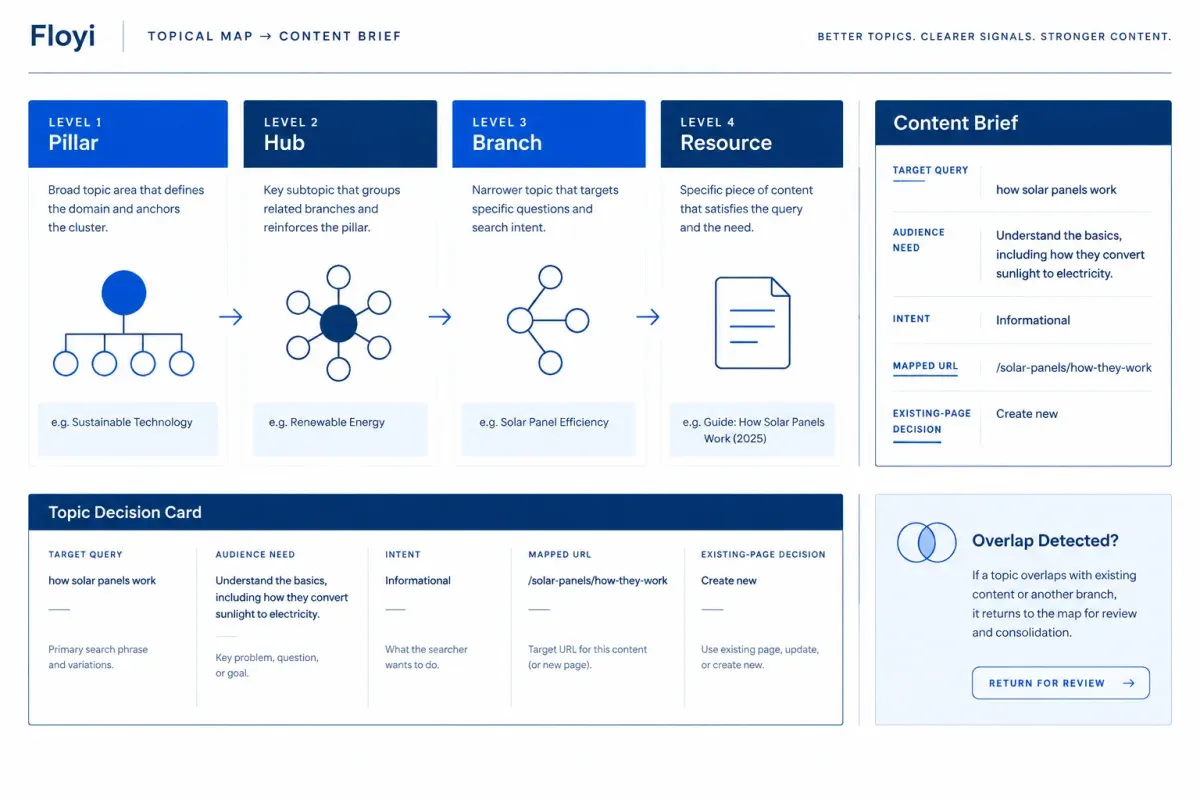
Approve topic maps before briefs by treating each topic-map row as a decision record. Settle the target query, audience need and page role before content brief creation starts. Draft review then can’t turn into a late debate about intent or scope.
Each row needs enough evidence for a publishing decision. Confirm the target keywords, audience pain point, funnel stage, search intent, content objective, topical scope, and relationship to existing pages. This is where content ideation and keyword research become a clear choice about what the site should publish.
Brand voice and buyer personas set the topical scope. The approved Pillar > Hub > Branch > Resource map then carries those choices into every brief.
Run four checks before a topic moves to briefing:
-
Confirm the search opportunity: Check that the query serves a defined audience need and that its intent fits the planned page type. A commercial query may fit a landing page. An awareness-stage question may suit a blog post or resource.
-
Apply the existing-page decision: Reuse the overlap decision from the new-client content audit or your latest audit instead of repeating it. The row should strengthen an existing URL, merge into an existing page or fill a gap no current page owns. Send unresolved overlap back to the audit instead of defaulting to a new article.
-
Validate structure and page identity: Confirm the hierarchy holds and every topic has a mapped URL or proposed URL slug. A missing slug blocks the row. Without a stable URL, the page can’t anchor internal links, publishing, performance tracking, or a topic-anchored brief.
-
Review evidence before promotion: Connect Search Console first. The Floyi Authority Planner then shows each topic’s intent and funnel stage next to its matched URL, clicks, impressions, top queries, and cannibalization indicator. When several URLs compete for one query, decide whether to consolidate, optimize or fix the URL match before the topic enters planning.
Review depth can change with team structure without weakening the gate:
| Team model | Review focus | Evidence |
|---|---|---|
| Solo marketer | Strategic fit and page relationship | Query, intent, objective, URL disposition, and rationale |
| Agency team | Validated rows for client confirmation | Audience fit, approved disposition, proposed slug, and audit record |
| Larger in-house team | Search, content and brand fit | Search fit, message fit, page type, and approval status |
Fast-track exceptions should follow the content type and the cost of getting the page wrong. A product category page may need brand and merchandising input. A support article needs close scrutiny of informational intent and existing documentation. The same logic shapes a blog post approval workflow, a landing page approval workflow and review of AI-assisted SEO content.
Each approved topic needs one complete, reviewable row:
-
Target query: The query the page is meant to serve.
-
Audience, pain point, funnel stage, and intent: The user need, buyer-journey position and expected result type.
-
Content objective and topical scope: What the page must achieve and the boundaries it keeps.
-
Mapped URL or proposed slug: The page identity used across planning and publishing.
-
Closest existing page and decision: Whether the topic strengthens, merges into or creates a page.
-
Rationale, reviewer and status: The basis for the decision and where it stands.
A row reaches brief approval only after every validation issue is resolved. Floyi carries the approved topic context into the brief and draft, so the choices made here reach the writer intact.
How Do You Approve SEO Briefs Before Drafting?
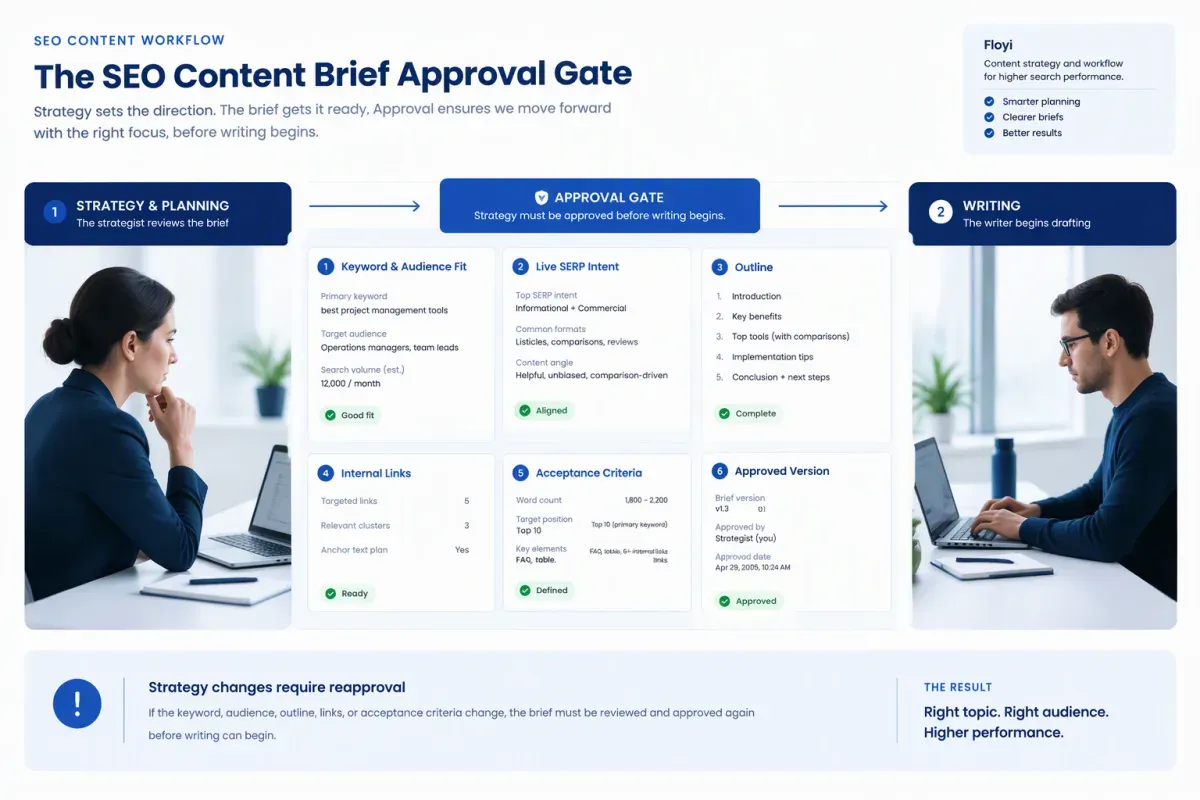
Approve SEO briefs before drafting by having the SEO strategist sign off one specific brief version. That content outline approval is the hard gate between planning and drafting. It turns the SEO content brief into a shared specification, not a set of writer suggestions open to reinterpretation.
Any change to the audience, topical scope, target keywords, page format, outline, required links, or evidence standard is a strategy change. It goes back to brief approval instead of becoming a late draft comment.
Six checks make the brief dependable:
-
Confirm keyword and audience fit: Approve one primary term that matches the page’s job, plus a focused secondary set backed by keyword research. Each secondary term should map to a distinct section, question or entity. If two terms need nearly identical coverage, keeping both usually produces repetition, not depth.
-
Validate intent against the live SERP: Test the proposed title angle, format, headings, and depth against the dominant need in the results. A how-to page shouldn’t become a comparison because one ranking result uses that format. Cover what several ranking pages share, then leave room for an angle grounded in brand knowledge.
-
Approve the outline before prose exists: A writer-ready outline has ordered H2 and H3 headings, each section’s purpose, required questions or entities, and boundaries that prevent overlap. Set a total word-count range. Section-level limits help most with AI-assisted writing, where thin points drift into tangents or repeated copy.
-
Set internal linking opportunities in context: Identify the relevant parent, sibling and child pages, with placement and anchor guidance for each. Links should move readers through the site’s topical structure, not fill a quota. Topic-anchored Floyi briefs include internal link targets and anchor suggestions from the Planner, so the writer starts from a settled plan.
-
Turn requirements into SEO acceptance criteria: Record required headings, keyword coverage, intent fit, the word-count range, link requirements, evidence limits, and non-negotiable brand guidance. The writer and editor then judge the draft against the same standard.
-
Log the strategist’s SEO sign-off: The writer receives the approved brief version. Floyi saves each brief edit as a new version, so later changes stay visible. A copy tweak can proceed, but a change in direction needs another approval before drafting resumes.
Floyi brings brand voice, buyer personas, SERP consensus claims, and information gain into the brief the strategist reviews. When the strongest new angle needs proof the brand doesn’t have, Floyi lists it as a Blocked Opportunity instead of inventing the claim. The strategist decides whether to add the data or drop the angle.
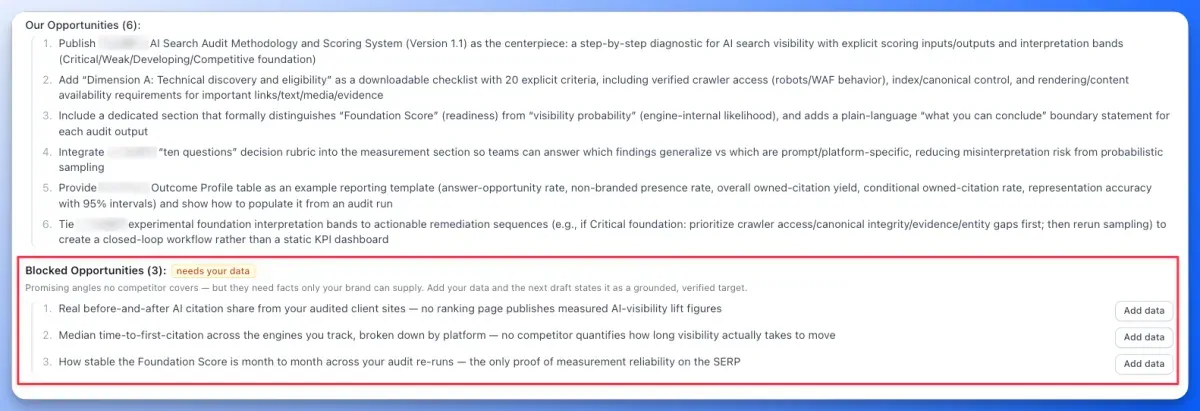
A stable brief gives writers clear constraints and editors measurable checks. It also keeps draft review from reopening decisions that are already settled.
How Do You Route Draft Reviews Without Reopening Strategy?
Route draft reviews against the approved brief, so reviewers test execution instead of reopening strategy. The SEO content review process confirms the agreed scope, audience, angle, outline, and brand guidance. A reviewer’s preference for a different direction isn’t a reason to revisit them.
Floyi drafts start from the Brand Foundation, buyer personas, Content Guide rules, and optimizer coverage terms behind the brief. Autosave and version history give reviewers a fixed version to assess, not a moving target.
Keep SEO and editorial review in one connected pass. This editorial and SEO quality check covers search fit and reader experience together:
-
Keyword integration: Primary and supporting keywords read naturally, answer the intended query and avoid repetitive phrasing.
-
Header hierarchy and readability: The approved H1, H2 and H3 order stays logical. Content readability, grammar and phrasing help readers move through the page.
-
Links and anchors: Internal links sit at the reader’s decision point with descriptive anchor text. Floyi’s Research tab lists suggested parent, sibling and subtopic links and marks each one as it’s placed.
-
Metadata and sources: The SEO title and meta description match the page’s purpose without an unsupported promise. External sources are relevant, credible and suited to the claim they support.
These checks tie on-page SEO best practices to the page’s purpose. An awkward keyword, missing link, weak meta description, or unclear heading is a draft-level fix. A different audience isn’t. It’s a brief-level change.
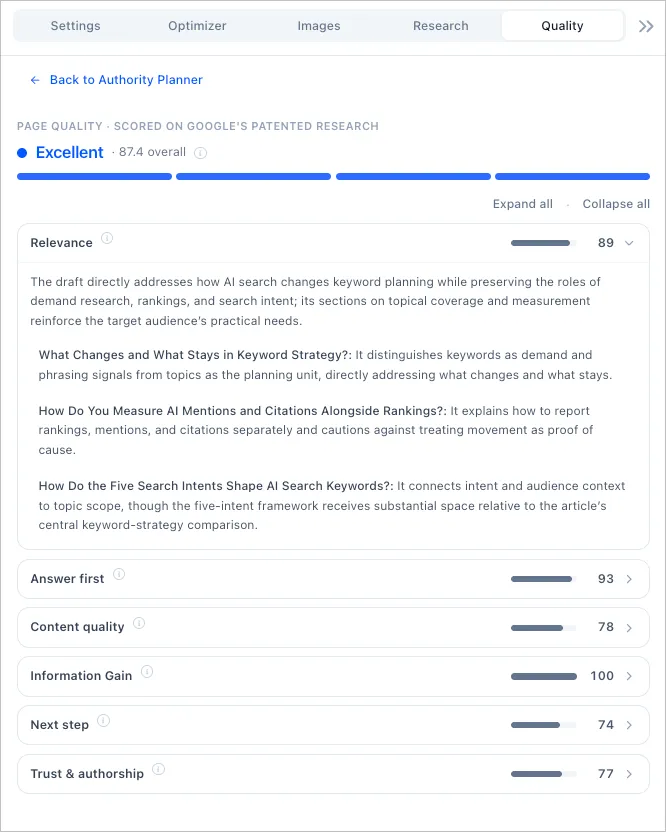
Floyi’s Page Quality Scorecard adds a second layer. It scores relevance, answer first, content quality, information gain, next step, and trust and authorship. Each score comes with evidence quotes that jump to the passage behind it. Re-analyze after substantial edits so the score matches the version you’re approving.
Match content fact-checking to the cost of an error. Technical claims, statistics, product statements, and data-led recommendations need subject-matter expert fact-checking before approval. Regulated or sensitive pages may also need legal or compliance review of claims and disclosures that affect E-E-A-T.
Controlled stakeholder approval keeps contradictory instructions away from the writer. Set the response window from your own turnaround targets, keep the reviewer group small and merge overlapping feedback before revisions start.
Sort consolidated feedback into four groups:
-
Brief requirement: A missing required point, coverage term, link, or outline element.
-
Factual correction: An unsupported statement, outdated detail or claim that needs evidence.
-
Editorial clarity: A readability, grammar, voice, or flow problem.
-
Publish readiness: Metadata, source quality, link placement, or final formatting.
Cap revisions with a fixed rule, such as two consolidated rounds, then approve the draft when the agreed checks pass. If a revision goes wrong, restore an earlier draft as the working copy. Floyi saves the current draft into history first.
Strategy reopens only when review exposes a defect in the approved premise. That includes changed intent, a materially different scope, an unsupported required claim, a new legal constraint, or a title that no longer fits the page. Keyword phrasing, links, metadata, readability, voice, and factual fixes stay in draft review.
How Do You Sign Off Publishing and Verify Pages?
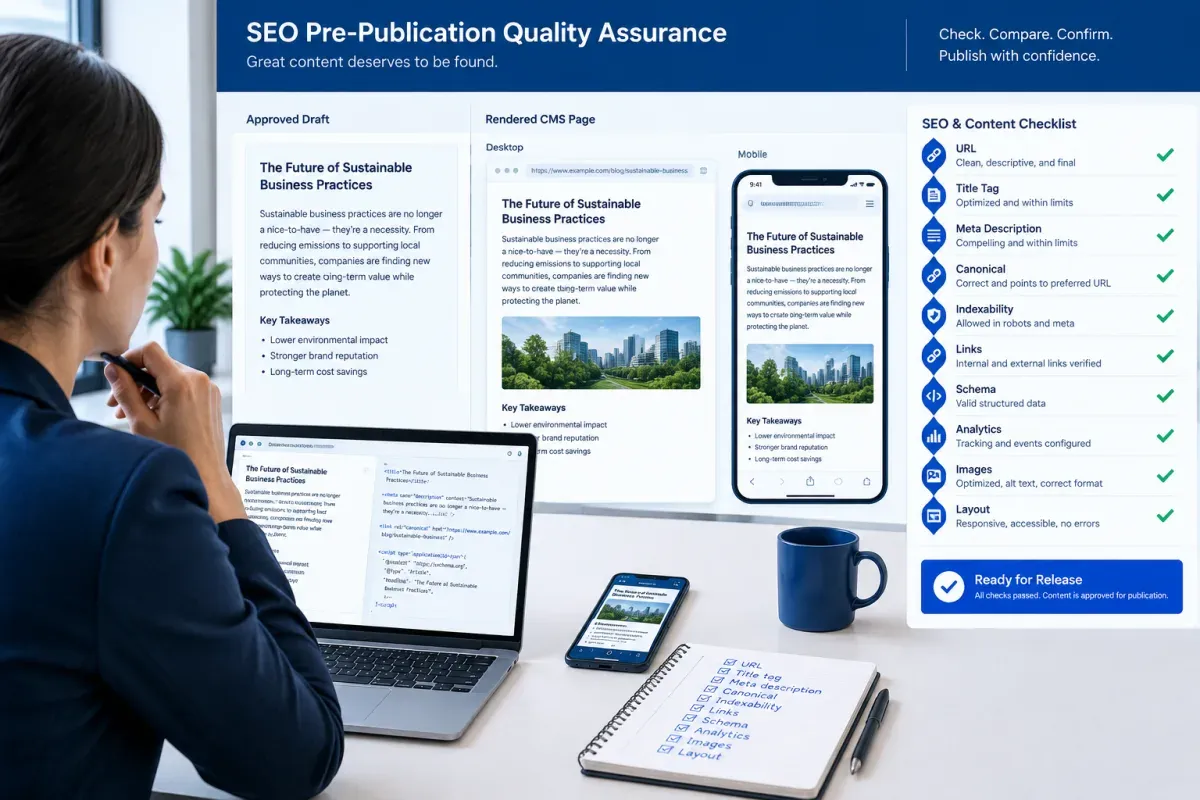
Sign off publishing by approving the exact CMS version scheduled to go live, not the document that passed editorial review. The publisher compares that version with the approved draft once SEO, brand, fact-check, and legal reviews are complete. A change to facts, targeting, claims, calls to action, compliance language, or the destination URL reopens the relevant gate.
Treat staging as a release candidate for SEO quality assurance. Check robots directives before release, especially inherited noindex tags, staging-domain references, duplicate URLs, and template canonicals that override the intended page.
Run this pre-publication SEO checklist on the rendered page, not the source document. CMS transfers can drop links, break tables or strip metadata without any sign in the editor.
-
Page identity: The URL, H1, title tag, meta description, canonical URL, and indexability settings match the approved version.
-
Links and destinations: Internal links, external citations, buttons, jump links, and downloads go where they should and return the expected status code.
-
Images and formatting: Image file names, alt text, captions, tables, accordions, forms, and calls to action survived the move. Text pasted from a document can keep its words and lose its layout.
-
Header hierarchy: Headings run in order from the H1 down. Copy can follow on-page SEO best practices and still be hard to scan when headings turn into bold paragraphs or skip levels.
Technical accuracy also covers markup and measurement. Compare the schema markup with the visible page, including the type, required fields, URL, headline, image, and author or organization. A structured-data validator confirms the markup parses. It won’t catch a FAQ answer or author name that contradicts the page.
Confirm analytics tags load and campaign UTM parameters are well formed. A malformed parameter won’t block publication, but it weakens the content performance review later.
Check desktop and mobile layouts at the site’s breakpoints for spacing, images, navigation, forms, tables, and CTA behavior. For WordPress publishing, confirm the Gutenberg conversion kept the formatting, categories, author, schedule, and SEO-plugin metadata. A direct connection doesn’t remove the need for review.
After release, open the production URL in a clean browser session and repeat the checks that affect crawling and user experience. Caching and deployment can change canonicals, robots settings, tracking scripts, schema, links, or mobile rendering between staging and production. Record the approver, action, timestamp, and exact version so the release stays traceable.
Publication is complete only when the live page matches the approved version and passes every item on this SEO content approval checklist.
How Do You Manage Turnaround, Client Feedback and Reapprovals?
Turnaround and reapprovals stay controlled when every asset has a visible status, a named decision-maker and a defined return path. A disciplined process shows a missed target before it delays publication.
Use one set of SEO workflow statuses across your SEO content approval tracker, whether it’s a content approval spreadsheet or a project board in Asana or Monday.com. Attach a next owner and decision to every status:
- Backlog: The SEO owner decides whether the idea enters planning.
- Brief in progress: The strategist completes the research and requirements.
- Brief approved: The writer confirms the scope is ready for drafting.
- Draft in progress: The writer produces the next version.
- In review: The assigned reviewer approves, requests edits or raises a strategy-change request.
- Changes requested: The stage owner turns reviewer input into one prioritized change set.
- Approved: The final approver accepts the exact version presented.
- Scheduled: The publisher completes CMS checks and confirms the release date.
- Published: The publisher records the live URL and check results.
- Monitoring: The strategist runs the performance review.
Floyi tracks its own editorial status on each draft: Awaiting Review, Needs Editing, Approved, and Published. Generation states such as Draft Done only mean the AI finished writing. A Draft Done article still needs human review before anyone marks it Approved.
Make the tracker the system of record, not a deadline list. Record the title, target keyword, content type, priority, owners, URLs, status, due dates, review outcomes, revision count, final approver, and performance-review date.
Set turnaround targets your team and client agree to meet, and treat a missed target as the escalation trigger. The targets below are examples to adjust, not industry standards:
| Stage | Example target (set your own) |
|---|---|
| Brief review | 1 to 2 business days |
| First draft | 3 to 5 business days |
| Editorial review | 1 to 2 business days |
| SEO review | 1 business day |
| SME or legal review, when needed | 2 to 5 business days |
| CMS checks and scheduling | 1 business day |
Every gate also needs a backup, so a missed target has somewhere to go:
| Approval element | Primary responsibility | Backup and escalation |
|---|---|---|
| Brief or draft decision | Named stage owner | An equally authorized backup decides after the target is missed. |
| Client decision | Named client approver | The publication-timing owner receives unresolved deadline risk. |
| Final publication sign-off | Final approver | A backup confirms whether the asset proceeds or is held. |
Client content approval works best as one bounded decision, not an open comment thread. Share the exact version and say whether you need approval or changes. Collect one consolidated response by the agreed date. A client request that changes an approved topic, target query or brief becomes a strategy-change request and goes back to that gate.
Before comments reach the writer, the stage owner merges duplicate, conflicting and out-of-scope input into one prioritized change set. Separate required fixes from optional suggestions, and log the decision on each proposed edit.
A rejected asset returns only to the stage that needs work. Copy issues go back to Draft in progress. Strategy issues go back to Brief in progress without voiding approvals that still hold.
Feed what Monitoring finds into the next topic-map approval. Floyi’s Topical Authority Scorecard shows how the map performs in Google and in AI search, including AI Overviews, AI Mode, Gemini, and ChatGPT. That turns the SEO content workflow into a loop instead of a one-way line.
To keep every gate on one record, manage approvals in Floyi Briefs & Drafts. Brief versions, draft history and editorial status stay attached to the same asset, so every reapproval traces back to what was approved.
SEO Content Approval Workflow FAQs
These FAQs answer common questions about setting up an SEO content approval workflow: who owns it, who signs off, what clients approve, and what to automate.
1. Who Owns the SEO Approval Workflow?
The SEO strategist owns the workflow’s direction: targeting, intent, scope, the brief, and acceptance criteria. Each gate then has its own accountable approver, from the SEO reviewer at draft review to the publisher at release. Small teams can combine roles, and a solo marketer may hold all of them. Keep one named owner per gate anyway, so no decision falls between people.
2. Who Has Final SEO Content Approval?
The named final approver, usually the content manager or publisher, has final approval. Writers create the content and reviewers request changes. The final approver confirms that SEO, editorial, stakeholder, and compliance reviews are complete, then releases, returns or holds the page. Approval of an earlier draft never authorizes publication of a later version.
3. Should Clients Approve Topic Maps or Only Drafts?
Clients should approve the topic map and the brief, not only the draft. Agreeing on scope, target queries and the outline before writing prevents the most expensive rewrites.
At draft stage, limit client review to factual accuracy, brand voice, product or legal claims, and details only the client can verify.
4. Can You Automate SEO Content Approvals?
You can automate the routing but not the decisions. Content workflow automation can move tasks between statuses, surface due dates, send reminders, and keep version history. It can’t judge whether a draft meets its intent, whether a claim is true or whether a page is ready to ship. Those calls stay with the human owner of each gate.
5. Should You Use an SEO Approval Template?
Yes. A reusable SEO content approval template keeps every asset’s decisions in one record, so nothing lives only in email or chat. Start from the topic-row fields and tracker columns above, then add the brief’s acceptance criteria and the final sign-off. One template across clients also makes an agency content approval workflow easier to audit.
About the author

Yoyao Hsueh
Yoyao Hsueh is the founder and CEO of Floyi, the topical authority platform, and the founder of Main Heading, an SEO and AI search agency. He is an expert in topical authority and topical mapping. He created Topical Maps Unlocked, a course studied by thousands of SEOs, content strategists and digital marketers, founded TopicalMap.com, a done-for-you topical mapping service for agencies and enterprise teams, and publishes the weekly Digital Surfer newsletter on SEO, content strategy and AI search.
About Floyi
Floyi is a closed loop system for strategic content. It connects brand foundations, audience insights, topical research, maps, briefs, and publishing so every new article builds real topical authority.
See the Floyi workflow