
How to Do an SEO Content Audit for a New Client: 6 Steps
Run an SEO content audit for a new client in 6 steps: set scope, reconcile URLs, map topics, find cannibalization, classify pages, and write the priority list.
Starting an SEO content audit for a new client with a crawl gives you a URL list, not a priority list the client can approve. The content audit process that holds up starts with scope. Set the business and topical scope, reconcile every meaningful URL, map each page to its job, then classify the work.
Search Console, GA4, XML sitemaps, CMS records, and crawl exports rarely agree on their own. A landing page with organic traffic can be missing from the crawl, while a sitemap can list redirected or noindex URLs. Reconciling those sources is the audit’s first real finding.
The deliverable isn’t a spreadsheet of fixes. It’s a URL action table and a client summary that state the evidence, action, owner, and success measure for every recommendation, ready to feed briefs and drafts. When a client has little traffic history, the same structure still works because the scope comes from the brand, its audience and the questions buyers ask.
SEO Content Audit Key Takeaways
- Set business outcomes, topical scope and access requirements before you crawl.
- Reconcile crawl, XML sitemap, CMS, Search Console, and GA4 URLs into one inventory.
- Map each indexable page to a Pillar, Hub, Branch, or Resource role.
- Check query-to-URL evidence and the SERP before calling anything cannibalization.
- Classify every existing URL as Keep, Optimize, Consolidate, or Prune, and log missing topics as coverage gaps.
- Rank actions by impact, opportunity, confidence, and effort, then record a baseline before anything ships.
Step 1: Set Scope and Request Access
A new-client content audit starts from the business outcome the content has to support, not from a crawl. In SEO client onboarding, you’re setting the SEO audit scope for a brand you don’t know yet. When you manage topical authority across a client portfolio, that scope keeps each client’s recommendations tied to that client’s goals.
Pull the audit’s inputs from a structured client intake questionnaire rather than re-running discovery. You need the priority offerings, target markets and languages, competitors, conversion events, and site history. The conversion events that matter are qualified form submissions, demo requests, purchases, or calls, not raw traffic. Site history covers migrations, redesigns, past pruning, and traffic losses.
Treat the client’s explanation of what broke as a hypothesis to test. A visibility drop, for example, can come from removed pages, weak redirects, an intent-changing rewrite, or stronger competing results. The intake tells you where to look. URL- and query-level evidence decides whether the assumption holds.
Weigh pages by commercial value, not vanity metrics. For example, a post with 10,000 visits and no relevant leads can matter less than a service page with 200 qualified visits. Flag the high-margin and strategic offerings now so they carry weight in every later recommendation.
Then set the working boundaries:
-
Delivery constraints: Note subject-matter expert availability, publishing cadence, compliance requirements, and development capacity. An editorial update belongs in a different tier from a fix that needs engineering time.
-
Sign-off path: Agree who approves which recommendations before findings arrive. Routing them through a clear content approval workflow keeps audit output from stalling in review.
-
Topical scope: Define the authority anchors, supporting hubs, buyer-question subtopics, and adjacent areas you’re deliberately leaving out. A first audit shouldn’t chase every keyword loosely tied to the business.
-
Coverage criteria: Judge opportunity at the hub level and weigh it against business relevance, not keyword volume or raw page counts.
For a client with little traffic history, ground the scope in the brand, its buyer personas and the questions those buyers ask. Performance data will be thin, so the topical structure carries more of the decision. Later steps place each page in a Pillar, Hub, Branch, or Resource role and test that placement against URL and query evidence.
Request read-only access before collection starts. These are the access requirements for most new clients:
-
Search Console: page- and query-level performance.
-
GA4 or the client’s analytics platform: engagement and conversion events.
-
A crawler such as Screaming Frog SEO Spider: technical and indexable URLs.
-
CMS access: publication dates, ownership and update history.
-
Optional tools: PageSpeed Insights for Core Web Vitals, plus your backlink and keyword tools for links and competitor gaps.
Agree on the evidence fields before the SEO site crawl, so every URL ends with a decision rather than a note. Step 2 lists the full set of columns. At minimum, each row needs the page type, intent, topical node, performance, conversion contribution, and recommended action.
Set the schedule after the first crawl count, not before. URL volume, templates, markets, and languages decide how long the audit runs, especially on ecommerce, publisher and international sites. Floyi’s Topical Audit covers up to 5,000 pages per audit, and path filters let you scope a large site to one section such as /blog.
Step 2: Build a Reconciled URL Inventory
A website crawl starts the content audit URL inventory, but it can’t be the inventory on its own. Reconcile crawlable URLs with XML sitemaps, CMS records, Search Console landing pages, and analytics data in one content audit spreadsheet. That surfaces valuable pages that navigation misses, without pulling every technical asset into the website content audit.
Build the file in this order:
-
Crawl the preferred HTTPS host and keep URL-level diagnostics. Run Screaming Frog against the canonical production host and export every response code, not just 200-status pages. Keep the final URL, response code, redirect target, title, meta description, H1, word count, canonical target, indexability, robots directives, internal inlinks, dates, and structured-data indicators.
Keep 301, 302, 404, and other non-200 responses in the working file. A redirect can explain why a sitemap entry differs from the live URL. A 404 with organic landing-page traffic can reveal a lost page or a broken redirect path.
-
Extract every XML sitemap child file. Sitemap locations usually sit in robots.txt. If they don’t, check sitemap.xml, sitemap_index.xml and WordPress’s wp-sitemap.xml. An index can split child sitemaps by directory or page type, so stopping at the index gives you an incomplete list.
Normalize each entry to the crawl format and keep last-modified dates. A sitemap URL is a declared indexing candidate, not proof of index status, rankings or content value. Exclude non-content files such as images, and record why.
-
Add CMS records and standardize URL variants. CMS exports catch pages that are orphaned, newly launched, hidden from navigation, or missing from the sitemap.
Match sources on a normalized URL key that handles protocol, www, trailing slashes, fragments, tracking parameters, and redirects. Keep each original source URL and a source-presence flag. That trail matters when a client asks why a page is in the inventory.
-
Attach organic and conversion evidence to each URL. Pull the longest history Search Console offers, which is 16 months of performance data. Include clicks, impressions, click-through rate, average position, representative queries, and indexing signals.
GA4 adds organic sessions, engagement, leads, purchases, and revenue when those events are configured. Search Console clicks and GA4 sessions won’t match because they measure different actions, so treat them as complementary evidence.
Compare the latest three months with the same months a year earlier. That separates a real decline from seasonality. A page with softer recent clicks but stable year-over-year numbers needs a different diagnosis from one falling in both periods.
-
Treat source mismatches as findings. A Search Console or GA4 URL missing from the crawl may be orphaned, blocked, redirected, removed, or logged under a variant. Sitemap or CMS URLs that error, redirect, point to another canonical, or carry noindex belong in separate exception groups. This step doubles as an indexability audit and a canonical tag audit.
Review crawl-only URLs before they expand scope. Parameters, archives, staging remnants, and internal search results can inflate the file without being content worth judging. Keep crawlable technical exceptions apart from indexable content pages.
-
Set the SEO audit spreadsheet columns, and hold the decision for later. Keep these fields for each content page:
- Page identity: final URL, source URLs, page type, publish or update date, canonical URL, and indexability.
- On-page evidence: title, meta description, H1, word count, primary keyword, search intent, audience, and quality notes.
- Search and business results: Search Console metrics, organic sessions, conversions, revenue, and referring domains.
- Technical context: response code, redirect target, robots directives, internal inlinks, structured data, and source flags.
- Decision fields: topical node, recommended action, priority, owner, and status, filled in during Steps 3 through 6.
If the sitemap is incomplete or bot protection blocks the crawler, Floyi’s Topical Audit accepts a pasted list of 5 to 5,000 URLs from one domain. A CMS export or a Search Console page list works as the input.
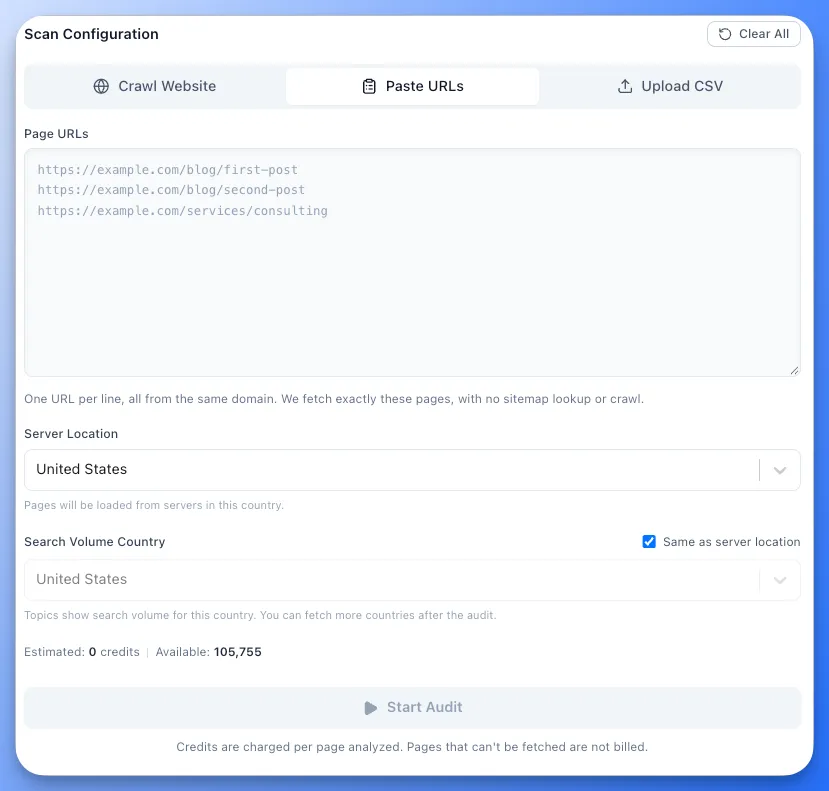
A reconciled inventory gives every URL a source trail, an indexability reading and performance context. That’s what makes the topical mapping in Step 3 defensible.
Step 3: Map Pages to Topical Coverage
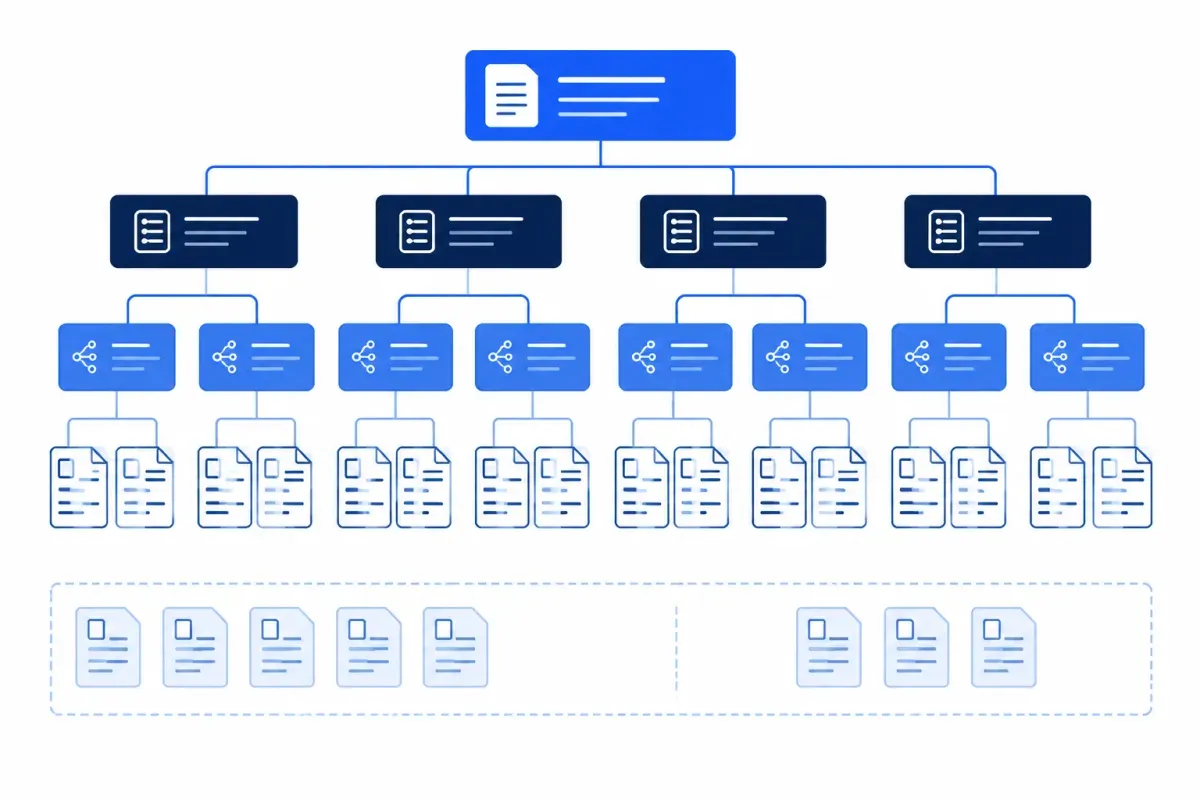
Map each indexable, user-facing page to a place in the client’s topical scope, not to the inherited navigation. The menu shows how pages were organized. It doesn’t show what the brand needs to own.
Segment page types first. Service, product, category, resource, and tool pages can cover the same subject while serving different intents and business roles. Comparing unlike assets as one group produces misleading conclusions.
Run the mapping pass in this order:
-
Classify the asset: Label it as a service, product, category, resource, tool, or other user-facing page.
-
Match the topic: Connect the page to its authority anchor and the most specific hub or supporting topic it serves.
-
Record the page’s job: Note the audience, search intent, commercial purpose, and expected next step.
-
Flag forced matches: Mark pages with no defensible topic, audience or business purpose instead of parking them in a convenient hub.
-
Keep it two-way: Each URL shows the topic it supports, and each topic shows the URLs and demand signals behind it.
This prevents a common audit error: treating every legacy page as proof the client should keep investing in that subject. An indexable article can still be off-topic, outdated or commercially irrelevant to the future map.
Search Console supplies the visibility layer of content performance evaluation. Compare clicks, CTR and average position across equivalent periods, then expand priority URLs to see the queries behind the totals. Rising impressions with flat clicks can point to a weak snippet, poor search intent alignment or rankings for questions the page only half answers.
Floyi’s Organic Audit ties this page-level data to the topical map. Its By Page view lets you sort URLs by clicks, impressions or position and expand any row to see the queries driving that page. When a slug or page copy doesn’t reflect the topic a page should support, you can match the URL to a topic by hand. Matching works from By Page or from the Planner’s topic details drawer, and both write the same record.
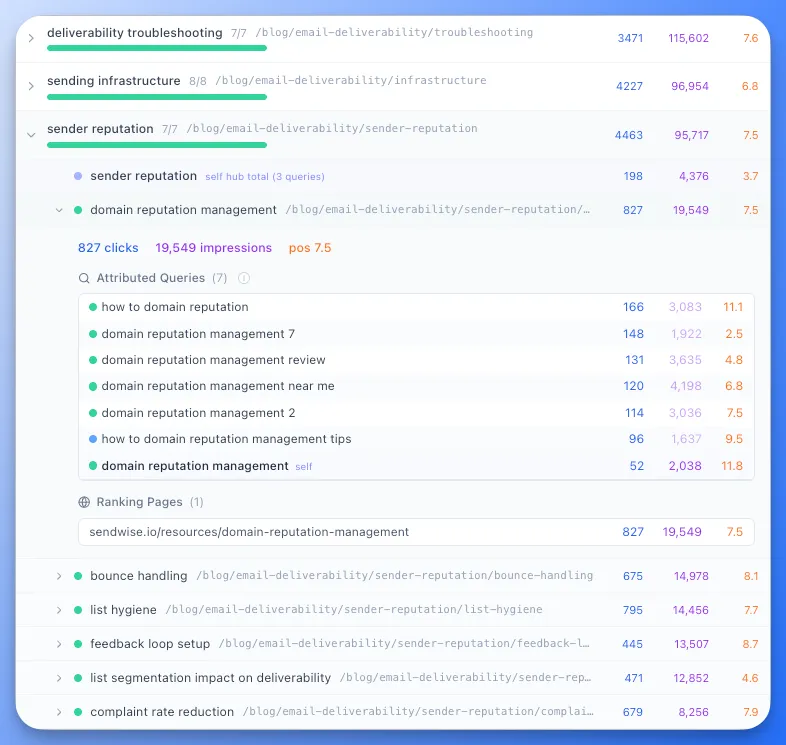
GA4 adds the outcome layer, though its totals won’t match Search Console. Search Console measures Google visibility and query demand. GA4 shows what organic visitors did after landing, including the conversions you agreed on in Step 1. Reading both separates a page that’s merely visible from one that reaches the right audience and contributes to the business.
Four groups deserve a manual, qualitative content audit pass:
-
High-visibility pages: Check whether a weak click-through rate comes from the title and snippet, poor intent fit or a SERP that favors another page type.
-
High-conversion pages: Confirm the information is current and the path to conversion has no needless friction.
-
Declining pages: Review lost queries, ranking shifts, freshness, and whether a newer internal page took over the intent.
-
Strategically important pages: Assess priority service, product and buyer-need pages even when traffic is low.
Automated scores point your attention, but they can’t judge whether a page is helpful, accurate, original, or backed by real expertise. Google’s people-first content guidance is the right lens for that call. Judge depth by the page’s job and its ranking context, not word count. A short product comparison can satisfy intent better than a long guide. Technical warnings are prompts to review, not proof that a page failed.
Log strategic content gaps against the target topical map, not the existing inventory. This is the content gap analysis half of the audit. For each query theme without a suitable page, record the demand signal, intended audience, closest existing URL, and why that URL falls short. Separate a single missing page from a missing set of related pages that an authority anchor needs. Leave suspected overlap for Step 4.
Step 4: Find Keyword Cannibalization and Quick Wins
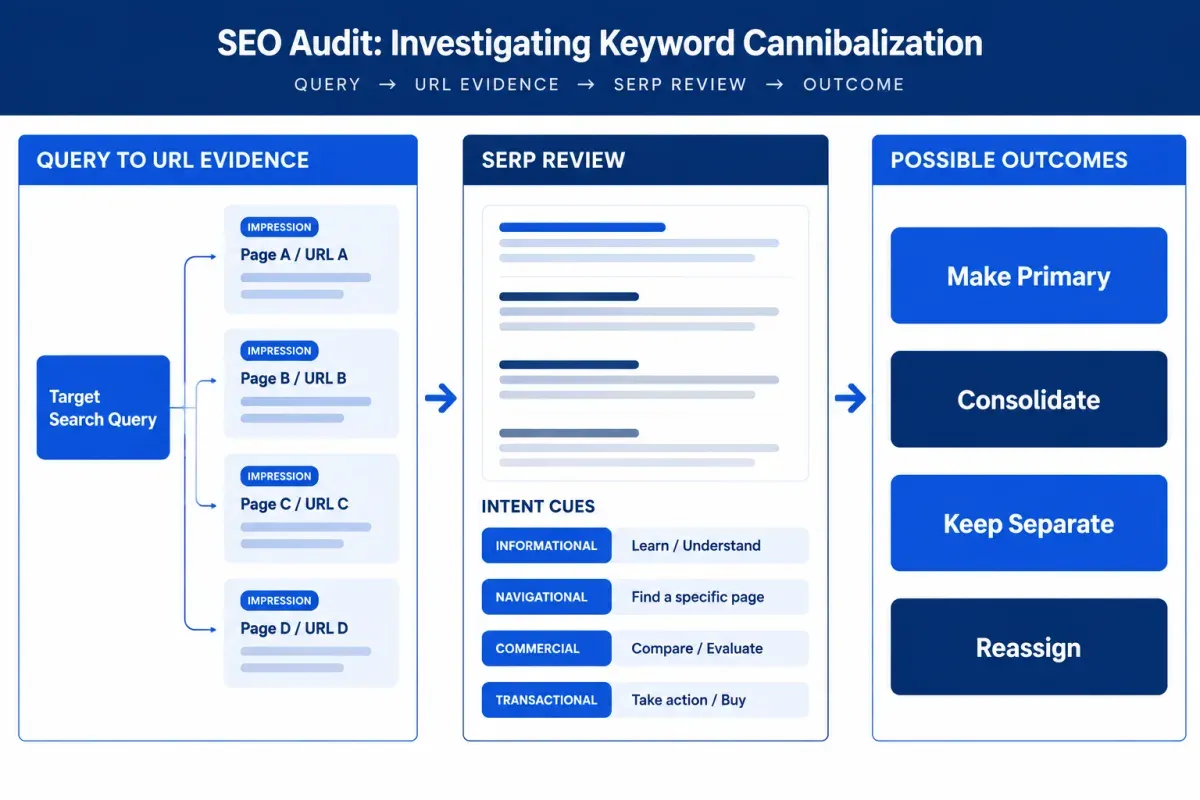
Keyword cannibalization shows up only when you map each query to every ranking URL and check whether those pages meet the same search need. Page-level totals hide that relationship. Join Search Console query and page data to the Step 3 mapping. For each meaningful query, capture the ranking URLs, clicks, average position, intended topic, and page purpose.
The same query-to-URL view exposes intent mismatches and thin topical coverage. An informational guide ranking for a transactional query may need a narrower topic match, a separate commercial page or a better conversion path.
Review the evidence in this order:
-
Compare page roles: Check search intent, audience, format, title, and on-page purpose for every URL on the same query. Multiple rankings can be valid when Google rewards different journey stages.
-
Inspect the SERP: Look at competing URLs and SERP features before recommending a merge. A guide and a category page can coexist when searchers need both research and purchase options.
-
Check the topic match: A misplaced URL can look like cannibalization when it actually belongs to another topic.
-
Review hubs separately: Check a hub’s own ranking pages apart from its child topics. A hub can have an overlap problem even when every child topic has a clear primary URL.
Set an evidence threshold so incidental visibility doesn’t become a finding. Floyi’s Organic Audit uses two tiers. It flags a topic when three or more URLs each earn at least two impressions. When exactly two URLs compete, each needs at least 10 impressions and at least 10 percent impression share. A 22-to-2 split isn’t flagged, because Google already has a clear primary result. These are Floyi’s rules, not an industry standard, so adjust them if your reporting uses different ones.
Then match the action to the evidence:
-
Make one page primary: When one URL clearly dominates, keep it as the main page and reinforce it with clearer differentiation, internal links or canonical tags. Floyi’s Organic Audit treats a URL with at least 70 percent impression share as dominant and recommends this route over a merge.
-
Consolidate: When useful material is split and no URL leads, combine the strongest content on one page and 301 redirect the retired URL.
-
Keep separate: Retain URLs with distinct intent, audience or format. A forced merge can remove a valid conversion path.
-
Reassign: Move a page to the correct hub or branch when its topic match is wrong, before you rewrite anything.
Quick wins come after the overlap decisions. Start with relevant pages that earn visibility but a low click-through rate. Before touching title tags or meta descriptions, check the queries, intent, competing snippets, and SERP features. A low rate can reflect an AI Overview or shopping results above the page. It can also mean the page ranks for a query it was never meant to win.
Pages sitting in positions 4 to 20 deserve a closer look when the query fits the page’s role. Fix the actual weakness, whether that’s answer completeness, intent alignment, internal links, or the title. A thin answer needs a different fix from weak metadata.
Investigate traffic declines for seasonality, algorithm updates, competitor movement, indexing issues, and recent edits. When traffic brings few conversions, compare the query, page purpose, calls to action, and conversion path before you label the page an underperformer.
A client-ready cannibalization finding names the query, the competing URLs, the intent evidence, and the chosen action.
Step 5: Classify Every URL as Keep, Optimize, Consolidate, or Prune
Classify each inventoried URL as Keep, Optimize, Consolidate, or Prune by whether it satisfies a distinct, commercially useful search intent. Surface quality isn’t enough. A polished article can compete with a stronger URL for the same task, while a low-traffic page with a unique role may need improvement rather than removal.
Use the four classes as a fixed action set for existing URLs:
-
Keep: Pages with sustained qualified visibility or conversions, close query relevance and no meaningful overlap. Don’t change a page that’s doing its job just to show activity.
-
Optimize: Pages that target the right intent but underperform on rankings, click-through rate, depth, or query fit. Record the sub-action: refresh outdated examples, expand missing answers, tighten broad targeting, or retarget the page to the query it should own.
-
Consolidate: URLs that substantially overlap, where one destination can carry the user’s task. Shared terms or adjacent subjects alone don’t qualify.
-
Prune: Pages with no remaining traffic, conversion, link, or intent value and no relevant replacement. Pruning is a deliberate removal decision, not a shortcut for weak content.
A missing topic isn’t a class for an existing URL. It belongs in the topical map as a coverage gap. Recommend a new page only when the closest URL can’t expand or refocus without muddying its purpose. That avoids a common onboarding mistake: creating a competing page for a topic an existing page could own.
Search intent is the gatekeeper for consolidation. Similar titles, overlapping queries and cannibalization flags don’t justify a merge on their own. Pages stay separate when they serve different audiences, formats, funnel stages, or questions. An educational guide and a commercial comparison can share language while doing different jobs.
Run an evidence review on every Consolidate or Prune call before client sign-off:
-
Organic history: sustained, seasonal and earlier visibility that a short reporting window can miss.
-
Conversions and engagement: direct or assisted conversion value. Modest traffic can still support an important customer journey.
-
Queries and intent fit: loose alignment suggests retargeting, while tight alignment supports keeping the page.
-
Backlinks and internal links: external links, contextual internal links and the URL’s place in the architecture.
-
Replacement quality: whether the destination satisfies the same need. An irrelevant redirect hurts visitors and weakens the structure.
For a consolidation, move useful material into the strongest destination and 301 redirect the retired URL to it. For a prune with no relevant replacement, return a 404 or 410 rather than sending visitors to a loosely related page. Thin, stale, duplicated, and irrelevant pages can qualify, but only after the review rules out optimization.
Internal linking belongs in the same decision, so run the internal linking audit here. Give each orphan URL a topical role when one exists, plus contextual links from its parent pages. Pages that can’t fit the client’s scope move toward consolidation or pruning.
Floyi’s in-app Content Audit matches crawled URLs to the client’s topical map and suggests Keep, Optimize, Consolidate, or Prune. Its cannibalization workflow offers Make Primary, Redirect, Reassign, or Keep Separate. Treat those suggestions as a starting point, then check them against intent, history, links, and conversion value.
Build a Client-Ready URL Action Table
Turn the classifications into one row per URL that a content lead, developer or subject-matter reviewer can act on without interpreting a vague verdict. This table works as your content audit template and as the implementation layer of the content audit report. The client summary in Step 6 covers only the decisions that need approval.
Sort rows by the priority score from Step 6. Include Search Console clicks, click-through rate, position, and query evidence, plus GA4 conversions where tracking exists. The rows below are examples of how each class should read.
| URL and page details | Search and technical evidence | Action and details | Priority and delivery |
|---|---|---|---|
/primary-url/, title, page type, mapped topic, update date | Clicks, CTR, position, conversions, primary intent, indexability, canonical status, cannibalization signal | Optimize: Broad query coverage weakens intent fit. Tighten the title and H1, answer the missing user need and add internal links from relevant pages. | Step 6 score, content lead, planned |
/old-url/, title, page type, mapped topic, update date | Low visibility, overlapping queries, duplicate intent, backlinks to check, conversions to check | Consolidate: Move the useful comparison sections into /primary-url/, publish the revised page, then 301 redirect /old-url/. | Step 6 score, content and development, awaiting review |
/stable-url/, title, page type, mapped topic, update date | Strong query match, meaningful visibility or conversions, no competing URL | Keep: Retain the URL and its internal links. Watch for query drift and aging facts. | Step 6 score, content lead, monitor only |
/retired-url/, title, page type, mapped topic, update date | Minimal traffic, weak topical fit, no conversion role, no viable refresh path | Prune: Check backlinks, historical conversions and indexability before removal. Return a 404 or 410 only when no relevant replacement exists. | Step 6 score, development, needs validation |
Write each Optimize cell as a constraint plus an edit, as in the first row. For a consolidation, record why the destination wins, which sections migrate and the redirect that follows publication. Then group the rows into immediate, planned and monitor-only work.
Step 6: Write the Client Summary and Priority List
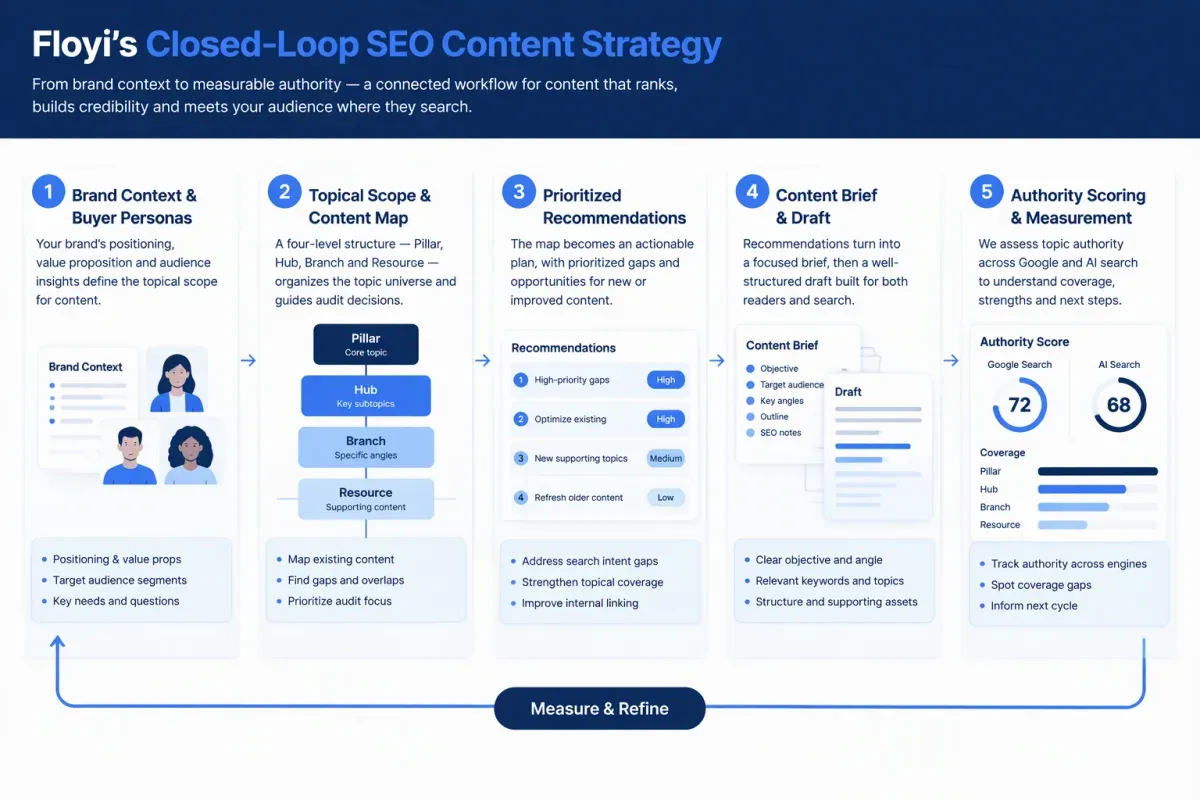
The client summary is your SEO audit executive summary. It turns audit evidence into a decision document. It states the baseline, the technical blockers with the biggest business consequence, the opportunity each fix creates, and the outcome it supports. Frame the findings around protecting the acquisition paths of priority offers and strengthening coverage for audience needs the site should own.
Knowing how to run an SEO content audit doesn’t help if the output is an unprioritized issue list. Build a content audit action plan that records the priority, business rationale, owner, effort, dependencies, success measure, and topical role for each recommendation. That keeps a non-urgent refresh from displacing a broken high-value landing page, and it becomes the prioritized SEO roadmap for the work that follows.
Priorities should reflect both business impact and implementation order:
| Priority | What belongs here | First action |
|---|---|---|
| P1 | Critical indexing failures, incorrect canonicalization, broken high-value landing pages, and material traffic losses | Correct canonicals, repair broken internal links, restore affected pages, or investigate the loss |
| P2 | Commercially important page improvements, promising visibility and intent mismatches | Improve page substance, title tags and meta descriptions when a relevant page underperforms |
| P3 | Topical gaps, supporting Resources, internal-link improvements, and lower-priority refreshes | Hold in the later queue until urgent fixes are underway |
Quick wins go first only when they support a meaningful offer. Rewriting the title of a relevant URL near page two can help, but it shouldn’t outrank an indexing issue on a revenue page. Confirmed consolidations also come before broad refreshes, because overlapping pages split signals and blur which URL is canonical.
When recommendations compete for the same delivery window, use a transparent SEO opportunity scoring aid instead of presenting opinion as certainty. Score impact, SEO opportunity, confidence, and effort from 1 to 3, with low effort scored as 1. The scores below are illustrative examples:
| Recommendation | Impact | SEO opportunity | Confidence | Effort | Planning score |
|---|---|---|---|---|---|
| Repair a broken priority landing page | 3 | 3 | 3 | 1 | 27 |
| Consolidate confirmed overlapping URLs | 3 | 2 | 3 | 2 | 9 |
| Refresh a supporting Resource | 2 | 2 | 2 | 2 | 4 |
Multiply impact, opportunity and confidence, then divide by effort. The result supports planning, not a forecast. A sitewide indexing problem can still outrank a higher-scoring refresh when it blocks pages that matter to the business.
Tie each recommendation to the topical role it strengthens. A canonical fix can protect a Pillar tied to a priority offer. An intent correction can strengthen a Hub that serves a buyer question. A new Resource can fill a Branch-level gap.
In Floyi, a URL you match to a topic in the Organic Audit appears on that same topic in the Authority Planner. The topical map then carries the decision into a brief and a draft, and authority scoring across Google and AI search shows whether coverage improved. That closes the loop between this audit and the next plan.
Record SEO baseline metrics before implementation, at URL and site level. They anchor the SEO measurement plan:
-
Search Console: clicks, impressions, CTR, query visibility, and index status.
-
GA4: organic landing-page sessions and conversions where tracking exists.
-
Topical coverage: existing Pillar, Hub, Branch, and Resource coverage before changes alter the map.
Compare like-for-like periods once changes have had time to take effect. Annotate releases, algorithm updates, seasonality, and major site changes so nobody credits unrelated movement to the audit.
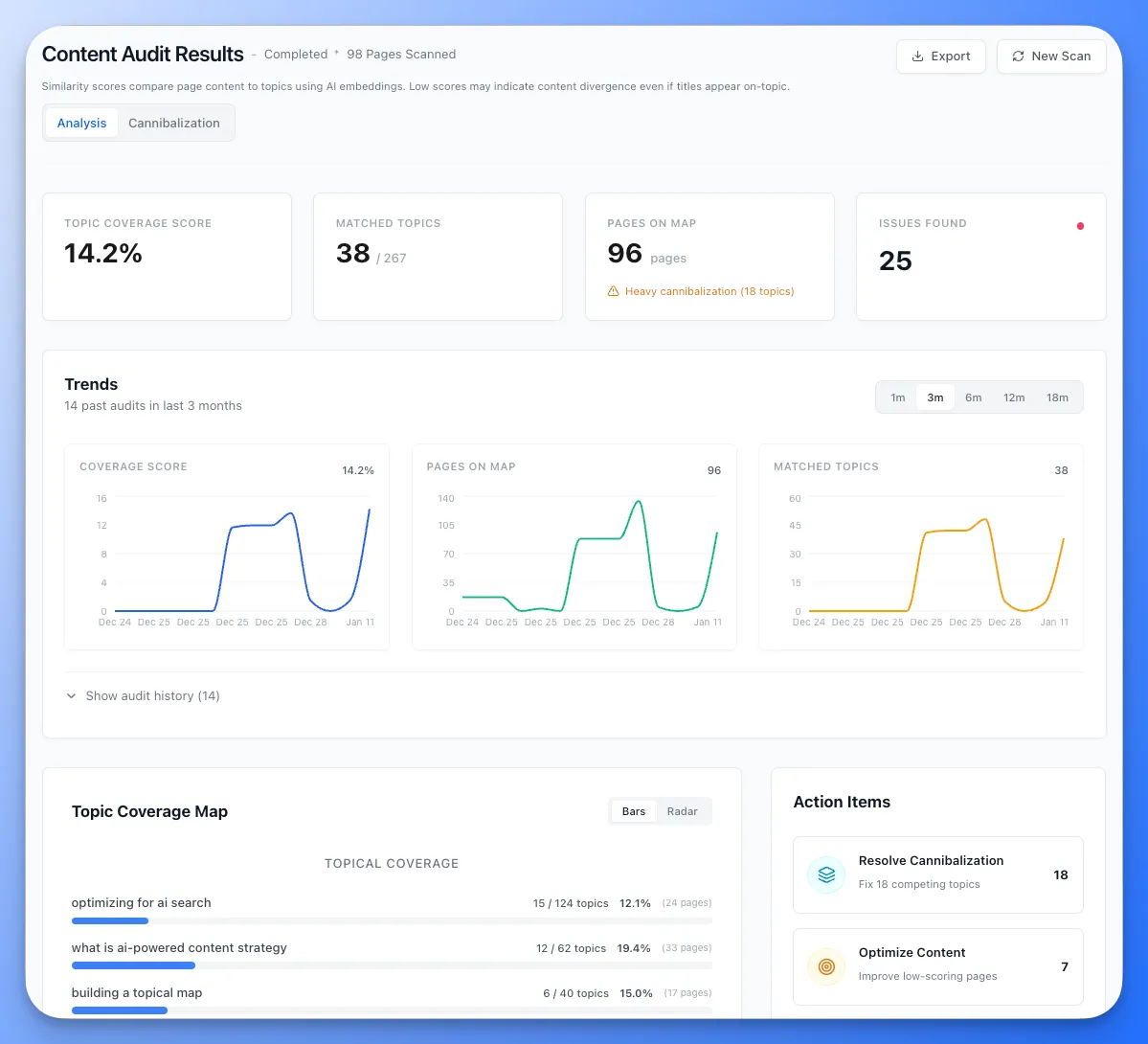
Before your next client kickoff, run the free Content Audit tool at floyi.com to see a new client’s current topic structure. The Coverage Map it returns gives Step 3 a starting point before you’ve built the client’s topical map.
SEO Content Audit FAQs
These answers cover the questions that come up when you work out how to conduct an SEO content audit for a client you’ve just signed.
1. How Long Does a New-Client Audit Take?
A content audit for new clients runs as long as the site requires, so set the schedule after the first crawl count rather than before. URL volume, templates, markets, and languages drive the effort, and ecommerce, publisher and international sites need longer reviews.
The phases stay the same at any size: access and crawl, reconciliation and baseline, mapping and manual review, then classification and priorities. Delayed access, thin Search Console history and the client’s implementation capacity usually stretch the timeline more than page count does.
2. Can ChatGPT Help Audit Client Content?
Yes, as an assistant rather than a judge. ChatGPT can help when you give it the reconciled URL inventory, page extracts, Search Console exports, and your topical map. It can group recurring themes, suggest possible coverage gaps and draft rationales for Keep, Optimize, Consolidate, or Prune calls. Treat its output as a hypothesis. Check each recommendation against the source data, then review priority pages yourself for intent, accuracy, freshness, and business fit.
3. What If Search Console Data Is Missing?
Build a structural baseline from the crawl, XML sitemaps, CMS export, redirects, and client-provided URL lists, then label each URL by source. A crawl alone can miss orphaned, blocked or weakly linked pages.
Analytics can still add organic landing-page sessions, engagement, leads, and purchases. Until Search Console access is restored, you can’t reconstruct query-level visibility, average position or indexing signals. Keep traffic and conversion conclusions provisional, and lean on the topical scope from Step 1 to set priorities.
4. Which Metrics Prioritize Content Audit Findings?
Rank metrics by how close they sit to the client’s business goals. Qualified conversions from organic landing pages come first, such as leads, demo requests or purchases. Visibility on priority queries comes next, then raw traffic. A page with heavy traffic and no qualified outcomes ranks below a commercial page with modest, converting visits. Read Search Console and GA4 across matched date ranges, and expect their totals to differ.
5. How Often Should Clients Repeat Content Audits?
Set the cadence in the engagement plan rather than by habit. A fast-publishing site may need a lighter quarterly check, while a smaller, slower site can go longer between full audits. Between audits, keep the new-client baseline and monitor priority URLs for visibility, organic sessions, conversions, and indexing.
Rerun the full inventory, mapping, cannibalization review, and classification after a migration, a major publishing push or a sharp visibility change. Annotate algorithm updates and seasonality so you can separate audit outcomes from outside changes.
About the author

Yoyao Hsueh
Yoyao Hsueh is the founder and CEO of Floyi, the topical authority platform, and the founder of Main Heading, an SEO and AI search agency. He is an expert in topical authority and topical mapping. He created Topical Maps Unlocked, a course studied by thousands of SEOs, content strategists and digital marketers, founded TopicalMap.com, a done-for-you topical mapping service for agencies and enterprise teams, and publishes the weekly Digital Surfer newsletter on SEO, content strategy and AI search.
About Floyi
Floyi is a closed loop system for strategic content. It connects brand foundations, audience insights, topical research, maps, briefs, and publishing so every new article builds real topical authority.
See the Floyi workflow