
Best Content Strategy Tools for Small Teams & Agencies
Compare content strategy tools for small teams and agencies, with workflow, pricing, and ROI guidance to find the best fit, including Floyi.
Choosing the best content strategy tools for small teams and agencies means comparing software by workflow fit, pricing, and integration depth, not brand name alone. Agency leads often see seat counts, client approvals, and CMS handoffs turn a lean setup into extra admin. Content strategy tools are software that help teams research, plan, brief, optimize, publish, and measure content. The goal is a stack that keeps brand voice intact while getting content live faster.
The comparison centers on strategy layers, drafting, optimization, publishing, and reporting, with Floyi, ChatGPT, Claude, Gemini, Jasper, Surfer SEO, Canva, Buffer, Mailchimp, Notion, and GA4 filling different jobs. Expect a practical checklist for true cost at real seat counts, stack fit with your CMS and CRM, and time-to-value under two weeks. The closing sections also show how to choose a lean stack for a small team or a fuller agency setup without buying overlap.
For agency owners, heads of content strategy, freelance SEOs, and in-house growth leads, the real value is cleaner approvals, steadier brand voice, and proof that content drives action. One team might use Floyi for a topical map, Claude for the draft, Surfer SEO for on-page cleanup, and GA4 to see which pages bring signups. The sections below make the tradeoffs clear so the right tools earn their place in the stack.
Content Strategy Tools Key Takeaways
- Small teams usually win with a focused stack instead of one all-in-one platform.
- Floyi connects brand inputs to topical maps, briefs, drafts, publishing, and tracking.
- ChatGPT and Claude are strongest for ideation and long-form drafting.
- Surfer SEO helps writers optimize structure, entities, and keyword coverage.
- Canva, Buffer, and Mailchimp cover visuals, scheduling, and email distribution.
- Notion keeps briefs, SOPs, and editorial planning in one workspace.
- GA4 connects content performance to conversions, leads, and revenue.
Which Tools Rank Highest For Small Marketing Teams And Agencies?
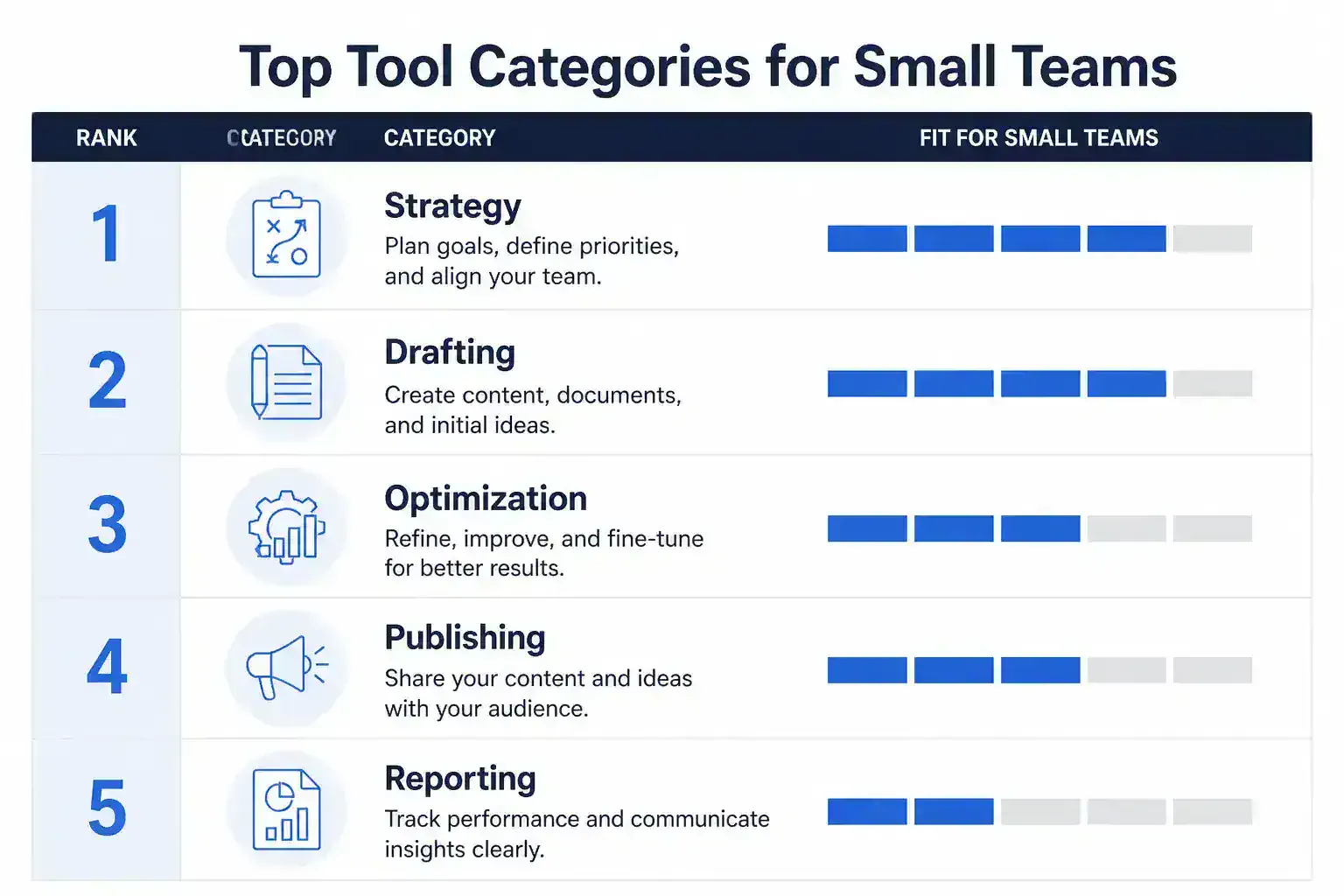
Small marketing teams usually get farther with a lightweight stack of focused tools than with one monolithic platform. That is especially true for AI marketing tools, where one product may handle strategy, another drafting, and another publishing or measurement. The best AI tools for small teams cut setup time, fit your current stack, and move work from idea to published content without extra handoffs.
The real ranking is job fit, not brand hype. Strong content strategy tools split research, search engine optimization (SEO), ideation, workflow, design, and scheduling so each tool earns its place.
| Tool or category | Best at | Why it ranks high for small teams |
|---|---|---|
| Floyi | Closed-loop strategy and execution | Connects brand and audience inputs to topical map, brief, draft, publish, and track in one system |
| ChatGPT for marketing and Claude | Ideation and long-form drafting | Fastest path to first drafts and concept expansion |
| Gemini | AI search visibility | Helpful when AI search presence matters in planning |
| Jasper | Brand-consistent copy | Strong for repeatable voice control |
| Surfer SEO | Real-time content optimization scoring | Useful when you want page-level guidance while writing |
| Canva | Quick visual production | Covers simple creative needs without a separate design stack |
| Buffer | Publishing and scheduling | Keeps distribution lean and simple |
| Mailchimp | Email distribution | Handles newsletter and campaign sends |
| Notion | Planning and SOPs | Works well for lightweight documentation and coordination |
| Google Analytics 4 | Post-launch performance tracking | Gives you the measurement layer after content goes live |
The selection criteria that matter most are practical, not flashy:
- True cost at your actual seat count: A low entry price can look good until you add writers, editors, and client seats.
- Time-to-value under two weeks: If setup drags on, the tool becomes hard to justify.
- Stack fit: The tool should work with your CMS, CRM, and analytics setup without awkward workarounds.
- Low collaboration friction: Small teams need shared visibility without constant status chasing.
- Repeatable workflow support: The best tools support a process instead of producing one-off outputs.
Floyi stands out because it is built for a closed-loop workflow. Brand and audience inputs feed the topical map, the brief, the draft, publishing, and tracking in one system. Native WordPress publishing and map-anchored AI search visibility tracking across 11 engines make it especially strong when strategy has to stay connected through delivery and measurement.
The smartest setup is usually one strategy system plus focused execution tools. Floyi is strongest when your strategy has to stay connected from planning through publishing and reporting, while point solutions still have clear jobs. ChatGPT for marketing and Claude are usually the quickest picks for ideation and long-form drafting, Gemini matters when AI search visibility is part of the brief, Jasper fits brand-safe copy, Surfer SEO wins on optimization scoring, and Canva handles fast visual work.
Most teams also use two to three large language models (LLMs) for marketing in combination, not just one. That makes fit with your existing stack, security and data handling, free trials, and cost per seat at real team size more important than a long feature list. For agency tools and in-house teams alike, the best answer is the one that reduces tool sprawl while keeping your workflow intact.
1. Floyi — Best Closed-Loop Strategy Workflow
Floyi is strongest for multi-brand or client work. It also keeps approvals and source material in one place. If you run content for multiple brands or clients, that continuity saves real time.
Floyi sits in the same buying lane as content strategy platforms with topical mapping, but its closed-loop design carries farther from intake to publish-ready output. Brand Foundation inputs, persona guidance, and scoped Knowledge Base documents ground each brief in approved source material. Those same signals then carry into multi-agent drafts with version history, autosave, and rewrite tools.
Floyi turns topic clustering into an execution path:
| Need | Floyi gives you |
|---|---|
| Research to brief | Intent-based clustering, page-level topical maps, and source-grounded briefs |
| Publish direction | Authority Planner guidance with content direction, keyword lists, internal link targets, incoming anchor text options, and quick anchor generation |
| Team alignment | A shared hierarchy that reduces overlap and keeps contributors and clients on the same page |
| Stack sync | Exportable site architecture outputs for Google Sheets, Excel, and CSV |
For workflow management, that structure replaces email review loops and spreadsheet sprawl with one centralized workspace. Small teams get client-ready topical research and exportable maps fast. Agencies get a cleaner approval path because everyone works from the same hierarchy and source set.
The reporting layer is just as practical. Floyi can surface exportable KPI summaries, leaderboards, trend data, and spreadsheet-friendly outputs that fit existing CMS, analytics, or reporting stacks. That matters when leadership wants proof, not just a content calendar.
Time-to-value is another edge. Scoped knowledge retrieval, SERP-backed clusters, and artificial intelligence (AI) visibility cues from Google AI Overviews, AI Mode, and ChatGPT Search help you launch a strategy that is usable fast and easier to defend in client or leadership reviews. Lean stacks can be cheaper for basic publishing, but SEO-heavy and agency workflows usually need the closed-loop path more than they need the lowest sticker price.
Floyi is the faster route when your real goal is topical authority, AI search visibility, and fewer wasted cycles across teams.
2. Buffer — Best Lightweight Publishing
Buffer fits best when you want a simple publishing layer, not a sprawling social suite. It gives small teams and boutique agencies a clean way to schedule, queue, and ship posts without extra workflow drag or long onboarding. If your marketing automation stack already handles routing and nurture, Buffer can stay focused on distribution.
The pricing signal is a big part of the appeal. Buffer Essentials starts at $6 per channel per month, which makes it easy to slot into a lean stack without an enterprise-style commitment. That is especially useful when budget matters more than deep collaboration depth.
A lean setup often works with four pieces:
- One operational hub: for planning and task visibility
- One SEO platform: for research and content direction
- One publishing tool: for scheduling and distribution
- One AI assistant: for faster drafting and reuse
Buffer plays the publishing role well in that setup because it reduces friction instead of adding another layer. You can move from draft to distribution with fewer handoffs and less tool hopping. For teams trying to reduce fragmentation, that kind of simplicity speeds time to value.
The trade-off is easy to see in a side-by-side view:
| Need | Buffer | Planable or Loomly |
|---|---|---|
| Best fit | Simple publishing and fast distribution | Visual calendars and client approval loops |
| Workflow style | Low admin burden | More collaborative review steps |
| Team priority | Speed and affordability | Coordination and sign-off |
If your content process is already handled elsewhere, Buffer gives you a lightweight publishing endpoint that keeps the stack agile and affordable. For teams that are time-constrained more than idea-constrained, that is usually the right call.
3. ChatGPT — Best For Fast Ideation
When speed matters more than structure, ChatGPT gives you the quickest path from idea to rough draft. For ChatGPT for marketing, that means less time staring at a blank page and more time testing angles you can refine later. It works best as the front end of your stack, not the whole stack.
A simple prompt can carry a lot of the load. Paste the topic, audience, and goal, then ask for:
- Headline variations
- Content angles
- FAQ prompts
- Outlines
- Draft paragraphs
That workflow gives you momentum in one session. It is a strong fit when you want an ideation layer instead of a full workflow suite. LLMs for marketing are most useful here when the goal is speed, not final polish.
The usage data supports that recommendation. ChatGPT holds about 64.5% of the consumer-facing AI assistant market by usage share as of January 2026. For small teams, the broader pattern is just as practical. Five LLMs cover about 95% of meaningful usage, and most teams rely on 2 to 3 tools together.
The guardrails still matter:
- AI disclosure matters when client policy, contract terms, or the EU AI Act requires it.
- Avoid sensitive inputs such as private client data, unreleased campaigns, or internal financial details.
- Verify facts before publishing and keep human editing and brand review in the loop.
- Maintain compliance checks for legal review, voice consistency, and governance.
ChatGPT works best as a fast starting point, not the source of truth. The strongest results come when you use it to accelerate drafts, then let your team add judgment, accuracy, and brand control. Not financial advice.
4. Claude — Best For Long-Form Drafting
Claude AI is the strongest choice when you need a long-form drafting engine that can carry a full article, guide, or landing page without losing structure, tone, or momentum. It fits best in the middle of your workflow, after strategy and brief creation and before human editing and SEO finalization. For agency teams, that makes it a practical bridge between planning and publish-ready content.
Its edge is draft quality, not brainstorm speed. While other AI tools are built for rapid ideation or short copy, Claude does a better job turning a solid outline into readable long-form prose with smoother transitions and a more editorial feel. That matters when the assignment is a 1,500-word guide, not a headline list.
Brand voice controls make the difference in real work. You can feed Claude style guides, client examples, product notes, and editorial rules so the first draft sounds closer to the target brand. That helps you balance search intent, brand voice, and topical coverage without starting from a generic AI draft.
A clean agency handoff looks like this:
- Drafting layer: Claude turns the brief into a strong v1.
- Editing layer: Writers and editors tighten accuracy, sharpen claims, and align compliance.
- SEO layer: Search-focused tools handle on-page SEO and content optimization.
- Publishing layer: The final page moves through your normal CMS workflow.
Claude should stay the drafting layer, not the final authority. Paired with tools like Surfer SEO, it helps you move faster from brief to draft while keeping editorial control intact. That is why it fits so well inside a modern agency stack across multiple clients.
5. Gemini — Best For AI Search Visibility
Gemini AI is strongest when AI search visibility matters more than classic SEO alone. Google’s AI Overviews now appear on roughly 80% to 88% of informational queries and reach more than two billion monthly users, so discovery now happens in the answer layer as much as in blue links. That shifts your goal from ranking only to showing up where AI systems summarize, cite, and reframe content.
Gemini deserves a place in your stack when you want to see what Google’s AI systems are surfacing, not just what the SERP is ranking. AI Overviews sit beside organic results, and they can change how your pages get seen, quoted, and selected. A small-team stack usually works better than a single-tool bet, because competitor research shows that five major LLMs capture about 95% of meaningful usage and most teams use 2 to 3 together.
The GEO targets that matter most are straightforward:
- Entity coverage: build a full, specific topic graph.
- Answer completeness: address the full question, not just the keyword.
- Clear structure: use crisp headings and short sections.
- Source-backed claims: support statements so AI systems can trust and reuse them.
Gemini also helps upstream in planning. It shows what people and AI engines are searching for, then helps you shape briefs and drafts around those high-value topics before publication. For small teams and agencies, that protects content spend by extending reach into AI surfaces and reducing the chance that a page only serves classic SERP intent.
6. Jasper — Best For Brand-Consistent Copy
Jasper works best when you need repeatable copy that still sounds like the client. You can load style guides, tone settings, and brand assets so the first pass on blogs, social posts, ad variants, briefs, and campaign copy stays closer to approved voice. That matters when one offer has to move across channels without sounding like it came from five different writers.
Where Jasper earns its keep:
- Recurring production: Faster first drafts help when the same topic needs a blog, a social set, an email angle, and a paid ad variant.
- Agency account management: Consistent tone across client accounts reduces the back-and-forth that often follows an AI draft.
- Brand-language cleanup: Built-in structure cuts the time spent turning generic output into language that passes review.
- Campaign repurposing: One offer can become channel-specific assets without starting from scratch each time.
The trade-off is clear. Jasper Pro is listed at $59/month. That sits above lightweight drafting tools, but the extra cost can make sense if you publish high-volume copy and want a dedicated brand-voice layer instead of prompting from scratch every time.
Jasper is still mainly a copy-scaling tool. It works best beside strategy and optimization workflows, not as a full closed-loop content system. It often sits alongside Copy.AI for drafting, MarketMuse for planning, and StoryChief for publishing. Its real edge is brand consistency, not end-to-end planning or publishing.
If you only need occasional drafts, the monthly fee can feel steep. If you ship branded content every week, Jasper can save rewrite time and keep the voice steady across accounts.
7. Surfer SEO — Best For Content Optimization
Surfer SEO fits when you already have a draft and need it to rank better. It is built for content optimization, not ideation or publishing. The Content Editor gives you a live score and real-time guidance, so the page stays close to what search engines already reward.
That score works best when it turns into a clear checklist for the writer. Junior writers and freelancers can follow it instead of guessing what to include:
- Suggested keywords: terms that help the page match search intent
- Required headings: structure cues that mirror top-ranking pages
- Word-count range: a target length instead of a vague estimate
- NLP entities: related terms and concepts that often show up on page-one results
For small teams, that usually means fewer revision loops and less hand-holding from senior editors. Writers can compare drafts with top-ranking pages, tighten coverage, and ship cleaner copy before CMS review. That saves editing churn and speeds up QA.
The pricing context matters if you are building a lean stack:
| Tool | Starting price | Best fit |
|---|---|---|
| Surfer SEO | around $79/month | Deep on-page optimization |
| Semrush Content Toolkit | $60/month | Standalone content workflows |
| Jasper Pro | $59/month | Drafting and AI-assisted writing |
Surfer SEO sits above those lower-priced options, so the value is in optimization depth, not raw brainstorming. That makes it a stronger fit when you already have a draft and need tighter search alignment.
The case for using it as a QA layer is strong. Competitor data shows Surfer’s Content Score has a measurable 0.28 correlation with rankings. That supports using it to standardize structure, keyword coverage, and entity inclusion before publication.
For agencies and small content teams, the payoff is simple. Editing churn drops, QA time shortens, and cleaner content gets out the door with less back-and-forth.
8. Canva — Best For Fast Visual Content
Canva is the fastest path to social-ready visuals when you do not have a dedicated designer. Its templates, drag-and-drop editing, and quick format changes cut the time spent bouncing between design tools. For small teams, that speed matters more than deep creative control.
The pieces that make it work are straightforward:
- Template depth: Build posts, carousels, presentation slides, and simple ad creative without starting from a blank canvas.
- Multi-size reuse: Turn one concept into several platform versions without rebuilding the design from scratch.
- Brand kit control: Lock in logos, colors, and fonts so non-designers still keep every asset on brand.
- AI-assisted resizing: Reformat a single concept for Instagram, LinkedIn, Facebook, or email with minimal cleanup.
That mix makes Canva a strong fit for visual content creation and content repurposing in busy workflows. It lowers the skill barrier, shortens review cycles, and keeps production moving when speed matters more than advanced design precision.
Adobe Express is a viable alternative, and Adobe Firefly is worth a look if your team wants more AI-generated image options. Even so, Canva is usually the default for small teams that want template depth, brand consistency, and fast turnaround with less overhead.
9. Mailchimp — Best For Email Distribution
Mailchimp is a strong fit when email distribution needs to stay simple. You can build a campaign, reuse a template, and send it without getting pulled into a full marketing suite. The drag-and-drop editor and approachable automation make it easy to learn fast, which helps when no one on the team is an email specialist.
Its basic segmentation still gives you enough control to send more relevant messages:
- Tags: group contacts by interest, product, or lifecycle stage
- Signup source: separate newsletter leads from event or form subscribers
- Engagement: target people who open, click, or go quiet
- Customer status: tailor sends for prospects, active customers, or lapsed buyers
Pricing is most attractive for smaller lists and teams that want an entry point they can grow from. Costs rise as your subscriber count and sending volume increase, so check the current tier against your list size and marketing automation needs before you commit.
Reporting works best when Mailchimp campaign analytics are paired with Google Analytics 4 (GA4). That combination shows what happens after the click, not just who opened or tapped. If you need deeper CRM-style sales and marketing integration, HubSpot is the better fit. Mailchimp stays the cleaner standalone option when your stack only needs email distribution and basic audience targeting.
10. Notion — Best For Planning And SOPs
Notion works best as a low-cost planning layer that keeps editorial calendars, briefs, campaign roadmaps, and SOPs in one workspace. Strategy and execution stay side by side instead of living across scattered docs. For small teams, that flexibility often matters more than heavier process controls.
Teams also use it as a content wiki or Marketing Operating System. You can build reusable pages for brand kits, voice guidelines, approval notes, and process docs. Those assets can sit inside briefs and calendar views, which makes handoffs faster and less messy.
The setup stays light because Notion adapts to your workflow:
- Databases, templates, tags, and linked views that match how your team already works
- Built-in AI that can summarize meeting notes, brainstorm headlines, and turn rough inputs into cleaner draft directions
- Central planning context that connects cleanly to your CMS, reporting, and content production stack
- Low setup overhead that fits small teams better than enterprise process layers
| Tool | Best fit | Main tradeoff |
|---|---|---|
| Notion | Planning, SOPs, and documentation | Not a publishing or analytics replacement |
| CoSchedule | Editorial calendars | Less flexible as a full wiki |
| Airtable | Structured calendar and workflow tracking | Less natural for brand and process docs |
That is why teams often shortlist Notion alongside CoSchedule or Airtable for editorial planning. Agency workflows may still need separate approval-specific tools elsewhere, but Notion wins when you want one flexible, cost-effective hub for planning and documentation. If your stack already has a CMS and analytics layer, Notion is the glue that keeps the operating system readable.
11. Google Analytics 4 — Best For Performance Tracking
GA4 sits at the center of performance tracking because it connects content engagement to business outcomes instead of stopping at page views. For small teams and agencies, that means you can trace articles, landing pages, and clusters back to leads, signups, demo requests, and other revenue-adjacent actions. Keyword tracking gets more useful too, because rankings stop being the whole story.
The attribution paths that matter most are easy to read in reports:
- First-touch discovery: which page or cluster introduced the visitor
- Assisted conversions: which content helped move the session forward
- Downstream actions: form fills, email signups, demo requests, and ecommerce events
That structure helps you show clients or leadership not just what ranks, but what moves people toward a measurable result.
GA4 gets even stronger when you pair it with Looker Studio for branded reporting. Funnel helps when you need cross-platform measurement across ads, CRM data, and other channels. If you also compare best content strategy tools for ecommerce teams, GA4 still answers the harder question of whether those pages earn traffic and action.
The smartest use case is to place GA4 beneath optimization tools. If Clearscope or MarketMuse improves topic coverage and ranking velocity, GA4 shows whether those gains turn into stronger engagement and conversion performance. That link between topical authority work and real demand is what makes the business case hold up.
For lean teams, GA4 fits cleanly into a typical agency stack of about 10 to 15 core tools without adding much overhead. The real value is not session tracking alone. It is a numbers-backed story you can defend with confidence.
How Do You Choose The Right Stack?
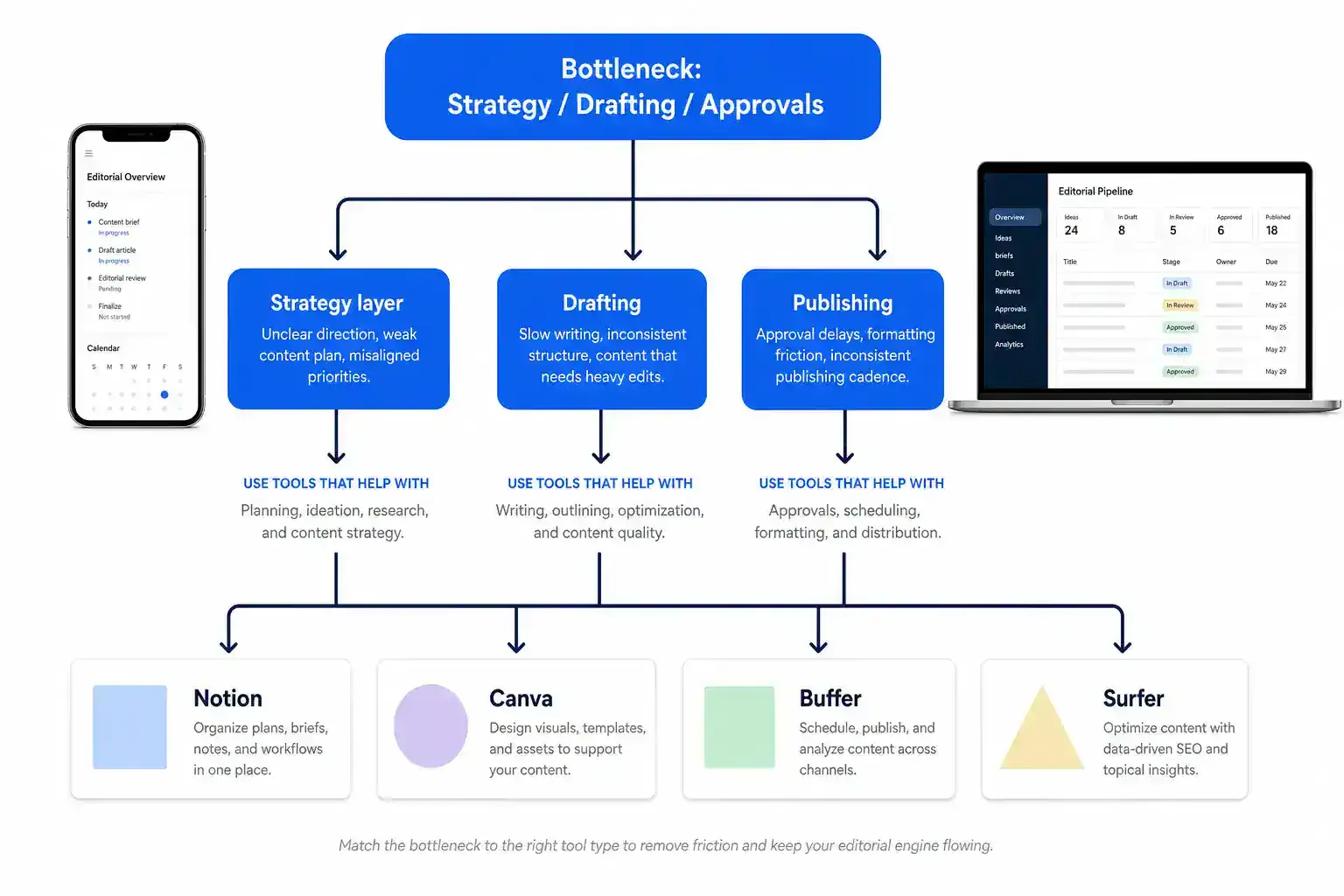
A strong stack starts with the biggest bottleneck, not the longest feature list. If strategy clarity is the problem, a strategy layer like Floyi should come first. If drafting or optimization is the drag, writing tools deserve the budget. If approvals slow everything down, workflow and collaboration tools should lead, because return on investment follows the constraint.
That is where content strategy tools differ from AI marketing tools that only add speed. The best AI tools for small teams are usually narrow, opinionated, and easy to connect to the rest of your stack. Big, glossy tool lists look impressive until they start eating time.
| Team or use case | Stack shape that fits | Why it works |
|---|---|---|
| 1 to 3 person team | Floyi or one research layer, Notion for planning and SOPs, Canva for visuals, Buffer for publishing | Keeps the stack lean and avoids 12-plus-tool sprawl that can consume nearly 40% of a small team’s time |
| 4 to 15 person agency | ClickUp or another project hub, Semrush or Ahrefs for research, Planable for approvals, HubSpot for reporting and lifecycle visibility | Moves work from one person’s head into repeatable delivery |
| SEO-heavy team | Semrush, Ahrefs, Clearscope, Notion, Google Analytics 4 | Connects keyword research, topical planning, optimization, and outcome tracking |
For solo operators and tiny teams, single-tool-per-category discipline matters more than fancy coverage. One research layer is enough if it gives you topic selection, search visibility, and a usable next step. Floyi is often the stronger fit when you want the strategy layer to do real work instead of just surfacing keywords.
For a 1 to 3 person team, keep the stack tight:
- Planning: Notion for briefs, notes, and SOPs
- Visuals: Canva for fast creative production
- Publishing: Buffer for scheduling and distribution
- Research: One topical and search layer, especially if you need a clearer content map
Agencies with 4 to 15 people need a different shape. The goal shifts from individual speed to repeatable delivery. ClickUp or a similar hub keeps work visible. Semrush or Ahrefs handles keyword and competitive research. Planable simplifies approvals, and HubSpot helps account leads see what content is doing across the funnel without spreadsheet chaos.
If your work is SEO-heavy, the stack should tie research to performance, not just rankings. Semrush gives you keyword and competitive data. Ahrefs is a strong alternative for that same research layer. Clearscope helps with optimization, Notion keeps briefs organized, and Google Analytics 4 connects the work to topical authority and ranking velocity.
Before you buy, judge every shortlist against a few hard filters:
- Integration fit: Does it work with your existing CMS, analytics, and CRM stack?
- Data handling: Does it meet your security and access requirements?
- Cost per seat: Does the price still make sense at your actual team size?
- Time-to-value: Can the team use it quickly enough to justify the subscription?
- Proof in practice: Can it improve a deliverable, save time, or both?
A simple decision rule works best. Pick the tool that solves one primary bottleneck, stays inside budget, and creates something you can use or show a client right away. Solo operators should prove value in a free trial. Agency owners should test on 2 to 3 real clients and keep only the tools that improve deliverables or save time.
Not financial advice. Choose the stack that fits your bottleneck, your seats, and your current systems.
Which Stack Fits Small Teams Versus Agencies?
Lean stacks and agency stacks solve different problems. Lean teams want fast onboarding and low coordination overhead. Agencies need workflow depth, approvals, reporting, and client-facing consistency.
The split is easier to see in a side-by-side view:
| Team shape | Primary use case | Budget ceiling | Time-to-value | Recommended tool combo |
|---|---|---|---|---|
| 1 to 3 person lean stack | Solo or small-team content planning, brief creation, and lightweight publishing | About $200 to $600 per month | Same day if the setup is tight | Notion + Canva + Buffer, with Floyi as the SEO and AI search planning layer |
| 4 to 15 person agency stack | Multi-client workflow, approvals, and proof of value | About $500 to $2,500 or more per month, depending on seats and reporting depth | Short pilot across 2 to 3 accounts before standardizing | ClickUp + Semrush + Planable + HubSpot, with Google Analytics 4 for performance tracking |
The lean stack works best when setup friction stays low. The best content strategy tool features for freelancers and solo consultants line up with this model because speed matters more than process weight. Notion handles planning. Canva handles fast visuals. Buffer keeps publishing lightweight.
If SEO is the main motion, Floyi adds the AI search visibility and topical planning layer. That lets you move from brand and audience inputs to a usable topical map without stitching together spreadsheets. Floyi’s closed-loop workflow matters here because it reduces handoffs for small teams. For a small team, that can mean a client-ready asset the same day instead of a pile of handoffs.
Agency tools work differently because they have to support repeatability, not just output. ClickUp gives you one operating surface for tasks and approvals. Planable keeps client-facing review clean. HubSpot adds reporting context, while Semrush can replace several point tools at once, which is why it can feel expensive but still cost-efficient when it consolidates research, keyword discovery, and competitive analysis. Pair Surfer SEO with Semrush when optimization matters. Use Notion when your content strategy workflow needs a lighter planning layer.
For SEO-heavy agencies, the most practical path is Semrush plus Surfer SEO plus Notion, with Google Analytics 4 for measurement. That stack fits best when ranking growth and topical authority are the main deliverables. Semrush brings breadth, Surfer tightens on-page execution, and Notion keeps strategy legible for writers and editors.
Time-to-value should change how you judge the stack:
- Lean teams: Aim for something stakeholder-ready the same day.
- Agencies: Run a short pilot across 2 to 3 accounts before rolling out the system.
- Floyi users: Keep brand, audience, topical map, draft, and publishing in one closed loop to shorten the path from strategy to visible output.
The decision rule is straightforward. If you are 1 to 3 people, optimize for speed, clarity, and low monthly burn. If you are 4 to 15 people, optimize for collaboration, repeatability, and reporting. Match the stack to the current bottleneck first. Ideas, production, and client reporting call for different levels of tooling. Not financial advice.
How Do These Tools Work Together?
The cleanest setup keeps your stack small and your workflow management simple. That usually means one hub, one research layer, one drafting tool, one review layer, and one publishing path.
A practical handoff looks like this:
| Stage | Tool fit | What moves forward |
|---|---|---|
| Research | Semrush, Surfer SEO, and Perplexity | Keyword targets, competitor gaps, source ideas, and optimization signals |
| Planning | Notion | A single brief, outline, or content card |
| Drafting | ChatGPT, Jasper, or Claude | A first draft built from the brief |
| Review | Planable | Comments, version comparison, and approval |
| Publishing | Buffer, Metricool, or the CMS | Scheduling, channel distribution, and launch-ready formatting |
| Feedback | Analytics and the next research pass | Performance notes that shape the next cycle |
Research should start in Semrush or Surfer SEO and land in one planning artifact in Notion. Semrush is strong for keyword discovery and competitor scans. Surfer SEO adds content optimization signals that help shape on-page structure. Topic clustering then turns raw findings into a cleaner page group instead of a pile of one-off ideas. Perplexity can sit beside that research layer when you need quick source checks or fresh angle discovery, but it works best as support rather than the main system.
The handoff into AI drafting needs to be explicit. Include target intent, outline, key entities, and brand voice guidance so ChatGPT, Jasper, or Claude can produce a first draft without rehashing the strategy. That keeps the team out of tab-hopping and cuts down on repeat explanation.
Planable removes the email bottleneck that slows review cycles. Internal editors and clients can compare versions, leave comments, and approve a near-final draft in one place. That same setup also makes content repurposing easier, because one approved asset can be adapted for social, email, or a second channel without reopening the whole cycle.
Publishing should be the least painful step. Buffer or Metricool can schedule and distribute the finished piece, while a tighter CMS workflow can publish directly when the platform allows it. The goal is to preserve approved copy and metadata and skip a second cleanup pass before launch. Floyi fits the closed loop by connecting brand and audience inputs to topical maps, briefs, drafts, AI writing support, content optimization, and direct WordPress publishing in one workflow.
For small teams, the rule is simple. Keep one shared hub and one strong tool per stage unless you truly need deeper governance or multi-client collaboration. The best system is the one you can repeat with fewer handoffs and less friction from insight to draft to approval to distribution.
How Do You Measure ROI And Keep It Lean?
The leanest ROI setup starts with a small KPI stack tied to business outcomes, not vanity counts.
Track a before-and-after view of these metrics:
| KPI | What it tells you | Where to watch it |
|---|---|---|
| Time-to-publish | How quickly strategy becomes live content | CMS, workflow tools, internal reporting |
| Cost per piece | What each asset really costs to produce | Budget tracker, planning sheet |
| Traffic lift | Whether the content is attracting more demand | GA4 and SEO tools |
| Conversion lift | Whether the content is moving action | GA4, CRM, and revenue reports |
| SEO visibility | Whether the page is gaining search presence | SEO platform and rank tracking |
That mix shows whether you’re producing faster, spending less per asset, and improving performance per dollar spent. It also keeps ROI tied to business impact instead of pageviews alone.
A quick-win dashboard should roll up the whole topic map, not just one page at a time.
The strongest view usually brings these signals together:
- Topic-cluster performance
- Ranking velocity
- Content gap closure
- Publishing throughput
- Market Authority, share of voice deltas, coverage and performance movement, and AI Authority
Floyi-style reporting makes that mix more useful because you can see whether gains are compounding across the map. A weak cluster, a new gap, and a rising page should read as one story, not three separate reports.
GA4 should answer one question first: what content drives action.
Track these metrics in GA4:
- Organic sessions by landing page
- Engaged sessions
- Conversions or conversion events
- Assisted conversions
- Revenue or pipeline attribution, when available
Pageviews tell you someone arrived. Conversions show whether the content moved them forward. When your CRM is connected, you can see which topics create real pipeline, not just traffic spikes.
SEO tools fill in the why behind the movement. Semrush-style clustering and structural-gap analysis can show missed topics, weak internal coverage, and pages that should rank but do not. SERP insight reports help confirm whether your page structure matches what is already winning. Pair that with GA4, and you can separate more traffic from better traffic.
Keep the stack lean by choosing tools that fit your content management system (CMS), analytics, and customer relationship management (CRM) workflow cleanly. A practical agency setup is simple:
- GA4 for outcome tracking
- One SEO platform for visibility and gap analysis
- Looker Studio for a shared view
- Only the planning or publishing tools your team uses every week
The best stack reaches time-to-value in under two weeks. Duplicate reporting layers only make sense when they remove manual work.
Review ROI on a cadence you can sustain:
- Weekly: publishing throughput and new ranking movement
- Monthly: coverage trends and performance shifts
- Quarterly: topic breadth, authority gains, and major gaps
Floyi’s operating model also supports board-ready exports for share of voice and rankings, and each chart can click through to the exact topics and pages that need attention. That makes the ROI story easier to defend and easier to act on. This is a measurement framework, not financial advice.
FAQs
These FAQs cover the questions you’re likely weighing before choosing a stack, from pricing and integrations to workflow fit. They also address AI disclosure and EU AI Act considerations so compliance stays in view.
1. Should You Use All-In-One Or Specialized Tools?
For most small teams, a lightweight stack of best-in-class tools is the better bet when CMS, analytics, and CRM fit matter most. All-in-one platforms can look simpler on paper, but forced workflows often slow planning, drafting, optimization, and publishing. Specialized tools work best when they connect cleanly to your CMS, analytics, and CRM, and Floyi goes a step further by closing the loop from brand and audience to topical map, draft, and publishing.
2. How Much Should A Small Team Budget?
A lean small-team stack usually lands between $100 and $300 per month, and a more practical middle tier is $250 to $500 once you add an optimizer, planner, and publishing tool. A starter setup can sit near $100 to $150 with Floyi Free, Buffer Essentials, Canva Pro, and Perplexity Pro, while a fuller growth stack can reach about $500 with Floyi Pro, Surfer SEO, Semrush Content Toolkit, Jasper Pro, and ClickUp. A pricing comparison of content strategy platforms helps you compare fit, but per-seat pricing, CMS, analytics, or CRM integrations, and agency client volume can push small-agency stacks to $500 to $2,500 or more. Not financial advice.
3. Can Free Tools Cover A Basic Stack?
Yes, a basic free stack can cover analytics, visual creation, planning, and first-pass AI work. Pair Google Analytics 4, Canva, and one AI tool for ideation, briefs, and drafts, and Floyi’s free plan adds 500 credits plus Brand Foundation, Buyer Personas, Topic Hierarchy, and Topical Maps with no credit card required. The trade-off is scale, since free tiers usually limit seats, credits, and workflow depth, so paid tiers make more sense once you need consistent output, client collaboration, stronger brand-voice control, or richer tagging in tools like Jasper and Airtable.
4. How Do You Avoid Tool Overload?
Keep your stack lean by giving each tool one job: one hub, one SEO tool, one publisher, and one AI assistant. Start with the biggest bottleneck, whether that is topic discovery, drafting, or approvals, and choose the fewest tools that remove it. A quarterly content audit helps you cut duplicate workflows and stale pages, while automation can handle brief routing, publishing, and status updates, leaving human review in place for brand voice, compliance, and client sign-off.
About the author

Yoyao Hsueh
Yoyao Hsueh is the founder and CEO of Floyi, the topical authority platform, and the founder of Main Heading, an SEO and AI search agency. He created Topical Maps Unlocked, a course studied by thousands of SEOs, content strategists and digital marketers, founded TopicalMap.com, a done-for-you topical mapping service for agencies and enterprise teams, and publishes the weekly Digital Surfer newsletter on SEO, content strategy and AI search.
About Floyi
Floyi is a closed loop system for strategic content. It connects brand foundations, audience insights, topical research, maps, briefs, and publishing so every new article builds real topical authority.
See the Floyi workflow