
7 Best Content Strategy Tools for Freelancers
Compare 7 content strategy tools for freelancers, with SEO and AI features, pricing, workflows, and when Floyi is the smarter choice.
The best content strategy tools for freelancers help solo marketers turn research, briefs, and publishing plans into client-ready work. Many consultants still piece together keyword exports, SERP notes, and approval comments across separate apps, and the admin time quietly eats into billable hours. A content strategy tool is software that turns research and brand inputs into structured topic plans, briefs, and next-step actions, so the first pass is cleaner and faster.
The comparison covers seven options, including Floyi, Asana, Grammarly, Buffer, Canva, Unsplash, and Medium, so the trade-offs are easy to see for SEO-heavy client work. Expect a clear look at topical research, SERP-validated maps, editing polish, social scheduling, visual support, and publishing. A simple stack framework and pricing logic are included so the right mix fits your workflow instead of bloating it.
Freelance SEOs, solo content strategists, and small growth teams care most about setup speed, client reporting, and keeping brand voice intact across every deliverable. A strategist who starts with Floyi for topical mapping and uses Asana only for approvals can move from keyword research to a client-ready brief without bouncing between spreadsheets. That kind of setup keeps costs focused on work that supports measurable SEO output, and the comparison below shows how to build it.
Freelancer Content Tools Key Takeaways
- Floyi is the strongest end-to-end strategy platform for solo SEO workflows.
- Asana handles task tracking, deadlines, and client approvals.
- Grammarly speeds up editing, but it does not build topical maps.
- Buffer manages simple scheduling and RSS-based promotion.
- Canva and Unsplash cover visuals, not research or SEO analysis.
- Medium works for fast publishing and thought leadership testing.
- The leanest stack weighs price, onboarding, integrations, and measurable output.
Which Tools Rank Highest For Solo Consultants?
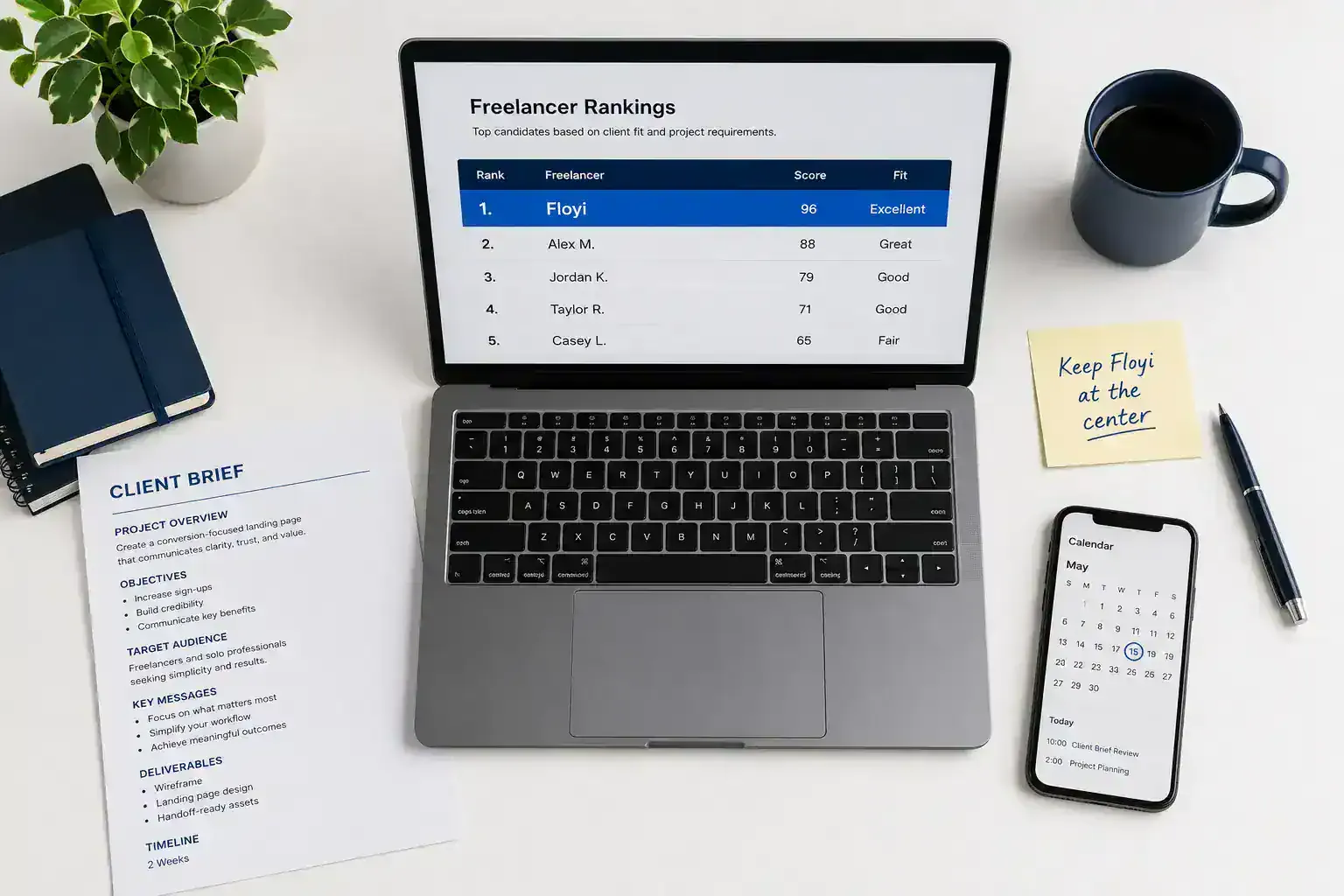
Solo consultants get the best return from content marketing tools that do more than one job. In tool feature comparisons, the biggest winners cut handoffs, reduce spreadsheet time, and support content activation without piling on subscriptions. For marketing tools for freelancers, Floyi ranks first because it combines brand foundation, audience insights, topical research, SERP-validated maps, brief creation, draft-to-publish support, and authority tracking in one workflow.
| Rank | Tool | Best fit | Why it belongs here |
|---|---|---|---|
| 1 | Floyi | End-to-end strategy | One system for research, planning, execution, and reporting. |
| 2 | Asana | Client delivery tracking | Strong for tasks and deadlines, but it does not replace strategy or search engine optimization (SEO) analysis. |
| 3 | Grammarly | Final polish | Fast editing help, but it will not build topical maps or connect content to authority growth. |
| 4 | Buffer | Distribution | Useful for scheduling, RSS feed integration, cross-platform posting, and a simple dashboard. |
| 5 | Canva and Unsplash | Visual support | Handy for graphics and image sourcing, but not research or artificial intelligence (AI) tools. |
| 6 | Medium | Fast publishing | Best when speed matters more than a full strategy system. |
Keep Floyi at the center, then add Asana only if client task tracking is a real pain point. Buffer fits well when freelancer marketing tactics include steady promotion across channels.
Grammarly, Canva, Unsplash, and Medium work best as support tools, not the engine. The strongest stack uses one core platform to connect planning, execution, and reporting instead of forcing you to stitch everything by hand.
If you want fewer tools and a cleaner workflow, start with the core system first and add only the lightest extras you actually need.
Not financial advice.
1. Floyi — Best For Strategy-First SEO Workflows
SEO work gets easier when research becomes a usable plan instead of a pile of notes. For freelancers comparing SEO tools for freelancers and AI tools for freelancers, that difference matters. Floyi sits with persona-driven content strategy platforms that connect keyword research to delivery, and it fits a practical content strategy framework built for billable work.
The details that matter most are straightforward:
- Topical Research: Live Google and YouTube autocomplete data, plus AI Search Gaps from ChatGPT, Gemini, and AI Mode, sharpen your audience research before you write a brief.
- Topical Clustering: SERP-driven grouping by intent and locale cuts overlap, limits cannibalization, and gets you to a defensible topic hierarchy faster.
- Topical Map: Page intent, URL slugs, Spreadsheet, Silo View, and Outline View make approvals easier and package cleanly for clients.
- Delivery stack: Brand Foundation, Audience Insights, and Knowledge Base keep every deliverable aligned to client voice, while your AI-driven workflow can expand from research and insights into briefs, drafts, and published outputs.
That structure makes Floyi easy to sell as separate research, strategy, and activation deliverables for productized freelance services. You can price premium work more cleanly while keeping brand, audience, and execution tied together.
2. Asana — Best For Client Task Tracking
Asana works well as a client-facing hub when you want project management for freelancers to stay visible and simple. One project per client keeps briefs, drafts, edits, approvals, and delivery in a single workflow. That keeps requests out of scattered email threads and gives clients one place to track progress.
A clear approval pipeline keeps work moving. Each task can carry a status, due date, and reviewer, so clients know what needs feedback, what is in revision, and what is ready to ship. Reusable templates speed up a content calendar, blog production, SEO audits, and monthly reporting, while Asana acts as a single source of truth for comments, file links, deadlines, and handoff notes in a shared workspace for drafts.
The real payoff comes when you connect Google Docs, Drive, and your other production tools.
- Link each task to the latest draft or final asset.
- Keep approval notes beside the work itself.
- Avoid duplicate work across platforms.
That setup keeps your task board tied to the work that matters.
3. Grammarly — Best For Fast Editing Polish
Grammarly works best as your last-pass editor after the draft already has solid structure. It catches grammar, spelling, punctuation, and consistency issues fast, so it fits neatly into a solo stack of content creation tools. That makes it a lightweight finishing tool when you need clean, professional copy without extra process overhead.
The biggest payoff is time. You can tighten client-facing copy, LinkedIn posts, and web pages in minutes instead of doing several manual proofreading passes.
A human editor still matters when the work needs:
- Argument quality: stronger logic and sharper persuasion
- Nuance: better handling of edge cases and subtle meaning
- Brand voice: copy that sounds like the client, not generic English
- Strategic messaging: a clearer link to the business goal
Use Grammarly for mechanical polish and obvious clarity fixes. Then finish with one read for tone, formatting, and factual accuracy. AI-assisted polish should support your judgment, not replace it.
4. Buffer — Best For Simple Social Scheduling
Buffer keeps social media scheduling light for solo consultants. You can batch posts, stay consistent, and avoid turning distribution into another task that eats your week. That matters when your value sits in strategy, not in platform hopping.
Its core workflow is simple and practical:
- Cross-platform scheduling: Publish to multiple networks from one queue.
- RSS integration: Pull new blog posts into automatic social sharing.
- Long-range queueing: Load posts months ahead and add date-specific updates when a launch or client moment needs it.
- Basic metrics: See quick traction signals without getting buried in complex dashboards.
That setup works well when you’re repurposing blog posts, newsletter snippets, and client thought leadership into a repeatable cadence. Buffer handles the repetitive promotion layer, so you can spend more time on positioning, messaging, and the craft of the content.
5. Unsplash — Best For Quick Visual Sourcing
Unsplash is a strong fit when you need polished visuals fast. It works well for blog headers, social previews, and client slide decks when a full photo shoot or custom illustration search would slow the project down.
Stock imagery fits best for early-stage posts, listicles, and support graphics where speed matters more than originality. Custom assets make more sense when the client needs product detail, proprietary proof, or a distinct brand look that stock photos can’t deliver.
A simple workflow keeps the result intentional:
- Match the image to the audience, color palette, and content angle.
- Crop it or pair it with typography so it feels designed, not generic.
- Check the license before delivery and avoid any hint of endorsement.
Unsplash images are generally usable in commercial client work, but attribution may still be required by a client style guide or publication standard.
6. Medium — Best For Publishing Thought Leadership
Medium works best when you want a low-friction place to publish SEO-adjacent thought leadership, test a point of view, and stay visible without running a full website. For solo consultants, it can fit portfolio platforms and support lead generation for freelancers who need proof of expertise fast.
The trade-off is simple:
- Reach: Medium can put your ideas in front of platform-native readers and people outside your current network.
- Control: Owned channels still give you stronger brand control, clearer conversion paths, and better list building.
- Measurement: A self-hosted blog or client portal usually gives you deeper tracking than Medium.
A strong post can also become:
- a POV memo
- a client briefing
- a sales follow-up asset
- a downloadable lead magnet
That reuse turns one argument into multiple client-facing assets.
7. Canva — Best For Client-Ready Visuals
Canva is the fastest option when you need polished, client-ready visuals without a full design workflow. It fits social graphics, slide covers, simple one-pagers, and branded lead magnets. For solo consultants, that usually means strategy beats expensive production. Strong imagery and clear layout are enough unless the brief truly calls for custom art.
A repeatable workflow keeps it efficient across clients:
- Brand kit: Set colors, fonts, and logos so every asset starts from the same approved base.
- Template control: Lock fonts and logo placement to cut revision time and keep layout consistent.
- Fast delivery: Duplicate a presentation, social post, or document template, then export the right format for decks, PDFs, or social channels.
That makes Canva one of the most practical content creation tools for marketing-first assets. It is weaker for complex information design, advanced motion, or highly custom brand systems. Bring in a designer when the work needs original visual identity, dense infographics, or a premium presentation that has to feel bespoke.
How Do You Compare Tools As A Solo Freelancer?
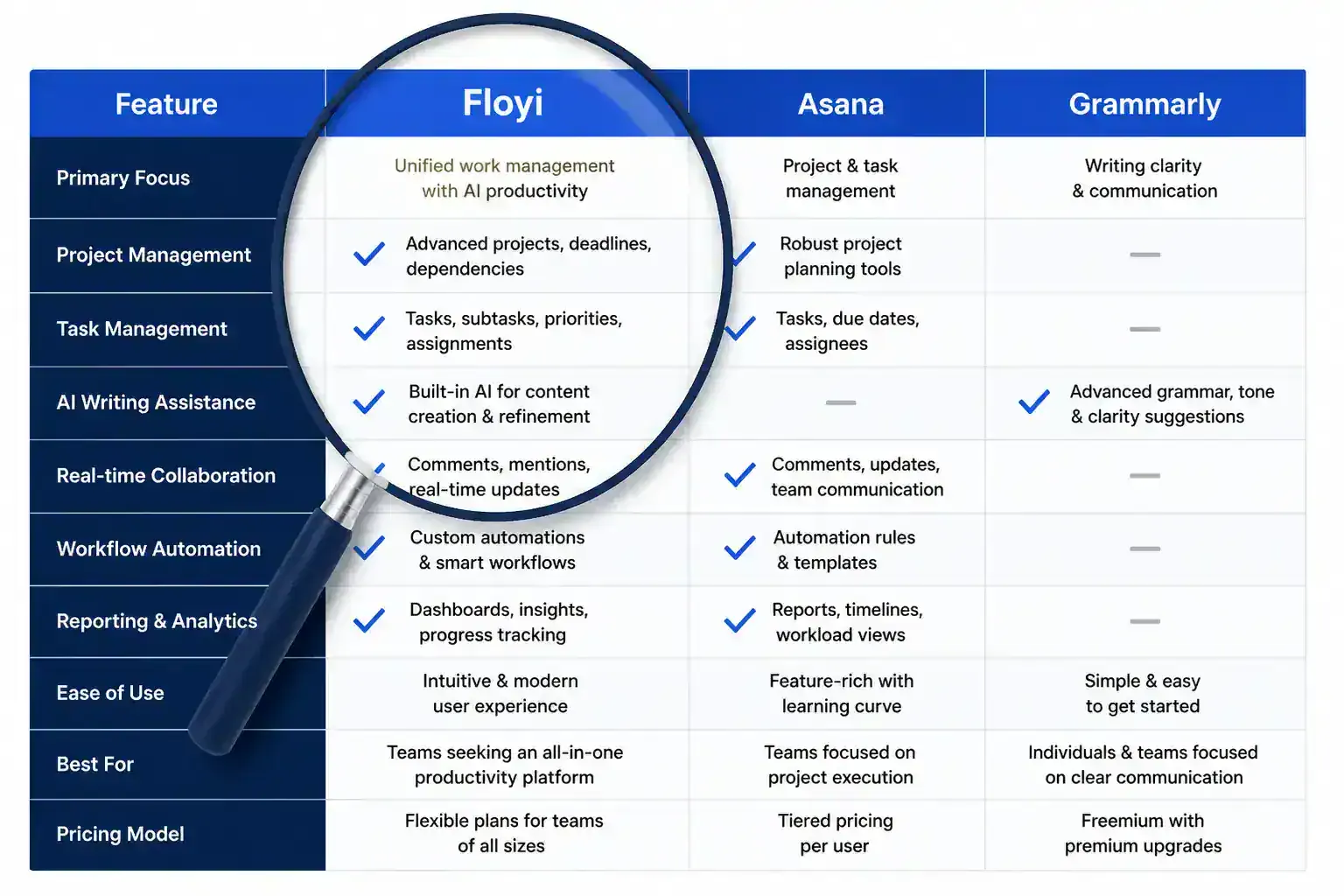
A broader full content strategy platform comparison helps, but your solo decision should start with the work a tool removes from your week. For workflow tools, tool feature comparisons matter most when they map to real deliverables like a client-ready brief, a topical map, or a publishable draft. That is what turns a content strategy framework into something you can run solo.
Compare options with this matrix:
| Factor | What to favor | Solo-freelancer signal |
|---|---|---|
| Cost | Ahrefs starts at $99/month and SEMrush starts at $119/month, while Frase runs from $39 to $239/month and Surfer SEO from $79 to $219/month | Subscription consolidation matters if a tool replaces spreadsheets or brief drafting |
| Learning curve | Fast setup and a quick first win | Floyi can run an AIRS analysis in 10 minutes and build a first topical map in 15 minutes |
| Collaboration | Branded exports, Google Sheets handoff options, and clear role controls | Clients review strategy without seeing your backend process |
| Workflow fit | Research, clustering, briefing, drafting, and publishing in one flow | SEO tools for freelancers should support your real sequence |
| Scalability | Reusable brand context, persona-driven planning, and consistent reporting | The best marketing tools for freelancers grow from one-off projects into retainers |
The strongest options also support audience research, preserve client data privacy, and make approvals easier. Floyi fits when you want a strategy layer that connects brand, audience, map, brief, and draft while still pairing with a core keyword tool for backlink and keyword data. For a solo consultancy, the right pick cuts non-billable work, speeds first delivery, and supports measurable AI search and SEO ROI without extra admin.
Which Tool Stack Fits Your Workflow Stage?
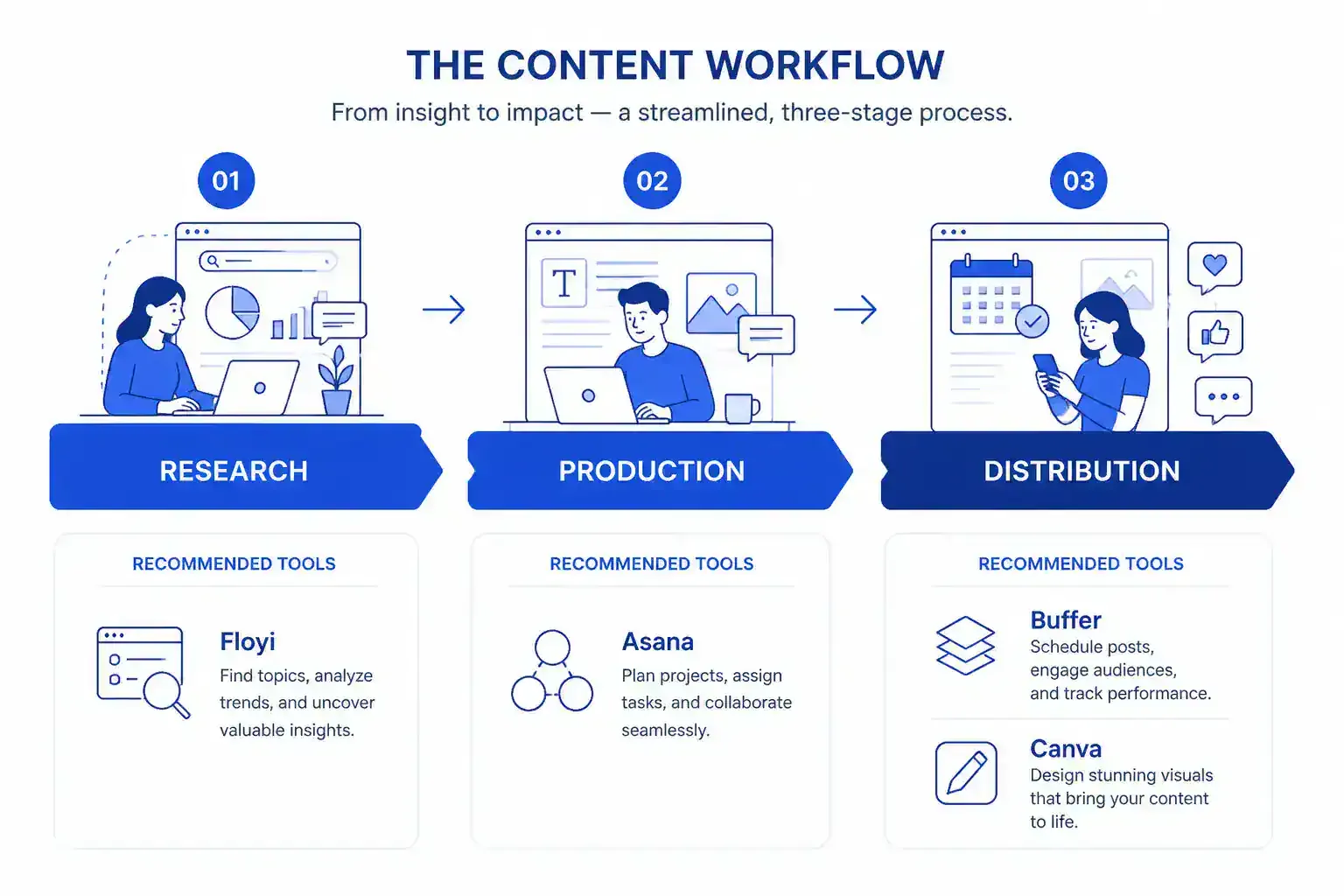
When you are still validating topics, a research-first stack is the safest bet. Floyi stays at the center for SEO strategy, with one task tracker and one editor to keep things lean. As output grows, add scheduling, visuals, and publishing so your AI-driven workflow moves from idea to live content without extra handoffs.
Stage by stage, the fit looks like this:
| Workflow stage | Best-fit tools | Why it works |
|---|---|---|
| Research and audience discovery | Floyi PAA Explorer, AIRS Analyzer, SERP Insights | Surfaces real questions, search patterns, and intent signals |
| Strategy and briefing | Brand Foundation, Audience Insights, content blueprints | Turns research into a usable plan |
| Creation and editing | Grammarly, Canva | Polishes copy and builds client-ready assets |
| Publishing | WordPress or GitHub | Supports a cleaner handoff from draft to live content |
| Distribution | Buffer | Keeps the content calendar moving |
| Reporting | Floyi scorecards, KPI views, Search Console-linked topic details | Makes performance visible without slide-building |
Lean freelancers usually win with a smaller stack. Keep Floyi as the core system, then add one task tracker, one editor, one scheduler, and one design tool. That setup gets you from topic discovery to a client-ready brief without duplicating notes across workflow tools.
Solo consultants with more clients need tighter coordination. Pair Floyi with Asana for multi-project planning, Canva for repeatable asset production, Buffer for distribution, and direct WordPress publishing for launch-ready delivery. Medium fits well for thought leadership, and it can sit alongside portfolio platforms when you need a public sample archive.
The content type matters too:
- Blog strategy: Floyi plus publishing
- Social content: Floyi, Canva, and Buffer
- Newsletter and thought leadership: Floyi plus Medium or WordPress
- Client reporting: Floyi exports and KPI views
A simple checklist helps you choose the right bundle:
- Cost: Does it stay affordable for solo work?
- Learning curve: Can you set it up fast?
- Client collaboration: Does it support sharing and review?
- Workflow fit: Does it match your content marketing tools?
- Integrations: Can it connect research, production, and reporting?
- Scalability: Will it still work as content activation grows?
That decision shapes operationalizing content. If one platform covers research through reporting, keep the stack simple. If not, a combined setup gives you stronger control and a cleaner solo system for the next phase of content activation.
How Much Should You Pay For Each Tool?
Your best spend is usually one core strategy tool plus a few light utilities. For a solo freelancer, overlap is the hidden budget leak. Free tiers are great for quick wins, but paid plans only make sense when they save real time in research, briefing, editing, or publishing.
For a single-seat stack, the pricing logic usually looks like this:
- Per-user tools: Asana can fit when client visibility, task tracking, or collaboration matters more than deep SEO research. Entry plans stay close to solo use, while team features raise the bill as seats are added.
- Writing and polish tools: Grammarly is worth upgrading only when it removes daily drafting and cleanup friction. Keep this spend modest so it supports execution instead of crowding out your strategy stack.
- Usage-based tools: These are often the best fit for lean budgets because you pay for output, not idle seats. Floyi’s Free plan includes 500 credits with no credit card required, Pro is $99 per month, Scale is $299 per month, and pay-as-you-go credits start at $10 per 1,000 credits.
- Annual billing: Choose it only after the tool is already part of your workflow. Floyi’s annual pricing drops Pro to $82.50 per month and Scale to $249.17 per month, which can work well when you build topical maps and briefs every month.
The smartest negotiation move is simple. Favor strong free tiers, low-friction upgrades, and integrations that cut non-billable admin, especially for topical research, SERP-based insights, and reporting. If a tool does not materially reduce research, drafting, or reporting time, keep it free or fold it into a broader platform. Not financial advice.
How Do You Manage Multiple Clients Efficiently?
Project management for freelancers gets cleaner when every request enters one triage board. Route each client request through the same intake view, then sort by urgency, revenue, and deadline so you know what needs same-day attention, what can wait, and when a scope reset is the right call. Pair Floyi client-ready workspaces and role controls with Asana or ClickUp so research, drafts, and approvals stay in one visible pipeline instead of splintering across email and direct messages.
A reliable client rhythm keeps deadlines from colliding:
- Shared calendar: Combine content deadlines, review windows, publishing dates, and recurring check-ins. Sprintful adds a custom domain and branded emails, while your internal calendar protects buffer time.
- Approval path: Move from draft to client review to revision to final sign-off. Floyi exportable topic architectures, topical clustering, and client-ready scorecards make the rationale easy to review.
- Task-level billing: Track time per task, not just per project, so you can spot revision-heavy clients and low-margin work. HoneyBook AI is reported to automate proposal, contract, follow-up, and pipeline steps and save about 6 hours per week.
Templates make the system repeatable. Use one discovery brief, one content calendar template, and one approval template for every client. Floyi keeps brand voice, audience insights, and knowledge base inputs organized per client, which makes operationalizing content much easier when each brief starts with the right context instead of a blank page.
Automation is where the workflow starts to feel light. When a topic gets approved, move it into the draft queue automatically, advance the next status, and notify the client only at review milestones. A weekly dashboard with outstanding approvals, hours burned, overdue tasks, and upcoming publish dates gives you an early warning system. Client-ready reporting with Floyi scorecards, Search Console performance details, HubSpot, and Google Analytics helps you explain why each queue is prioritized the way it is.
Best Content Strategy Tools FAQs
These FAQs cover the questions you’re most likely to ask when comparing content strategy tools, from AI-assisted research and SERP analysis to pricing, integrations, and workflow fit. They’re designed to help you narrow the field fast without spending time on features you won’t use.
1. Which tools help solo consultants plan content?
Google Sheets should be your master content plan, and Floyi fits when you want SEO research, topical mapping, and brief generation in one place. Keep the spreadsheet for intent, content type, buyer’s journey stage, publish and update dates, writer, status, and brief links. Use Asana, Trello, ClickUp, or Nifty for Kanban-style movement, then validate topics with Ahrefs, Semrush, Google Keyword Planner, manual SERP checks, and AI ideation that still needs verification. For most solo consultants, Google Sheets plus Floyi plus one task board is the lean stack that holds up best.
2. Can one tool replace a full stack?
One tool can cover parts of your stack, but it rarely replaces every layer, so solo freelancers usually keep a strategy hub plus one core keyword tool for depth and integrations, and an AI features comparison for content strategy platforms helps you judge the trade-offs. Floyi comes close to a full workflow replacement because it ties brand, audience, topical map, authority, brief, draft, publish, and measure together, and a one-stop setup can still fit a small client load when onboarding speed and spreadsheet cleanup matter, while the smartest compromise is usually a consolidated hub plus Ahrefs or SEMrush if it removes your biggest non-billable bottleneck. Not financial advice.
3. Which tools support client approvals best?
CoSchedule and Asana are the safest picks when you need a visible approval pipeline. CoSchedule gives you a calendar-led workflow, while Asana works well for drafts, statuses, and client sign-off. Floyi is stronger when approvals need strategy context, since you can invite clients into workspaces, control access, and share review-ready topical maps, briefs, and drafts built from Brand Foundation, persona bundles, and SERP-backed research, plus export Google Sheets or DOCX/PDF files for easier review. If your approval process is visual-heavy or has multiple stakeholders, the content strategy tools for small teams and agencies helps you match the workflow to the handoff.
4. What tools help track billable content time?
A solid setup pairs a project hub like Asana with a dedicated time tracker or invoicing tool, and HoneyBook AI can handle proposals, contracts, follow-ups, and pipeline tracking so you spend less time on admin. Plan on about 10 to 15 hours for planning, research, and brief creation, then add more time for complex sites or multi-stakeholder approvals. Bill research, SERP analysis, and brief building as strategy time, and track drafting, revisions, publishing, and optimization separately. Floyi gives you client-ready research outputs that make strategy and execution easier to show side by side.
About the author

Yoyao Hsueh
Yoyao Hsueh is the founder and CEO of Floyi, the topical authority platform, and the founder of Main Heading, an SEO and AI search agency. He created Topical Maps Unlocked, a course studied by thousands of SEOs, content strategists and digital marketers, founded TopicalMap.com, a done-for-you topical mapping service for agencies and enterprise teams, and publishes the weekly Digital Surfer newsletter on SEO, content strategy and AI search.
About Floyi
Floyi is a closed loop system for strategic content. It connects brand foundations, audience insights, topical research, maps, briefs, and publishing so every new article builds real topical authority.
See the Floyi workflow