
Strategy vs Article Edits
Floyi vs Surfer SEO
Turn a four-level topical map into content briefs, article drafts and a score that picks the next topic.
Last verified: September 2026
See all Floyi comparisonsIs Floyi or Surfer SEO Better for You?
Surfer covers one stage of what Floyi does. In Floyi the work starts with your brand positioning and buyer personas, runs topical research grounded in live Google Web and YouTube autocomplete, then asks ChatGPT, Google Gemini and Google AI Mode what they recommend for your buyers that your research missed.
Those keywords get clustered by the URLs that actually rank together, so the groups reflect real search intent, and every cluster lands in a four-level map that drives the content brief, the article draft, publishing, and the authority score that comes back afterward.
Surfer's Topical Map shares the name but not the shape. It is a set of keyword clusters grouped by semantic relevance, not by the URLs that actually rank, and it never arranges those clusters into a parent and child architecture. Surfer is strong at the stage it was built for: scoring and editing the page in front of you.
Choose Floyi When
- You want a topical map that is a real information architecture, not a flat set of keyword clusters.
- You want content briefs and article drafts built with your brand, audience and internal-link plan.
- You want a whole-page quality judgment after the live score, not just a coverage number.
Choose Surfer SEO When
- You want Auto-Optimize to apply changes to the article rather than a score telling you what to change.
- You want daily prompt tracking, at 25 to 100 tracked prompts depending on plan.
- You want every fact shown with the source it came from, pulled from the top 20 results plus ChatGPT, Perplexity and Google AI Overview.
Floyi vs Surfer SEO: Key Differences
Floyi runs the content strategy and execution pipeline from start to finish: brand, research, clustering, a four-level map, the content brief, the article draft, publishing, and the score that comes back. Surfer optimizes the page you are already writing. That is one stage of the pipeline, and it begins after every structural decision has been made.
| Capability | Floyi | Surfer SEO |
|---|---|---|
| Brand context | Brand Foundation holds positioning, USP, competitors, brand voice analyzed from your own writing samples, visual style, and Content Guide rules for terminology and compliance. Buyer personas add roles, pain points and objections. It's set once and inherited by research, maps, content briefs, article drafts, and images. | One Brand Knowledge profile per workspace is enabled by default on new Content Editor queries. It supports Surfy, Auto-Optimize and Insert Outline. Once a query is created without Brand Knowledge, there is no option to enable it later. |
| Topical and keyword research | Generate topics and keywords from your Brand Foundation, buyer personas and core topic, grounded in live Google Web and YouTube autocomplete. AI Search Gaps then asks ChatGPT, Google Gemini and Google AI Mode what they recommend for your buyer personas and adds the topics your research is missing to the hierarchy, each with a suggested level and parent topic. | Topical Map surfaces article ideas from your Search Console data and marks which ones you already cover. AI Tracker watches prompts and citations in a separate view, so nothing feeds what AI assistants recommend back into topic discovery. |
| Topical planning | Build a SERP-grounded map with up to four levels: Pillar, Hub, Branch, and Resource. Every topic knows its parent and its siblings, and that architecture drives the content brief, the internal-link targets, the article draft, and the authority score. | Surfer's Topical Map is a set of keyword clusters grouped by semantic relevance from your Search Console data. It never checks which URLs rank together, so the clusters don't resolve search intent, and it never arranges them into a parent and child architecture. It requires a Search Console connection, sits on the Pro and Peace of Mind plans, and refreshes every 14 days. |
| SERP clustering | SERP-overlap clustering turns a keyword list into intent groups built from the URLs that actually rank together, then feeds those groups into the topical map. Each keyword carries search volume, CPC and competition, but the grouping comes from shared ranking URLs rather than from volume. | Clusters come from semantic relevance between keywords, not from the URLs that actually rank for them. Two keywords that read alike get grouped even when Google answers them with completely different pages. |
| Internal links and anchor text | The map defines parent, sibling and subtopic relations, so every content brief carries internal-link targets with anchor text options. Write your own anchors or generate suggestions, and the Research tab tracks which links the article already uses. | 1-click Internal Linking suggests links for the page you are editing, from the Standard plan up. The suggestions never come from a topical hierarchy, so they can't say which parent or sibling topic a link should reinforce. |
| Site architecture | Site Architecture plans service, location, industry, feature, integration, and category pages across four site types with more than 40 page types. It generates the URL hierarchy, service and location matrices and LocalBusiness schema, then exports to Excel, CSV or Google Sheets. | There's no site architecture planning. Content Ideas and Coverage Gap suggest article topics, not a service or location page structure. |
| Knowledge Base | Upload your own documents, up to 2,000 on the Scale plan, organized into categories. Scope exactly which ones a content brief may draw on: all documents, a category, specific files, or none. Floyi grounds original angles in that evidence. When an angle needs proof you haven't supplied, the content brief flags a Blocked Opportunity and asks you for the data. Floyi won't invent the number. | Brand Knowledge holds one profile per workspace and only applies when the editor writes. There's no document library the research grounds its claims in. |
| Content brief depth | Content briefs define the audience and the page goal, then read the top SERP competitors and the AI responses in full. They carry consensus claims with a source count on each, key entities, an information gain pass against your Knowledge Base that surfaces original angles, and internal-link targets with anchor options. Content type detection picks one of 24 dedicated outline templates, so your writer gets a real structure built for that format rather than a list of H2s. Blocked Opportunities flag the angles that still need your evidence. | Content Editor guidelines and outline tools cover structure, terms and coverage, and Brand Knowledge can inform the outline. There's no audience or page goal, no information gain pass, and no internal-link targets drawn from a hierarchy. |
| Article drafts | Every decision in the content brief carries into the draft: the audience, the brand rules, the consensus claims, the original angle, and the internal-link targets. Writer and Editor agents write against the outline template for that content type, then Fact Checker, Web Research, Conversion Coach and Evidence Integrator passes run over the result before you check coverage and page quality in the Content Editor. | Surfer writes articles in its editor with Brand Knowledge and Auto-Optimize applied. There are no specialist passes for fact checking, web research or evidence integration behind the draft. |
| Live content scoring | The live content score updates from 0 to 100 as you write, checking weighted topic and entity coverage, natural term usage, heading structure, AI chunkability, and reading ease against SERP competitors and AI responses. The AI Writing Assistant edits inline to simplify, expand, shorten, fix grammar or optimize, all in your brand voice. | Surfer scores the page live against the top-ranking pages for your keyword. The score never looks at what AI assistants actually answered, and there's no separate whole-page judgment once the article draft is finished. |
| SERP and AI evidence | Read the full AI responses and the competitor source content. The Term Coverage Heatmap is a matrix of term and entity frequency per source, across 6 top-ranking SERP competitors and 3 AI engines: Google AI Overview, AI Mode, and ChatGPT, with SERP and AI counts kept separate. | Facts pulls sourced statements from up to the top 20 search results plus ChatGPT, Perplexity and Google AI Overview, and shows each one with the source it came from. You get facts, not the full response text, and there's no matrix showing which terms each source used or how SERP and AI counts compare. |
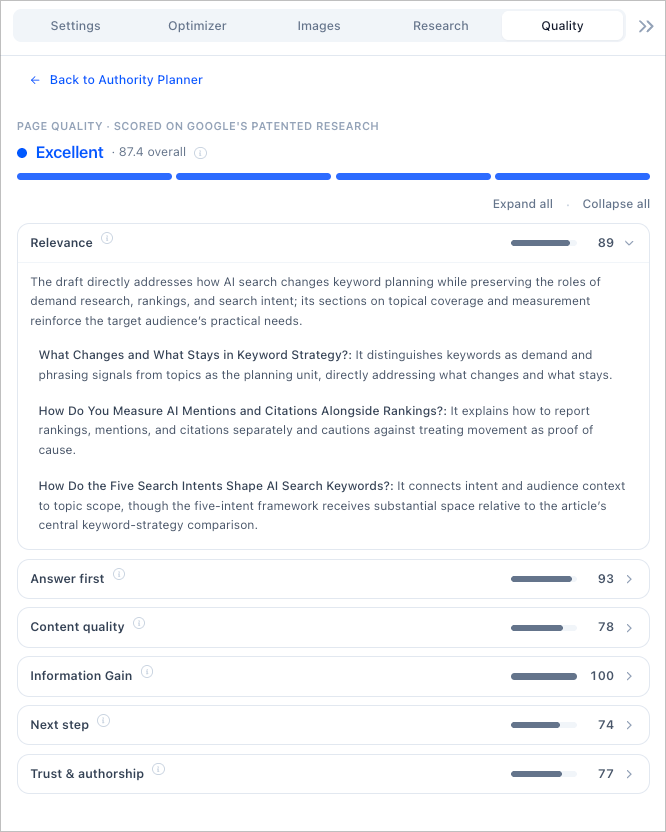
| Whole-page quality | Use the Page Quality Scorecard to review relevance, content quality, information gain, next step, and trust and authorship. It cites passages from your article draft and checks whether you delivered the original contribution set out in the content brief. | Content scores, Facts and optimization guidelines assess coverage and suggest improvements. There's no whole-page quality judgment, and nothing checks the finished article draft against the contribution its content brief asked for. |
| Schema markup and AI images | Auto-generates JSON-LD for Article, FAQ, HowTo, LocalBusiness, Organization, and BreadcrumbList with no AI credits. Entity schema connects the entities in your article to Wikipedia, Wikidata and Google Knowledge Graph identifiers. Brand-aligned AI images generate in the editor with suggested placements. | There's no schema generation and no AI image generation. |
| Content Audit and Organic Audit | Content Audit scans your live site against your topical map and tells you which pages to keep, improve, merge or delete, including the ones competing with each other and the topics you never covered. Organic Audit connects Google Search Console to the same map so you can see which topics earn clicks and which pages need a refresh. | Topical Map marks covered and uncovered article ideas, and a Cannibalization Report is available on Pro and higher. Neither classifies your published pages as keep, optimize, consolidate or prune against a map you defined. |
| Competitor comparison | The Competitor Matrix shows you, topic by topic across the whole map, which competitors rank, at what positions, the exact URLs they rank with, and their AI search status for AI Overviews, AI Mode, Gemini, and ChatGPT. The Topical Authority Scorecard adds a share of voice leaderboard, domain rankings and 7-day to 1-year trends across up to 10 tracked competitor domains. Content Audit puts your map side by side with a competitor's in the same shape, or recolors one map by who wins each topic. | The AI Tracker Sources Dashboard shows which competitors get cited in AI answers, how often each domain appears, and a Mention Gap against your brand. There's no per-topic matrix of competitor rankings across a map you defined, and no organic share of voice. |
| Feedback into priorities | The Topical Authority Scorecard tracks Content, Market and AI Authority on your map, with Top 10 and Top 20 rankings, a share of voice leaderboard, up to 10 tracked competitor domains, and 7-day to 1-year trends. Silo Analysis marks each topic area Leading, Contested or Trailing, and the Authority Planner turns that into what to work on next. AIRS Analyzer adds an on-demand read of any query across nine AI engines and two SERPs, counting AI citations separately from organic rankings. | AI Tracker monitors mentions and citations across ChatGPT, Gemini, Perplexity and other assistants, with 25 to 100 tracked prompts depending on the plan, and its Sources Dashboard can open a Content Editor from a source. There's no authority score alongside it, no Leading, Contested or Trailing read on a topic area, and no organic ranking measured next to it, because there's no map behind any of it. |
| Publishing | Publish to WordPress or GitHub, single or in bulk, with SEO metadata and optional JSON-LD. GitHub covers Astro, Next.js, Hugo and other static builds with custom frontmatter. Scores, maps, content briefs, and article drafts also export to Google Docs, DOCX, XLSX, CSV, and PDF. WordPress status syncs back to update your coverage records. | Surfer exports to WordPress and lets you edit the post there. There's no GitHub or static site publishing for Astro, Next.js or Hugo builds. |
What Floyi Adds Beyond Article Optimization
Check Coverage While You Write
Use the live score to improve coverage and structure. Then open the Quality tab to check the finished page, including the evidence behind its claims and the original contribution set out in the content brief. There's no separate round of pasting the draft into another tool to find out whether it actually said anything new.
Trace the Research Into the Article Draft
Inspect the actual SERP and AI-source content behind recommendations. Check consensus coverage and whether the original angle identified in the content brief made it into the article.
Choose the Next Article From Topic Performance
After publishing, review coverage and competitive authority on the same map. Use those findings in the Authority Planner to choose which topic needs work next.
Build the Content Brief Before You Optimize the Article Draft
Start with the topic, audience and evidence, then use live coverage guidance and page quality checks during production.
A Practical Workflow
Start with a contested silo in Floyi, choose a topic and generate its content brief with the intended persona and brand knowledge. Draft in the same workspace, use the live Optimizer and review the Page Quality Scorecard before publishing.
Publish to WordPress or GitHub, then return to the Authority Planner. The published page reports back into the same map it came from, so the next topic is chosen from coverage and competitive position rather than from a fresh keyword search.
Floyi vs Surfer SEO: Common Questions
How Does Floyi's Live Score Differ From Surfer's?
Both update as you write. Floyi's score benchmarks against SERP competitors and AI responses at the same time, checking weighted topic and entity coverage, natural term usage, heading structure, AI chunkability, and reading ease. Surfer's benchmarks against the top-ranking pages for your keyword. The gap shows up on topics where the AI answers and the SERP disagree.
Does Floyi's Live Score Do the Same Job as Surfer's Content Score?
Only half of it. Both move as you type and check whether the terms, entities and structure are there. What Surfer's Content Score doesn't do is ask whether the finished page was worth publishing. The Page Quality Scorecard reads the article draft afterward and checks whether it delivered the original contribution the content brief called for, citing the passages it judged. An article can score well on coverage and still add nothing new.
How Does Floyi's AI Source Analysis Compare With Surfer's Facts?
Floyi's Optimizer shows you the AI responses themselves, with a separate term count for every SERP and AI source and a coverage matrix across all of them, so you can see what each engine said and what your article draft is missing. Surfer's Facts pulls from the top 20 results plus ChatGPT, Perplexity and Google AI Overview, and shows each fact with the source it came from.
What Happens to Your Surfer Work If You Switch?
Nothing has to be rewritten. Your published articles stay where they are, and Floyi's Content Audit scans your live site and classifies every page as Keep, Optimize, Consolidate, or Prune against your new map. What changes is where the next topic comes from. Surfer starts from your Search Console data. Floyi starts from your brand positioning and buyer personas.
Build the Floyi Optimization Workflow
Sources for These Surfer SEO Capabilities
Every Surfer SEO capability on this page was checked against its own documentation and product pages in September 2026. Features and plan limits change, so confirm the current details with the vendor.
- Surfer: Brand Knowledge
- Surfer: Facts and AI sources
- Surfer: Topical Map
- Surfer: AI Tracker
- Surfer: WordPress workflow
- Surfer: AI Tracker to Content Editor
The Rest of the Closed Loop
Most tools have a brand kit, applied as an input at the moment something gets written. In Floyi, Brand Foundation and the Knowledge Base are the source everything else reads from, so topical research, the map, content briefs, article drafts, images, and the authority score all work from the same positioning, personas, rules, and evidence. That's the loop, and it's the part a feature-by-feature table can't show.
One Brand Foundation
Positioning, voice, Content Guide rules, and buyer personas are set once, then inherited by research, maps, content briefs, article drafts, and images without being restated.
Workspaces and Teams
A separate brand workspace per client, with role-based access and a shared credit pool across the team.
Knowledge Base
Up to 2,000 documents on the Scale plan, organized by category and scoped per content brief, so original angles are grounded in your evidence instead of invented.
Local and Multi-Location
Content briefs and article drafts built for service pages, location pages and service-area landing pages, with NAP consistency and local schema.
Developer API and MCP Server
A REST API across the whole pipeline, plus an MCP server so an AI assistant drives the real Floyi rather than a copy of it.
Client-Ready Exports
Authority scores, coverage data, maps, content briefs, and article drafts export to XLSX, DOCX, CSV, PDF, and Google Docs.
The Floyi Tools in This Comparison
Each one sits behind a row in the table above, from topical mapping through publishing.
Topical Maps
Turn SERP clusters into a four-level topical map that doubles as your content plan.
Briefs & Drafts
Turn any topic into a SERP-grounded content brief and a writer-ready article draft.
Content Plans
Turn your topical map into a ranked publishing queue, with an owner for each topic.
Topical Authority
Track your Topical Authority Score, coverage, and presence in AI Overviews, AI Mode, Gemini, and ChatGPT.
Content Editor & Optimizer
Real-time content scoring, page quality review, competitor benchmarking, and term coverage.
AI Writing Assistant
Edit inline with SEO entity guidance, grammar fixes, and rewrite suggestions.
Topical Audit
Reverse-engineer any website's topical structure and find its authority gaps.
Site Architecture
Plan hundreds of pages at once, with a clean URL hierarchy for every page type.
Compare Floyi With Other Tools
See how Floyi compares with other SEO, content optimization and AI search platforms.
Floyi vs Frase
Plan by topical map, not page by page, then carry the brand and the evidence into every content brief.
Read comparison →Floyi vs MarketMuse
Set the strategy once for the brand, then let every topic inherit it through the content brief and article draft.
Read comparison →Floyi vs Profound
Your buyers still use Google, so Floyi scores Google and AI answers on one map and turns every gap into a content brief.
Read comparison →Floyi vs Ahrefs
Turn keyword and backlink findings into a topical map, content briefs and article drafts.
Read comparison →Optimize the Article Without Losing the Strategy
Build the content brief from your topical map, improve the article draft with live source coverage and check page quality before publishing.