
Mapped Prompts vs a Prompt List
Floyi vs OtterlyAI
Track AI answers by topic and by buyer prompt on one map, then turn each gap into a content brief.
Last verified: November 2026
See all Floyi comparisonsIs Floyi or OtterlyAI Better for You?
Floyi and OtterlyAI both track AI visibility for buyer prompts, reading each answer for whether it mentions and cites you. The difference is what a prompt connects to. OtterlyAI runs a list of search prompts you choose, each tied to one country, with the allowance set by your plan's credits. Floyi's Prompt Tracking checks the full questions your buyers ask ChatGPT, Gemini and Google AI Mode, and each prompt belongs to a topic on your topical map, next to that topic's Google rank, content brief and article draft.
As of November 2026, OtterlyAI runs prompts daily, or weekly on Premium, on any of 7 engines: ChatGPT, AI Overviews, Perplexity, Copilot, AI Mode, Gemini, and Claude, with each engine drawing on your plan credits. Floyi runs Prompt Tracking on a weekly schedule and any time you start a check. The Scorecard tracks every topic in AI Overviews, AI Mode, Gemini, and ChatGPT daily, weekly or monthly. AIRS Analyzer reads any query on demand across 9 AI engines plus Google and Bing, including Perplexity, Copilot, Claude, and Grok.
What Floyi adds is what happens after a gap shows up. The gap sits on a four-level topical map that says where the page belongs, and the same topic carries the content brief, the article draft, publishing, and the score that tells you whether it worked. A buyer prompt your map doesn't cover shows up as a topic gap you add to the Planner, and the content brief for a topic takes up to five buyer prompts and plans a direct answer to each one.
Choose Floyi When
- You want Google organic rankings and AI answers measured on the same topics, in one score.
- You want each AI visibility gap placed on a topical map, so it arrives as a topic with a parent, siblings and a content brief.
- You want the content brief, article draft and publishing in the same tool that found the gap.
- You want each buyer prompt linked to a topic on your map, so its AI results sit next to that topic's Google rank, brief and draft.
Choose OtterlyAI When
- You want daily prompt tracking on any of 7 AI engines, Perplexity, Copilot and Claude included, from $29 (or €29) a month as of November 2026, metered in credits.
- You need to test whether 19 AI crawlers can reach your pages and see which AI bots and agents actually visit your site.
- You want off-page recommendations for Reddit threads, press coverage and YouTube videos alongside your on-page fixes.
Floyi vs OtterlyAI: Key Differences
Both tools track AI visibility for buyer prompts. OtterlyAI tracks a prompt list, and a prompt on its own shows whether one phrasing of one question, in one country, mentions you. Floyi links each buyer prompt to a topic on your map, and that topic carries its keywords, its Google rankings, its AI mentions and citations, its place under a parent, and the content brief that will close the gap.
| Capability | Floyi | OtterlyAI |
|---|---|---|
| How your content is organized | Every topic sits at one of four levels, Pillar, Hub, Branch, or Resource, in an information architecture built from what actually ranks. Each one knows its level, its parent and its siblings, and that's what tells a content brief which pages to link to and what your score is measured across. | You track a list of search prompts, each tied to one country, grouped with tags into Brand Reports and Workspaces. As of November 2026 the allowance comes from your plan credits: 16 prompts on Lite, 120 on Standard and 403 on Premium when you track 4 of the 7 engines daily. |
| Brand and audience | Brand Foundation holds positioning, USP, competitors, brand voice analyzed from your own writing samples, visual style, and Content Guide rules for terminology and compliance. Buyer personas add roles, pain points and objections. It's set once and inherited by research, maps, content briefs, article drafts, and images. | Brand Profiling reads the attributes, objections and claims AI engines attach to your brand and each competitor, with the source behind each one. A brand voice or persona profile that feeds content production is not listed in public documentation. |
| AI answer analysis | Prompt Tracking checks the full questions your buyers ask ChatGPT, Gemini and Google AI Mode, weekly and whenever you run a check, each linked to a topic, and reads every answer for mentions, recommendations, citations, sentiment, and share of voice. The Topical Authority Scorecard, on Pro and Scale, trends AI mentions and citations on AI Overviews, AI Mode, Gemini, and ChatGPT for every topic on your map, next to Top 10 and Top 20 Google rankings. AIRS Analyzer reads any query on demand across 9 AI engines plus the Google and Bing SERPs, including Perplexity, Copilot, Claude, and Grok. | As of November 2026, every plan can track all 7 engines, ChatGPT, AI Overviews, Perplexity, Copilot, AI Mode, Gemini, and Claude, daily or, on Premium, weekly. Each engine uses credits, and Claude counts as 3. Reports cover brand coverage, position, sentiment, share of voice, and cited URLs. OtterlyAI says it focuses on AI search visibility, not traditional keyword rankings. |
| Topic research | Generate topics and keywords from your Brand Foundation, buyer personas and core topic, grounded in live Google Web and YouTube autocomplete. AI Search Gaps then asks ChatGPT, Google Gemini and Google AI Mode what they recommend for your buyer personas and adds the topics your research is missing to the hierarchy, each with a suggested level and parent topic. Once the map is live, Topic gaps in Prompt Tracking lists what buyers ask about that the map doesn't cover, and you add each gap to the Planner as a new topic or as a keyword on an existing topic. | AI Prompt Research turns a brand, a topic, a URL or your Search Console keywords into prompt ideas with an Estimated Intent Score, grouped by intent, funnel stage and topic, and Query Fan-Out shows the sub-queries an engine generates. Any suggested prompt can go straight into a Brand Report. |
| What's in a content brief | Content briefs define the audience and the page goal, then read the top SERP competitors and the AI responses in full. They carry consensus claims with a source count on each, key entities, an information gain pass against your Knowledge Base that surfaces original angles, and internal-link targets with anchor options. Content type detection picks one of 24 dedicated outline templates, so your writer gets a real structure built for that format rather than a list of H2s. Blocked Opportunities flag the angles that still need your evidence. A brief generated from the Planner also takes up to five buyer prompts and plans a direct answer to each one, with Buyer Prompt Coverage showing where each prompt is answered. | The GEO Content Creator, on its separate GEO tools site, has a content-brief-only option, and a Marketplace prompt writes briefs from your citation gaps when you run it in Claude with the OtterlyAI connector. An in-app brief generator is not described in the help center as of November 2026. |
| Writing the article draft | Every decision in the content brief carries into the draft: the audience, the brand rules, the consensus claims, the original angle, and the internal-link targets. Writer and Editor agents write against the outline template for that content type. Fact Check and Research then checks claims and adds a Sources section, and Intro and Key Takeaways writes an opening that gets to the answer, before you check coverage and page quality in the Content Editor. | The GEO Content Creator writes an article, blog post, listicle, or comparison for a low-visibility prompt, with optional FAQs, a comparison table and a CTA. Brand voice, personas and internal-link planning for those drafts are not listed in public documentation. |
| Judging the finished page | Use the Page Quality Scorecard to review relevance, answer first, content quality, information gain, next step, and trust and authorship. It cites passages from your article draft and checks whether you delivered the original contribution set out in the content brief. | OtterlyAI's Content Audit scores a page across 15 structural checks and 13 AI readiness dimensions, and grades headings, entities and coverage against the sources winning those answers. Content checks can also run through the API. |
| Schema markup and AI images | Auto-generates JSON-LD for Article, FAQ, HowTo, LocalBusiness, Organization, and BreadcrumbList with no AI credits. Entity schema connects the entities in your article to Wikipedia, Wikidata and Google Knowledge Graph identifiers. Brand-aligned AI images generate in the editor with suggested placements. | Content Checker evaluates the structure, metadata and structured data already on a page and recommends fixes. Generating schema or images is not listed in public documentation. |
| Checking pages you already published | Organic Audit connects Google Search Console to your topical map, so you can see which topics earn clicks, which pages compete for the same queries and which topics are missing from AI search. For a live page, the Optimizer's GSC Queries tab checks the draft against the Search Console queries that page already earns. | GEO Audit tests whether 19 AI crawlers can reach a page through robots.txt and your live server. Agent Analytics, on Standard and up as of November 2026, shows which AI bots and AI-referred visitors reach your site. Mapping Search Console clicks and impressions onto a topic plan is not listed in public documentation. |
| Competitor comparison | The Competitor Matrix shows you, topic by topic across the whole map, which competitors rank, at what positions, the exact URLs they rank with, and their AI search status for AI Overviews, AI Mode, Gemini, and ChatGPT. The Topical Authority Scorecard adds a share of voice leaderboard, domain rankings and 7-day to 1-year trends across up to 10 tracked competitor domains. Organic Audit's Map view puts your map side by side with a competitor's in the same shape, or recolors one map by who wins each topic. | As of November 2026, Brand Reports benchmark unlimited competitors on coverage, position, sentiment, and share of voice across your prompts, and the Gap Analyzer ranks the prompts where they're named and you aren't. The comparison covers AI answers, with no organic ranking position listed next to it. |
| What to work on next | The Topical Authority Scorecard tracks Content, Market and AI Authority on your map, with Top 10 and Top 20 rankings, a share of voice leaderboard, up to 10 tracked competitor domains, and 7-day to 1-year trends. Silo Analysis marks each topic area Leading, Contested or Trailing, and the Authority Planner turns that into what to work on next. | Recommendations turn Brand Report data into a queue ranked by impact, on-page and off-page, from crawlability fixes to Reddit threads, press coverage, YouTube, and content partnerships, with Lite limited to 3 a week. The Marketplace also lets you book placements on sites AI already cites. |
| Publishing | Publish to WordPress or GitHub, single or in bulk, with SEO metadata and optional JSON-LD. GitHub covers Astro, Next.js, Hugo and other static builds with custom frontmatter. Maps also export to XLSX, Google Sheets or Markdown, content briefs to TXT, DOCX or Google Docs, and article drafts to DOCX, HTML, Markdown, TXT, or Google Docs. Scorecard data exports to XLSX, CSV or Google Sheets. WordPress status syncs back to update your coverage records. | Publishing isn't part of the core app. The Marketplace lists Beta add-ons that update Webflow content from Recommendations and turn on-page recommendations into WordPress articles through n8n. |
| Reporting, seats and API | Scorecard data exports to XLSX, CSV or Google Sheets, Prompt Tracking to XLSX or Google Sheets, and AIRS reports to DOCX, PDF, HTML, or Google Docs, all with no Floyi branding and no branded client portal. Pro includes 3 seats (up to 5) and Scale includes 8 (up to 15). Both include a REST API and an MCP server. | As of November 2026, every plan includes unlimited team members and CSV, JSON and PDF exports, with your own logo on PDF brand reports. Standard adds a Looker Studio connector plus 2,000 API and 2,000 MCP requests a month, and agencies build branded client reports in Looker Studio. |
What Changes When Every Prompt Belongs to a Topic
Track the Topic and the Questions Buyers Ask About It
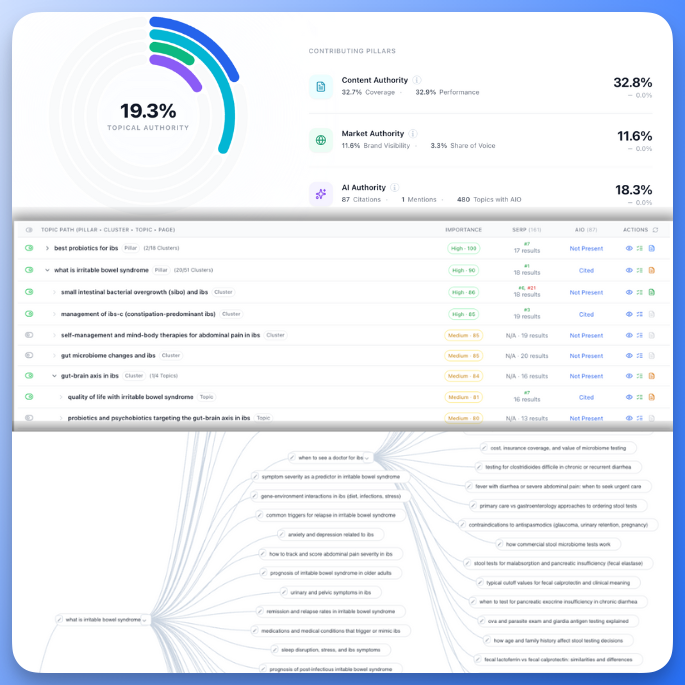
A prompt is one question, asked one way, in one country. A topic on your map is a page you plan to own, with the keywords that share its ranking URLs, a parent and siblings. Floyi tracks both. The Scorecard reports an AI mention or a lost ranking against that page, and Prompt Tracking shows how ChatGPT, Gemini and Google AI Mode answer the full questions buyers ask about it, so the result already says what to fix.
See Google and AI Answers on the Same Topic
The Scorecard puts Top 10 and Top 20 Google rankings next to mentions and citations in AI Overviews, AI Mode, Gemini, and ChatGPT. Its gained and lost topic lists show which topics entered or dropped out between refreshes, so you catch a topic that gains a citation but loses its ranking.
Turn the Gap Into the Page
Generate the content brief from the topic, with your buyer personas, Knowledge Base documents, internal-link targets, and up to five buyer prompts attached, then the article draft. Publish to WordPress or GitHub, and the next scheduled refresh shows whether AI Overviews, AI Mode, Gemini, or ChatGPT started naming you.
Turn a Tracked Topic Into a Published Page
Start from a topic where AI answers name competitors and not you, then take it through a content brief, an article draft and publishing.
A Practical Workflow
In Floyi, open the Competitor Matrix in the Planner to see which competitors AI Overviews, AI Mode, Gemini, and ChatGPT name on each topic. Pick a topic where they name a competitor and not you, then generate its content brief and article draft.
Check page quality, publish, and set a scheduled refresh so the Scorecard rechecks rankings and AI answers daily, weekly or monthly. Put the topic's buyer prompts on the weekly Prompt Tracking schedule to see whether ChatGPT, Gemini and Google AI Mode start naming you, and run AIRS Analyzer to read Perplexity, Copilot and Claude on demand.
Floyi vs OtterlyAI: Common Questions
Does Floyi Track Perplexity and Copilot Like OtterlyAI?
Yes, on demand. Floyi's AIRS Analyzer reads any query across 9 AI engines, Perplexity and Copilot among them, plus Google and Bing. For scheduled coverage, Prompt Tracking checks your buyer prompts on ChatGPT, Gemini and Google AI Mode every week and whenever you run a check, and the Planner and Topical Authority Scorecard, on Pro and Scale, track every topic in AI Overviews, AI Mode, Gemini, and ChatGPT daily, weekly or monthly. As of November 2026, every OtterlyAI plan can track ChatGPT, AI Overviews, Perplexity, Copilot, AI Mode, Gemini, and Claude daily, with each engine drawing on your plan credits.
Does OtterlyAI Track Google Rankings?
No. As of November 2026, OtterlyAI says it focuses on AI search visibility rather than traditional keyword rankings, and suggests SEO teams keep rankings in their existing tools and combine the two in Looker Studio. Floyi's Scorecard tracks Top 10 and Top 20 Google rankings for every topic next to AI mentions and citations, so you can see when a topic gains a citation but loses its ranking.
How Do OtterlyAI Prompts Compare With Floyi Topics and Prompt Tracking?
Both track AI visibility for buyer prompts. OtterlyAI meters prompts through credits, and Floyi links each buyer prompt to a topic on your topical map. As of November 2026, OtterlyAI includes 2,000 credits on Lite, 15,000 on Standard and 50,000 on Premium, where one credit is one prompt checked once on one engine and Claude counts as 3. That covers 16, 120 or 403 prompts tracked daily on 4 engines, and each country counts as its own prompt. Credit packs add 5,000 credits for $65 a month on Standard or 10,000 for $99 on Premium, with the same figures in euros. In Floyi, AI Overviews come with each SERP refresh, and AI Mode, Gemini and ChatGPT tracking cost extra credits per topic, with the credit estimate shown before you save the setting. A Prompt Tracking check is charged per answer, per AI engine, and failed or empty answers are free.
Can OtterlyAI Write Content Briefs and Article Drafts?
Partly, outside its tracking dashboard. The GEO Content Creator writes a draft or a content brief for one prompt, and a Marketplace prompt builds briefs from citation gaps when you run it in Claude with the OtterlyAI connector. Floyi generates content briefs and article drafts from the topic on your map, with your Brand Foundation, buyer personas, Knowledge Base, and internal-link targets, then publishes to WordPress or GitHub.
Track AI Answers by Topic and by Prompt
Sources for These OtterlyAI Capabilities
Every OtterlyAI capability on this page was checked against its own documentation and product pages in September 2026. Features and plan limits change, so confirm the current details with the vendor.
- OtterlyAI: pricing and plan limits
- OtterlyAI: supported AI engines
- OtterlyAI: prompts by credits and country
- OtterlyAI: GEO Audit and crawlability
- OtterlyAI: AI Search Optimization
- OtterlyAI: Recommendations
- OtterlyAI: data and report exports
- OtterlyAI: AI search analytics for SEO teams
- OtterlyAI: GEO Content Creator
The Rest of the Closed Loop
Most tools have a brand kit, applied as an input at the moment something gets written. In Floyi, Brand Foundation and the Knowledge Base are the source everything else reads from, so topical research, the map, content briefs, article drafts, images, and the authority score all work from the same positioning, personas, rules, and evidence. That's the loop, and it's the part a feature-by-feature table can't show.
One Brand Foundation
Positioning, voice, Content Guide rules, and buyer personas are set once, then inherited by research, maps, content briefs, article drafts, and images without being restated.
Workspaces and Teams
A separate brand workspace per client, with role-based access and a shared credit pool across the team.
Knowledge Base
Up to 2,000 documents on the Scale plan, organized by category and scoped per content brief, so original angles are grounded in your evidence instead of invented.
Local and Multi-Location
Content briefs and article drafts built for service pages, location pages and service-area landing pages, with NAP consistency and local schema.
Developer API and MCP Server
A REST API across the whole pipeline, plus an MCP server so an AI assistant drives the real Floyi rather than a copy of it.
Client-Ready Exports
Maps export to XLSX, Google Sheets or Markdown, and AIRS reports to PDF. Content briefs and article drafts export to DOCX or Google Docs. None carry Floyi branding.
The Floyi Tools in This Comparison
Each one sits behind a row in the table above, from topical mapping through publishing.
Topical Maps
Turn SERP clusters into a four-level topical map that doubles as your content plan.
Briefs & Drafts
Turn any topic into a SERP-grounded content brief and a writer-ready article draft.
Content Plans
Turn your topical map into a ranked publishing queue, with a status for each topic.
Topical Authority
Track your Topical Authority Score, coverage, and presence in AI Overviews, AI Mode, Gemini, and ChatGPT.
Content Editor & Optimizer
Real-time content scoring, page quality review, competitor benchmarking, and term coverage.
AI Writing Assistant
Edit inline with SEO entity guidance, grammar fixes, and rewrite suggestions.
Topical Audit
Reverse-engineer any website's topical structure and find its authority gaps.
Site Architecture
Plan hundreds of pages at once, with a clean URL hierarchy for every page type.
Compare Floyi With Other Tools
See how Floyi compares with other SEO, content optimization and AI search platforms.
Floyi vs Profound
Your buyers still use Google, so Floyi scores Google and AI answers on one map and turns every gap into a content brief.
Read comparison →Floyi vs Clearscope
Both grade your content. Clearscope grades a draft's term coverage. Floyi grades that too, then the whole page, your published pages and your authority on the topic.
Read comparison →Floyi vs Surfer SEO
Turn a four-level topical map into content briefs, article drafts and a score that picks the next topic.
Read comparison →Floyi vs Frase
Plan by topical map, not page by page, then carry the brand and the evidence into every content brief.
Read comparison →Turn Tracked Topics Into Published Pages
Measure Google rankings and AI answers on the topics of your map, then build the content brief and article draft for each gap.