
Free Topical Map Tools: What Each Route Can and Can't Do
See what you can build for free with spreadsheets, search features, free tiers, and open-source scripts, plus where each stops and when free is not enough.
You can build a usable topical map for free, but no single free tool will hand you one. A spreadsheet, Google Search Console, a keyword generator, and a clustering script each cover one slice of the job, and the rest falls to you.
A quick search won’t show where each route stops. A spreadsheet can hold a four-level Pillar > Hub > Branch > Resource hierarchy but can’t tell you which keywords share a page. Optimo caps free input at 3,000 characters, and AI Helperhub took up to 250 keywords per run in a February 2025 review. Scripts cluster well, yet live SERP data usually costs something.
The sections ahead cover what each of the four routes can and can’t do, then compare them side by side. The real price of free shows up in setup time, manual validation and upkeep, not in dollars.
Free Topical Map Tools Key Takeaways
- No single free tool builds a full topical map. You chain several together.
- Google Sheets can hold the hierarchy but can’t group keywords by meaning or intent.
- SERP checks are the validation step, and they stay manual in free workflows.
- Google Search Console validates your own site’s queries but can’t show topics you haven’t covered.
- Free generators return idea lists, with little or no volume data and capped inputs.
- Open-source scripts cluster keywords, but live SERP data often needs a paid source.
- Free runs out when maps must stay current, feed briefs or scale across several sites.
What Can You Honestly Build for Free?
You can build a working SEO content plan for free, as long as you accept that you’ll assemble it from several tools. An SEO topical map is a structured plan showing how topics relate, not a flat keyword list. It sets parent topics and supporting subtopics, then guides how you group content, link internally and shape site navigation. “Topical map” also gets confused with topographic or GIS maps, and this guide covers only SEO content maps.
A usable free topical map workflow ends with a hierarchy (Floyi uses four levels: Pillar > Hub > Branch > Resource) and one row per planned URL. Each row records:
- Parent topic: Where the page sits in the hierarchy.
- Primary intent: What the searcher is trying to do.
- Supporting queries and required entities: The terms and concepts the page must cover.
- Existing-page status: Whether the URL is new, live or needs a rewrite.
- Internal links: Which pages it links to and receives links from.
- Priority: Where it falls in the publishing queue.
No single generator produces all of that. You chain keyword discovery, keyword clustering, SERP checks, and a spreadsheet, usually across several free SEO tools. The four routes ahead are spreadsheets, free search features, free tiers and generators, and open-source scripts. This guide sticks to routes that cost nothing and leaves paid topical map platforms to a separate comparison.
Here’s the honest ceiling. Maintained open-source projects for SEO mapping are few and small, because most SEO software is commercial. Free also isn’t the same as open source: a free tier is a pricing choice, while open source is a licensing fact.
Free routes cost setup time, technical skill and manual validation instead of money. Data depth and upkeep strain first, since someone has to refresh the sheet when SERPs shift. Once that time adds up, weigh it against topical map tool ownership costs before you decide free is cheaper.
How Far Do Spreadsheets Take a Topical Map?
Google Sheets (free) and LibreOffice Calc (open source) can hold a complete topical map and track it from planning through publishing. What they can’t do is tell you which queries belong together. That judgment still comes from you and the search results.
A spreadsheet map works when the columns do the structural work. Start with hierarchy columns that run from main topic down through subtopic levels, with the lowest level marking the page you’ll create. Then add the fields that make the sheet usable as a plan:
- Primary keyword: The query the page targets.
- Supporting queries: Related terms the page should also cover.
- Search intent: What the searcher wants, recorded after you check the results.
- Target URL: Temporary URLs are fine for unpublished pages.
- Existing-page status: Whether you already have something to update.
- Priority and publishing status: What ships first and where each page stands.
For a working starting point, building a topical map in Google Sheets walks through the setup column by column.
Large lists stay manageable with one formula. Add a column that checks whether the lowest subtopic (column G) equals the primary keyword (column H) with =G2=H2. Rows that return TRUE are the unique page-level entries, so filtering on TRUE shows only the pages to create. Sorting, filters and pivot tables then count queries per pillar and expose thin branches. If you also want a visual, a free mind-mapping app can mirror the same topical map structure.
The limits show up in grouping. Similar wording doesn’t prove two keywords belong on one page, and sorting alphabetically or by volume groups strings, not intent. A sheet can’t cluster by meaning or flag the overlap that causes cannibalization. It also gets slower and more error-prone as lists grow.
That’s why the SERP check is the validation step. For each major cluster, look at the actual results. If the same URLs rank for two queries, they likely share a page. If the result types differ, such as guides for one query and product pages for another, they split. Record the observed intent in the sheet so the decision survives handoff to writers.
Spreadsheets are a strong free planning and tracking layer. But SERP checking stays manual and repeats for every cluster, and that time is the real cost of the route.
What Can Free Search Features Tell You?
Free search features tell you two different things: where new topics might start, and which demand your existing site already earns. Keep those jobs apart, because no single free source does both well.
For starting points, four sources need no account: Google autocomplete, People Also Ask, related searches, and competitor sitemaps. All of them surface raw phrases and SEO content ideas you can paste into a spreadsheet. What comes back is a pile of strings with no hierarchy, no intent labels and no validation. A sitemap shows what a competitor published, not whether any of it performs.
Search Console is the strongest free validator, but only for your verified site. It reports queries, impressions, clicks, and position. Here’s what that data tells you:
- Long-tail and striking-distance queries: Terms where you sit just off page one point to subtopics that deserve a dedicated page.
- Overlapping pages: Several URLs earning impressions for the same queries flag pages to consolidate.
- Missing pages: Queries with impressions but no matching page show where coverage is thin.
Ahrefs Webmaster Tools is free for verified site owners (as of October 2026) and lists organic keywords for your own properties, which helps you spot subtopics to map next. Google Keyword Planner is free with a Google Ads account (as of October 2026). It expands a seed into ideas with demand estimates, though the volume ranges can be broad. Neither tool builds a hierarchy.
The limit is simple. First-party data only covers queries where your site already appears. It can’t show demand for topics you haven’t covered, and it can’t group terms into a Pillar, Hub or Branch structure.
Treat these features as the input layer for keyword research for topical maps. Before you finalize any topic list, pair your Search Console export with at least one outward-looking source, such as competitor sitemaps or a Keyword Planner expansion of your best seeds.
Which Free Tiers and Generators Are Worth Using?
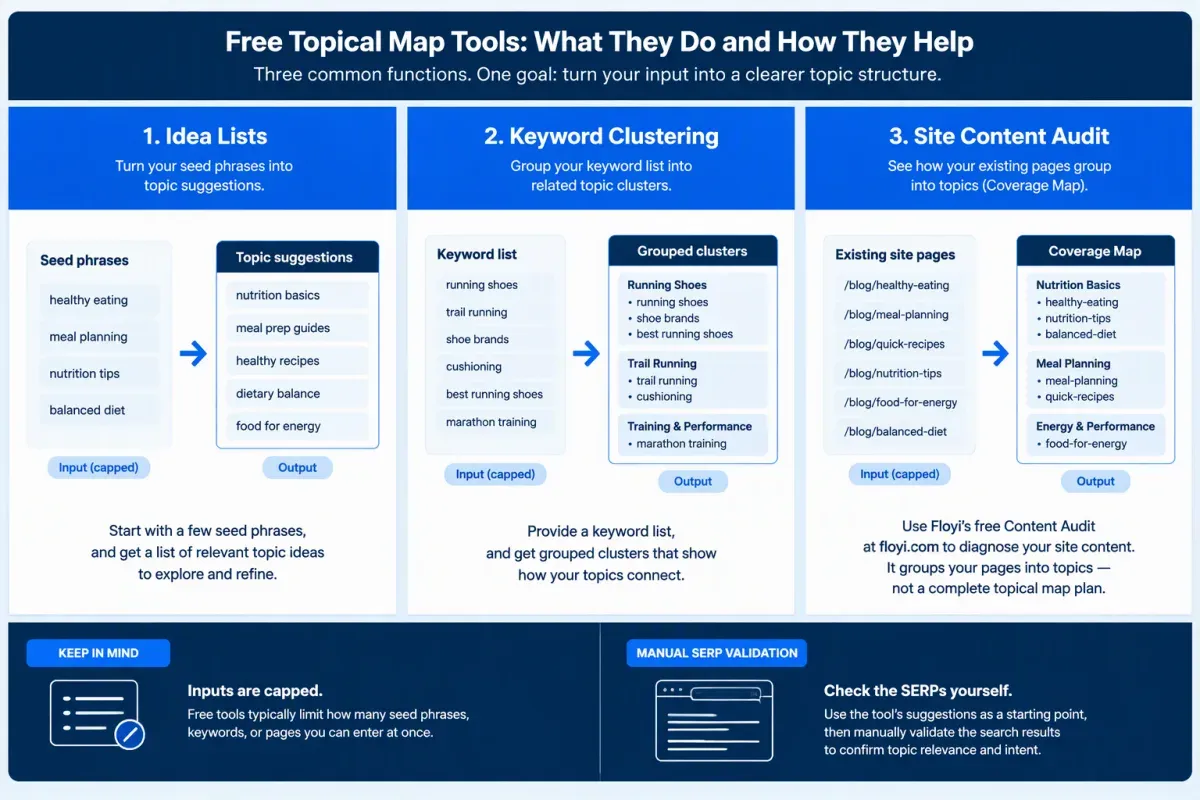
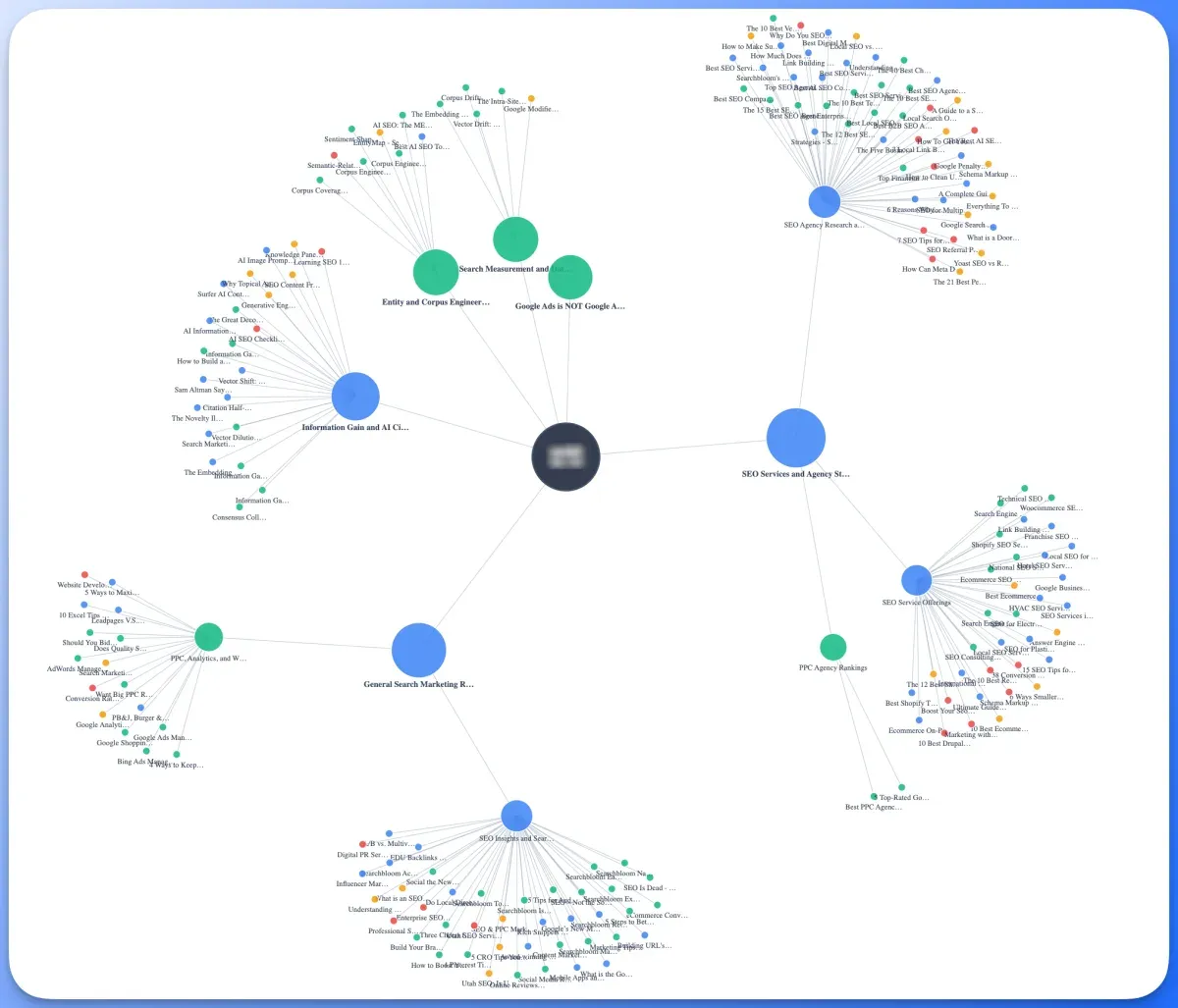
A free topical map generator is worth using for brainstorming, and free tiers are worth using for a first pass on a small list. Sort them by output type before comparing limits: idea lists from a seed keyword, clustered keyword groups from a list you bring and visual maps. Most stop at the first.
Seed-keyword generators return idea lists, and the three below share the same gap: none adds volume data or SERP validation.
- Optimo: The free generator accepts up to 3,000 characters of input and says it’s free to use as often as you like (checked October 2026). Thruuu’s February 2025 review found its output reads like a general AI chatbot answer.
- Fatjoe: Thruuu’s February 2025 review found it returns pillar topics with bulleted subheadings and copy-to-clipboard, but no CSV or Excel export.
- GravityWrite: It requires sign-in, takes a target keyword and a quantity, and returns a list of titles. New users get 1,000 free words (October 2026).
If you already have a keyword list, free keyword clustering is the better fit. Per Thruuu’s February 2025 review, AI Helperhub accepts up to 250 keywords by CSV, draws Force Directed or Radial Dendrogram views, and exports SVG. It groups by semantic similarity, not SERP similarity, so it can’t confirm that Google ranks two keywords together. SERP-based grouping is a separate category served by dedicated SERP clustering tools.
The free Content Audit tool at floyi.com takes a different route. Enter a domain and an email, wait roughly 5 to 13 minutes, and you get a Coverage Map of how up to 100 pages group into topics. There’s no account, no credit card and no credits. Each email gets one audit, and the result link stays live for 30 days.
The Coverage Map shows pillar, hub and branch topics, with Topic Strength and Competes With, and the PNG export makes it easy to share. It shows the structure you have, not the structure you need, so it’s a diagnosis rather than a plan.
The Floyi Free plan is separate. It includes access to all core features and 1 seat.
Here’s how the options map to the job:
- Brainstorming: An idea-list generator.
- Grouping a keyword list: List-based clustering.
- Diagnosing an existing site: The free Content Audit tool at floyi.com.
Across these free keyword tools, the shared gaps are little or no volume data, capped inputs and thin exports. Treat their output as a starting draft, and validate every group against live SERPs before it becomes a content plan.
Can Open-Source Scripts Cluster Keywords for You?
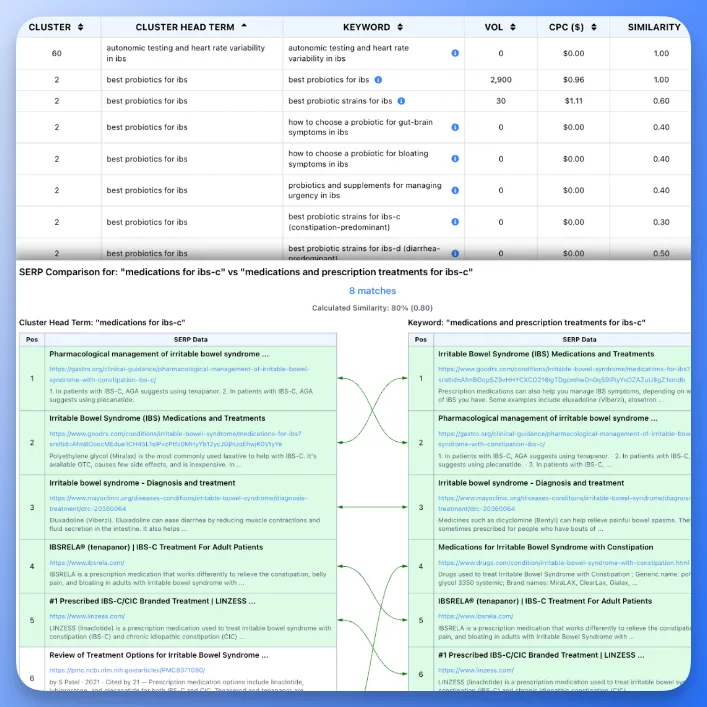
Yes, scripts can cluster keywords, but “free” splits three ways, each with a different cost profile. Text-similarity scripts need no paid data, SERP-overlap scripts need search results from somewhere and DIY builds run on free-tier or local models.
The first route is text similarity. A Python script can embed each keyword with an open-source sentence-embedding model, group the vectors with scikit-learn or HDBSCAN and write the clusters to CSV. It costs nothing in data. The limit is that grouping by meaning doesn’t show which keywords Google answers with the same pages, so two phrases that read as synonyms can still deserve separate URLs.
The second route is SERP overlap. A script fetches the top 10 results for each keyword, compares shared URLs pairwise and groups keywords whose overlap count meets a threshold you set. This reflects intent better and reduces cannibalization. The code can be free, but the data is the cost: you either export results by hand or pay a metered SERP API. A license covers the code, never the data.
Notebook workflows make either route easier to audit. The same steps run cell by cell in a Jupyter or Google Colab notebook:
- Load a keyword export.
- Fetch or import results.
- Compute overlap or embeddings.
- Cluster.
- Export to CSV.
Because you can inspect each cell, threshold changes and keyword cleanup are quick to test.
Public projects vary widely, so check the license, the last update and the data dependencies of any script before relying on it. A project that looks complete may still need a paid data source for live SERP analysis.
The local-model route works differently. Open-weight models run through Ollama can draft pillar topics and subtopics from a seed at no cost beyond your hardware. Custom generators built with LangChain or LlamaIndex on free-tier LLM APIs follow the same pattern. The catch is that the output carries no search data or SERP evidence. Treat it as a brainstorm that needs a SERP check before anyone commits a content calendar to it.
Scripts suit practitioners who are comfortable with Python, environment setup and CSV cleanup, who will maintain the code and who will hand-check clusters against live results. If you’d rather not build a pipeline, the Floyi Free plan includes 500 credits with no credit card required. SERP Clustering costs 1 credit per keyword, and re-clustering an existing report is free.
How Do the Four Free Routes Compare, and When Is Free Not Enough?
Each free route covers a different slice of the job, and none covers all of it. Free stops being enough once maps must be validated, kept current and handed to writers across several sites.
The comparison below uses only the limits covered earlier in this guide:
| Route | Can do | Cannot do | Time cost | Skills | SERP validation | Hierarchy depth | Export |
|---|---|---|---|---|---|---|---|
| Spreadsheets | Hold any structure you build | Group or validate on their own | High, all manual | Basic formulas | Manual checks only | As deep as you build it | Sheet, CSV |
| Search features (autocomplete, People Also Ask, Search Console) | Show real query data | Give structure or levels | Medium | Low | Real queries, no grouping | None | Copy-paste |
| Free generators and tiers | Produce idea lists fast | Confirm intent or page type | Low | Low | Limited | Flat or two-level lists | Varies by tool |
| Open-source scripts | Cluster keywords into CSV | Supply volume or live results without extra data sources | Setup-heavy | Python | Needs extra data sources | Clusters, not levels | CSV |
A keyword cluster list groups related queries. An SEO topical map adds levels and names one primary page per topic. Spreadsheets and scripts reach that second stage only if you do the leveling yourself.
Free has hit its ceiling when any of these show up:
- Page-type or intent decisions need a live results check for every cluster.
- Manual grouping breaks down as lists grow.
- The map has to stay current month after month.
- Briefs need the map without re-keying.
- You repeat the work across several sites.
One gap holds across nearly every free route: generators and scripts start from a seed, not from your pages. Content gaps against what you already published stay invisible until you audit the site itself.
Run the free Content Audit tool at floyi.com on your own site to see how your content groups into topics today, with no account and no credits.
Free Topical Map Tools FAQs
These FAQs answer what practitioners ask most about free topical map tools: clustering in spreadsheets, Search Console, keyword limits, visual exports, and script safety.
1. Can Google Sheets Cluster Keywords Automatically?
No, not in any meaningful way. No filter, formula or pivot table groups keywords by meaning or shared results.
The page-level formula from the spreadsheet section only surfaces groupings you’ve already made. It doesn’t decide which keywords share a page.
Real clustering takes manual review or a script, plus SERP validation that keywords share ranking pages before you assign one URL. The open-source scripts covered earlier help here, and a dedicated clustering tool can export results back to your sheet.
2. Is Google Search Console Enough for Topic Research?
No, Search Console isn’t enough on its own. It’s free and gives first-party query, impression and click data for a verified site, which exposes long-tail and striking-distance queries and pages that overlap on the same search terms. That makes it a strong map of what you already rank for, but it complements keyword discovery rather than replacing it.
Search Console only reports queries where your site already earned impressions, so it can’t show untapped demand, competitor coverage or a full topical hierarchy. Google Keyword Planner, free with a Google Ads account (as of October 2026), fills part of that gap by expanding seed topics into keyword ideas with demand estimates, though volumes can be broad or grouped. It doesn’t build a topical map either.
3. How Many Keywords Can Free Tools Handle?
A spreadsheet can track a very large keyword list, but free clustering and generator tools usually accept far less per run.
Keyword count alone doesn’t set the useful limit. What matters is how much a tool processes per run and whether SERP data backs the groupings. Review time matters too, since each cluster needs a target URL and intent. A list you can review properly beats a bigger one you can’t.
4. Do Free Tools Export Maps to Visual Formats?
Export options depend on the route. Spreadsheets are portable by default, since a sheet downloads as CSV or XLSX. Clustering scripts usually output plain files, and many free generators return copyable text, so you paste results into a sheet or diagram yourself.
Visual exports are rarer. AI Helperhub exported SVG, according to Thruuu’s February 2025 review. The free, open-source draw.io (diagrams.net) app lets you draw a map by hand, and the free Content Audit tool at floyi.com exports its Coverage Map as a PNG. Check the format before building a workflow around any tool.
5. Are Open-Source Clustering Scripts Safe for Beginners?
Open-source clustering scripts are generally safe once you review the code and install it in a virtual environment, but they aren’t beginner-friendly out of the box. You skip the paid account, yet you still need Python installed, some command-line comfort and patience for dependency errors. Treat that as a setup-time trade-off, not a cost saving.
Store any API keys in environment variables, never paste them into shared scripts and check a script’s data sources before trusting its clusters.
For a no-cost start, Ollama or LM Studio (free as of October 2026) can run Llama 3 or Mistral locally to draft pillar topics, subclusters and search intent. Validate that output against SERPs before publishing.
About the author

Yoyao Hsueh
Yoyao Hsueh is the founder and CEO of Floyi, the topical authority platform, and the founder of Main Heading, an SEO and AI search agency. He is an expert in topical authority and topical mapping. He created Topical Maps Unlocked, a course studied by thousands of SEOs, content strategists and digital marketers, founded TopicalMap.com, a done-for-you topical mapping service for agencies and enterprise teams, and publishes the weekly Digital Surfer newsletter on SEO, content strategy and AI search.
About Floyi
Floyi is a closed loop system for strategic content. It connects brand foundations, audience insights, topical research, maps, briefs, and publishing so every new article builds real topical authority.
See the Floyi workflow