
SERP Clustering Tools Compared: 9 Options on 6 Criteria
Compare 9 SERP clustering tools on grouping method, overlap threshold, cost per keyword, location control, exports, and map support. Prices checked Oct 2026.
Two clustering tools can return the same number of groups from one keyword list and still mean different things by “group.” The grouping method decides that, so it’s the first thing to check in any keyword clustering tools comparison, ahead of price or interface. Nine options are compared here on grouping method, overlap threshold, cost and limits, location and language, exports, and hierarchy.
Vendor pages make the comparison harder than it looks. KeyClusters applies a fixed rule of 3 or more shared top-10 URLs, Floyi lets you set overlap from 20% to 90%, and Serpstat reportedly compares a top-30 window. Several vendors publish no threshold, location or export details at all, and a monthly sticker price hides what reruns cost. A comparison table, nine tool reviews, a flat-cluster versus topical-map contrast, and shortlists by team type put those gaps side by side. Floyi makes one of the tools, so its entry is flagged as such.
SERP Clustering Key Takeaways
- Grouping method defines what a cluster means, so check it before price or interface.
- SERP overlap reflects what Google ranks now, while semantic grouping is faster but never checks results.
- Ask hybrid vendors which step makes the final call, semantic or SERP.
- Threshold adjustability and rerun cost matter most, since tuning is where judgment happens.
- Floyi offers 20% to 90% overlap, 40% to 50% recommended, free reclustering, and XLSX export.
- KeyClusters’ fixed 3+ shared top-10 URL rule is easy to audit for client work.
- Flat clusters target keywords, while a topical map defines page roles, nesting and internal links.
How Does Grouping Method Change What A Cluster Means?
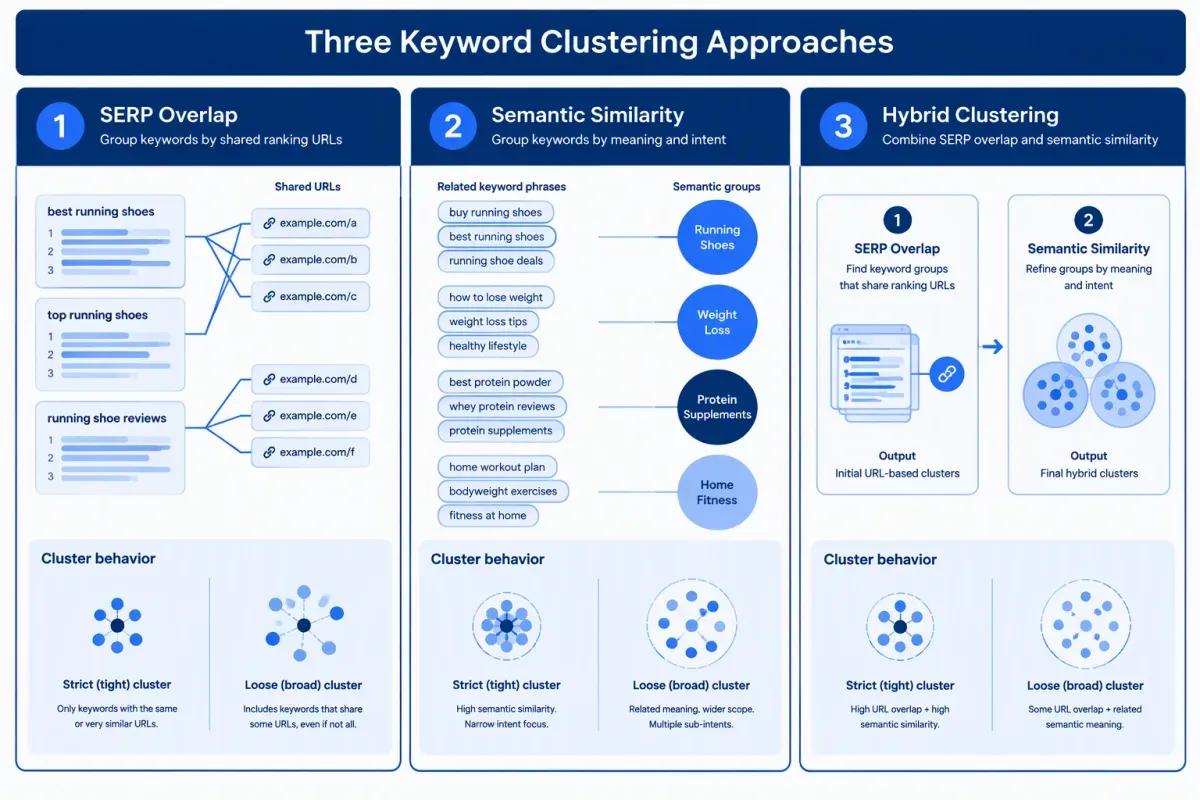
Start with the grouping method, because it decides what a cluster means. There are three approaches, and each one fails in a different way.
SERP keyword clustering, also called SERP overlap clustering, fetches live results and groups keywords whose top results share ranking URLs. KeyClusters, for example, groups keywords that share 3 or more of the top 10 pages. It reflects what Google ranks right now. The cost is a SERP fetch, and usually a credit, for every keyword.
Semantic keyword clustering groups terms by text or vector similarity. It’s faster and cheaper, which suits early discovery of related topics. But it never checks the results page, so it can merge queries Google answers with different pages or split queries Google treats as one.
Hybrid tools combine the two, running semantic grouping first and then a SERP check, or the reverse. Ask each vendor which step makes the final call. If the semantic pass has the last word, you’re buying a semantic tool with a SERP garnish.
The overlap threshold then shapes cluster size:
- Stricter setting: Produces tighter, smaller groups and may split queries one page could serve.
- Looser setting: Merges more keywords and risks mixing intents on a single page.
Check whether the threshold is adjustable and whether a rerun triggers new SERP fetches. A tool that charges for every rerun makes tuning expensive, and tuning is where most of the judgment happens.
Dedicated clusterers aren’t the only route. Some software for building topical maps clusters inside a wider planning workflow, and free routes to a topical map let you script an overlap rule yourself.
Whatever the method, treat each cluster as a recommendation, not an order to publish a page. Compare it with pages you already rank for, which is how you identify keyword cannibalization before it happens. A cluster that matches an existing URL is a signal to update that page instead.
Which SERP Clustering Tools Fit Which Teams?
The right tool depends on how you group keywords, how often you rerun them and whether the clusters need to become a site structure. Floyi makes one of the tools compared here, so weigh its entry with that in mind.
Six criteria separate the tools in practice:
- Grouping method: Shared-URL overlap, semantic or hybrid grouping changes which keywords land together.
- Overlap threshold: An adjustable setting lets you tighten or loosen clusters without switching tools.
- Cost and limits: Cost per keyword matters, and so do keyword caps and whether reruns charge again.
- Location and language: Local SEO keyword clustering only works if country, language and city settings match your market.
- Exports: Export fields decide how clean the handoff to writers is.
- Hierarchy: Clusters that carry into a map save you a rebuild.
| Tool | Grouping method | Overlap control | Cost per 1,000 keywords | Location and language | Export | Hierarchy |
|---|---|---|---|---|---|---|
| Floyi | Top-10 SERP overlap | 20% to 90% (40% to 50% recommended) | $6 to $10 in credits, reruns free | Country, language, optional city | XLSX, Google Sheets | Pillar > Hub > Branch > Resource map |
| Keyword Insights | Live SERP overlap with intent labels | Confirm on trial | About $5 to $5.80 | By country | Not published | Flat groups |
| Ahrefs Keywords Explorer | Parent Topic (top-ranking page) | None | No separate fee, paid plan | By country database | Not published | Flat groups |
| Keyword Cupid | SERP data plus machine learning | Not published | About $20 for extra keywords on Starter | Not published | Not published | Visual cluster views |
| SE Ranking | Shared top-result URLs | Grouping strength | Not published | Search engine, country, language | Not published | Flat groups |
| LowFruits | SERP checks plus clustering | Not published | Check the vendor’s pricing page | Not published | Not published | Flat groups |
| KeyClusters | 3+ shared top-10 URLs | Fixed | About $7.60 | Any geography, desktop or mobile | Excel | Flat groups |
| Semrush | Top-10 SERP similarity (per Semrush’s blog) | Not published | Check the vendor’s pricing page | By country database | Not published | Pillar and subpage planning aid |
| Serpstat | Top-30 window (per Semdash) | Connection strength | Check the vendor’s pricing page | Not published | Not published | Flat groups |
Prices and limits were checked on vendor pricing pages in October 2026 and change often. Before shortlisting, price 1,000 keywords with reruns included, not the monthly sticker price. Credit-based keyword clustering that looks cheap can climb fast when every threshold change is billed, and clustering is only one line in the total cost of topical mapping tools.
1. Floyi: Top-10 Overlap That Feeds A Topical Map
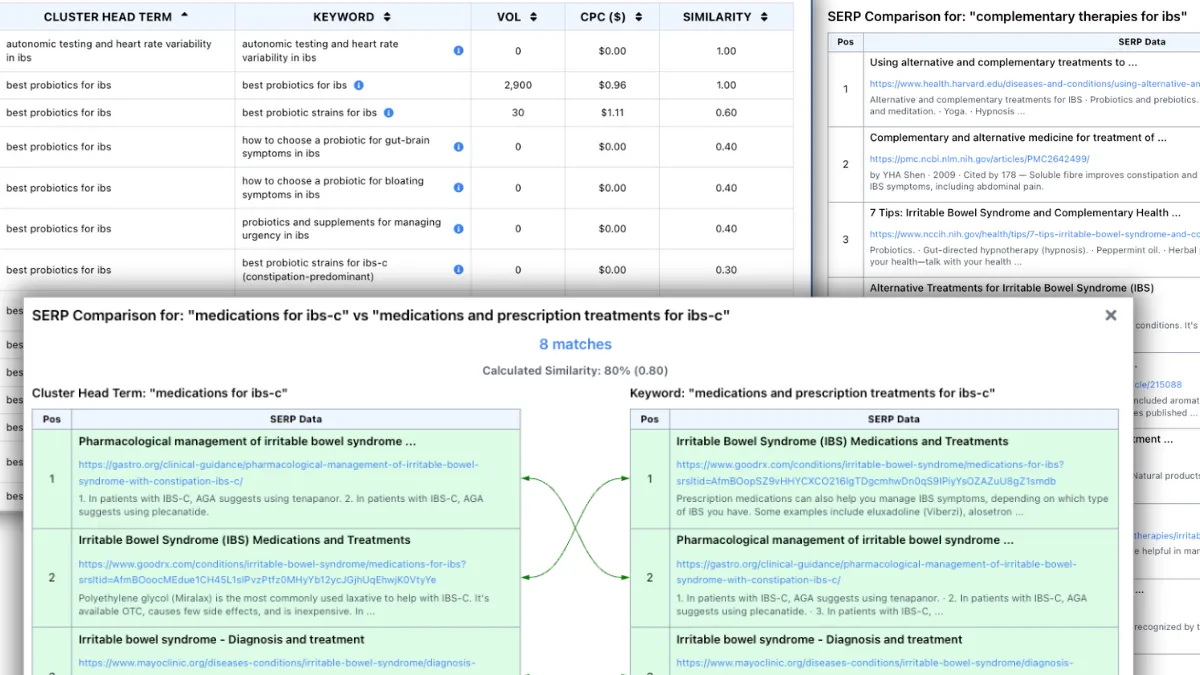
Floyi SERP Clustering groups keywords by shared-URL overlap, and its output is built to flow into a site structure rather than stop at a spreadsheet. It compares the top 10 URLs for each keyword pair and groups the keywords that meet your overlap setting.
Here’s how it scores on the six criteria:
- Threshold: Overlap runs from 20% to 90%, with 40% to 50% recommended as a starting point. Reclustering at a new threshold reuses the stored SERPs, so it costs no extra credits.
- Cost and limits: Each keyword uses 1 credit, with up to 1,000 keywords per report. Pay-as-you-go credits cost $10 per 1,000 on the Free plan, $7 on Pro and $6 on Scale.
- Location and language: You set country, language and an optional city or region for each report.
- Exports: Every cluster has a Cluster Head Term, the keyword that best represents the group, and each keyword gets a Similarity score. Volume, CPC and Competition sit alongside them, and results export to XLSX or Google Sheets.
- Hierarchy: In the strategy flow, clusters feed Floyi’s Topical Map, a four-level Pillar > Hub > Branch > Resource hierarchy with URL slugs and page intent.
A map only helps once the team can review it, which is why visualizing and exporting a topical map is the step after clustering. Before a full run, the free SERP Similarity Chrome extension compares two SERPs side by side, which settles whether two close keywords deserve separate pages.
Floyi fits teams that want clusters to become a site structure. It doesn’t lead on keyword research depth, where Ahrefs and Semrush are stronger, so pair one of them with Floyi if discovery is your bottleneck.
2. Keyword Insights: SERP Clustering With Intent Labels And Briefs
Keyword Insights groups keywords by live SERP overlap within a chosen country and attaches an intent label to each group, according to the vendor’s own description. That makes it a search intent clustering tool as much as a grouper.
Confirm during a trial run whether the overlap threshold is adjustable on your plan. Don’t assume a default, because the setting decides how tightly groups form.
Pricing comes from the vendor’s pricing page (checked October 2026). Clustering costs 1 credit per keyword, and other features draw on the same pool:
| Plan | Monthly price | Credits |
|---|---|---|
| Trial | $1 for 7 days | 5,000 one-time |
| Basic | $58 | 10,000 |
| Professional | $99 | 20,000 |
If every credit goes to clustering, that’s roughly $5 to $5.80 per 1,000 keywords. Your real cost depends on how much of the balance goes to briefs and writing.
Those extras are the workflow draw. Content briefs and writing tools sit in the same product, so briefs built from keyword clusters need no export step. The limit is structure. Output is grouped keywords, not a multi-level hierarchy, so you’ll arrange groups into pillars and hubs elsewhere.
Agencies and in-house teams running bulk keyword clustering on a recurring basis get the most from the credit model. Occasional users with small lists may find the monthly floor harder to justify, so run your largest list through the trial first.
3. Ahrefs Keywords Explorer: Parent Topic Grouping Inside Research
Ahrefs Keywords Explorer groups keywords by Parent Topic, which assigns each term to the topic of the page ranking first for it. It doesn’t compare overlap across the whole top 10, so the grouping is directional rather than a full SERP overlap analysis. The upside is speed, because it sits inside keyword research Ahrefs subscribers already do.
There’s no adjustable overlap threshold, so you accept the grouping as given or adjust it by hand. Ahrefs charges no separate clustering fee, but Keywords Explorer needs a paid plan, so check the vendor’s pricing page for current tiers.
Mixed intent is the main risk. When a group merges informational and commercial terms, open the SERPs and split it wherever the ranking pages differ. That manual keyword cluster review is the price of speed.
Ahrefs leads on keyword research depth and backlink data. It fits existing subscribers who want quick grouping without another product. Teams running large recurring batches, or those who need a hierarchy to plan from, should weigh a dedicated clusterer with threshold controls and exports built for handoff.
4. Keyword Cupid: Clusters Shown As Visual Maps
Keyword Cupid is a hybrid tool. The vendor says it combines live SERP data with machine learning to group terms, and its main output is an interactive mind-map view of clusters. That visual keyword clustering helps when you’re sketching site sections or internal linking paths. These are visualized clusters, not a four-level topical map with page roles, so hierarchy decisions still sit with you.
Pricing comes from the vendor’s pricing page (checked October 2026):
| Plan | Monthly price | Keyword credits |
|---|---|---|
| Starter | $9.99 | 500 |
| Freelancer | $49.99 | 5,000 |
| Agency | $149.99 | 20,000 |
| Enterprise | $499.99 | 80,000 |
Extra keywords cost $0.020 each on Starter (about $20 per 1,000) and drop to $0.006 on Enterprise. Keyword Cupid doesn’t publish a rerun cost, so ask before you plan to iterate.
The workflow accepts CSV uploads. Time a batch of your own keywords before committing, since that tells you more than any reviewer’s speed claim. Visual strategists who want to see how clusters relate fit it best. Teams that need briefs to inherit the structure will carry it over by hand.
5. SE Ranking: Keyword Grouper Inside An SEO Suite
SE Ranking’s Keyword Grouper builds groups from shared ranking URLs in Google’s top results. Before each run, you choose the search engine, country and language, plus a grouping-strength setting that controls how tightly keywords bind.
It also offers soft and hard grouping. Soft clustering lets a keyword sit in more than one group, which shows where topics overlap. Hard clustering assigns each keyword to exactly one group, which suits page-level keyword mapping where every term lands on one target page. The cluster view shows search volume and keyword difficulty, so you can rank hubs before exporting.
SE Ranking’s pricing page (checked October 2026) lists Core at $103.20 per month billed annually ($129 monthly) and Growth at $223.20 per month billed annually ($279 monthly). It doesn’t state Keyword Grouper limits by plan or a per-1,000-keyword cost, so confirm Grouper inclusion and limits with the vendor before you budget.
The fit is clearest for teams that will also use rank tracking and site audits under one login. If clustering is the only need, a dedicated clusterer may cost less.
6. LowFruits: Clustering For Low-Competition Keyword Hunting
LowFruits is an opportunity-discovery tool with clustering attached. It runs SERP checks on a keyword list, flags weak top-10 results such as forums and small sites, and groups keywords into clusters. You can see which group has the softest openings.
Per-cluster signals, such as the count of low-competition keywords, help you decide what to write first. The vendor’s own blog post describes using those counts to separate crowded clusters from ones with real openings, which suits niche site keyword research.
LowFruits offers subscription and pay-as-you-go credit options, with one credit per analyzed keyword. Published third-party figures conflict, so check the vendor’s pricing page before budgeting.
It has no multi-level hierarchy and no brief generation, so you’ll organize clusters and write briefs elsewhere. Niche-site builders and solo SEOs hunting easier-to-rank opportunities get the most from it. Agencies that need a connected research-to-brief workflow should treat it as a discovery step, not the whole pipeline.
7. KeyClusters: Pay-As-You-Go Shared-URL Grouping
KeyClusters groups keywords by a fixed shared-URL rule. If two keywords share 3 or more of the same top 10 ranking pages, they land in one group. That makes its groupings easy to audit, since you can open the two SERPs and confirm the match yourself.
The threshold isn’t adjustable. That’s a trade-off, not a flaw: you give up a tuning slider and get a rule you can explain to a client in one sentence.
Pricing, checked on keyclusters.com in October 2026, is pay-as-you-go:
- $19: 2,500 keywords, or about $7.60 per 1,000.
- $110: 20,000 keywords.
- $350: 100,000 keywords.
There’s no subscription, credits don’t expire and the vendor states no keyword limit.
You can run any geography on desktop or mobile. Imports accept Ahrefs and Semrush exports or a plain CSV, and results download as an Excel file. The output is flat groups, so hierarchy and briefs happen in a separate planning step.
Freelancers and teams with one-off bulk jobs get the most from it, because they pay only when a project lands. If you cluster every week, compare the per-batch cost against a subscription.
8. Semrush: Keyword Strategy Builder Inside A Full Suite
Semrush’s Keyword Strategy Builder suits teams already working inside the Semrush suite. Per Semrush’s knowledge base, you enter seed keywords and the tool groups related terms into topics, pillar pages and subpages, with intent, volume and difficulty metrics attached.
Keyword research depth is a real Semrush strength. Because the grouping sits beside that data, a strategist can move from a seed list to a pillar and subpage plan without leaving the platform.
Semrush’s blog says it groups keywords whose top 10 results share URLs, but it publishes no adjustable overlap threshold to compare. Treat the pillar and subpage output as a planning aid inside the suite. It isn’t a four-level topical map with page roles and link guidance.
The builder comes with paid Semrush subscriptions, so check the vendor’s pricing page for the current tier.
Existing Semrush users will find it convenient. Teams that only need SERP-overlap clustering with location control should compare the dedicated clusterers above.
9. Serpstat: Clustering That Shares Suite Credits
Serpstat suits teams that already run research or rank tracking inside the suite and want clustering on the same login and bill.
Semdash’s September 2026 comparison reports that Serpstat compares URLs across Google’s top 30 results, a deeper window than the top 10 most tools use, with adjustable connection strength. Confirm both in the live tool before you commit.
A deeper window changes what a group looks like. Keywords that share only lower-ranking URLs can end up linked, so groups may come out broader. That helps when you want wide scope, and it can blur intent splits you’d rather keep apart.
Clustering draws on the same credit pool as Serpstat’s other modules, so a big run competes with research and tracking. Check the vendor’s pricing page, then confirm these points:
- Cost per run: Price a single clustering run.
- Cost per 1,000 keywords: Include reruns.
- Credit limits: Confirm the cap on your plan.
- SERP settings: Verify country, city, search engine, and device, especially for local markets.
Output is flat groups, so any hierarchy gets built separately.
Where Do Clusters Stop And A Topical Map Start?
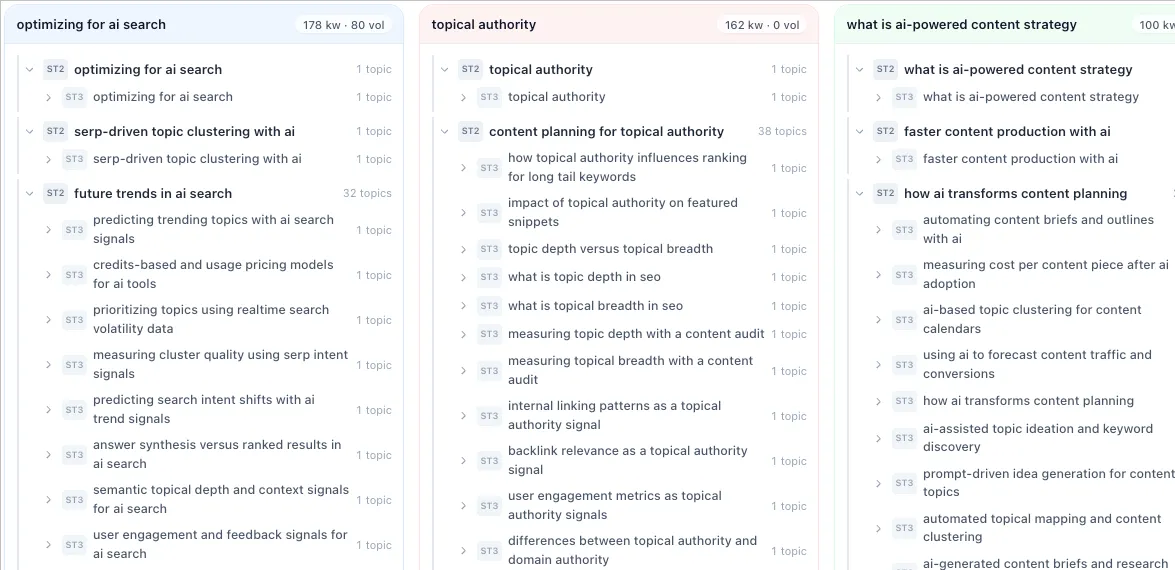
A cluster tells you which keywords one page can target. A topical map tells you which pages exist, how they nest and how they link.
Flat clusters are a list of groups, each with a lead keyword. They work for page targeting, but they say nothing about parent and child pages, page roles or internal links. Grouping is only the first half of the job.
A topical map is a hierarchy. In Floyi it has four levels, Pillar > Hub > Branch > Resource, with URL slugs, page intent and internal linking guidance for each page. Here’s the contrast:
| Flat clusters | Four-level topical map | |
|---|---|---|
| Structure | A list of groups | Pillar > Hub > Branch > Resource |
| Page roles | Not defined | Set per page, with intent |
| Internal links | Not defined | Guidance per page |
| What you can brief from | A target keyword set | A page with a slug, a role and a place in the hierarchy |
Of the nine tools here, Floyi is the only one that carries clusters into a four-level hierarchy. Keyword Insights, KeyClusters, Serpstat, SE Ranking, LowFruits, and Ahrefs end at grouped keywords. Keyword Cupid adds visual cluster views, and Semrush offers pillar and subpage output as a planning aid. Each is useful, and none sets page roles and link guidance on its own.
Here’s the practical test for your keyword clustering workflow. If your next step after clustering is a spreadsheet you restructure by hand, weigh map carry-through heavily.
Which Tool Should Agencies, In-House Teams And Freelancers Shortlist?
Shortlist by three factors: how often you cluster, how many markets you cover and whether the groups must become a site structure. Those answers narrow most lists to two or three candidates.
Agencies run recurring, multi-client batches, so per-market location control and exports a client can review matter most. If you also deliver site structures, look for tools that carry groups into a map. From the comparison above, three entries fit best:
- Floyi SERP Clustering: Location control, XLSX export and carry-through into the map.
- Keyword Insights: Recurring large lists that feed content briefs.
- SE Ranking or Semrush: The practical choice if the team already works inside one of those suites.
In-house teams that already pay for Ahrefs, Semrush, SE Ranking, or Serpstat should start with the built-in grouping. Add a dedicated clusterer only when the threshold or locale control falls short.
Freelancers need low entry pricing and a rule clients can audit. KeyClusters fits that need, with pay-as-you-go packs and a fixed 3+ shared URL rule. Floyi is the option if you want an adjustable threshold with free reruns.
Before buying, run this check:
- Run the same 100 to 200 keywords, in the same country, through two shortlisted tools.
- Compare a few borderline groups by hand and decide which split you’d defend to a client.
- Price the rerun, since your first grouping will rarely be your last.
If you want clusters to carry into a four-level Pillar > Hub > Branch > Resource map, start with Floyi SERP Clustering.
SERP Clustering Tools FAQs
These answers cover what buyers ask most when comparing SERP clustering tools: how the methods differ, how big a cluster should be, which threshold to pick, and whether a free option exists.
1. How Is SERP Clustering Different From NLP Clustering?
SERP-based keyword grouping fetches live results for each keyword and groups queries that share ranking URLs, often three or more in the top 10. That overlap is evidence Google treats the queries as one intent. NLP keyword clustering groups terms by text or vector similarity and never checks what Google returns.
The trade-off is speed and cost against fidelity to the results page. SERP grouping mirrors Google more directly but costs more time and credits, since every keyword needs a fetch. Language-based grouping scales faster and costs less, though it can merge queries with different results. Use NLP for early discovery and SERP overlap for page-level decisions.
2. How Many Keywords Belong In One Cluster?
No universal keyword count applies. A group is the right size when its keywords share one page-level intent and their top results overlap enough that a single URL could rank for all of them. Size follows the overlap setting, so a loose threshold produces large groups and a tight one produces smaller ones.
Review any oversized group, or any group that mixes informational and transactional queries, since that usually signals a loose threshold. Tighten the overlap and rerun, or split the group by intent. Before you change site structure, check the group against your existing rankings.
3. What Overlap Threshold Works Best For SERP Clustering?
No single threshold fits every dataset, so judge tools on how much control they give you and what a rerun costs. KeyClusters applies a fixed rule of three or more shared top-10 URLs, which is easy to audit. Floyi lets you set overlap from 20% to 90%, with 40% to 50% as the recommended start, and reclustering is free, which makes testing cheap.
4. Is There a Free SERP Clustering Tool?
Yes, for small jobs. Floyi’s free SERP Similarity Chrome extension compares two SERPs side by side, so you can check a borderline keyword pair without running a full report. For a whole list, Floyi’s Free plan includes 500 credits, and SERP Clustering uses 1 credit per keyword, enough to cluster a starter list of up to 500 keywords.
About the author

Yoyao Hsueh
Yoyao Hsueh is the founder and CEO of Floyi, the topical authority platform, and the founder of Main Heading, an SEO and AI search agency. He is an expert in topical authority and topical mapping. He created Topical Maps Unlocked, a course studied by thousands of SEOs, content strategists and digital marketers, founded TopicalMap.com, a done-for-you topical mapping service for agencies and enterprise teams, and publishes the weekly Digital Surfer newsletter on SEO, content strategy and AI search.
About Floyi
Floyi is a closed loop system for strategic content. It connects brand foundations, audience insights, topical research, maps, briefs, and publishing so every new article builds real topical authority.
See the Floyi workflow