
Topical Mapping Tool TCO: A 12-Month Cost Model to Fill In
Topical mapping tool TCO goes beyond the subscription. Fill in a 12-month model covering data, labor, rework, and switching costs to compare three options.
You’re comparing a spreadsheet stack, a keyword-grouping tool and a full platform, and the pricing pages don’t line up. The subscription is only one of five cost components in a topical mapping tool’s 12-month total cost of ownership (TCO). The other four are data, labor, cannibalization rework, and switching costs, and they often outweigh the plan fee.
A quick search gives you vendor plan tables and feature lists, not a way to price the work around them. Floyi’s Pro plan at $99 a month looks cheap or expensive depending on how many hours your team spends on clustering, hierarchy and briefs. A free tool can look cheaper until staff time moves into the labor line. The model here uses nine variables (S, C, D, H, M, R, T, W, and X) and one comparison table, and you fill both in with your own numbers.
Market averages would only hide the real gaps. Cost per usable map, meaning total cost divided by maps that passed review and reached production, gives you one figure to compare across all three options.
Topical Mapping TCO Key Takeaways
- Topical map cost has five components: subscriptions and credits, data, labor, cannibalization rework, and switching costs.
- Sticker price misleads because billing cycle, seats, usage limits, and credits change what you pay over 12 months.
- Put each charge in exactly one row so nothing is counted twice.
- Labor equals H x M x R, so time one real map instead of borrowing a benchmark.
- Cannibalization rework equals overlapping page pairs times hours per fix, multiplied by your loaded hourly rate.
- TCO_12 equals 12 x (S + C + D) plus labor, rework and switching cost.
- Compare options by cost per usable map, using only maps that passed review.
What Are the Five Cost Components of a Topical Map?
TCO for a topical map has five components: subscriptions and credits, data, labor, cannibalization rework, and switching costs. It covers everything you spend over 12 months to get a usable, maintained map, not only what the vendor invoices. That’s why topical mapping tool costs rarely match the pricing page, and why the hidden costs of topical mapping sit in labor and rework.
Each component feeds one or more variables in the model:
- Subscriptions and credits (S, C): Plan fees plus any usage credits you buy on top.
- SERP and data API costs (D): Search result data, search-volume lookups and API charges.
- Labor (H, at rate R): Hours spent on research, clustering, hierarchy, and briefs.
- Cannibalization rework (W): Hours spent fixing pages that compete with each other.
- Switching costs (X): Migration, retraining and overlap if you change tools.
Other software categories already price ownership this way, adding implementation, training, integrations, and exit costs to the license fee. Here, setup and training go under a one-time labor line, integrations go under subscriptions or data, and exit costs go under switching. Opportunity cost stays outside the model because it’s a judgment call, not a number you can trace.
Feature comparisons help with choosing a topical map tool, and this model adds the price of the work around it. Each component becomes one row in the fill-in model below, filled with your own numbers.
How Do Subscriptions and Credits Add Up?
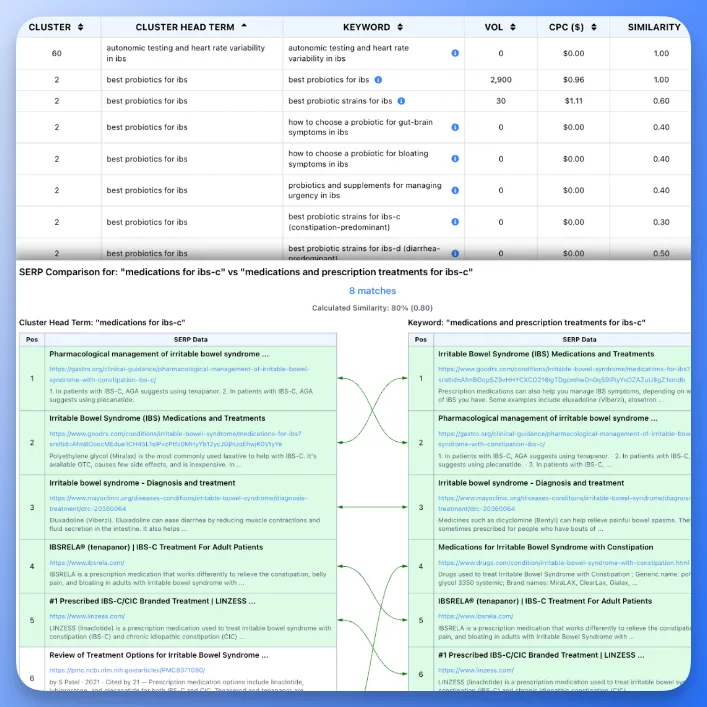
Sticker price is only the starting point, because billing cycle, seats, usage limits, and credits all change what you pay over 12 months.
SEO software pricing for mapping tools follows five models: flat subscription, per-seat pricing, credit-based pricing, per-keyword charges, and bring-your-own-key tools, where the model provider’s API bill arrives separately. Copy current prices from each vendor’s pricing page and record the date you checked.
The formulas:
S = monthly plan price (or annual price / 12) + extra seats x seat priceC = top-up or overage credit spend per monthHere’s our own pricing as the worked example:
- Free: 500 credits a month and 1 seat.
- Pro: $99 a month or $990 a year ($82.50 a month), with 15,000 credits and 3 seats. You can add up to 2 more seats at $15 each per month.
- Scale: $299 a month or $2,990 a year ($249.17 a month), with 50,000 credits and 8 seats. You can add up to 7 more seats at $10 each per month.
Seats and shared credits matter most for agencies, so compare mapping tools built for agency teams on how they price extra users and client workspaces.
Plan credits reset each billing cycle and don’t roll over. Pay-as-you-go credits cost $10, $7 or $6 per 1,000 on Free, Pro and Scale. They never expire and get used after plan credits.
Usage drives C. SERP clustering costs 1 credit per keyword, so keywords per map times maps per year tells you whether a plan covers the load. For example, 1,000 keywords of SERP Clustering cost 1,000 credits, which is about $6.60 of a Pro plan’s monthly credits ($99 / 15,000 x 1,000) or $7 at Pro pay-as-you-go rates. Reclustering with SERP data you’ve already fetched is free, so testing different groupings doesn’t add to C.
A low sticker price can still hide labor. Free mapping tools and scripts move cost from S into staff time rather than removing it.
What Do SERP and Data API Costs Add?
Data is its own line, D, separate from the subscription. Three inputs belong in it: SERP pulls, search-volume lookups and API or token usage for scripted or bring-your-own-key workflows. Fill each one from your own invoices or usage logs, not from published estimates.
In a spreadsheet stack, you may pay a SERP API and a language model API directly. That cash goes in D. The hours spent querying, exporting, cleaning, and organizing the data go in the labor line.
Under credit-based pricing, SERP data is bought with credits, so D folds into C. We bill SERP clustering in credits per keyword and charge only when new SERPs are fetched. Put each charge in exactly one row so nothing is counted twice.
Many teams keep Ahrefs or Semrush for keyword research depth and backlinks, and we don’t compete there. If that subscription stays, it goes in the S line of every option you compare.
Before you finalize D, check three points:
- Search-volume data: Confirm the country and language settings match your market.
- SERP validation: Check that grouping decisions rest on live results, not assumptions.
- Duplicate detection: Look for overlapping keywords that would produce competing pages.
Weak validation rarely shows up in the data bill. It shows up later as rework hours.
How Many Labor Hours Do Research, Clustering and Briefs Take?
Time one real map end to end, then multiply hours per map by maps per year and your loaded rate. Labor is the line most teams leave blank, and it’s often the largest in the model. In a manual topical mapping workflow, hours pile up across eight tasks:
- Keyword research
- Clustering
- Building the Pillar > Hub > Branch > Resource hierarchy
- Validating search intent
- Assigning URL slugs
- Planning internal links
- Writing briefs
- Reviewing the finished map
Labor = H x M x RSetup = T x RH = hours per mapM = maps per yearR = loaded hourly rateT = one-time setup and training hoursSetup and training happen once, so they get their own one-time line, T x R, outside H x M x R.
Use your own timed hours instead of a published benchmark. For R, use the loaded rate your finance team carries, including overhead, not the salary figure alone. That keeps topical map labor costs traceable when someone questions the total.
Tools change the H column, so treat each feature as a task to time during a trial. Our SERP Clustering groups keywords by real search result overlap. Topical Maps include URL slugs, page intent, internal linking guidance, and anchor text recommendations. Briefs inherit the Brand Foundation and buyer personas, so content brief generation doesn’t start from a blank page. Log hours for each step and let the totals speak.
Outsourcing topical mapping fits the same model. That’s what hiring a topical mapping service does to H: it turns hours into an invoice. Enter the fee in place of H x R, then add your own review hours at your own rate.
Labor also continues past the map. Our research on the real cost of a publish-ready article found that rewrite burden, not generation price, drives real cost. Add a brief-and-revision line to your hours, and count edits, not drafts.
What Does Cannibalization Rework Cost?
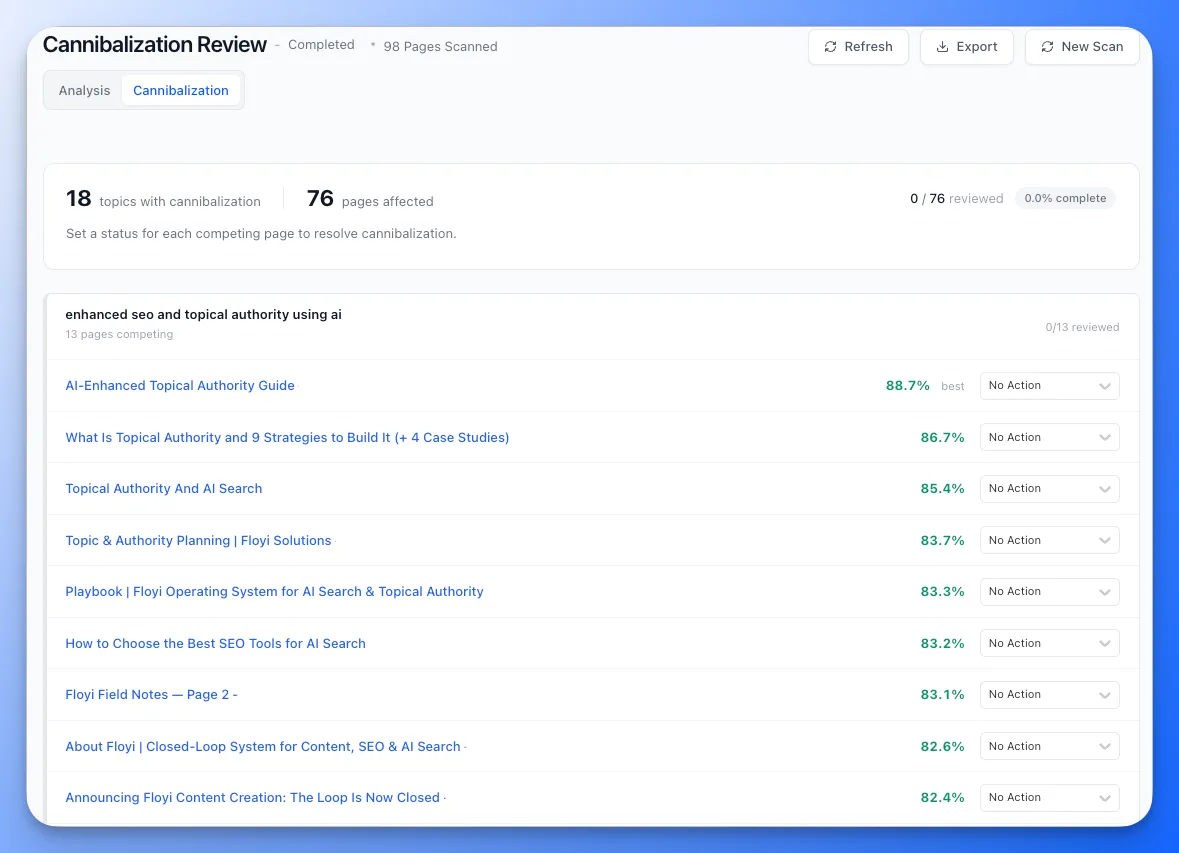
Cannibalization rework costs W x R: the hours you spend each year fixing overlapping pages, times your rate. You pay it after the map ships, when two pages end up competing for the same intent. A cheap map that groups keywords badly can cost more here than it saved on the subscription.
Overlap usually starts with a map built without SERP validation. One intent gets split across two pages, or two intents get merged into one. Fixing it means choosing to merge, redirect, rewrite, or re-scope, then updating internal links and re-briefing every affected page.
W = overlapping page pairs found per year x hours per fixRework cost = W x REstimate pairs from your last content audit. Leave the cell empty until you have that count rather than borrowing someone else’s figure.
Detection costs time too. By hand, it means comparing target keywords and Search Console queries page by page. Our Content Audit classifies pages as Keep, Optimize, Consolidate, or Prune and surfaces cannibalization and coverage gaps. Topical Audit names the topic each weak topic competes with, and two topics naming each other are merge candidates.
Topical Audit costs 1 credit per page analyzed, so that spend belongs in C, not W.
What Are Your Switching Costs?
Switching costs cover migration, rebuilding the hierarchy, overlapping subscriptions, retraining, and lost output. Together they form X, the exit line in your 12-month model, and they decide whether a cheap tool stays cheap. Topical map migration costs rarely appear on a pricing page.
X has five parts, each with a cell for your own figure:
- Data migration: Hours to move keyword and map data.
- Hierarchy rebuild: Hours to recreate the structure level by level.
- Overlap months: Months both subscriptions run at once.
- Retraining: Hours for writers, editors and SEO specialists to learn to read, follow and update maps in the new tool.
- Lost output: The value of pieces you don’t publish while the team adapts, at your own publishing rate.
Portability is the quiet risk, because proprietary formats can trap work. Run a trial export and confirm that hierarchy levels, URL slugs, search intent labels, and keyword data arrive intact. As one example, we export maps to XLSX, Google Sheets and Markdown.
X = (migration hours + rebuild hours + retraining hours) x R + overlap months x old S + lost outputLost history, such as records that don’t transfer, is hard to price. Note it beside X rather than inventing a number.
How Do You Build Your 12-Month TCO Model?
The model is one table and two formulas, filled with your own numbers. Each cell stays empty until you enter a figure you can trace to an invoice, a timesheet or a quote.
| Variable | Spreadsheet stack | Keyword-cluster tool | Full platform |
|---|---|---|---|
| S: monthly subscription and seats | Your figure | Your figure | Your figure |
| C: monthly credit or overage spend | Your figure | Your figure | Your figure |
| D: monthly SERP and data API spend | Your figure | Your figure | Your figure |
| H: labor hours per map | Your figure | Your figure | Your figure |
| M: maps per year | Your figure | Your figure | Your figure |
| R: loaded hourly rate | Your figure | Your figure | Your figure |
| T: one-time setup and training hours | Your figure | Your figure | Your figure |
| W: rework hours per year | Your figure | Your figure | Your figure |
| X: one-time switching cost | Your figure | Your figure | Your figure |
The annual TCO calculation:
TCO_12 = 12 x (S + C + D) + (H x M x R) + (T x R) + (W x R) + XEach term does one job:
- 12 x (S + C + D): A year of subscriptions, credits and data calls.
- H x M x R: Mapping labor across all maps.
- T x R: One-time setup and training hours.
- W x R: Hours spent fixing cannibalization after launch.
- X: The one-time switching cost from the section above.
The unit formula:
Cost per usable map = TCO_12 / maps that passed review and reached productionDivide by maps that passed review and reached production, not maps generated. This mirrors the method in our publish-ready article cost research, which divides monthly cost plus usage costs by publish-ready output instead of raw output.
Two optional inputs adjust the model: a renewal price change and growth in seats or clients. Leave them blank if you have no quote or plan. For a multi-year TCO model, repeat the annual formula for each year and count T and X only once.
Fill one column per option before reading the comparison.
How Do You Compare Three Options With One Model?
The three options compare fairly only when the same assumptions run through each one. Fix maps per year, sites, markets, and the 12-month horizon first, then compare cost per usable map.
Where each option’s cost usually sits:
- Spreadsheet stack: S is low, but most of the cost lands in H, and the risk of a higher W is real.
- Keyword-cluster tool: S or C rises and keywords get grouped, but the hierarchy, URL slugs, internal links, and briefs stay manual work in H. Grouped keywords are an input to a topical map, not the map itself.
- Full platform: S and C are higher, and the bet is that work moves out of H and W. Verify it by timing the same tasks in a trial.
For the platform column, here’s what we can state. Our maps run four levels (Pillar > Hub > Branch > Resource), are validated against SERP data, and include URL slugs, page intent and internal linking guidance. Agencies get a separate brand workspace per client.
Scope matters too. We don’t replace keyword research depth or backlink analysis (Ahrefs, Semrush) or technical audits (Screaming Frog, Semrush). Each is strong at its job. If your team keeps them, their cost stays in S for every option, so they don’t change the ranking.
Compute cost per usable map for each column before you open any vendor’s pricing page. That order ties the cost to finished work that supports your content strategy, not to what a plan costs per month.
When Does the Cheaper Option Win?
The cheaper option wins when mapping adds little labor. If your team already pays for Ahrefs or Semrush and only needs keyword grouping for a few pages, the new-subscription cost is close to zero. In-house topical mapping in a spreadsheet can be the right call there, because the incremental cost of topical mapping is small.
A pricier option pays back only when the labor and rework it removes exceed what it adds:
Pays back if: (change in H x M + change in W) x R > 12 x change in (S + C + D) + XA solo strategist making a few maps a year often fails this test. A team with many maps or clients has more hours and rework for a pricier tool to remove. Timing each task during a trial is how you check.
Two ways the rule plays out:
- The cheap option loses: Each map in the spreadsheet stack needs many hours of clustering, intent checks and rework. Multiplied by M and R, those hours exceed the pricier tool’s extra 12 x (S + C + D) plus X.
- The cheap option wins: You build few maps a year, and the pricier tool saves only a little time on each. The saved labor never covers the extra subscription, and X adds to the bill.
Whichever option shows the lower cost per usable map is the better buy for your team.
Run the model with your own inputs, then check our plan and credit numbers on the pricing page to see which side of the rule you land on.
Topical Mapping Tool TCO FAQs
These FAQs cover the questions buyers ask most often when pricing a topical mapping tool over 12 months, including subscription fees, credits, labor, rework, and switching costs. Each answer ties back to the variables you fill in yourself.
1. Do Agencies Pay More Per Client Than Solo Sites?
Total spend rises with every client, but cost per client can fall. Subscriptions and credits are shared, while research, map review and cannibalization checks stay per client. With topical mapping tools for multiple clients, that split matters. In Floyi, each client is a separate brand workspace, and Teams share one credit pool across seats.
To test it, divide S and C by your active clients. Then enter H and W for each client and compare cost per client against a single site.
2. Are Free Topical Mapping Tools Really Free?
Free topical map tools rarely cost $0 once you count total cost of ownership. Querying, cleaning, clustering, and maintaining the map by hand all land in H and W, and that labor can outweigh a subscription. Scripts that connect a spreadsheet to a language model may also add API or token charges, so enter them in D.
Separate what a plan includes from what it caps or meters, and log each cap as a trigger for paid usage. Our Free plan includes 500 credits a month, and the free Content Audit tool at floyi.com maps up to 100 pages with no login and no credits.
3. How Often Should You Revisit Your TCO Model?
Review your TCO model at least once a quarter, and revisit it right away when a trigger hits. Triggers include a price or credit change, more maps or audits, added clients or seats, or a workflow change. Connecting a new CMS or project-management tool counts, since integrations add setup costs and staff time. Ongoing topical map maintenance costs, like refreshing keyword data and updating maps after a Google core update, also shift your hours.
Keep the same variables and the same 12-month window every time. Log actual spend and hours beside your original assumptions, so any variance shows real cost drift instead of a redefined model.
4. Do Enterprise Seat Licenses Change Topical Mapping Costs?
Yes. Per-seat pricing multiplies the S line, so count everyone who opens the tool: editors, writers, SEO leads, and client managers. In Floyi, Pro includes 3 seats and takes up to 5, at $15 per extra seat a month. Scale includes 8 seats and takes up to 15, at $10 per extra seat a month.
Training time for each new user belongs in the one-time setup and training line, T x R, not in H x M x R. Retraining after a tool switch stays in X. A plan upgrade also resets your cost per map, so rerun the model after any seat change.
About the author

Yoyao Hsueh
Yoyao Hsueh is the founder and CEO of Floyi, the topical authority platform, and the founder of Main Heading, an SEO and AI search agency. He is an expert in topical authority and topical mapping. He created Topical Maps Unlocked, a course studied by thousands of SEOs, content strategists and digital marketers, founded TopicalMap.com, a done-for-you topical mapping service for agencies and enterprise teams, and publishes the weekly Digital Surfer newsletter on SEO, content strategy and AI search.
About Floyi
Floyi is a closed loop system for strategic content. It connects brand foundations, audience insights, topical research, maps, briefs, and publishing so every new article builds real topical authority.
See the Floyi workflow