
How to Visualize and Export a Topical Map by Audience
Learn which topical map view fits each task and which export (XLSX, Google Sheets or Markdown) fits stakeholders, writers and CMS or developer handoff.
One topical map can show up in several views, and the one you pick should depend on the question in front of you. Outline View checks structure, Silo View spots thin pillars and the Spreadsheet handles bulk edits. Matching topical map visualization to the task, and the export file to the person opening it, keeps a client, a writer and a developer working from the same plan.
The usual shortcut is to send whatever file the tool produces first. That gets a locked file to a writer who needs to edit, or a color-coded sheet to a developer whose CSV import drops every shade. Floyi’s Topical Maps offer Spreadsheet (with Map and Plan column sets), Silo View and Outline View, plus exports to XLSX, Google Sheets and Markdown. There’s no native mind map view, so a radial picture comes from exporting the outline into a mind-mapping tool.
The sections ahead pair each task with a view and each audience with a format. They then list the columns every handoff row needs, including Topic ID, Parent ID, level, and URL slug. A file naming pattern and a three-step post-export check keep every shared copy traceable to one live map.
Topical Map Views and Exports Key Takeaways
- Choose a topical map view by the decision you need to make, not the default.
- Floyi offers Spreadsheet, Silo View and Outline View, with Map and Plan column sets.
- Use Outline View for structure review and Silo View to spot thin pillars.
- Floyi has no native mind map view, so export the outline into a mind-mapping tool.
- Send Google Sheets for collaborative review and XLSX for offline work and developer handoff. Markdown feeds docs and mind-mapping tools.
- Every handoff row needs Topic ID, Parent ID, level, title, intent, slug, and link targets.
- Name exports with brand, topic, audience, date, and version so each traces to the live map.
What Is Each Topical Map View For?
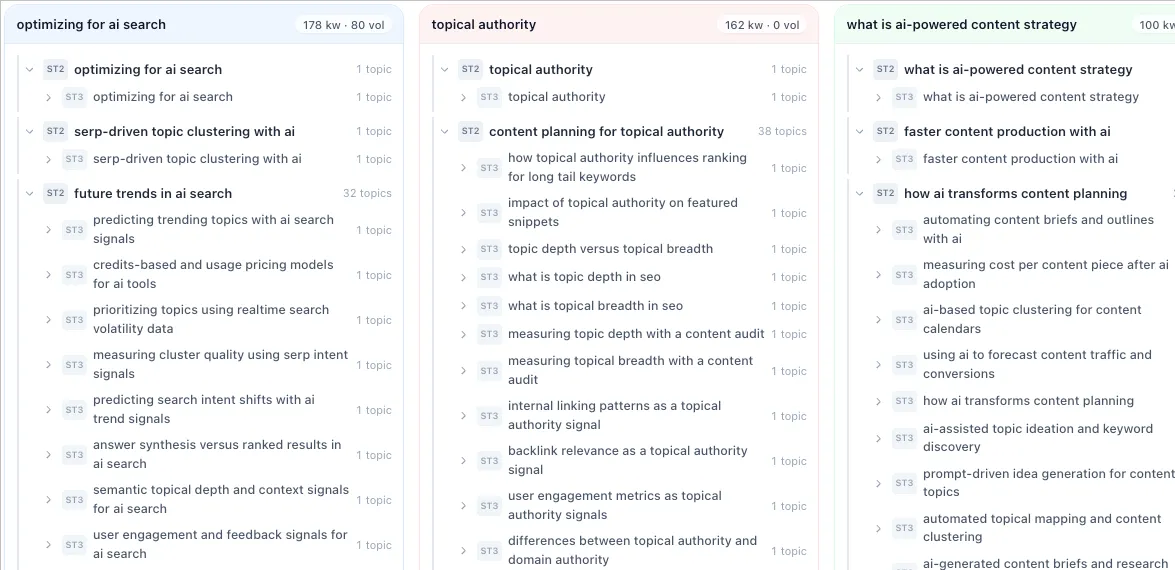
Visualizing a topical map starts with the question you need answered, because each view answers a different one. Where does a page sit, which pillar is thin, what will the client approve, and what needs a bulk edit? Choosing the view by the decision in front of you beats accepting whatever the tool opens first. The underlying object stays the same: a content hierarchy of pages organized as Pillar > Hub > Branch > Resource.
Four general view types cover most needs:
- Tree or outline: Navigates depth and checks parent-child logic.
- Silo: Shows each pillar’s coverage side by side so thin silos stand out.
- Mind map: Gives workshops and stakeholders one radial picture.
- Table or spreadsheet: Handles bulk edits to slugs, intent, funnel stage, and status.
| View | Weak at |
|---|---|
| Tree or outline | Comparing pillars at a glance |
| Silo | Editing fields in bulk |
| Mind map | Large maps and precise edits |
| Table or spreadsheet | Showing the shape of the topical hierarchy |
Tools that generate topical maps differ in which of these views they offer. Grids earn their place when the work is data entry, and anyone mapping topics in Google Sheets knows how fast one handles status and slug cleanup.
Floyi maps onto three of the four. The Spreadsheet is the default editable grid, with Map and Plan column sets. Map focuses on hierarchy and search result status, while Plan covers titles, journey stage, content type, and snippet. Both are column sets inside the Spreadsheet, not separate views.
Silo View gives you one column per main topic pillar, showing its hub and branch hierarchy. Outline View is a collapsible tree for large maps, with topic counts and depth at each level.
Floyi has no native mind map view. If you need that radial picture, you build it through export, which a later section covers. Match the view to the question, then switch when the question changes.
Which View Should You Use for Each Task?
With Spreadsheet, Silo and Outline views in hand, pick the one that matches the decision you need to make. Four tasks cover most of the work on a topical map, and each has a view that answers its question fastest.
| Task | View | What to look for |
|---|---|---|
| Structure review | Outline View | Every branch sits under the right hub, and every page sits one level below its parent |
| Gap spotting | Silo View | Thin or lopsided pillars when columns sit side by side |
| Client presentation | Simplified silo or mind map | Pillars and hubs only, with no keyword detail |
| Editorial planning | Spreadsheet | Status, intent and funnel stage you can sort and filter |
A tree or outline suits structure review because it mirrors your site architecture. In Floyi, Outline View shows topic counts and hierarchy depth, so you can audit a large map without scrolling a grid. A branch filed under the wrong hub is easy to spot there.
Silo View works best for gap spotting. A pillar with three hubs next to one with twelve stands out immediately.
When you share topical map visuals with stakeholders, strip the map down to pillars and hubs. Use a simplified silo or a mind map built from an exported outline. That visual overview of the topic hierarchy lets approvers judge structure and skip keyword detail. Agencies comparing options can start with topical map software for agencies. Floyi exports carry no Floyi branding, so agencies can add their own and share the overview as their deliverable.
Editorial planning belongs in the spreadsheet. Sort and filter by status, intent and funnel stage, and categorize topics by search intent before you move the rows into a content calendar. Teams assembling views from free topical mapping tools will do most of this work here.
Generate every view from the same live map so the picture and the plan never disagree.
Which Export Format Fits Which Audience?
Topical map export formats should follow the reader: a shared Google Sheet for reviewers, a Markdown outline for writers and an XLSX file for developers. The format depends on who needs to read, edit or run the plan.
Floyi exports topical maps to XLSX, Google Sheets and Markdown. When you export the map to Excel, the file includes a hierarchical sheet and a Markdown outline sheet, so one file covers two jobs. Here’s how the formats map to audiences:
| Audience | Format | Why | What to include |
|---|---|---|---|
| Stakeholders and clients | Google Sheets | One shared copy for collaborative review and comments | Pillar > Hub > Branch > Resource hierarchy, page titles, intent |
| Writers | Markdown, one outline per hub | Drops cleanly into docs and mind-mapping tools | Title, primary keyword, intent, slug, link targets |
| CMS and developer handoff | XLSX | One row per page, works offline and is easy to script | Slug, parent, level, page type, internal links |
Google Sheets works best when the client needs to leave comments on the map itself. Send the XLSX file when you want approval on a fixed version they can open offline. Split writer files by hub so each person gets only their pages.
Developers get the most from a spreadsheet file, because every attribute sits in its own column. A script can then read slug and parent without anyone retyping the hierarchy.
A mind map is a workflow, not a Floyi view. Copy the Markdown outline from the export into a mind-mapping tool that imports Markdown or indented outlines, and check that tool’s own import options first.
One pairing rule covers the rest: send one overview file for approval and one data file for execution, both exported from the same version of the map. The map your stakeholders approve then matches the SEO content plan your writers and developers build from.
What Should a Handoff File Include So Nothing Is Lost?
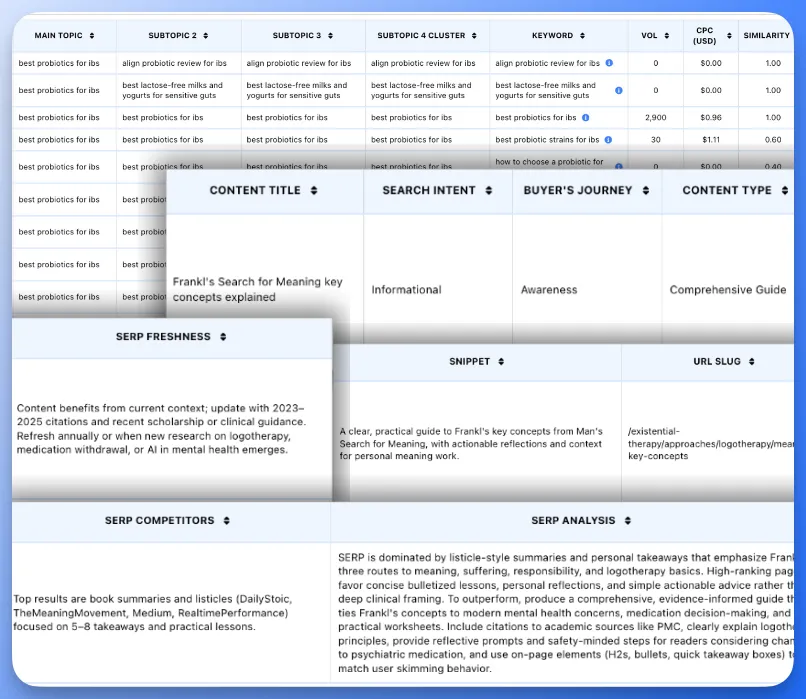
A handoff file should include hierarchy columns, page columns and action columns, so every row carries its own context. A writer or developer should be able to act on a single row without opening the map. If a row needs a second tab or a Slack thread to make sense, the file has already failed.
Three groups of columns make that possible:
- Hierarchy columns: Topic ID, Parent ID and level (Pillar, Hub, Branch, or Resource). With these three, anyone can rebuild the tree from the file alone, even after sorting or filtering. A flat list of titles hides which page supports which.
- Page columns: Title, primary keyword, search intent, funnel stage (TOFU, MOFU or BOFU), and URL slug. These tell a writer what to produce and where it will live.
- Action columns: Internal link targets with anchor text, status and owner. These tell the team what happens next and who does it.
You don’t have to retype the page columns. Floyi’s map export already carries titles, keywords, intent, journey stage, and URL slugs. Pull link targets and anchor options from the Authority Planner, and add status and owner yourself. A clean writer handoff is mostly a matter of exporting what’s already there.
If you color-code status or intent, repeat the value in a text column. Color doesn’t survive a comma-separated export, and screen readers can’t see it, so a cell shaded light purple means nothing in a plain-text tool.
Run three checks before any export:
- Save the map so the file reflects the latest hierarchy.
- Resolve every validation issue Floyi flags.
- Confirm no row is missing a slug.
Filter the slug column for blanks as a last pass. One empty cell is enough to stall a developer.
How Do You Keep Exports in Sync With the Live Map?
Keep exports in sync by treating the live map as the single source of truth, naming every file by version and routing edits back through import. Every exported file is a dated snapshot of the map. Edits made inside an exported file change nothing in the map until they come back, so drift starts the moment someone shares a copy.
Good version control starts with the file name. A copyable convention covers brand, core topic, audience, date, and version:
- Pattern: brand_core-topic_audience_date_version
- Example: acme_coffee-brewing_writers_2026-10-12_v2
Keep one folder per audience, such as writers, developers and clients, so an old version never gets mistaken for the current one.
Once the file exists, run a quick post-export check:
- Open the file and confirm the columns align and no text is cut off.
- Confirm the row count matches the map.
- Scan the URL slugs column to make sure edits did not blank any of them.
Edits need a controlled return path. Reviewers should change only the exported spreadsheet and leave the header row and IDs untouched. The file then comes back through the map’s import, where Floyi checks headers and IDs and reports any problems it finds. A broken ID surfaces before it reaches the map. Then export a fresh dated version and retire the old one.
A renamed column header or a deleted ID is the usual way a round trip fails. Tell reviewers which cells are theirs to change before you send the file.
Keep every export tied to one live map when you manage your topical maps in Floyi.
Topical Map Visualization and Export FAQs
These answers cover common questions about viewing and exporting a topical map, from topographic mix-ups to file formats and readable layouts.
1. Is a Topical Map the Same as a Topographic Map?
No. A topographic map shows physical terrain, using contour lines to mark elevation. A topical map for SEO turns a keyword list into a content blueprint. It shows a site’s planned pages as a content hierarchy, from pillars down to resource pages, along with how they link.
Take coffee as the pillar, brewing methods as the hub, pour-over as the branch, and a step-by-step pour-over how-to as the resource. Each level narrows the topic and sets up parent and child pages. You can show that hierarchy as an outline, silo, mind map, or table, and only the picture changes.
2. How Do You Export a Topical Map?
Finalize and save the map first so the file reflects the approved version. Then export it to XLSX, Google Sheets or Markdown, the three formats Floyi offers for maps. Floyi doesn’t export maps to PDF, CSV or PNG.
Pick the format by reader. Send Google Sheets when reviewers need to comment. Use XLSX for offline review and developer handoff. Markdown drops cleanly into docs and mind-mapping tools. When the export finishes, open the file and confirm that columns align, nothing is cut off and the row count matches the map.
3. Is There a Free Topical Map Export Tool?
Yes, in a limited way. Google Sheets downloads spreadsheets in common formats at no cost, and many mind-mapping apps have free tiers. Which formats are free depends on the tool and plan, so confirm before you build a handoff around one.
The free Content Audit tool at floyi.com needs no login or credits, covers up to 100 pages and returns a Coverage Map you can export as a PNG. The Coverage Map shows the structure a site already has. It doesn’t build a planned topical map, and the full export suite belongs to the Floyi app.
4. Can You Visualize a Topical Map in Spreadsheets?
Yes, a spreadsheet topical map works, though only partly. Google Sheets or Excel holds the map as a sortable table with Topic ID, Parent ID, level, title, primary keyword, search intent, funnel stage, slug, and content status. A filter view per hub gives you a simple view of each hub’s branches.
The limit is that a table shows lists, not a picture of parent and child pages. For a real tree, move to an outline or silo layout, or paste an indented outline into a mind map tool that accepts imports. In Floyi, the same map switches between Spreadsheet, Silo View and Outline View without a rebuild.
5. How Many Hubs Fit Readably in One View?
No fixed limit exists. Readability depends on label length, zoom level and layout, so short labels fit far more nodes than full keyword phrases do.
For dense maps, give each pillar and its hubs their own page or slide. Then open the exported file at the zoom your audience will use and confirm that no labels overlap and that spreadsheet columns align. If text collides, re-export a narrower view.
About the author

Yoyao Hsueh
Yoyao Hsueh is the founder and CEO of Floyi, the topical authority platform, and the founder of Main Heading, an SEO and AI search agency. He is an expert in topical authority and topical mapping. He created Topical Maps Unlocked, a course studied by thousands of SEOs, content strategists and digital marketers, founded TopicalMap.com, a done-for-you topical mapping service for agencies and enterprise teams, and publishes the weekly Digital Surfer newsletter on SEO, content strategy and AI search.
About Floyi
Floyi is a closed loop system for strategic content. It connects brand foundations, audience insights, topical research, maps, briefs, and publishing so every new article builds real topical authority.
See the Floyi workflow