
How to Match Content to Buyer Journey Stages, Hub by Hub
Match content to buyer journey stages one hub at a time. Find the hubs missing a TOFU, MOFU or BOFU page, fill each gap and link every stage to the next step.
A content library can look balanced while a high-value hub sends problem-aware visitors straight to a product page or leaves evaluators without a decision step. Match content to buyer journey stages hub by hub, not by counting TOFU, MOFU and BOFU assets across the site. A hub is the subtopic that groups related pages, and each one needs its own path from awareness to decision. That path gives every page a relevant next action instead of one borrowed from an unrelated topic.
Format doesn’t settle the stage. A case study can support early research or provider selection. So start from the persona’s problem and decision, then pick the page. In Floyi’s Topical Authority Planner, each topic carries a funnel stage and up to two intent labels. The Funnel Stage and Publishing Status filters show which hubs still lack a live page for a stage.
Even a hub with all three stages can strand buyers. It happens when TOFU pages don’t reach the MOFU resources, or when MOFU pages don’t lead to a relevant BOFU destination. One primary next-step link per page keeps the route measurable and tied to the buyer’s next decision.
Matching Content to Buyer Journey Stages Key Takeaways
- Audit buyer stages within each hub, not from library-wide page totals.
- Assign every page one primary TOFU, MOFU or BOFU stage based on its question and next action.
- Classify formats by purpose, since a case study or webinar can serve different stages.
- Check live pages first, because planned topics don’t close reader-facing gaps.
- Fill a missing MOFU stage with evaluation content that makes trade-offs and limitations visible.
- Link TOFU to MOFU and MOFU to a relevant BOFU destination within the same hub.
- Filter the Planner by Funnel Stage and Publishing Status to find hubs missing live coverage.
Map Buyer Journey Stages Hub by Hub, Not Library-Wide
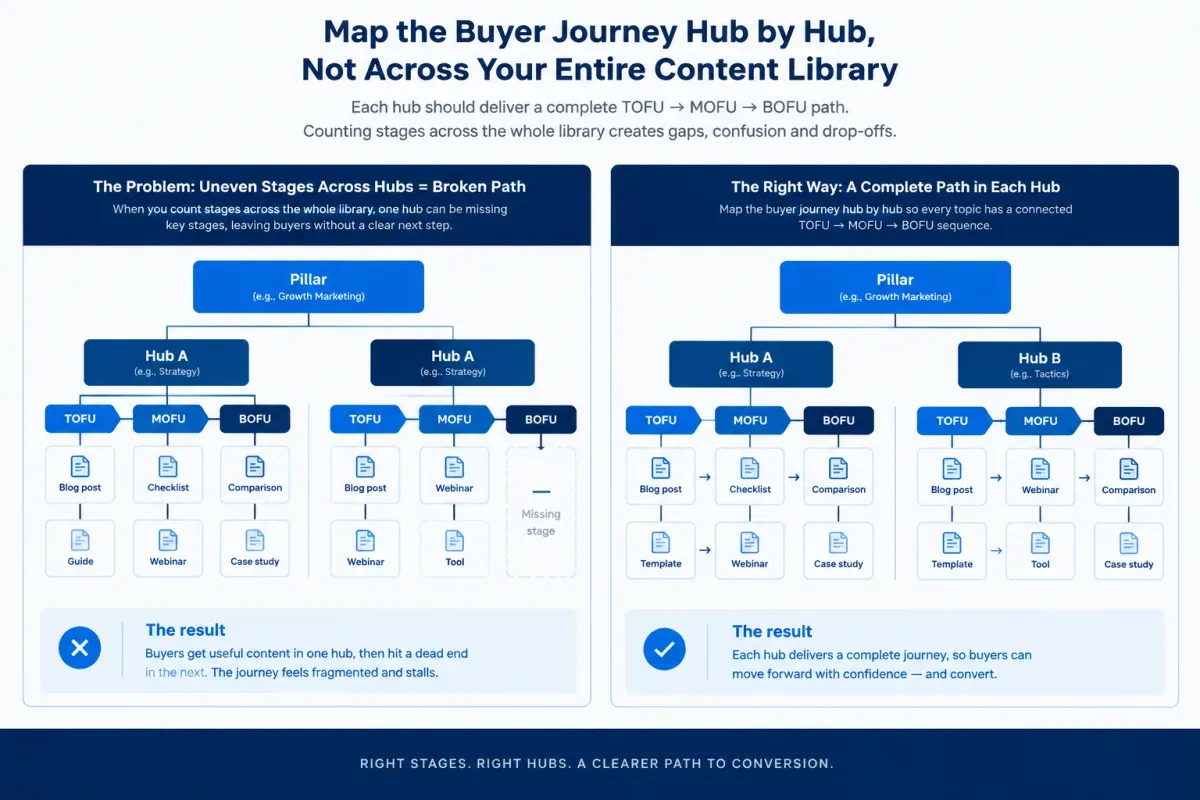
Match content to buyer journey stages one hub at a time, not across the whole content library. List the hub’s pages, give each one a primary stage and check that the hub has its own path from TOFU (awareness) through MOFU (consideration) to BOFU (decision). The BOFU step usually links out to a site page, such as a service, product or pricing page.
In a Pillar > Hub > Branch > Resource topical map, a hub is the subtopic that groups related Branch and Resource pages. Hub-level stage mapping is one layer of an AI-powered content strategy framework, and it’s where mapping content to the buyer’s journey gets specific. A reader who lands in a hub is asking about that hub’s subject, so the next step they need belongs in the same subject.
A library-wide tally of stages hides the gaps that matter. Take two sites with the same totals as an example: two awareness articles, two comparison pages and two decision pages.
On the first site, the analytics hub holds both awareness articles and both comparisons, while the reporting hub holds both decision pages. A reader in the analytics hub can learn and compare but has nowhere to act. On the second site, each hub holds one page per stage. The totals match, but only the second site gives a reader in either hub a relevant next step.
The hub view also fits how different teams sell. For a SaaS head of content, each product-feature hub needs a route to the matching feature or pricing page, so organic content can feed pipeline. For a B2B manufacturing content manager with a long sales cycle, every product-line hub needs its own awareness, evaluation and decision content. Buyers in a long cycle may return to the hub at each stage.
The steps below follow that logic. Use the stage matrix as a reference, find the missing stage in each hub, fill it with the right page, and link the stages together. The last section shows how Floyi’s Planner filters speed up the gap check.
Match Content Formats to Each Buyer Stage
Inside each hub, choose a page’s format from the buyer’s question at that stage and the action the page should support. Most buyer journey guides carry a version of the matrix below, so treat it as a reference rather than the method.
| Stage | Buyer’s question | Typical formats | Next step the page should offer |
|---|---|---|---|
| Awareness (TOFU) | What’s causing this problem? | Educational articles, how-to guides, checklists, explainer videos | A comparison or evaluation resource |
| Consideration (MOFU) | Which approach fits us? | Comparison and buying guides, webinars, case studies, solution explainers | The matching site page, a demo or a consultation |
| Decision (BOFU) | Why this provider? | Service and product pages, pricing, demos, trials, testimonials, ROI calculators | The conversion action |
| Retention and advocacy | How do I get more value? | Onboarding tutorials, help articles, training, and referral or review requests | Deeper adoption or a referral |
Format alone doesn’t set the stage. A webinar or case study can serve awareness or decision, depending on the question it answers and the next step it offers.
Retention and advocacy content usually lives in a help center or customer resource area, not in a hub’s public articles. So the gap check below covers the TOFU to BOFU path each hub needs. SaaS content for every buyer stage applies a similar stage table to software buying cycles.
Find the Missing Stage in Each Hub
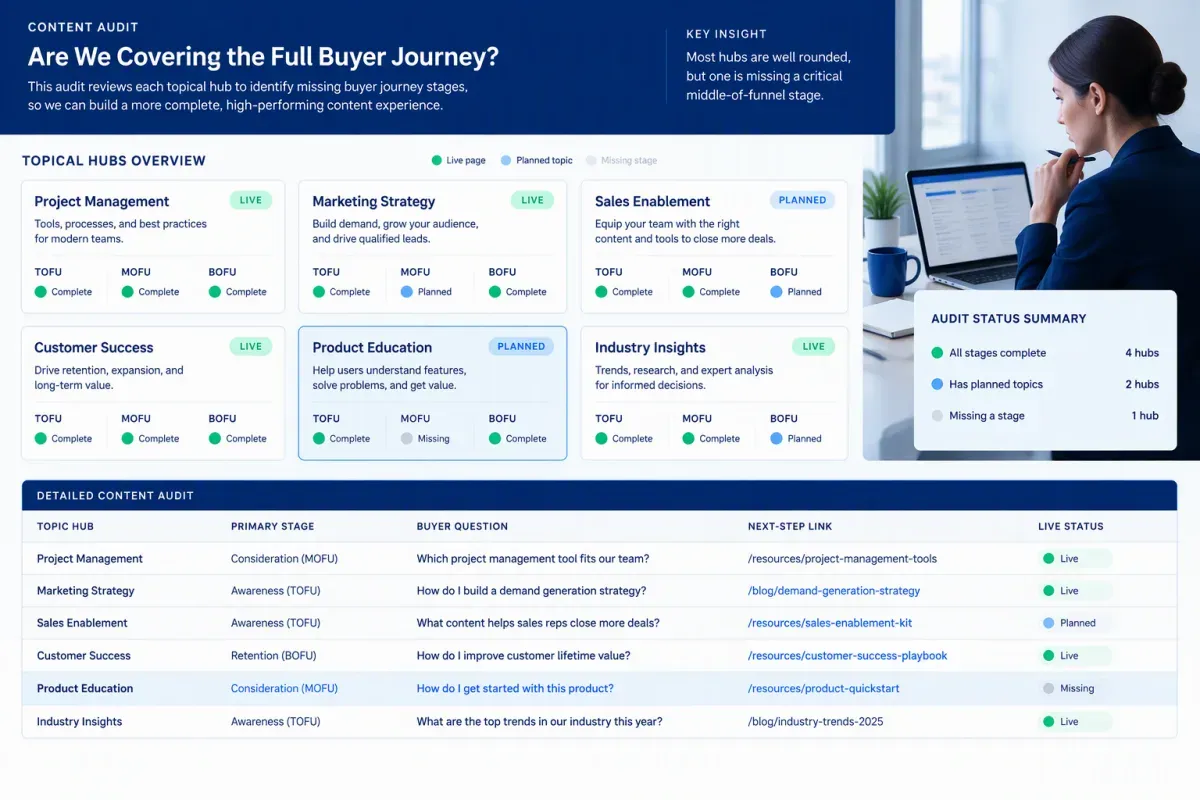
Find the missing stage by auditing one hub at a time. Start with the hubs that matter most to the business, and finish one hub’s path before starting the next.
A spreadsheet works for a content audit by funnel stage, as long as each hub gets its own tab. Include published pages and planned topics, but keep their status separate. Record four fields for every page in the hub:
-
Primary stage: TOFU, MOFU or BOFU.
-
Buyer question: The problem, need, concern, or decision the page addresses.
-
Next-step link: The page a reader should reach after this one.
-
Live status: Whether readers can access the page today.
To set the stage, start from the page’s buyer question. Then check the live search results to confirm whether searchers are learning, comparing options or getting ready to buy. A problem-focused explainer usually belongs at TOFU and an evaluation page at MOFU. A page that hands off to a service, product or pricing page belongs at BOFU. The same results also show intent, which you can label with the five intent types, including Generative.
With stages set, read each hub’s live pages as a whole. Content gaps by funnel stage usually fall into three patterns:
-
Awareness-only hub: The hub has explainers and introductory guides but no page that helps readers evaluate options. Readers learn about the problem and then stall.
-
Missing middle: TOFU pages send readers straight to a product or service page, with nothing that compares approaches or answers objections.
-
Missing decision step: Evaluation pages exist, but they never point qualified readers to the relevant service, product, pricing, or contact page.
A planned page doesn’t close a reader-facing gap. If a MOFU comparison is unpublished, visitors still lack that stage. Judge the path on live pages, then treat planned topics as the publishing work that completes it.
Next, check the links between pages. Open each TOFU page and confirm it links to the hub’s MOFU resource, then confirm the MOFU page links to the BOFU step. A hub can hold all three stages and still strand readers when its internal links don’t connect them.
Judge each gap against how the business sells. A long B2B buyer journey across several product lines may need more than one MOFU page per hub, while a simple offer may need one. Either way, each hub needs at least one live page or link-out for each stage.
Each finished hub also feeds the next round of closed-loop content planning with AI, where results from the live path show what to fix or add next.
Fill the Gap with the Right Stage Page
Fill the gap with a page that answers the missing stage’s buyer question inside the same hub. Don’t borrow a page from another hub or send readers to a generic company page.
Before creating anything, check whether a page already in the hub answers that question. If one does, give it that job and link it into the path instead of publishing a near-duplicate.
Start from the question a specific buyer persona still needs answered. Someone who has just noticed a symptom, need or opportunity wants an explanation before a product pitch. Someone comparing solution paths wants clear trade-offs. A buyer who has shortlisted providers wants proof, practical detail and an easy next step.
Match the page type to the gap:
-
Missing awareness stage: Publish a problem-first explainer or how-to guide on the hub’s subject. Good top-of-funnel content names the problem, its likely causes and the solution categories before it introduces your offer. Keep the call to action light, because readers don’t yet know which approach fits.
-
Missing consideration stage: Create a vendor-neutral evaluation page for the hub’s subject. It can compare approaches, offer a buying-criteria checklist, answer the persona’s objections, or show how a similar buyer chose a path. Strong evaluation pages make trade-offs and limitations visible, then point readers toward the decision step.
-
Missing decision stage: Link the hub’s MOFU page to the existing service, product, feature, or pricing page that fits the subject.
A manufacturing product-line hub, for example, may point to a product-line page or a request-a-quote page. If no suitable site page exists, flag the gap for the product or sales team rather than forcing a blog post into the BOFU slot.
Link Each Stage to the Next Step in the Hub
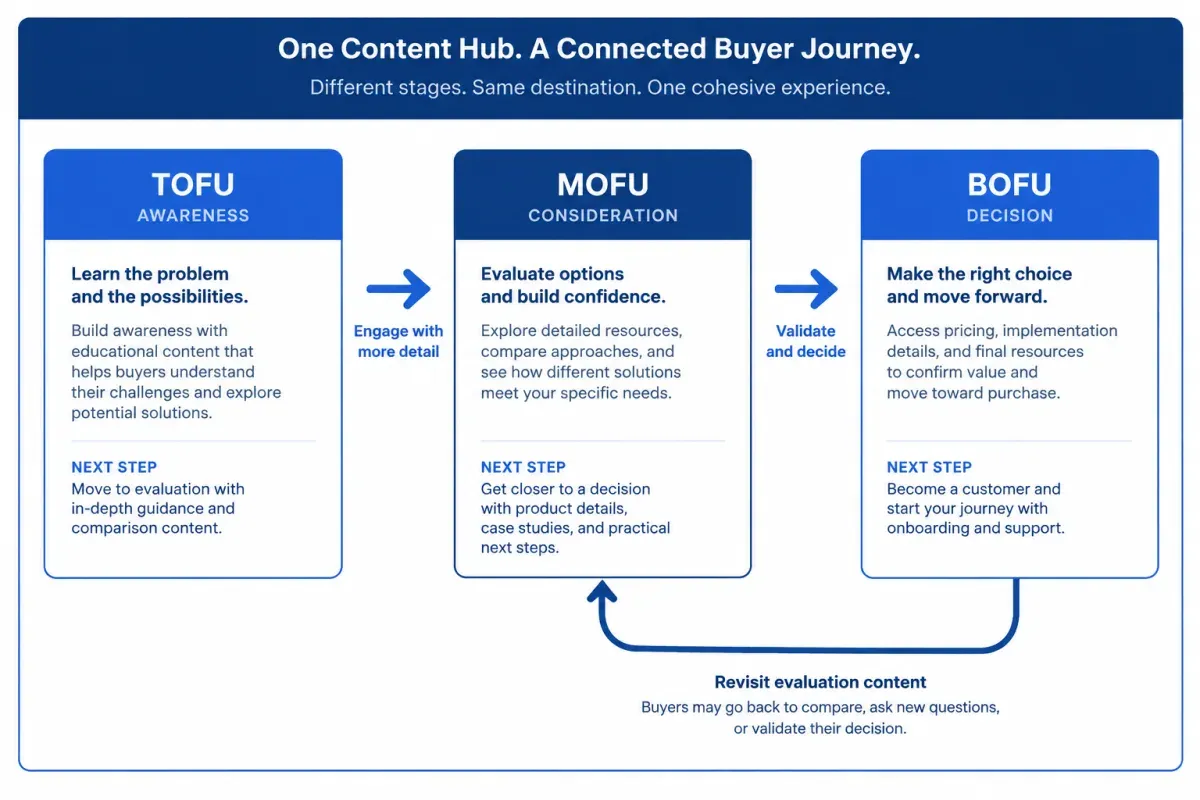
Give every page in the hub one primary next-step link to the adjacent stage, placed where the reader’s next question comes up. Use descriptive anchor text that names what’s ahead, such as “compare implementation options,” rather than “learn more.”
Next-step links turn separate pages into one clear route through the subject. Match each link’s call to action to the reader’s readiness:
-
TOFU to MOFU: Awareness pages point to an evaluation resource in the same hub, such as a comparison, checklist or case-study collection. Keep the ask low-commitment. A guide to manufacturing reporting problems, for example, can lead to a page that compares reporting approaches.
-
MOFU to BOFU: Evaluation pages lead to the relevant product, service or pricing page, or to a demo, trial or consultation.
-
BOFU back to MOFU: Decision pages link back to the evaluation content that answers common objections, such as implementation effort or ROI.
B2B buyers often loop back rather than moving in a straight line. A stakeholder may reach a pricing page, then go back to a comparison or case study to build an internal case. Links back up the hub keep that route open.
Keep each link inside the hub’s subject. If the right evaluation or decision page doesn’t exist yet, log it as a gap instead of linking to a loosely related page in another hub. That keeps the path coherent and the missing stage visible.
After purchase, onboarding and help content can link customers back into the hub when they want more value from what they bought.
Filter Floyi’s Planner for Hubs Missing a Stage
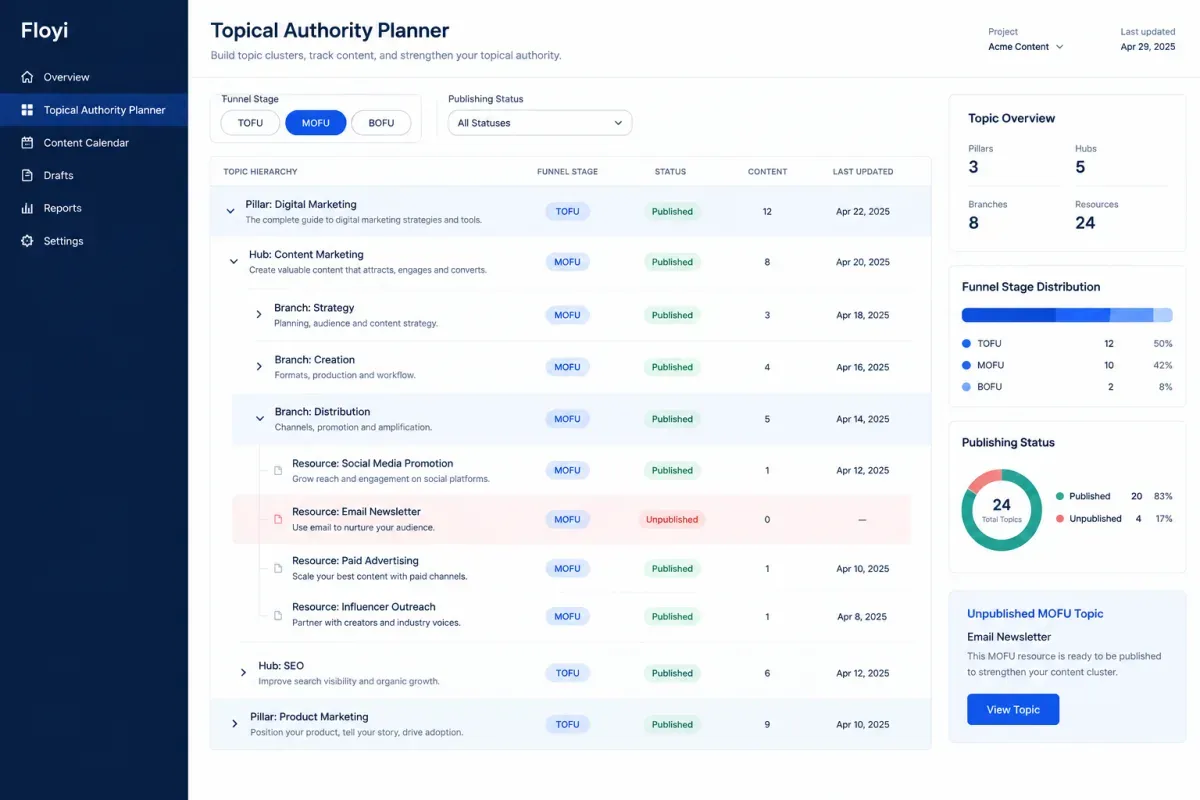
Floyi’s Topical Authority Planner speeds up the hub-by-hub check with funnel stage labels and filters. Every topic in the Plan view carries a funnel stage (TOFU, MOFU or BOFU) and up to two of the five search intents: Informational, Navigational, Commercial, Transactional, and Generative. The Planner shows the hierarchy from Pillar to Resource, so you can read stages hub by hub instead of as one flat list.
The Planner labels every topic for you. When a label doesn’t match how you sell, click the stage or intent on the topic row and pick a new value.
Use the Planner to check hubs systematically:
-
Filter by Funnel Stage, for example MOFU, and look for hubs with no matching topic. A hub with no MOFU topic has no evaluation step planned at all.
-
Add Publishing Status set to Not Published. Combined filters must all match, so this view shows MOFU topics that exist only as plans. A hub whose only MOFU topic appears here still has a gap for readers.
-
Open each hub that comes up and decide which page fills its gap, using the page types above.
This turns content gap analysis into a list of specific topics, each tied to a stage and a place in the hierarchy, rather than a page inventory.
Audience Insights generates buyer personas with their goals, pain points and objections. Select the relevant persona when you generate the brief for the missing stage’s page. The brief is then written for the buyer who needs that step, not a generic audience.
The Planner is part of Topical Authority, on the Pro and Scale plans. Start with your highest-priority pillar and find the hubs missing a stage.
Matching Content to Buyer Journey Stages FAQs
These FAQs cover whether every hub needs every stage and whether one page can serve several stages. They also cover how to tell whether a hub’s path works and whether BOFU content belongs on a blog post or a site page.
1. Does Every Hub Need Content for Every Buyer Stage?
Yes, though not in equal numbers. A hub can hold many TOFU pages and a single BOFU link-out. A hub with no path to a decision leaves ready buyers with nowhere to act. Close that gap before adding another awareness article.
2. Can One Page Serve Multiple Buyer Stages?
Yes, a page can serve overlapping needs. A comparison guide may help an early researcher weigh solution approaches and help a later-stage buyer narrow vendors. Give it one primary stage based on its intended audience, the main question it answers and the next action it supports.
Query wording, referral context, on-page behavior, and the next page readers choose all hint at a page’s dominant stage. Its links and calls to action can still serve the stages on either side.
3. How Do You Tell Whether a Hub’s Stage Path Works?
Track whether readers move along the path, not whether single pages attract visits. In your analytics, check how often visitors to the hub’s TOFU pages click through to its MOFU page. Then check how often MOFU visitors reach the BOFU page or take its action. Strong awareness traffic with little progression usually points to a missing or poorly linked middle stage. Compare each hub with your other hubs and with its own past numbers, because progression rates vary with the offer and the sales cycle.
4. Should BOFU Content Be a Blog Post or a Site Page?
It’s usually a site page. Buyers at the decision stage want the service, product or pricing page, a demo or a consultation. A blog post fits when buyers need decision support the site page doesn’t give, such as a pricing explainer, an implementation checklist or a detailed case study. That post hands off to the site page rather than replacing it.
About the author

Yoyao Hsueh
Yoyao Hsueh is the founder and CEO of Floyi, the topical authority platform, and the founder of Main Heading, an SEO and AI search agency. He is an expert in topical authority and topical mapping. He created Topical Maps Unlocked, a course studied by thousands of SEOs, content strategists and digital marketers, founded TopicalMap.com, a done-for-you topical mapping service for agencies and enterprise teams, and publishes the weekly Digital Surfer newsletter on SEO, content strategy and AI search.
About Floyi
Floyi is a closed loop system for strategic content. It connects brand foundations, audience insights, topical research, maps, briefs, and publishing so every new article builds real topical authority.
See the Floyi workflow