
Free SEO Content Brief Template to Copy, With an Example
Copy a free SEO content brief template with fields for keywords, search intent, SERP evidence, links, and acceptance criteria, plus a filled-in example.
Copy this free SEO content brief template and fill each field with evidence from the topic and the live SERP. Then hand it to a writer or an AI writer. It covers page basics, keywords, search intent, audience, angle, outline, internal links, sources, AI-answer notes, and acceptance criteria.
A template works best as one step in a larger SEO workflow. The topic’s place in your map, the persona it serves and the links it owes all come from SEO content planning done before the brief. Below the template is one labeled example for a fictional software company, then a short guide to turning the same fields into instructions an AI writer follows literally.
SEO Content Brief Template Key Takeaways
- Copy the template fields and fill each one with evidence from the topic, brand, audience, and live search results.
- Label intent as one of five types: Informational, Navigational, Commercial, Transactional, or Generative.
- Let SERP evidence and AI answers set the content format and outline, not a fixed word count.
- Mark any angle that depends on first-party data as “needs our data” instead of inventing proof.
- Give every internal link a destination, an exact anchor and a section.
- Write AI-writer fields as instructions covering audience, angle, exclusions, and evidence.
- Review every draft against the acceptance criteria before approval.
What Is the Copyable SEO Content Brief Template?
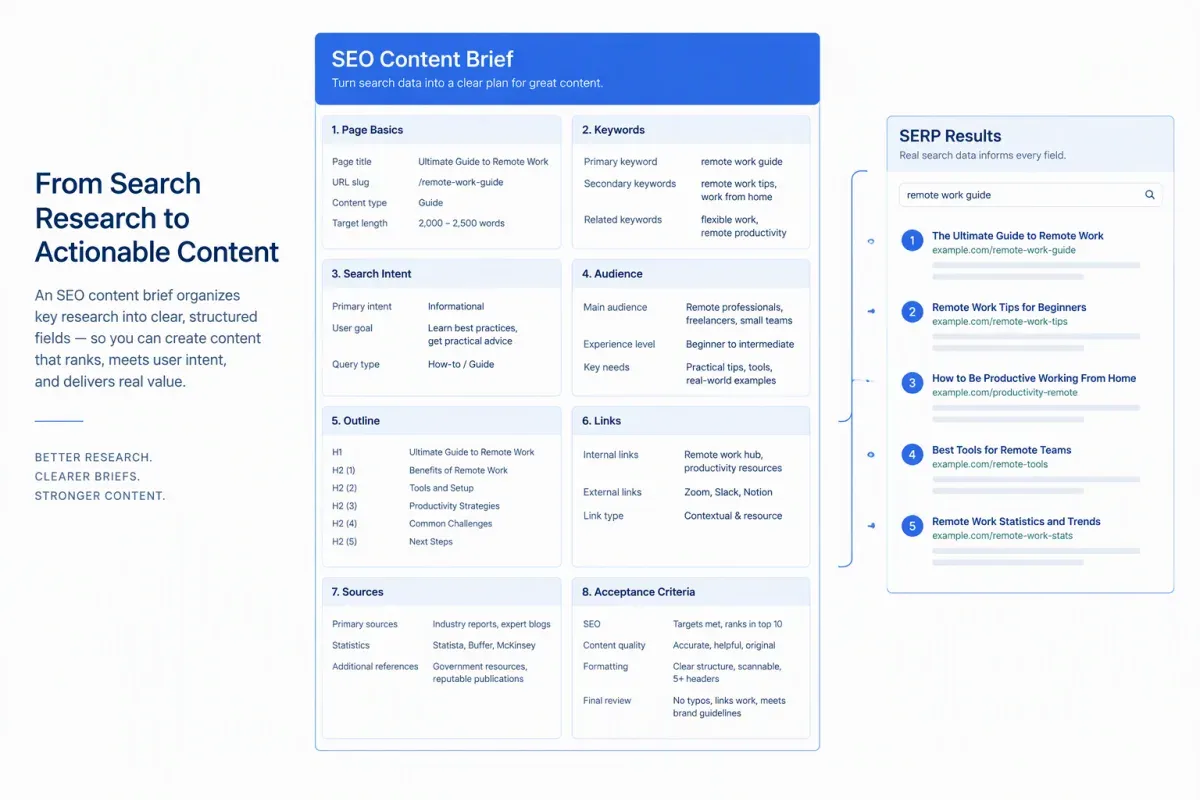
This SEO content brief template turns research and planning decisions into instructions a writer or AI writer can follow without guessing. Copy it into a doc, keep the field labels and replace each prompt with your own answer.
PAGE BASICS- Working title: the draft title for this page.- Proposed SEO title: the title shown in search results.- Meta description: a short summary for the search result.- Target URL or slug: the page address or planned slug.- Canonical URL: the preferred URL for indexing.- Page status: new page or update to an existing page.- Content type: the format the topic and SERP call for.- Schema type: the schema markup the page needs, if any.- Map position: Pillar, Hub, Branch, or Resource, plus the parent topic.- Writer: the person drafting the page.- Reviewer: the person approving the draft.- Due date: the agreed delivery date.- Word-count range: a flexible range set by the topic and the ranking pages.
PRIMARY AND SECONDARY KEYWORDS- Primary keyword: the main query this page targets.- Secondary terms: related keywords and variations to cover naturally.- Supporting questions: the questions readers ask about the topic.
SEARCH INTENT AND SERP EVIDENCE- Search intent: Informational, Navigational, Commercial, Transactional, or Generative.- Funnel stage: TOFU, MOFU or BOFU.- Dominant SERP format: the format most top results use.- Common subtopics: the subtopics most ranking pages cover.- Coverage check: each subtopic and entity from top results and AI answers, marked missing, covered or overused in your plan.- AI answer evidence: what AI answers say and which sources they cite.
AUDIENCE AND PERSONA- Target audience: the reader's role, needs and constraints.- Existing knowledge: what the reader already knows.- Reader problem: the need or question that brings them to the page.- Brand voice notes: tone, style and words to avoid.
ANGLE AND INFORMATION GAIN- Content objective: the primary content goal for the business, such as earning a signup or supporting a product page.- Primary question: the main question this page must answer.- Reader takeaway: what the reader should know or do after reading.- Distinctive angle: what this page adds that ranking pages and AI answers don't.- First-party data needs: claims that depend on your data, marked "needs our data."
OUTLINE WITH SECTION GOALS- H2 and H3 outline: each heading, the question it answers and the direct answer its first sentence gives.- Supporting details: the points, examples and entities each section needs.- Section length: a word-count range for each section.
INTERNAL LINKS AND ANCHORS- Link placement: destination URL, exact anchor text and the section each link belongs in.
SOURCES AND CLAIMS POLICY- Source requirements: the claims that need a primary source. No statistic goes in without one.
AI-ANSWER AND GEO NOTES- Entities to name: the people, products, organizations, and concepts the page should name.- Quotable answers: short, direct answers AI search could quote.
ACCEPTANCE CRITERIA- Review checklist: intent matched, outline followed, links placed with the given anchors, every claim traceable to a source, word-count range met without padding, and call to action placed.
Page basics set scope and ownership. Map position ties the page to its parent topic, so the writer knows what this page covers and what belongs to a neighbor.
Keyword fields name the terms to cover, with no repetition quota. Intent and SERP evidence set the format: informational queries usually call for a guide, while commercial or transactional queries may call for a comparison or product page. The coverage check turns SERP analysis into a short list of gaps to close.
Audience and angle fields tie the page to one reader and one contribution. The “needs our data” flag stops a writer from inventing proof for an angle only you can back up.
Vague outline, link and source fields force the writer to guess. Specific ones let the acceptance criteria work as an on-page SEO checklist for the reviewer.
The six-step brief guide explains how SEO, GEO and AEO briefs differ and where this template fits in the full build. To see why these decisions have to be settled before anyone drafts, read what makes a content brief effective.
What Does a Completed Brief Example Look Like?
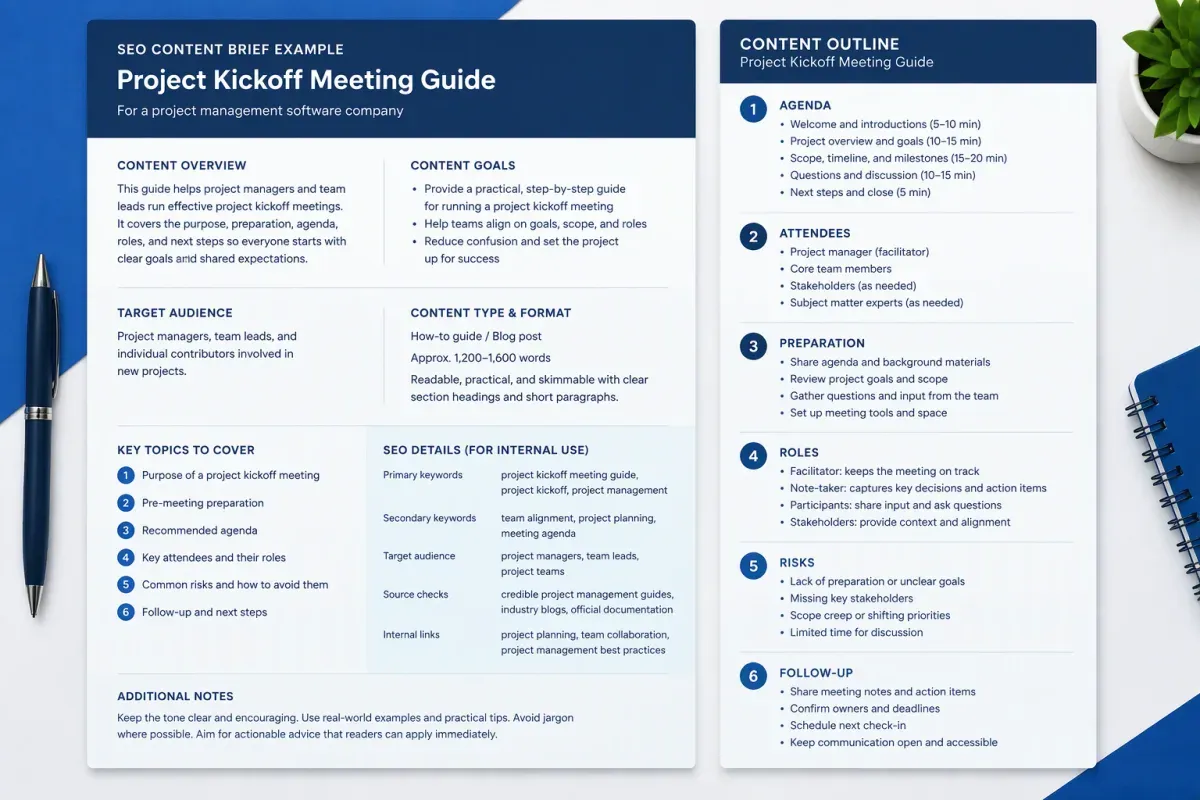
A completed content brief example fills every template field with a specific, checkable answer. The example below is illustrative: a fictional project management software company planning a guide to running a project kickoff meeting. It isn’t a real client brief or a ranking result, and every value is an example, not a benchmark.
Page basics
- Working title: How to Run a Project Kickoff Meeting: Agenda, Roles and Follow-Up
- Proposed SEO title: How to Run a Project Kickoff Meeting: Agenda and Steps
- Meta description: Learn how to prepare for a project kickoff, set the agenda, clarify roles, and turn decisions into next steps.
- Target URL or slug: /resources/project-kickoff-meeting/
- Canonical URL:
https://example.com/resources/project-kickoff-meeting/ - Page status: New page
- Content type: How-To Guide
- Schema type: Article
- Map position: Resource under the Meetings Branch
- Writer: Assigned staff writer
- Reviewer: Content lead, with a project management expert
- Due date: To be confirmed
- Word-count range: 1,500 to 2,000 words, set after reviewing the ranking pages
Primary and secondary keywords
- Primary keyword: how to run a project kickoff meeting
- Secondary terms: project kickoff agenda, kickoff meeting checklist
- Supporting questions: What should a kickoff agenda include? Who should attend? What happens after the meeting?
Search intent and SERP evidence
- Search intent: Informational. Searchers want to learn how to prepare for and run the meeting.
- Funnel stage: TOFU
- Dominant SERP format: step-by-step guides, often with a sample agenda
- Common subtopics: meeting purpose, attendees, preparation, agenda items, roles, risks, and follow-up
- Coverage check: risks and follow-up are missing from the plan. Attendees and agenda are covered. General meeting etiquette is overused, so it gets one line.
- AI answer evidence: AI answers stress defining goals, inviting key stakeholders and recording action items. Verify each point against primary sources.
Audience and persona
- Target audience: project managers at small and midsize companies who need a repeatable way to align teams before work starts
- Existing knowledge: they’ve run meetings before but have no standard kickoff format
- Reader problem: unclear expectations at the start of a project turn into missing owners and rework later
- Brand voice notes: practical and direct. Tie product mentions to specific tasks and avoid performance claims.
Angle and information gain
- Content objective: introduce the company’s kickoff template and earn template downloads
- Primary question: How do you run a project kickoff meeting?
- Reader takeaway: leave the meeting with shared goals, clear owners and agreed next steps
- Distinctive angle: build the agenda from the company’s own project templates and tie each agenda item to a follow-up task in the software
- First-party data needs: “Teams using our template surface risks earlier” needs our data. Hold it until there’s evidence.
Outline with section goals
- H2 and H3 outline: five sections, each listed with the answer its first sentence gives.
- Section 1, What is a project kickoff meeting? It aligns the people, goals and working expectations for a project.
- Section 2, Who should attend? The project lead, key contributors, decision-makers, and anyone who approves the scope.
- Section 3, How do you prepare? Share the goals, scope and draft agenda before the meeting.
- Section 4, What should the agenda include? Move from shared context to decisions and next steps. Three H3s cover goals and scope, roles and communication, then risks and next steps.
- Section 5, What happens after the kickoff? Send a recap with decisions, owners and follow-up tasks.
- Supporting details: a sample agenda drawn from the company’s real template and one recap email
- Section length: 200 to 400 words per section, with room for the agenda section to run longer
Internal links and anchors
- Link placement: “project plan template” to
https://example.com/templates/project-plan/in section 3. “team task tracking” tohttps://example.com/features/task-tracking/in section 5. Replace these fictional URLs with real ones before publishing.
Sources and claims policy
- Source requirements: the company’s templates and product docs, plus interviews with the company’s own project managers. Exclude direct competitors as sources.
AI-answer and GEO notes
- Entities to name: project manager, project sponsor, stakeholders, scope, agenda, action items, and project plan
- Quotable answers: “A project kickoff meeting aligns the team on goals, roles and next steps.” “A good kickoff agenda moves from shared context to decisions and assigned tasks.”
Acceptance criteria
- Review checklist: primary keyword in the working title, every supporting question answered, outline followed, and agenda checked against the real template. The risk claim waits for data, and both links get checked before publishing.
Two fields carry most of the value here. The angle gives the guide a reason to exist beyond standard meeting advice. The needs-data flag keeps an attractive but unproven claim out of the draft until someone can back it up.
How Can You Adapt the Brief for AI Writers?
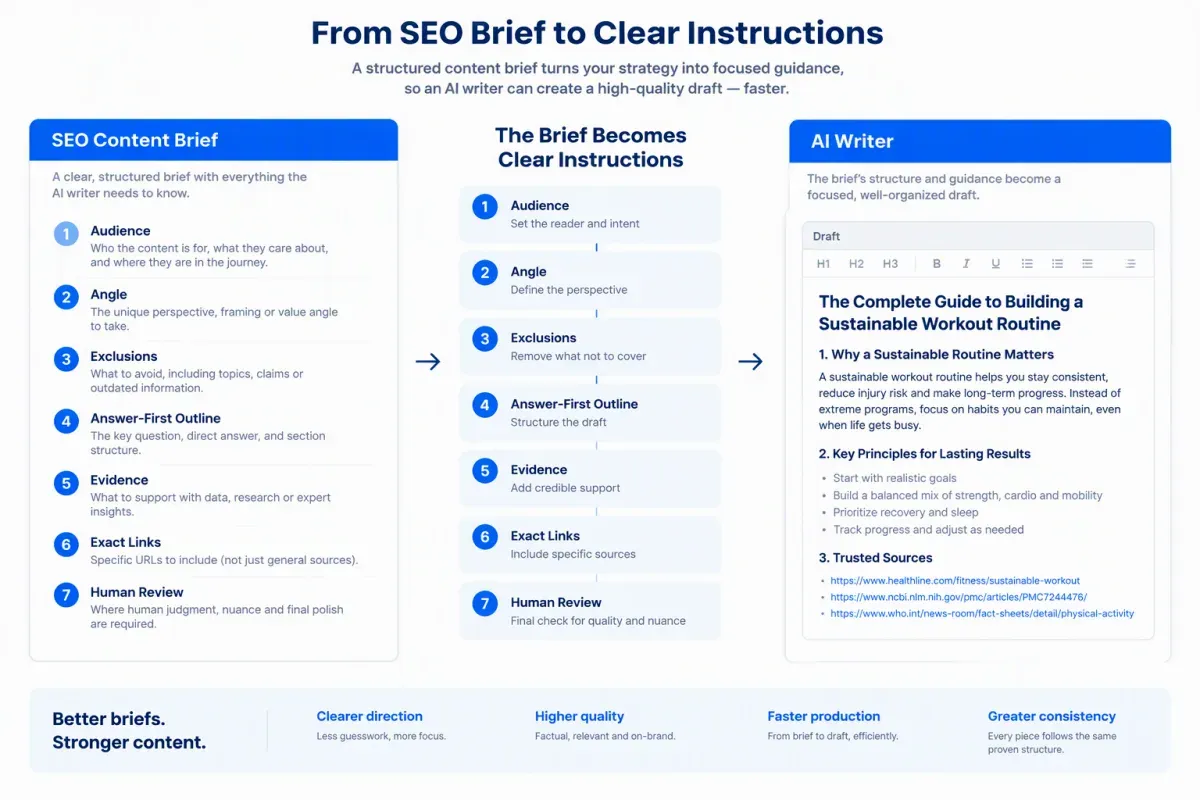
To adapt an SEO content brief for AI writers, rewrite each field as an instruction rather than a note. An AI writer follows the brief literally, so it needs the page’s purpose, audience, angle, and exclusions spelled out before it drafts.
Add an instruction block at the top of the template:
- Write one page for one primary query and its intent.
- Write for this audience: audience description.
- Use this angle: page angle.
- Leave out these topics: out-of-scope topics.
- Place the page at this level of the map: Pillar, Hub, Branch, or Resource.
Add brand voice notes and persona details so the draft sounds like the brand and speaks to the reader’s real problem. The scope lines keep the model from drifting into adjacent topics or overlapping another page on the site.
Turn the SEO content outline into answer-first directions. For each heading, give the direct answer the first sentence must deliver. Then list the supporting points, examples, entities to name, and exclusions.
Set a word-count range for each section, not only for the page. A section range limits tangents and padding without squeezing out context the reader needs.
Treat keyword placement as editorial guidance. Use the primary keyword where it reads naturally in the title, introduction and headings, and don’t state a repetition count as a rule.
Then set evidence and internal linking requirements the model can’t misread:
- Every factual, policy or numerical claim cites a source supplied in the brief.
- No statistics, studies or quotes that aren’t in the brief. Flag unsupported claims for review instead of stating them as fact.
- Keep SERP consensus points separate from the angle only this page adds. Leave needs-data angles flagged, not filled in.
- Give each link’s destination URL, anchor text and section. Don’t add, change or drop links, and keep external citations next to the claims they support.
These rules matter most when an AI writer is asked to sound authoritative. Fluent writing doesn’t make an unsupported claim safe to publish.
Run the draft in two passes so structure comes before polish:
- Draft for intent and coverage. The model follows the outline and opens each section with a direct answer. Review structure and coverage before editing style.
- Revise against the brief. Add the supplied evidence and exact links, plus tables or FAQs where they help readers.
A human reviewer then checks the draft against the acceptance criteria and removes or flags any claim without traceable support. The criteria double as an AI content QA checklist. Use Google’s SEO Starter Guide and its people-first content guidance as references. Both say Google has no preferred word count, so the ranges in the brief guide editing rather than set a target.
Floyi briefs can fill many of these fields from your research. They can include SERP consensus claims, Information Gain angles and Blocked Opportunities for angles that need your data. They also carry several title candidates and your brand voice and personas, plus internal links and anchors from the Planner. Each brief edit saves a new version, and drafts export to DOCX, HTML, Markdown, TXT, and Google Docs. See how Floyi builds briefs and drafts, then check one against the acceptance criteria above.
SEO Content Brief Template FAQs
These FAQs cover using one template across content types, where to keep it, reusing it across clients, and when to update a brief.
1. Can You Use One Template for Every Content Type?
Yes. One SEO brief template can cover every content type as long as the core fields stay fixed. Search intent, audience, angle, links, claims policy, and acceptance criteria apply to every page. The outline guidance changes with the content type and format. A how-to guide outline needs ordered steps. A comparison needs the items compared and the criteria. A product or category page needs the offer and a clear call to action. Delete fields that don’t apply instead of leaving them blank.
2. Should You Keep the Template in a Doc or a Spreadsheet?
Use a doc for a single brief with a long outline and section notes. Use a spreadsheet to track many briefs at once, with one row per page for status, owner, due date, and target URL, plus a link to each brief’s doc. That setup suits content teams running several writers.
Either way, keep one main copy of the template and duplicate it for each assignment so the field labels stay consistent.
3. How Do You Reuse the Template Across Clients or Brands?
Keep the field labels and order identical for every client so writers learn one reusable SEO content brief format. Fill the client-specific fields from a reference doc kept for each client: brand voice, personas, map placement, internal link targets, claims policy, and call to action.
Start every brief from the blank template, never a filled brief from another account. Old details survive quick edits, and one client’s tone, links or claims can end up on another client’s page.
4. When Should You Update a Content Brief?
Revisit a content brief after reviewing the published page’s performance, when the topic or brand requirements change or when the SERP shows that intent has shifted. Check that the outline, audience needs and topical scope still match what searchers want.
Before changing the plan, refresh the SERP evidence, sources, audience notes, and content requirements, then revise the outline and links. Reset the target word count from the topic’s scope and reader needs. A sample range in a template is guidance, not a length to hit.
About the author

Yoyao Hsueh
Yoyao Hsueh is the founder and CEO of Floyi, the topical authority platform, and the founder of Main Heading, an SEO and AI search agency. He is an expert in topical authority and topical mapping. He created Topical Maps Unlocked, a course studied by thousands of SEOs, content strategists and digital marketers, founded TopicalMap.com, a done-for-you topical mapping service for agencies and enterprise teams, and publishes the weekly Digital Surfer newsletter on SEO, content strategy and AI search.
About Floyi
Floyi is a closed loop system for strategic content. It connects brand foundations, audience insights, topical research, maps, briefs, and publishing so every new article builds real topical authority.
See the Floyi workflow