
Map Every Topic.
Ship Better Content.
Turn SERP clusters into a clear four level topical map that doubles as your content plan. Every topic comes with intent, titles, slugs, and SERP-backed content info so writers never start from a blank page.
Visualize Your Content Universe
See your entire content ecosystem in one view. Four levels from domain to article, with metadata, intent tags, and internal linking recommendations built in.
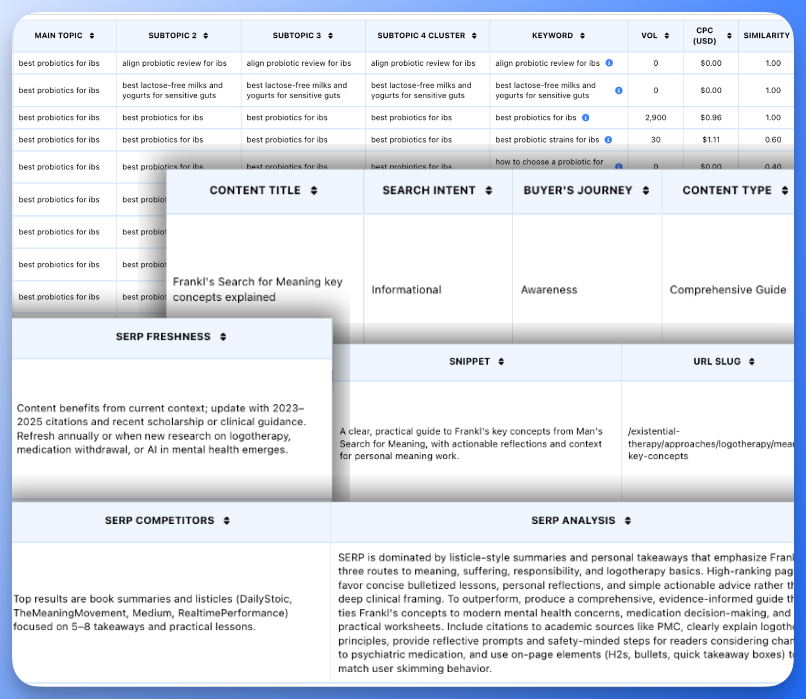
Granular Content Info for Every Topic
Everything writers need, auto filled in one click.
Four level hierarchy
Organize topics into pillar, cluster, topic, and article level. See exactly where each page fits in your content ecosystem.
Search intent tags
Tag every topic with informational, commercial, navigational, or transactional intent based on SERP patterns.
SEO ready slugs
Get pre suggested URL slugs that match the map structure. Copy straight into your CMS with minimal tweaking.
Buyer journey stages
Map topics to awareness, consideration, and decision stages so your plan covers the full journey, not just top funnel traffic.
Content titles
Use suggested working titles pulled from SERP context and topic clusters to brief writers with clear angles.
SERP and content snapshot
See example ranking URLs, snippets, and freshness cues for each topic so your plan reflects the real search results, not a guess.
How It Works
Map, refine, and export in four steps.
Step 1: Import clusters
Start from Floyi SERP Clustering or upload your own keyword clusters. Each group becomes the seed for a topical area.
Step 2: Build the map
Floyi analyzes relationships and SERP overlap, then arranges everything into a four level topical hierarchy.
Step 3: Enrich with SERP data
Rename pillars, move topics, merge or split clusters, and adjust tags. Each node can be enriched with titles, slugs, intent, journey stage, and SERP snapshots like example URLs and freshness.
Step 4: Export to production
Export to CSV or Sheets, send topics into the Topical Authority Planner and Briefs, and hand a clear, SERP-aware map to your writers and editors.
Content Teams Rely On Structured Maps
After years of creating Topical Maps for businesses, he’s packed ALL his knowledge and heart into this tool – and it really shows.

Paul Pilavachi
Founder, LowFruits
Being able to move topics, tag intent, and push article nodes straight into briefs cut our planning time from weeks to a few days.

Tom Anderson
SEO Manager, Digital Marketing Agency
Before Floyi, building a topical map took me weeks. Now my entire keyword map from A to Z is done in a few hours.

Michael Moshkovich
COO, Get Visible
Frequently Asked Questions
What inputs does the Topical Map use?
Topical Maps use your clustered keywords, SERP snapshots from Floyi’s clustering step, and your brand and audience settings. Floyi combines these to organize topics into pillars, clusters, topics, and article level nodes.
Does the map include SERP examples and URLs?
Yes. Each topic can reference example ranking URLs, titles, snippets, and SERP features captured during clustering. You see how search engines currently frame the topic while you plan content structure.
Can I edit the map after generation?
Yes. The map is fully editable. You can rename nodes, move topics between clusters, merge or split groups, adjust intent and journey tags, and add notes. When you are happy with the structure, export or send it to Briefs.
How do I use this as a content plan?
Treat pillar and cluster levels as your main content hubs and category pages. Article level topics become individual pages. You can export the map to Sheets for tracking or push selected nodes into Floyi’s Topical Authority Planner and Content Briefs to manage production.
Can I create briefs from the map?
Yes. Article level topics can be sent directly into Floyi’s Content Briefs workspace. The brief generator reads your map, brand settings, personas, and SERP context so every outline stays aligned with your structure.
How many topics can I map at once?
Most teams map between 100 and 500 topics per domain in a single run, though larger sets also work. For very large sites you can build multiple maps by product line, region, or service area and manage them inside the same Floyi project.
Your branded topical map is one click away.
Turn scattered keyword lists into a structured map that guides briefs, drafts, and published content.