
Four Levels vs One
Floyi vs Topical Map AI
A four-level map built from what actually ranks, where every topic comes with a researched content brief and a score that tells you whether it worked.
Last verified: September 2026
See all Floyi comparisonsIs Floyi or Topical Map AI Better for You?
Floyi builds a topical map out of evidence. Topical Map AI asks a model to generate one from a seed keyword, and what comes back is a single level of clusters with keywords inside them.
In Floyi the work starts with your brand positioning and buyer personas, then topical research grounded in live Google Web and YouTube autocomplete, then AI Search Gaps, which asks ChatGPT, Google Gemini and Google AI Mode what they recommend for your buyers and adds back the topics your research missed.
Those keywords are then clustered by the URLs that actually rank together, so the groups reflect real search intent instead of what a model guesses is related. Only then does the four-level map exist, and every topic on it comes with a content brief, an article draft, the pages it should link to, and a score that tells you whether it worked once the page is live.
Choose Floyi When
- You want the map shaped by your brand and your buyers, not by a seed keyword.
- You want each topic to arrive with real research and the pages it should link to, not a list of headings.
- You want the content brief grounded in your own documents, not only in what is already ranking.
- After you publish, you want to know whether that topic actually improved.
Choose Topical Map AI When
- You want a keyword map generated from a seed in about a minute.
- You want editable subtopics and white-label map exports for client deliverables.
- You already have the strategy, the research and the production workflow, and only need the outline.
Floyi vs Topical Map AI: Key Differences
Floyi builds a four-level information architecture from your brand, live autocomplete research and keywords grouped by the pages that rank for them, then carries every topic on it into a researched content brief, an article draft, publishing, and an authority score that returns to the map. Topical Map AI generates keyword clusters from a seed and exports them. What happens next is your problem to solve.
| Capability | Floyi | Topical Map AI |
|---|---|---|
| What the map is built from | Brand Foundation holds positioning, USP, competitors, brand voice analyzed from your own writing samples, visual style, and Content Guide rules for terminology and compliance. Buyer personas add roles, pain points and objections. It's set once and inherited by research, maps, content briefs, article drafts, and images. | Starts from a niche or keyword with controls for map type, language, market, and size, across 20 or more languages and 25 or more countries. Nothing holds your positioning, your buyer personas or your terminology rules, so the same seed produces the same map for you and for your competitor. |
| Topic research | Generate topics and keywords from your Brand Foundation, buyer personas and core topic, grounded in live Google Web and YouTube autocomplete. AI Search Gaps then asks ChatGPT, Google Gemini and Google AI Mode what they recommend for your buyer personas and adds the topics your research is missing to the hierarchy, each with a suggested level and parent topic. | Generates the map from a niche or seed keyword with controls for map type, language, market, and size. The topics come from that seed rather than from your brand, your buyer personas or what AI assistants recommend. |
| What you actually get | Every topic sits at one of four levels, Pillar, Hub, Branch, or Resource, in an information architecture built from what actually ranks. Each one knows its level, its parent and its siblings, and that is what tells a content brief which pages to link to and what your score is measured across. | Generates roughly 800 to 1,200 keywords in about a minute, sorted into topic clusters with search metrics and exports. That is one level of clusters with keywords inside them, which is the bottom level of a Floyi map. Nothing sits above it, so no topic has a parent or siblings, no content brief can pull links from it, and nothing is scored across it. |
| SERP clustering | SERP-overlap clustering turns a keyword list into intent groups built from the URLs that actually rank together, then feeds those groups into the topical map. Each keyword carries search volume, CPC and competition, but the grouping comes from shared ranking URLs rather than from volume. | Sorts the keywords it generated into topic clusters. The grouping comes from what the model thinks is related, not from which pages actually rank for those keywords together. |
| Site architecture | Site Architecture plans service, location, industry, feature, integration, and category pages across four site types with more than 40 page types. It generates the URL hierarchy, service and location matrices and LocalBusiness schema, then exports to Excel, CSV or Google Sheets. | There's no site architecture planning. You get URL structure recommendations for the generated map, not the service and location page matrices a business site needs. |
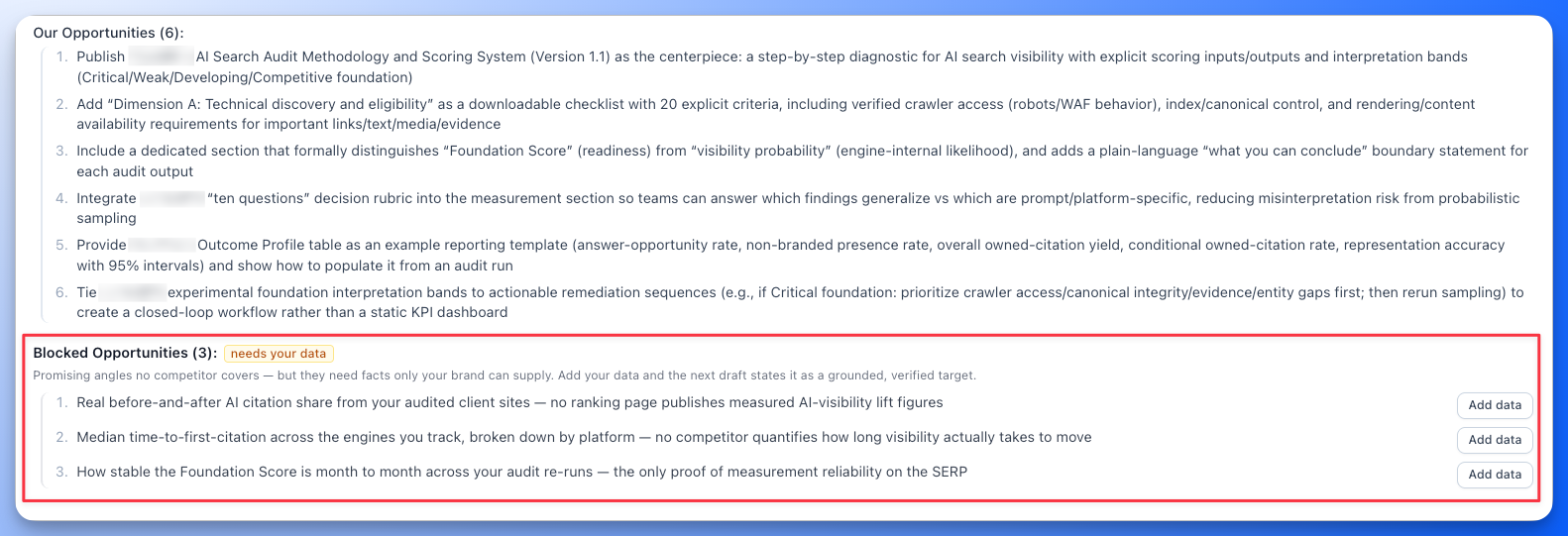
| Knowledge Base | Upload your own documents, up to 2,000 on the Scale plan, organized into categories. Scope exactly which ones a content brief may draw on: all documents, a category, specific files, or none. Floyi grounds original angles in that evidence. When an angle needs proof you haven't supplied, the content brief flags a Blocked Opportunity and asks you for the data. Floyi won't invent the number. | Generates from a niche or seed keyword. There is nowhere to add your own documents or evidence. |
| What's in a content brief | Content briefs define the audience and the page goal, then read the top SERP competitors and the AI responses in full. They carry consensus claims with a source count on each, key entities, an information gain pass against your Knowledge Base that surfaces original angles, and internal-link targets with anchor options. Content type detection picks one of 24 dedicated outline templates, so your writer gets a real structure built for that format rather than a list of H2s. Blocked Opportunities flag the angles that still need your evidence. | It suggests headings and topics for a piece of content, and stops there. There are no consensus claims with a source count, no key entities, no original angles drawn from documents you own, no internal-link targets, and no template for the content type you're writing. |
| Saying something new | Research identifies consensus claims and net-new angles grounded in brand knowledge. Blocked Opportunities ask for your own proof when an angle can't yet be supported. | Its content briefs stop at headings and topics, so your writer brings the firsthand proof and works out the original claims alone. Nothing tells them which angles the ranking pages have already used up. |
| Internal links | Map-linked content briefs carry internal-link targets and anchor options based on topic relationships. Those options remain available during drafting. | Provides URL structure recommendations and meta title suggestions to help organize the site. No content brief names which pages to link to or what the anchor text should say, because no topic knows its parent or its siblings. |
| Writing and publishing | Generate an article draft from the content brief's brand rules, persona guidance, research, and internal-link targets, then check coverage and page quality in the Content Editor. Publish to WordPress or GitHub, single or in bulk, and export to Google Docs, DOCX, XLSX, CSV, and PDF. | Maps and outlines export to CSV, Excel, PDF, and Google Docs, including a white-label PDF for client work, then go to your writers or AI tools. Nothing drafts, optimizes or publishes, and nothing tells the map what shipped. |
| Scoring the page as you write | The live content score updates from 0 to 100 as you write, checking weighted topic and entity coverage, natural term usage, heading structure, AI chunkability, and reading ease. The AI Writing Assistant edits inline to simplify, expand, shorten, fix grammar or optimize, all in your brand voice. Behind it, the Term Coverage Heatmap is a matrix of term and entity frequency per source, across 6 top-ranking SERP competitors and 3 AI engines: Google AI Overview, AI Mode, and ChatGPT, so you can see the terms each engine used to build its answer, not only the ones your competitors used. | Nothing scores the page you write. You get a map and an outline, and the rest is on your writer. |
| Schema markup and AI images | Auto-generates JSON-LD for Article, FAQ, HowTo, LocalBusiness, Organization, and BreadcrumbList with no AI credits. Entity schema connects the entities in your article to Wikipedia, Wikidata and Google Knowledge Graph identifiers. Brand-aligned AI images generate in the editor with suggested placements. | There's no schema generation and no image generation. You get meta title suggestions. |
| Checking pages you already published | Content Audit scans your live site against your topical map and tells you which pages to keep, improve, merge or delete, including the ones competing with each other and the topics you never covered. Organic Audit connects Google Search Console to the same map so you can see which topics earn clicks and which pages need a refresh. | There's no audit at all. Maps are generated for planning, and nothing checks your existing site or its Search Console performance against them. |
| AI search visibility | AIRS Analyzer runs an on-demand analysis of any query across nine AI engines and two SERPs, with a Brand and Entity Landscape showing who the answers name and AI citations counted separately from organic rankings. AI Authority tracks the same map over time across AI Overviews, AI Mode, Gemini, and ChatGPT. | The product ends at the map and its exports. Nothing measures what happens after you publish, on Google or in AI answers. |
| Competitor comparison | The Competitor Matrix shows you, topic by topic across the whole map, which competitors rank, at what positions, the exact URLs they rank with, and their AI search status for AI Overviews, AI Mode, Gemini, and ChatGPT. The Topical Authority Scorecard adds a share of voice leaderboard, domain rankings and 7-day to 1-year trends across up to 10 tracked competitor domains. Content Audit puts your map side by side with a competitor's in the same shape, or recolors one map by who wins each topic. | There's no competitor comparison. The product generates maps from a seed keyword and stops there. |
| Knowing whether it worked | The Topical Authority Scorecard tracks Content, Market and AI Authority on your map, with Top 10 and Top 20 rankings, a share of voice leaderboard, up to 10 tracked competitor domains, and 7-day to 1-year trends. Silo Analysis marks each topic area Leading, Contested or Trailing, and the Authority Planner turns that into what to work on next. | There's no coverage or authority measurement. Saved maps stay available for planning, and nothing scores them once you publish. |
What Floyi Adds to the Topical Map
Build the Map From Evidence, Not a Seed
Brand Foundation and buyer personas frame the research, live Google Web and YouTube autocomplete supply the demand, AI Search Gaps adds what ChatGPT, Google Gemini and Google AI Mode recommend that you missed, and SERP-overlap clustering groups it by the URLs that actually rank together.
Give Every Topic a Place and a Content Brief
Four levels mean each topic knows its parent, its siblings and its subtopics. That's what lets a content brief name the pages to link to and the anchor text to use, and it's what your score is measured across.
Keep the Map Working After You Publish
Content Audit checks the pages you already have against the map, Organic Audit brings in your Search Console clicks, and Silo Analysis marks each area Leading, Contested or Trailing. Floyi then tells you which topic to do next, instead of handing you a finished export and stopping.
Turn the Topical Map Into Content Your Team Can Publish
Give each topic an audience, real research and the pages it should link to, so the map still does something once the planning is over.
A Practical Workflow
Review your existing map against your brand and audience. Bring the topics worth keeping into Floyi, sort them into the four levels and generate the content briefs.
Add firsthand evidence where a content brief flags a gap, generate the article draft and publish it. Return to the topical map to review coverage and choose the next topic.
Floyi vs Topical Map AI: Common Questions
What Does a Floyi Content Brief Have That an Outline Doesn't?
The decisions a writer would otherwise have to make alone. A Floyi content brief reads the top SERP competitors and the AI responses in full, then carries consensus claims with a source count on each, key entities, original angles grounded in documents you uploaded, internal-link targets with anchor options, and one of 24 outline templates chosen for the content type. Topical Map AI gives you headings and topics, with nothing behind them.
Why Does Floyi Use Four Levels Instead of Flat Clusters?
Because one level can't do the work. Topical Map AI gives you topic clusters with keywords inside them, and that is the bottom level of a Floyi map, the Resource level. Above it sit Pillar, Hub and Branch, which give every page a parent and siblings. Those relationships are what tell a content brief which pages to link to, and what your score is measured across. A flat list of clusters has nowhere to put a page and nothing to link it to.
Can You Build on a Map You Already Have?
Yes. Bring the relevant topics into Floyi, organize them into the hierarchy around your brand and buyer personas, and run the coverage review for gaps and overlap before you generate content briefs. Content Audit can also read your live site against the result, so you see which existing pages already cover which topics.
Does Floyi Measure the Map After Publishing?
Yes, and that's the part the export ends before. The Topical Authority Scorecard tracks Content, Market and AI Authority across the map with Top 10 and Top 20 rankings, share of voice, up to 10 competitor domains, and 7-day to 1-year trends. Topical Map AI measures nothing after you publish, on Google or in AI answers.
Build a Topical Map Your Team Can Execute
Sources for These Topical Map AI Capabilities
Every Topical Map AI capability on this page was checked against its own documentation and product pages in September 2026. Features and plan limits change, so confirm the current details with the vendor.
- Topical Map AI: product and content briefs
- Topical Map AI: map workflow
The Rest of the Closed Loop
Most tools have a brand kit, applied as an input at the moment something gets written. In Floyi, Brand Foundation and the Knowledge Base are the source everything else reads from, so topical research, the map, content briefs, article drafts, images, and the authority score all work from the same positioning, personas, rules, and evidence. That's the loop, and it's the part a feature-by-feature table can't show.
One Brand Foundation
Positioning, voice, Content Guide rules, and buyer personas are set once, then inherited by research, maps, content briefs, article drafts, and images without being restated.
Workspaces and Teams
A separate brand workspace per client, with role-based access and a shared credit pool across the team.
Knowledge Base
Up to 2,000 documents on the Scale plan, organized by category and scoped per content brief, so original angles are grounded in your evidence instead of invented.
Local and Multi-Location
Content briefs and article drafts built for service pages, location pages and service-area landing pages, with NAP consistency and local schema.
Developer API and MCP Server
A REST API across the whole pipeline, plus an MCP server so an AI assistant drives the real Floyi rather than a copy of it.
Client-Ready Exports
Authority scores, coverage data, maps, content briefs, and article drafts export to XLSX, DOCX, CSV, PDF, and Google Docs.
The Floyi Tools in This Comparison
Each one sits behind a row in the table above, from topical mapping through publishing.
Topical Maps
Turn SERP clusters into a four-level topical map that doubles as your content plan.
Briefs & Drafts
Turn any topic into a SERP-grounded content brief and a writer-ready article draft.
Content Plans
Turn your topical map into a ranked publishing queue, with an owner for each topic.
Topical Authority
Track your Topical Authority Score, coverage, and presence in AI Overviews, AI Mode, Gemini, and ChatGPT.
Content Editor & Optimizer
Real-time content scoring, page quality review, competitor benchmarking, and term coverage.
AI Writing Assistant
Edit inline with SEO entity guidance, grammar fixes, and rewrite suggestions.
Topical Audit
Reverse-engineer any website's topical structure and find its authority gaps.
Site Architecture
Plan hundreds of pages at once, with a clean URL hierarchy for every page type.
Compare Floyi With Other Tools
See how Floyi compares with other SEO, content optimization and AI search platforms.
Floyi vs Keyword Insights
Turn keyword clusters into a four-level map, content briefs, article drafts and a score that picks the next topic.
Read comparison →Floyi vs Ahrefs
Turn keyword and backlink findings into a topical map, content briefs and article drafts.
Read comparison →Floyi vs MarketMuse
Set the strategy once for the brand, then let every topic inherit it through the content brief and article draft.
Read comparison →Floyi vs Surfer SEO
Turn a four-level topical map into content briefs, article drafts and a score that picks the next topic.
Read comparison →Turn the Topical Map Into Published Content
Build the map around your brand and your buyers, then give each topic a content brief, an article draft and a spot in the queue.