
AI Search Attribution: Track Referrals and Estimate Influence
AI search attribution has two paths. Measure AI referrals and conversions in GA4, then estimate AI-assisted discovery and report both without overclaiming.
An AI citation is not a recorded visit, and reporting it as one weakens AI search attribution. Credit for AI search comes from two places with very different confidence. One is referrals your analytics can see. The other is discovery you can only estimate.
GA4 shows the first path when an assistant click arrives with a readable referrer or tag. The second path covers people who meet your brand in an AI answer and come back later through branded search or a typed URL. This guide shows how to track the first, estimate the second and report both without claiming more than the data supports.
AI Search Attribution Key Takeaways
- Separate measured AI referrals from estimated AI-assisted discovery in every report.
- GA4’s AI Assistant channel catches recognized assistant referrers, not all AI search exposure.
- Clicks from Google AI Overviews and AI Mode count as Organic Search, not AI Assistant.
- Missing referrer data can push AI-influenced visits into Direct.
- Branded search, cited-page visits, form answers, and sales notes show association, not cause.
- Label every report line with its confidence, data source and known gap.
- Floyi shows upstream AI visibility gaps, while analytics and the CRM stay the attribution sources.
Separate Measured Referrals From Estimated Influence
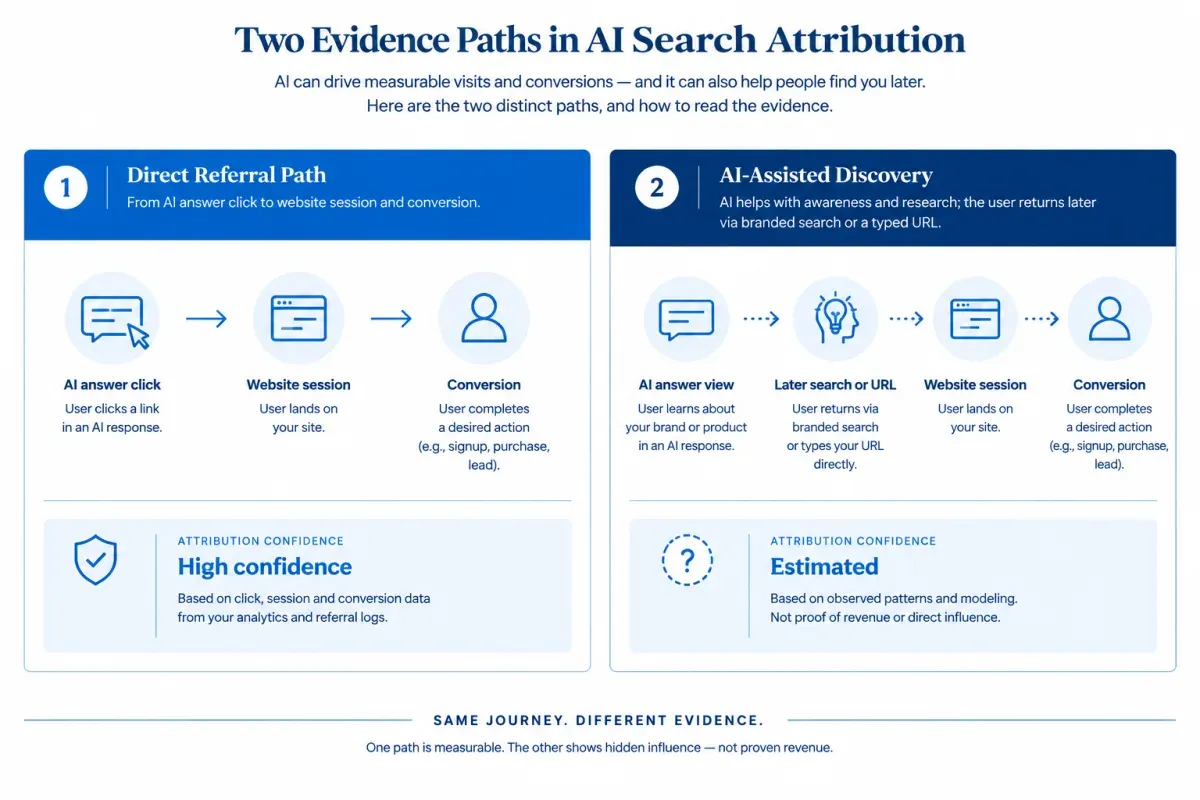
AI search attribution assigns credit for the visits, leads, conversions, and revenue that AI search may influence. AI search here covers assistants such as ChatGPT, Gemini, Perplexity, Claude, and Copilot, plus Google AI Overviews and AI Mode. Attribution is narrower than visibility measurement. A mention or citation shows that an AI answer included your brand. Attribution asks what that exposure produced.
AI search conversion attribution runs on two evidence paths with different confidence levels:
-
Measured AI referrals: A person clicks a link in an AI answer and lands on your site with a referrer or campaign tag your analytics can read. You can count those sessions and the conversions that follow. This is the strongest evidence available for AI search revenue attribution.
-
Estimated AI-assisted discovery: A buyer learns about your brand in an AI answer, then returns later through a branded search, a typed URL or another channel. No single session ties this zero-click influence to the answer. Branded search trends, self-reported attribution and sales notes can support an estimate, but none of them proves that AI search caused a sale.
Keep the two paths in separate report columns with separate confidence labels.
AI visibility sits upstream of both paths as a leading indicator, not as attribution. Mentions and citations show whether AI answers surface your brand before any visit or sales conversation happens. For the full set of AI search visibility metrics and the benchmarking method, see how AI search measurement fits together.
Track Direct AI Referrals in GA4
GA4 handles the measured side of AI referral traffic attribution when an assistant click arrives with a referrer it recognizes. It can’t show every AI-influenced visit.
Use this workflow to find AI traffic in GA4:
-
Check the default AI Assistant channel. Open Reports, then Acquisition, then Traffic acquisition, and set the table to Session primary channel group. The default channel group includes an AI Assistant channel, which gets the medium ai-assistant when the referrer matches Google’s list of AI assistants. Google’s default channel group definitions name sources like ChatGPT, Gemini, Deepseek, Copilot, and Grok. Switch the dimension to Session source / medium to break out each assistant, including ChatGPT referral traffic.
-
Scan Referral for assistants the default misses. Claude referrals and Perplexity referrals may land in Referral if Google’s list doesn’t classify them. Treat domains such as claude.ai and perplexity.ai as examples to check, never as a complete list. AI products add, rename and retire domains, and some clicks arrive with no referrer at all.
-
Build a custom channel group when you need your own rules. Go to Admin, then Data display, then Channel groups, and select Create new channel group. Add an AI channel with a Source matches regex condition, then move it above Referral. Traffic goes to the first channel whose definition it matches, so the order decides the result. Per Google’s custom channel group guide, these groups apply to historical data, and a standard property allows two.
A pattern such as .*(perplexity|claude)\.ai.* is a starting example. GA4 regex must match the whole value, so the pattern opens and closes with .*. The pattern only catches the domains you list, so review it whenever a new AI source appears in Referral.
The AI Assistant channel leaves out Google’s own AI features. GA4 counts clicks from AI Overviews and AI Mode as Organic Search, mixed in with regular organic clicks.
Then connect referrals to outcomes. Break the AI channel down by landing page and key events, and compare engagement and conversions with Organic Search and Referral. Pass the session source into hidden form fields or the CRM so leads and closed deals keep their AI origin. Report these as observed AI referrals, not total AI influence.
UTM parameters for AI search help only on links you control, since you can’t tag the links an assistant chooses to cite. ChatGPT links have carried utm_source=chatgpt.com, which fills some of that gap, but that behavior can change. Add your own UTMs to links you share, such as newsletter, social and partner links.
Document AI Referral Data Blind Spots
Measured AI referrals count only the clicks that reach your analytics with a referrer or tag it can classify. Everything else falls into an AI attribution gap between recorded sessions and the discovery that happened before them.
Several paths leave AI referrals misclassified as direct traffic:
- App and in-app browser clicks: A link opened from a desktop app, mobile app or in-app browser may arrive without a referrer.
- Copied links: Someone copies a URL from an AI answer, sends it to themselves or opens it in another browser. The visit arrives with no trace of the answer.
- Privacy settings: Some browser settings and privacy protections strip the referrer before the session reaches your site.
Google Analytics direct traffic attribution is a catch-all for visits without a recognized source. A Direct session doesn’t prove that someone typed your address.
The delayed path is the second blind spot. Someone reads a recommendation in an AI answer, leaves without clicking and later searches your brand or types your URL. Analytics credits Organic Search or Direct. No attribution model, last-click attribution included, can credit a touchpoint that was never recorded.
Treat measured AI referrals as a floor, not a total. Write down which of these blind spots apply to your site so report readers know what the numbers can’t show.
Estimate AI-Assisted Discovery Signals
AI-assisted discovery is estimated, not attributed, and no AI search analytics setup changes that. Every signal below has other possible causes, so read each one as corroboration and look for several moving together. Before you compare periods, log everything else that changed in the same date range:
- Marketing activity: campaigns, email sends, paid media, and PR coverage.
- Business changes: product launches, promotions and sales pushes.
- Search conditions: seasonality, ranking changes and major page updates.
Measuring AI search influence then rests on these proxies:
-
Branded search lift: In Search Console, track impressions and clicks for branded queries and compare them with the period before AI visibility changed. Rising branded demand is consistent with AI search brand discovery, but a webinar, news story or paid campaign can produce the same lift.
-
Direct traffic shifts: Look at direct sessions to the deep pages AI answers cite, not the homepage, and split new from returning visitors. A rise on one cited page while paid and email activity stayed flat says more than a sitewide change. Don’t relabel unexplained direct traffic as AI traffic.
-
Self-reported attribution: Add a “How did you hear about us?” field to signup, demo or checkout forms. Offer ChatGPT, Gemini, Perplexity, and “Other AI assistant” as options, add an open text box and store each answer with the contact record. Memory is imperfect, but this is the only signal that can capture exposure that never produced a click.
-
Sales notes: Ask sales and onboarding teams to log when buyers mention an AI assistant. Tag those CRM records so you can count them by period and set them beside AI-assisted conversions.
-
AI visibility: Track AI search visibility for a fixed set of priority topics, meaning brand mentions in AI answers and citations of your pages. Rising visibility makes AI-assisted discovery plausible. It doesn’t measure it.
Report the pattern, not a cause. “Branded demand, direct visits to cited pages and buyer-reported AI mentions rose in the same period” describes what happened. “AI search caused the increase” claims more than the data shows.
Build an Honest AI Attribution Report
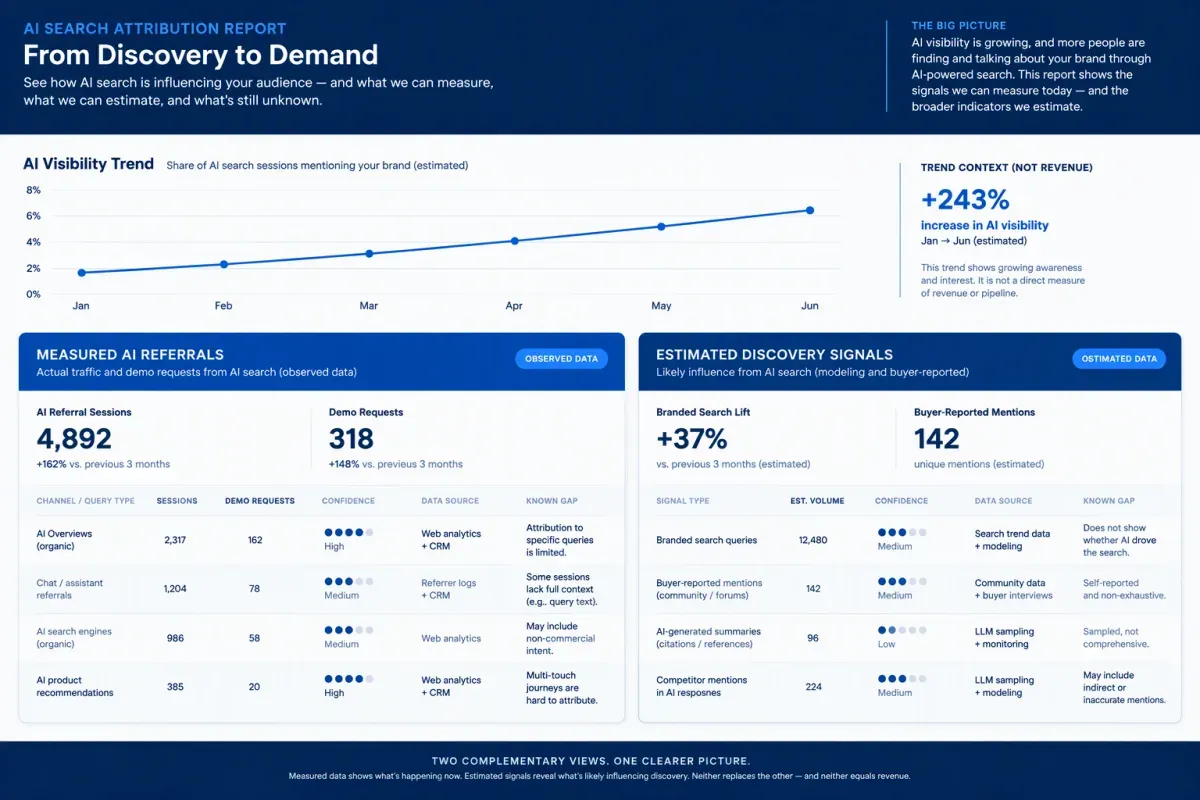
Honest marketing attribution for AI search keeps the two paths in separate blocks and puts the AI visibility trend above both as context, not as evidence of traffic or revenue. Compare the same date ranges every period, and label each line with its confidence, data source and known gap:
| Report block | Line item | Confidence | Data source | Known gap |
|---|---|---|---|---|
| Measured | AI Assistant or custom AI channel sessions, engaged sessions and key events | High | GA4 | Clicks without a referrer land in other channels |
| Measured | CRM-verified leads, pipeline and revenue with an AI source | High | CRM matched to analytics source data | Source matching can be incomplete |
| Estimated | Self-reported AI mentions and sales notes | Medium | Forms and sales notes | Buyers forget or misremember touchpoints |
| Estimated | Branded search trend and direct traffic to cited pages | Low | Search Console and analytics | Neither signal identifies AI as the cause |
KPI targets and AI search ROI measurement belong in AI search KPIs and ROI models. This report stays on what was measured and what was estimated.
Use wording that matches each block. A measured line, with example values, reads: “AI assistants referred 340 sessions and 12 demo requests this quarter.” An estimated line reads: “Branded search impressions rose over the same period, which is consistent with AI-assisted discovery.” Keep “AI search drove” and “caused” out of everything outside the measured block.
Keep the totals honest:
- Never add estimated influence to measured revenue.
- Show “unknown” rather than zero where referrer data is missing.
- Keep assistant-level labels, such as ChatGPT, only where the source data supports them.
Find the Visibility Gaps Behind Thin AI Referrals
When AI referrals are thin, check AI search visibility before you rework tracking, because an assistant can only send a click from an answer that includes you. If a page ranks in Google but AI answers don’t cite it, comparing AI and SERP performance covers that diagnosis.
Floyi’s Organic Audit connects Search Console to your topical map. Its Priority view flags topics that have organic visibility in Google but are absent from all four AI search surfaces it checks: Google AI Overviews, AI Mode, ChatGPT, and Gemini. Those topics already earn organic attention, which makes them the place to start.
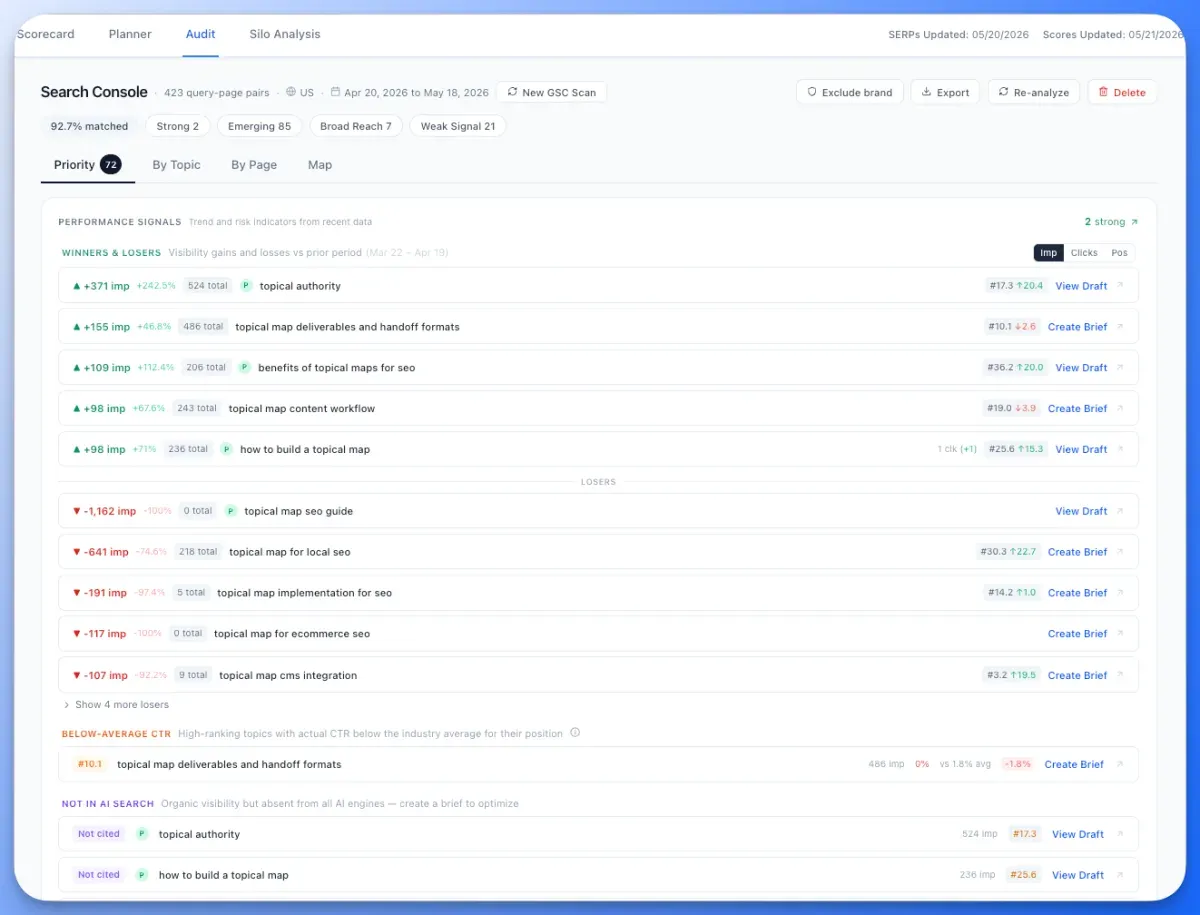
Floyi’s Topical Authority Scorecard measures and trends brand visibility, share of voice and AI citations over time, with mentions and citations reported separately. Read that trend beside measured referrals and branded search as an association, not proof of cause.
Floyi doesn’t track referrals, conversions or revenue. GA4 and the CRM stay the source of truth for both attribution paths, and Floyi shows where AI visibility is missing upstream.
Run an Organic Audit to see which of your topics are missing from AI search.
AI Search Attribution FAQs
These answers cover the attribution questions that come up once AI referrals start appearing in your reports.
1. Do AI Search Platforms Pass Referral Data?
Sometimes. Whether an AI click carries a referrer depends on the product, the device and the click path, and that behavior changes over time. A click in a web browser may pass one, while a click in an app or a copied link may not.
Recheck which AI sources appear in Referral every period, and add new ones to your custom channel regex.
2. Do AI Referrals Convert Better Than Organic Search?
There’s no reliable universal answer. Published comparisons come from different sites, samples and definitions, so a third-party AI-referred traffic conversion rate tells you little about your own AI referral traffic.
Check your own data instead. Compare key-event rate and revenue per session for the AI channel against Organic Search on the same landing pages and date range. AI referral volumes are often small, so a few conversions can swing the rate. Report early differences as observed activity, not proof.
3. Can You Attribute Revenue to a Specific AI Prompt?
No. A referrer or UTM shows which AI product sent the click and where it landed, not the prompt the person typed or the answer they read. AI assistants don’t pass prompts to the sites they cite.
AI search revenue attribution stops at the source and landing page. You can infer likely questions from the page’s topic, but label any prompt-level revenue figure as an estimate.
4. How Does Consent Affect AI Referral Data?
When visitors decline tracking, your analytics records fewer sessions in every channel, AI referrals included. That widens the AI attribution gap on top of clicks that arrive without a referrer.
Report AI referrals as the measured share of the traffic your consent setup lets you observe, and note the consent gap in the report. Don’t scale the numbers up to cover it.
About the author

Yoyao Hsueh
Yoyao Hsueh is the founder and CEO of Floyi, the topical authority platform, and the founder of Main Heading, an SEO and AI search agency. He is an expert in topical authority and topical mapping. He created Topical Maps Unlocked, a course studied by thousands of SEOs, content strategists and digital marketers, founded TopicalMap.com, a done-for-you topical mapping service for agencies and enterprise teams, and publishes the weekly Digital Surfer newsletter on SEO, content strategy and AI search.
About Floyi
Floyi is a closed loop system for strategic content. It connects brand foundations, audience insights, topical research, maps, briefs, and publishing so every new article builds real topical authority.
See the Floyi workflow