
How to Run an AI Visibility Audit: Steps, Tools and a Worksheet
Run a one-time AI visibility audit: build a prompt set, record mentions and citations, check crawler access, map content gaps, and rank fixes in a worksheet.
Ranking well in Google doesn’t prove your brand will appear in an AI answer or supply the citation behind it. An AI visibility audit tests that directly. You run fixed buyer prompts once, keep the answer evidence and turn the gaps into a prioritized fix list.
The audit separates outcomes that look alike. A brand can be named without being cited, and an owned URL can be cited without a recommendation. A worksheet that keeps prompts, mentions, citations, competitors, and answer context in one record tells an entity gap apart from a missing source, an inaccurate claim or a weak recommendation.
Log crawl and rendering checks as a separate record beside the answer evidence. A page can look complete in a logged-in browser and still return an empty shell or a challenge page to a crawler. Classify every finding as access, content, entity, or observed visibility before you assign a change, then keep the baseline for a controlled rerun.
AI Visibility Audit Key Takeaways
- Define a dated, one-time scope around buyer questions, offers, entities, eligible URLs, and direct competitors.
- Build fixed persona-based prompts and tag each as Informational, Navigational, Commercial, Transactional, or Generative.
- Record full responses, session conditions, mentions, citations, recommendation framing, and factual errors for every run.
- Keep mentions and citations separate, then compare brands using the same prompt-run denominator.
- Audit crawler access, rendering, indexability, canonical signals, and extractable server-rendered content on representative templates.
- Match priority prompts to candidate pages and diagnose evidence, entity, structure, and topical-scope gaps.
- Rank fixes by business relevance, evidence strength, gap size, dependencies, and remediation effort before rerunning identical prompts.
Set Your One-Time Audit Scope and Baseline
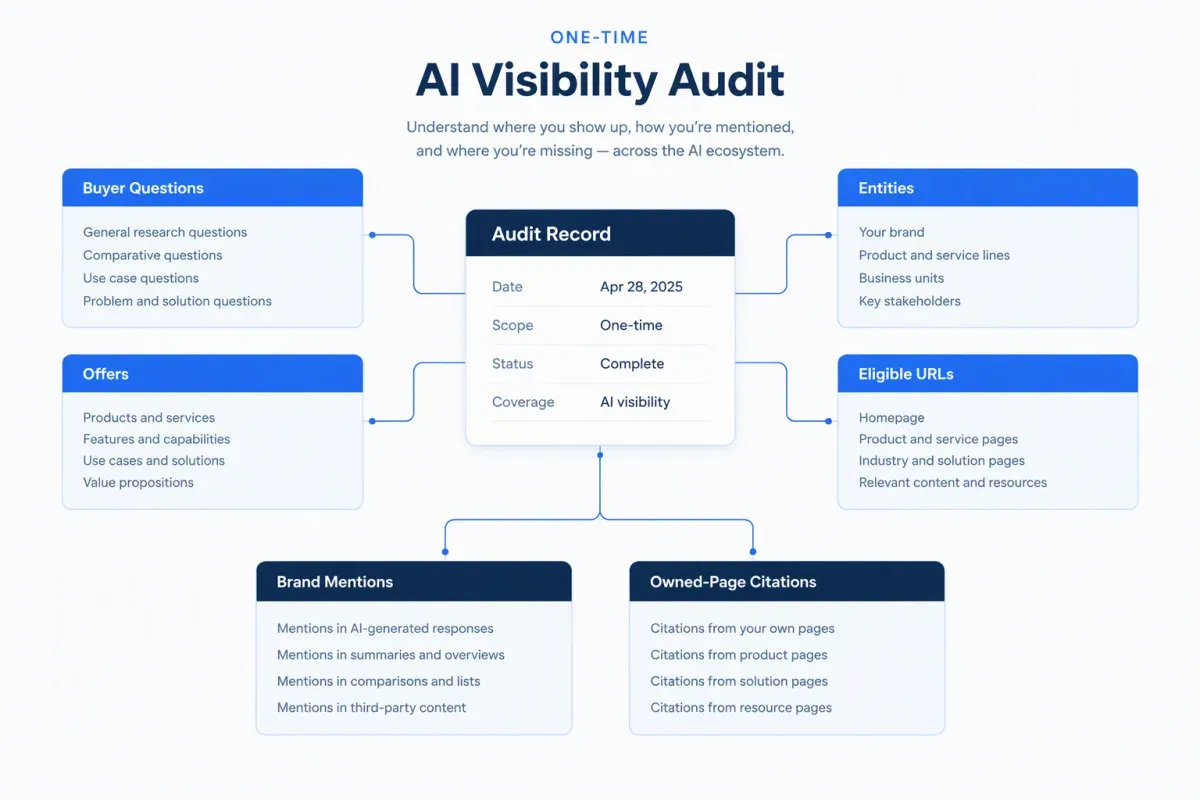
An AI visibility audit is a dated, one-time record of how answer engines treat your brand before you change anything. It ends in a prioritized fix list, not an ongoing reporting program.
The audit measures observable answer behavior. Does an engine mention your brand, recommend it for a relevant need, cite an owned page, and represent your claims accurately? A high-ranking URL is useful context, but it doesn’t prove an answer engine will select, quote or correctly attribute that page.
A tight topical scope keeps the audit from turning into an inventory of every question a model could answer. Set these boundaries before you collect results:
- Audience questions: Decisions your priority buyers need to make, not curiosity queries with no content or commercial consequence.
- Offers and entities: Products, services, named concepts, brand and product aliases, and the market boundaries that change the answer.
- Eligible pages: Owned domains and the URLs you want cited.
- Direct competitors: A small set tied to the same buyer need. A broad publisher may rank well without being a meaningful benchmark.
Scope also decides which tools you need. Set it first, then weigh each tool against the criteria for AI search tooling for the step it serves.
Keep two kinds of evidence apart from the start. Prompt testing shows whether engines mention, cite, recommend, or misrepresent your brand. Technical checks diagnose the possible causes: whether crawlers can reach a page, whether its content renders and whether systems can quote its passages. A checker that only inspects a page can assess readiness, but it can’t verify citations without testing real answers. Neither readiness nor past citations guarantee future selection.
Each step below names the tool category that does the work. Question-research tools build the prompt set. Multi-engine testing tools collect answers and citations. Crawl and rendering tools check technical access, and content coverage tools map gaps to topics. A gap that needs a new page ends in a brief, which is where brief generators built for AI search pick up after the audit.
Build a Prompt Set with Research Tools
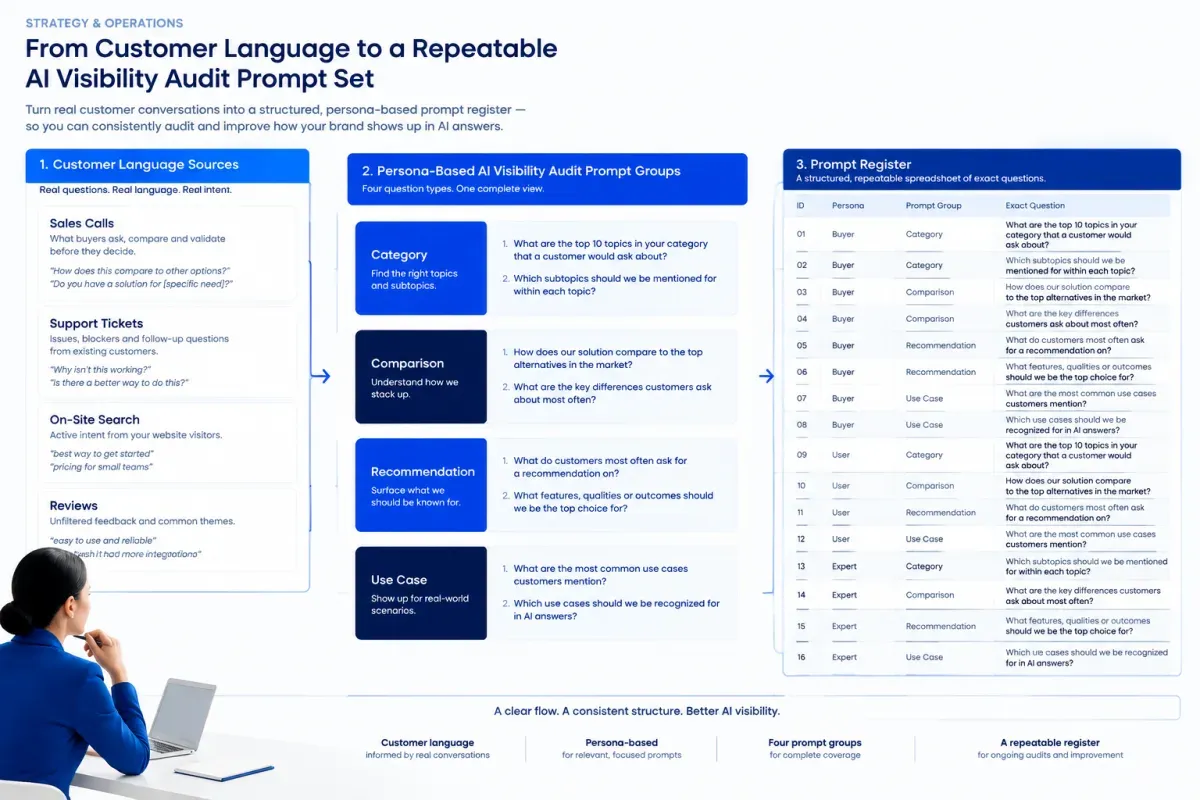
A fixed, persona-based prompt set makes the baseline repeatable. Build it from the priority topics and buyer personas you set in scope, and keep it small enough to rerun exactly. AI platforms don’t publish prompt volumes, so observed buyer language is a better foundation than estimated demand.
Pull that language from places where customers describe their needs in their own words:
- Sales calls: Objections, comparisons and qualifying details that come up before a purchase.
- Support tickets: Implementation problems, feature gaps and the terms customers use after adoption.
- On-site search and reviews: Recurring questions that may never show up in keyword tools.
- Question-research tools: People Also Ask data, question maps and community threads that show natural follow-up questions.
Spread the set across four buyer groups:
- Category questions: Define a problem or explain an approach.
- Comparison questions: Weigh named options against clear criteria.
- Recommendation questions: Ask which solution fits a stated need.
- Use-case questions: Add conditions such as role, industry, budget, or scale.
Keep prompts that differ by a meaningful qualifier and drop near-duplicates that would produce the same answer. Tag every prompt with its intent: Informational, Navigational, Commercial, Transactional, or Generative. A brand can show up in educational answers and vanish when engines recommend or compare vendors.
Each question should call for a testable explanation, choice or recommendation. A bare query such as “AI visibility tools” reveals little. “Which audit tools help an agency find missing brand citations?” is a clearer test, because a good answer has to address agency workflow, citation gaps and tool function. Include brand and competitor prompts only where they mirror real evaluation behavior.
Log every prompt in a register before the first run. Give each row a stable prompt ID, the exact wording, the persona and buyer group, the intent and topic, and the page you expect to earn the citation. Never edit the wording later. The register becomes the Prompt runs tab of the worksheet.
Set the denominator before testing: unique prompts × answer engines × repeat runs. For example, 20 prompts run three times on five engines give 300 answer opportunities. Keep the wording, engine mix and repeat count fixed so a later rerun stays comparable.
Select Answer Engines with Testing Tools
Choose answer engines by where your buyers ask questions, not from a generic list. A typical set includes ChatGPT, Perplexity, Gemini, Claude, Google AI Overviews, and AI Mode. Add Microsoft Copilot when Bing visibility or workplace search matters to the brand.
Results in Google AI Overviews and ChatGPT can differ sharply, because each surface retrieves, cites and frames sources its own way. No single engine stands in for AI search, so keep separate findings for every engine instead of blending them into one score.
Each run needs evidence another strategist can inspect later:
- Full response: The complete answer, including caveats and follow-up suggestions.
- Sources: Every visible linked or named source, even when the engine shows no formal citations.
- Failed prompts: Refusals, empty answers and irrelevant results. Keep them.
- Test conditions: Engine, surface, location, language, browsing state, session state, date, and prompt version.
Browsing is a test variable too. A surface that searches the web while answering may cite newly published pages, while a non-browsing answer leans on training data. Logged-in personalization also shifts recommendations, so run the baseline in logged-out sessions.
Two kinds of testing fit this step. Multi-engine prompt testing tools run one identical query across engines and keep the full output. A manual AI visibility audit in logged-out sessions works for a small prompt set if capture conditions stay consistent. In Floyi, AIRS Analyzer runs one query on demand across 11 surfaces, 9 AI engines plus Google and Bing SERPs. It doesn’t track or monitor, so each report is a dated snapshot.
Validate automated captures by hand before they become the baseline. Rerun a few representative prompts in each engine and compare the visible answer and citations with what was captured.
Record Mentions and Citations with Analysis Tools
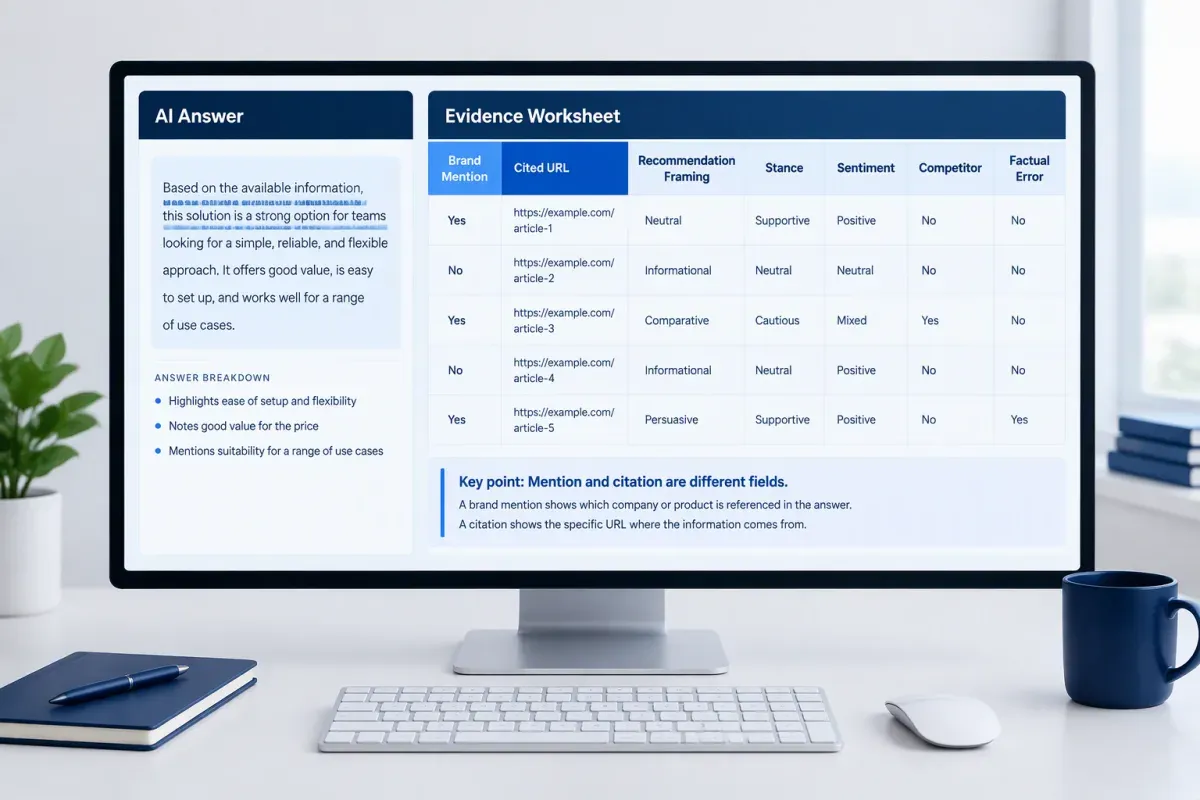
Recording turns unstable AI answers into a consistent evidence record. Model updates, source availability, session context, and query interpretation can all change an answer while your site stays the same.
Create one record per prompt, engine, session, locale, and run date. Keep the full response where you can. If an engine doesn’t allow durable capture, save a substantial excerpt with the prompt ID and exact query.
Each record separates evidence from interpretation:
| Field | What to record |
|---|---|
| Prompt evidence | Prompt ID, exact query, engine, session, locale, run date, and full response or saved excerpt |
| Brand presence | Exact wording, answer position, stance, sentiment, and whether the brand is recommended |
| Citation evidence | Each cited URL, root domain, ownership classification, placement, surrounding context, and claim-support assessment |
| Quality notes | Factual errors, missing qualifications, unsupported claims, and the exact wording used |
| Competitive evidence | Every competitor named or cited, its URLs, answer position, framing, and sentiment |
A mention is a named reference in the answer text. A citation is an identified source URL. Keep them apart, because a favorable mention with no cited page isn’t source-backed. A cited URL can also sit beside a claim it doesn’t support, so check each one against the claim it’s attached to. Note whether each citation points to your own pages, third-party coverage of your brand or a competitor’s domain.
Code position, stance and sentiment the same way every time. Position is where the brand appears: lead recommendation, comparison entry, supporting source, caveat, or criticism. Stance is recommended, conditionally recommended, compared, mentioned, or criticized. Sentiment is positive, neutral, negative, or mixed, and a positive line can still fall short of a recommendation.
Capture factual errors and missing conditions word for word. That matters when an engine recommends your product but drops the qualification that makes the recommendation accurate. Log every competitor named or cited in the same pass, so you can compare them later without rerunning the prompt set.
Repeat each prompt in fresh sessions, ideally on more than one day, and keep the repeat count fixed. Report ranges for mentions, citations, position, and sentiment rather than treating one live answer as definitive. A missing mention in one run may be ordinary variation, so describe what you observed without pass or fail thresholds.
A structured spreadsheet is enough for a manual audit. For larger prompt sets, multi-engine answer analyzers cut the transcription work. Look for one that highlights each brand mention in place, records stance and sentiment for every named entity and counts AI citations apart from organic rankings.
Compare Competitors Using Evidence Tables
An evidence table makes competitor results comparable when every brand is measured against the same prompt-run denominator. Keep one row per prompt, engine, locale, date, and run. Report outcomes as counts from that sample, never as a universal benchmark.
A spreadsheet or pivot table over the Prompt runs tab is enough for this step. Keep mentions and citations in separate columns, since an engine can name a brand without linking to any page.
| Prompt ID | Engine | Prompt Group | Brand | Mention Outcome | Citation Outcome | Response Position | Sentiment | Supporting Excerpt | Cited Domain and URL |
|---|---|---|---|---|---|---|---|---|---|
| P-014 | Engine name | Recommendation | Your brand | Mentioned | Cited | Lead recommendation | Positive | Example excerpt | Example domain and page |
| P-014 | Engine name | Recommendation | Competitor A | Mentioned | Not cited | Later list item | Neutral | Example excerpt | None |
Calculate each measure by brand, engine and prompt group:
- Mention rate: Runs that name the brand, divided by the denominator.
- Citation rate: Runs that cite a brand-owned URL, divided by the same denominator.
- Share of voice: Citations to your domains divided by all citations in those answers.
A high mention rate with a low citation rate can point to entity recognition without enough owned evidence. Separate category, comparison and recommendation prompts before you calculate share of voice. An aggregate can hide a competitor that dominates the purchase-stage questions.
Citation patterns often show the more useful gap. For each prompt, compare every cited domain and URL, and note the source types: publishers, review sites, forums, and competitor-owned pages. Flag cited pages that don’t rank for the query. The pattern only describes your sample, but it shows what evidence engines reach for when your site has no equivalent source.
Build the competitor set from the answer text as well as the SERP. Brands that engines name repeatedly belong in the table even if their sites don’t rank prominently.
Some multi-engine analyzers rank every entity the answers name by how many engines named it, so your brand reads as one row among competitors. Check any tool’s totals against your own denominator before you report them.
Check Technical Access with Crawl Audit Tools
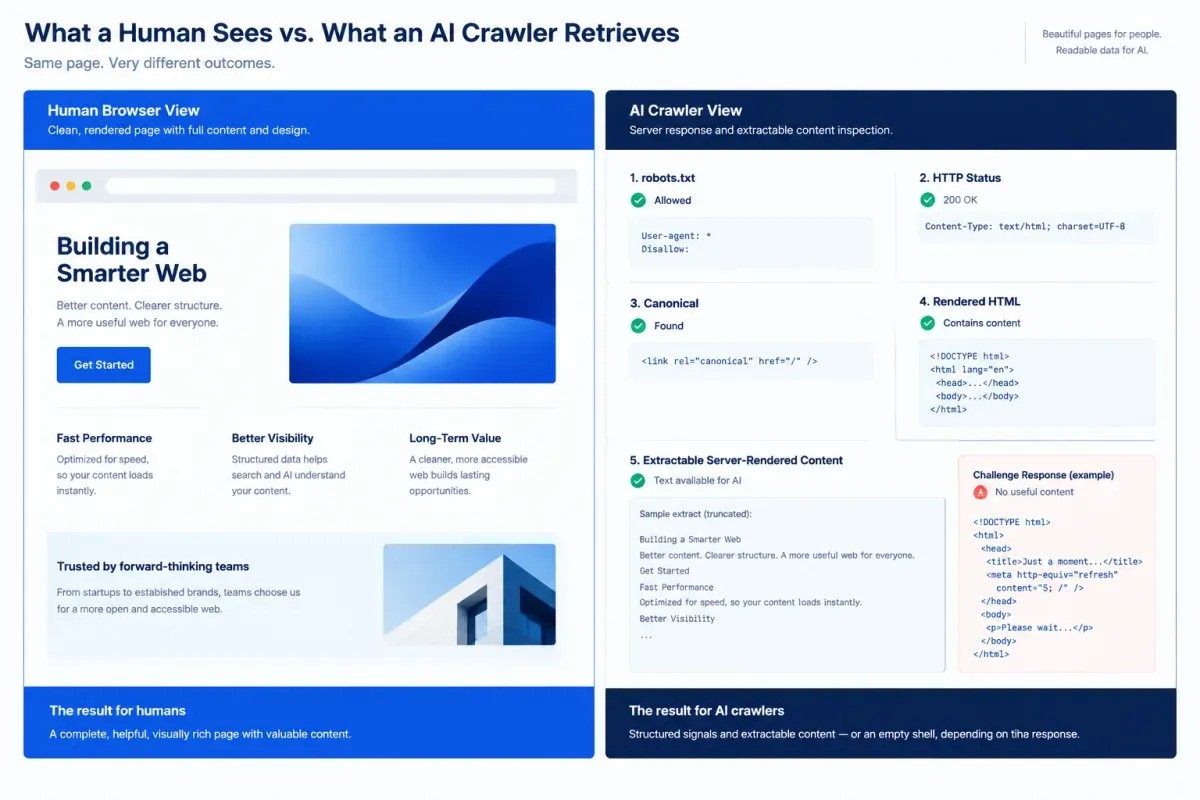
Technical access needs its own baseline, because a mention in an answer doesn’t prove crawlers can retrieve or parse the pages you want cited. Much of this AI crawlability audit overlaps a standard technical SEO audit. The difference is the list of AI agents you test.
Run it on representative URLs from each template that carries business value, such as product, pricing, guide, comparison, FAQ, and help pages. For each URL, check robots.txt, HTTP status, meta robots, X-Robots-Tag headers, canonical tags, and XML sitemap inclusion. The canonical tag, sitemap URL, response URL, and internal-link target should agree, because conflicts split signals across duplicates.
Test each crawler by purpose. Assess search crawlers such as OAI-SearchBot, Claude-SearchBot and PerplexityBot separately from training crawlers such as GPTBot and ClaudeBot. Permission for one agent doesn’t carry over to another. Test user-triggered fetchers too, including ChatGPT-User, Claude-User and Perplexity-User.
The response a crawler receives matters more than its status code. A CDN, firewall, bot-management layer, rate limit, or login gate can return HTTP 200 while serving a challenge page, consent screen or empty application shell. Compare direct and rendered fetches instead of trusting a logged-in browser view.
Priority claims, definitions, author details, and product facts should sit in server-rendered HTML, not behind JavaScript, clicks or scrolling. Flag hidden copy, failed hydration and source order that puts navigation ahead of the main answer. Then review the parsing and discovery signals:
- Page hierarchy: One descriptive H1 and a logical heading sequence that separates the main answer from supporting detail.
- Semantic HTML: Real tables and lists, image alt text, a declared page language, and main content early in the source order.
- Sitemaps: XML sitemaps that list only canonical, indexable URLs. Treat llms.txt as optional guidance, not an access guarantee or ranking control.
Site crawlers, robots.txt testers, rendered-HTML fetchers, and Search Console URL Inspection each answer a different question. A free one-page checker can flag an initial issue, but it can’t confirm sitewide access or how a specific provider retrieves pages. Confirm material findings with direct fetches and a site-level crawl before you name a restriction as the cause.
Audit structured data in the same pass. Check JSON-LD on priority templates for Organization, Product, Article, and FAQ markup only where the type genuinely applies. Entities, authors, dates, and URLs must match the visible copy. Google’s Rich Results Test reports errors for supported markup types, but a clean result isn’t an AI visibility score.
For each failure, record the URL, the affected agent, the observed response, and the evidence, so each fix stays testable.
Map Content Gaps with Coverage Audit Tools
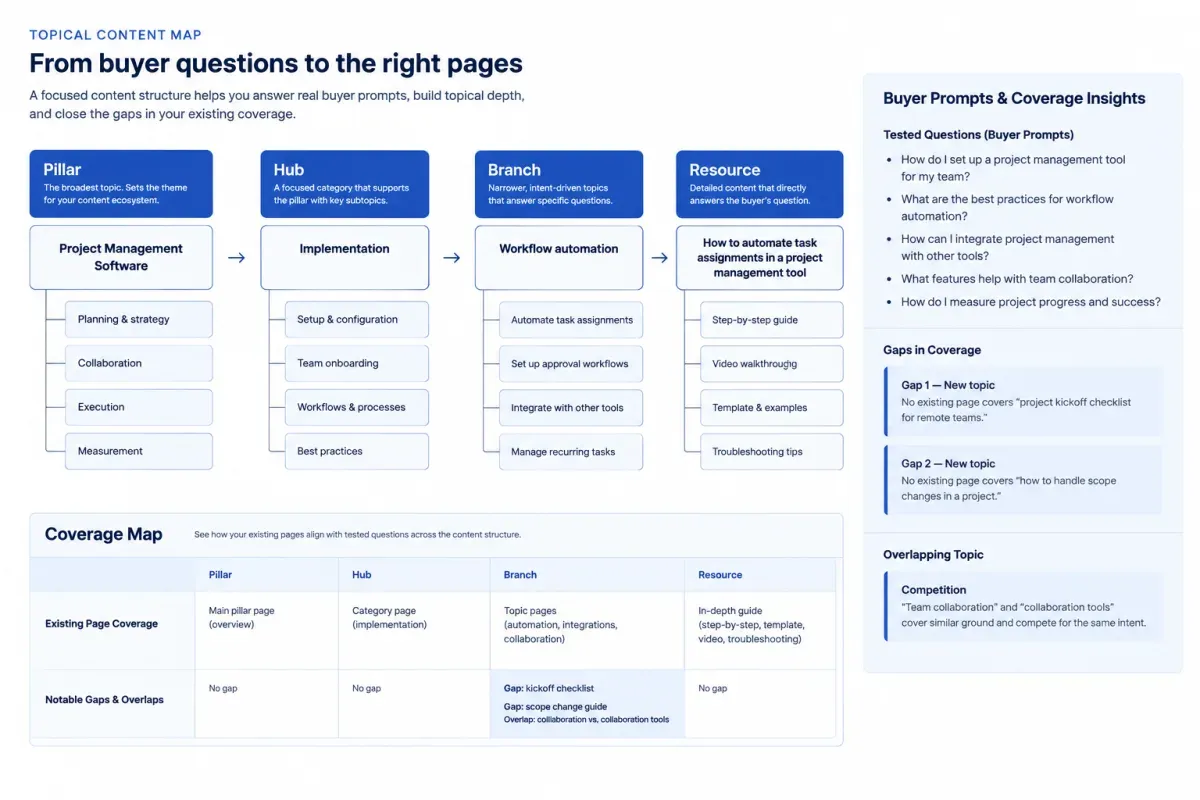
In a content audit for AI visibility, coverage isn’t page count. A crawlable, technically sound page can still miss a priority prompt because it never gives a clear, supportable answer. For each page that should answer a tested question, check factual consistency, visible evidence, entity clarity, direct-answer quality, and observed mention or citation status.
Compare material claims across every candidate URL before you add coverage. Specifications, pricing, service areas, company details, and dates should match your most current first-party source. Contradictory descriptions can do more harm than a missing page, because an AI system may retrieve either version. Put stale dates, unsupported superlatives and conflicting details on the fix list before drafting anything new.
Evidence has to be visible on the page, not implied by the domain. Check priority URLs for a named author where authorship affects credibility, dates on time-sensitive claims and sources next to the claims they support. Correct, qualify or remove statements without visible support.
Entity gaps show up next. Test natural prompts that combine the brand, offerings, executives, locations, and category terms. Your own pages should state each brand-to-offering relationship directly instead of leaving a retrieval system to infer it. A service page can repeat its service name and still never explain who it serves, what evidence backs it or how it differs from nearby offerings.
A page-to-question table keeps the audit traceable:
| Topic | Tested question | Best candidate URL | Mention or citation status | Direct-answer quality | Blocker |
|---|---|---|---|---|---|
| Topic | Prompt | URL | Observed result | Clear, partial or absent | Evidence, entity, structure, or topical scope |
Group the finished rows by topic rather than URL. That view tells a weak page apart from a weak subject area, and it shows when several pages compete for the same question.
Content audit tools that group pages by topic handle this step. The free Content Audit tool at floyi.com reads up to 100 pages with no login and returns a Coverage Map. It shows the pillar, hub and branch hierarchy of the content you already have and a Topic Strength score for each topic. For any topic below Strong, it names the rival topic it Competes With.
Scope it to one section, such as /blog, to spend the full page budget there. On a larger section, treat a thin topic as a lead to verify, because the pages that would fill it may sit outside the sample.
Weak or competing topics point to consolidation. A tested prompt with no matching page in your table points to a new brief.
Use This Copyable AI Visibility Audit Worksheet
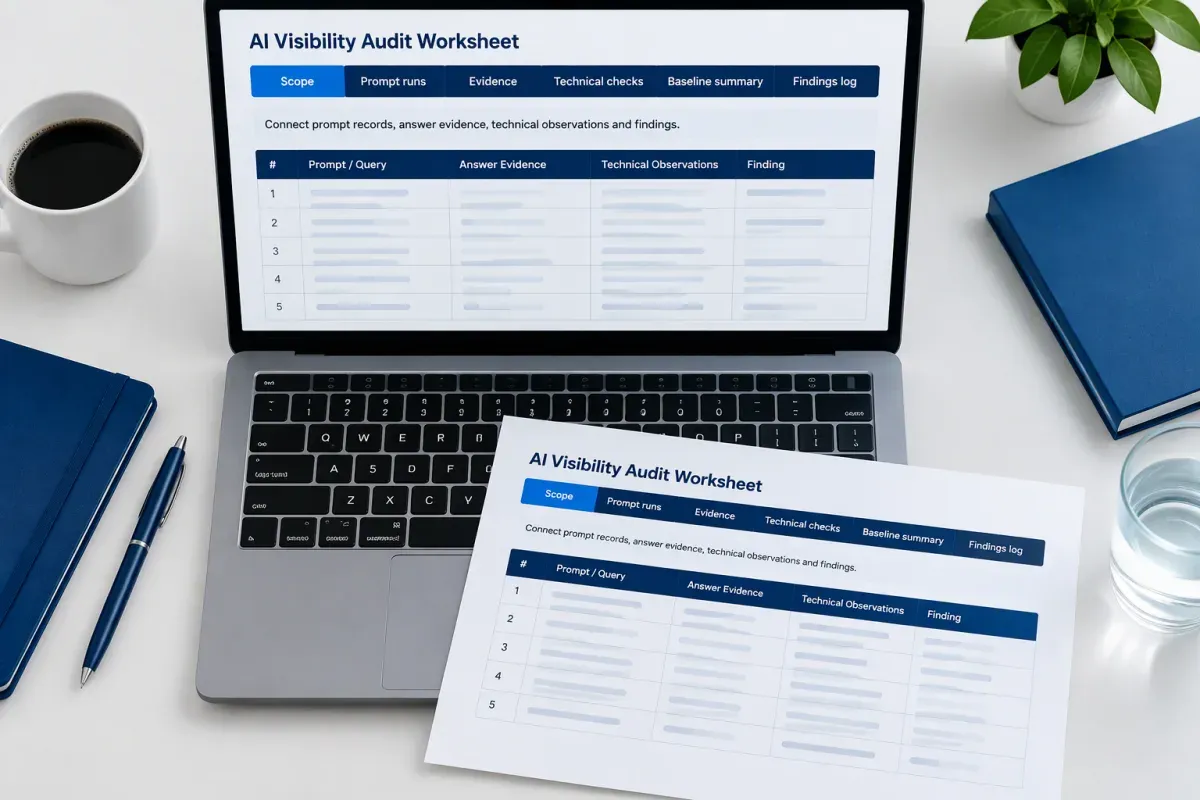
Duplicate this worksheet before testing and keep the original as the audit record. The second row of every table below holds example values only, so replace each one with evidence from your own tests. It works as an AI search audit checklist and an evidence log in one file.
The Scope tab fixes the boundaries before any prompt runs.
| audit_name | audit_date | domain_or_subfolder | topical_scope | personas | market_language | objective | included_page_types | exclusions | method_notes |
|---|---|---|---|---|---|---|---|---|---|
| Q4 baseline | 2026-10-15 | /blog | technical SEO | agency lead | US English | establish baseline | guides | product docs | signed-out tests |
The Prompt runs tab keeps exact prompt wording and stable IDs. Log each repetition as its own row so answer changes and source selection stay comparable.
| prompt_id | prompt | persona | buyer_group | search_intent | topic | engine | market_or_location | session_state | date_tested | run_number | answer_URL_or_screenshot | answer_summary | answer_present | our_brand_mentioned | our_domain_cited |
|---|---|---|---|---|---|---|---|---|---|---|---|---|---|---|---|
| P-01 | How do agencies audit AI visibility? | content lead | agency | Commercial | AI visibility | AI surface | US | signed out | 2026-10-15 | 1 | screenshot file | cites two vendors | yes | no | no |
The Evidence tab records answer-level detail, not just a yes or no flag. It separates favorable framing, a bare citation, an inaccurate claim, and a competitor recommendation.
| brand_framing_or_quoted_mention | cited_domains | cited_URLs | competitor_domains | competitor_URLs | source_type | evidence_link | anomaly_notes |
|---|---|---|---|---|---|---|---|
| Useful for planning | example.com | source URL | competitor.com | competitor URL | editorial guide | screenshot file | citation omitted on rerun |
The Technical checks tab keeps crawlability, rendering, extractability, structured data, and entity findings apart from answer outcomes. Parsed JSON-LD shows markup is present, not that Schema.org requirements or rich-result eligibility are met.
| check | affected_URL_or_template | finding | status | evidence_link | likely_visibility_impact | proposed_fix | owner |
|---|---|---|---|---|---|---|---|
| structured data | guide template | JSON-LD parses | open | validator capture | unclear | validate properties | SEO lead |
The Baseline summary tab rolls run-level evidence into the dated baseline you compare against after fixes.
| audit_date | engine | prompt_group | prompts_tested | runs | answer_present | our_mentions | our_citations | share_of_voice | open_findings | notes |
|---|---|---|---|---|---|---|---|---|---|---|
| 2026-10-15 | AI surface | commercial | 8 | 16 | 9 | 3 | 2 | 0.12 | 4 | baseline only |
The Findings log ties each gap to its evidence and a next step.
| finding_id | finding_type | related_prompt_id_or_URL | evidence_link | test_date | confidence | recommended_next_step | owner | status |
|---|---|---|---|---|---|---|---|---|
| F-01 | citation gap | P-01 | screenshot file | 2026-10-15 | medium | review source coverage | content lead | open |
Turn Findings Into a Prioritized Fix List
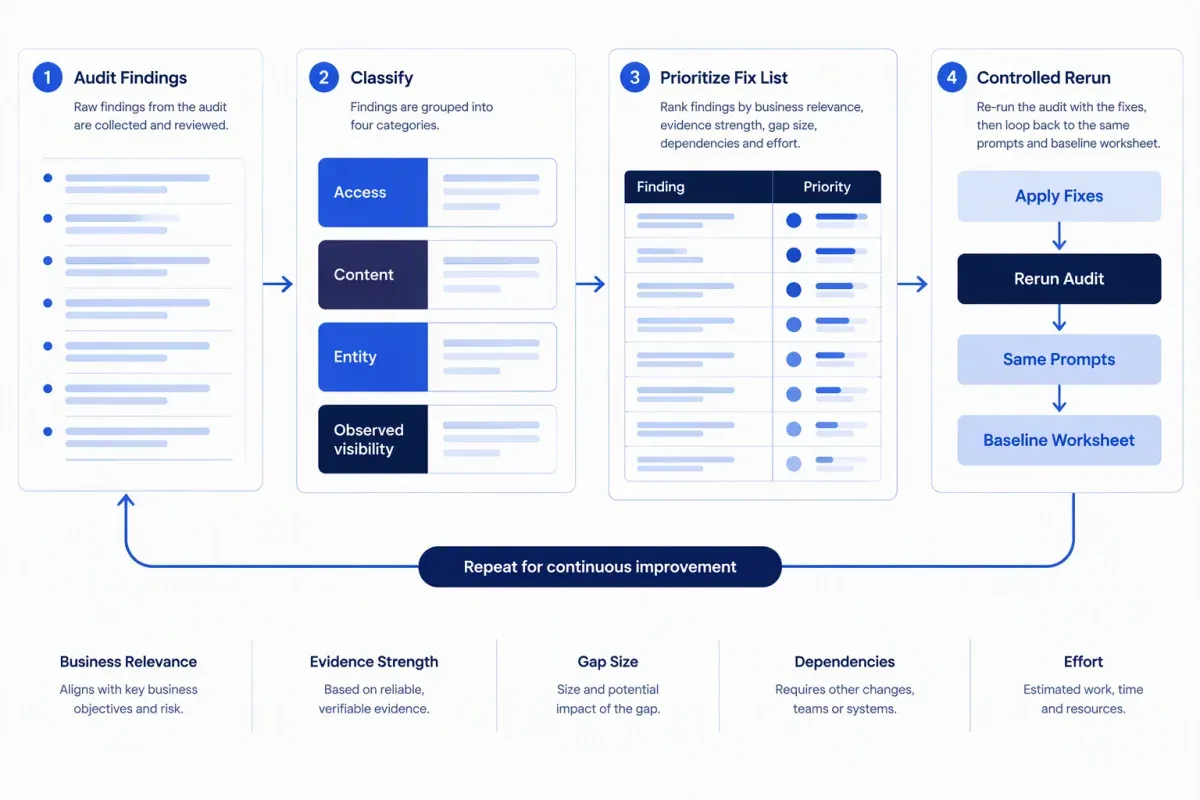
A prioritized fix list turns the one-time baseline into publishable changes. Keep the tested prompt, engine, cited or missing URL, competitor evidence, affected page, and answer context with each item, so every recommendation stays traceable.
Classify each finding before you rank it. Four categories keep technical defects, weak content and visibility outcomes from getting the same remedy:
- Access: Crawlability, rendering, indexability, and canonical status.
- Content: Direct answers, original evidence, comparisons, and structured data.
- Entity: Missing concepts or weak connections between entities in your topical scope.
- Observed visibility: Whether the brand is mentioned, cited, accurately framed, or absent.
Review both the pages AI answers cite and the pages that should have been cited. A cited URL may describe your brand wrongly. A missed URL may answer the prompt but lack the proof, structure or comparison format a competitor’s page supplies.
Rank each item on business relevance, evidence strength, gap size, technical dependency, and effort. Keep the scope of each fix matched to its evidence. A canonical issue on one URL doesn’t prove a sitewide access problem, and one thin page doesn’t prove a domain-wide authority gap.
Match the change to the constraint:
- Access failures: Fix them first, because no content change helps a page crawlers can’t read.
- Competitor citations built on comparisons: Publish a factual comparison, not another broad explainer.
- Unsupported product claims: Add specific proof.
- Strong coverage, weak citations: Work on trust signals, mentions or distribution rather than more content.
The Coverage Map shows where a content fix belongs. A weak Topic Strength score or a Competes With rival suggests consolidating overlapping pages. A prompt topic with no matching page calls for a new brief. Everything else is a change to an existing URL.
Make one controlled set of changes, then rerun the identical prompts with the same recording fields and compare the result with your baseline. Spot-check conversational follow-ups by hand, because a single-turn test can miss buyer context. If you later want those mentions and citations trended over time, the Topical Authority Scorecard does that across AI Overviews, AI Mode, Gemini, and ChatGPT on Pro and Scale plans.
Start with the finding that matters most to the business. Run its prompt through AIRS Analyzer to see the answers, sources, query fan-out, and entities behind it, then use its content blueprint to plan the fix.
AI Visibility Audit FAQs
These answers cover common decisions in an AI visibility audit, from logged-out testing to fixing an answer that gets your brand wrong.
1. How Is an AI Visibility Audit Different From AI Visibility Monitoring?
An AI visibility audit is a one-time, dated baseline that records how AI engines mention or cite your brand, diagnoses likely causes and produces a fix list. Monitoring reruns a fixed prompt set on a schedule to show change. Run the audit first. A trend line without a diagnosed baseline shows movement without telling you which content, entities or technical conditions need attention.
2. How Long Does an AI Visibility Audit Take?
Audit effort depends on prompts multiplied by engines multiplied by runs, plus the page templates and site sections included in technical and coverage checks. Reducing prompts or engines is the fastest way to limit answer collection. Technical review scales by templates, such as product, category and article pages, rather than by every URL. A baseline limited to one site section can keep coverage findings focused and comparable.
3. Should You Test AI Answers While Logged Out?
Yes. Run baseline prompts while logged out or in a clean, fresh session. Personalization, saved memory and prior chat history can change which brands appear, which weakens comparison between runs. Reserve logged-in tests for separately labeled spot checks of a returning user’s experience. Record the session state, engine and prompt for every run.
4. What Should You Do When an AI Answer Gets Your Brand Wrong?
Log the exact false claim, AI engine, date, and cited source, then correct the underlying information. Start with your own pages, where outdated pricing or conflicting product facts may cause the error. When an AI answer cites a third-party page, request a correction from its publisher and retain the evidence. Rerun the same prompt after updates, but don’t expect the engine to refresh on a defined timeline.
About the author

Yoyao Hsueh
Yoyao Hsueh is the founder and CEO of Floyi, the topical authority platform, and the founder of Main Heading, an SEO and AI search agency. He is an expert in topical authority and topical mapping. He created Topical Maps Unlocked, a course studied by thousands of SEOs, content strategists and digital marketers, founded TopicalMap.com, a done-for-you topical mapping service for agencies and enterprise teams, and publishes the weekly Digital Surfer newsletter on SEO, content strategy and AI search.
About Floyi
Floyi is a closed loop system for strategic content. It connects brand foundations, audience insights, topical research, maps, briefs, and publishing so every new article builds real topical authority.
See the Floyi workflow