
How to Structure Content for AI Extraction in Standalone Chunks
Learn how to structure content for AI extraction with standalone sections, clear headings, lists, tables, and semantic HTML, plus a before and after rewrite.
Shorter sections don’t automatically make content easier for AI systems to extract. To structure content for AI extraction, build self-contained sections with descriptive headings, focused paragraphs and semantic HTML, so each passage keeps its meaning apart from the page. A chunk is an extractable passage that a system may retrieve, summarize or quote without the copy around it.
Generic H2s, vague pronouns, screenshot-only tables, and CSS-styled divs strip that context away. The Passage-Ready Structure method below checks section scope, heading hierarchy, format choice, visible text, and semantic HTML. It ends with one section rebuilt before and after, so you can see every fix applied.
Structuring Content for AI Extraction Key Takeaways
- Build self-contained sections that keep their meaning when lifted out of the page.
- Write H2 and H3 headings that name each section’s subject and job.
- Keep each paragraph to one claim, explanation or example.
- Define acronyms and technical terms where they first matter in a section.
- Use ordered lists for sequences, bullets for independent items and tables for comparisons.
- Put key facts in selectable HTML text, not only in images, widgets or screenshots.
- Use semantic HTML so headings, lists, tables, and captions exist as real elements.
How AI Systems Break Pages Into Passages
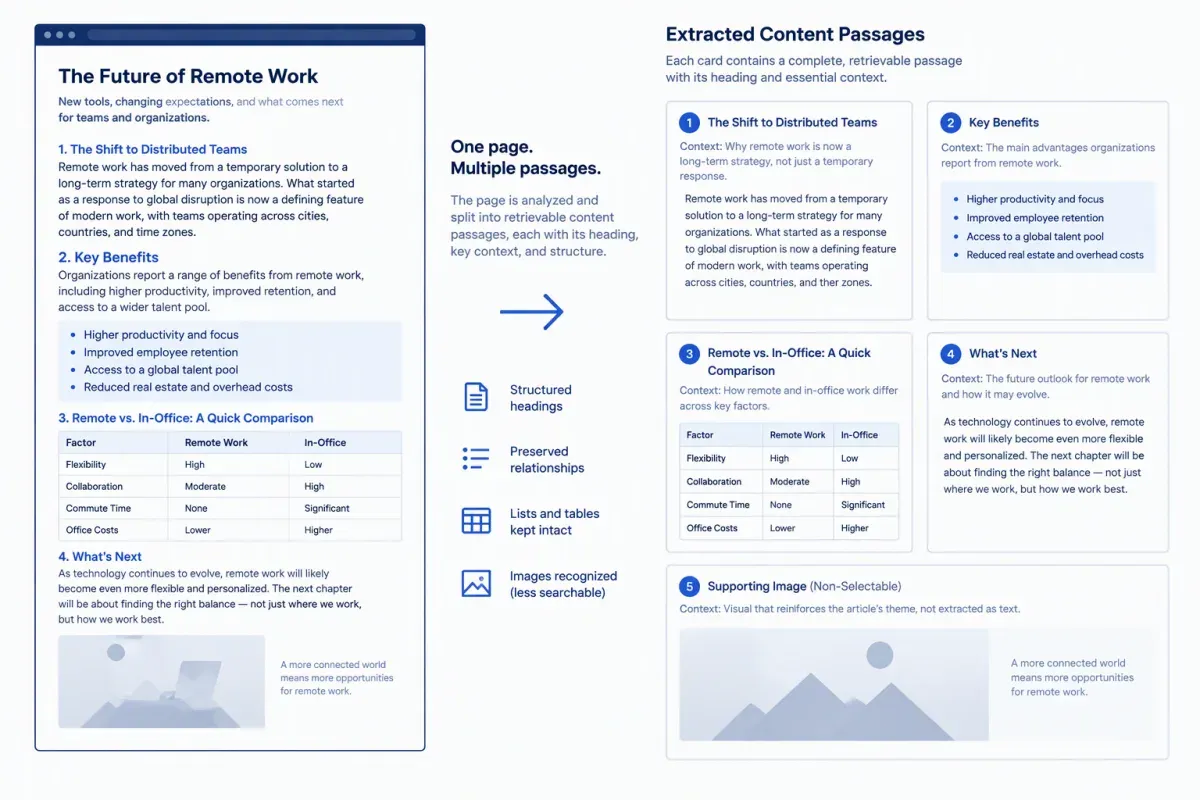
AI search features and retrieval systems generally split a page into smaller passages, often along headings and paragraph breaks. They then retrieve, summarize or quote one passage without the text around it. This guide uses “chunk” and “passage” for the same thing.
This describes how retrieval pipelines generally work and what practitioners observe. AI engines don’t publish their chunking rules, so nothing here depends on an exact chunk size or boundary.
The mechanism has four consequences for structure:
- Context dependence: A section that leans on an earlier explanation becomes unclear when it’s extracted alone.
- Headings as labels: The heading above a passage is often the only label that travels with it.
- Relationships between facts: Lists and tables keep order and comparisons intact.
- Hidden facts: Facts locked inside images, scripts or unrendered interface elements may never enter the extracted text.
This guide covers content formatting for AI extraction: sections, headings, paragraphs, lists, tables, visible text, and HTML. The opening answer itself follows the answer-first writing patterns covered in a separate guide, so they aren’t repeated here.
The same mechanics apply to documentation, blog posts, product pages, and help centers, whether a passage ends up in Google AI Overviews, ChatGPT or Perplexity. Every structural fix below serves human readers first. A clear hierarchical content structure can make a page easier to interpret and extract, but it doesn’t guarantee retrieval, quotation or citation on any platform.
Make Every Section Self-Contained
A self-contained section answers its question when read alone. It names its subject, states its point and keeps any condition that changes the point in the same passage. That’s what lets an LLM work with the passage without the paragraphs around it.
Start with the noun that carries the meaning. “This approach improves clarity” depends on the paragraph before it. “Descriptive H3 headings improve clarity in product documentation” stands on its own. Name the organization, product, method, or page type directly instead of leaning on “it,” “this” or “the tool.”
Naming entities consistently also helps systems connect related concepts across a page. Entities and semantic signals for AI search covers that practice in depth.
Cross-references are a common content chunking problem. Phrases such as “as covered above,” “the second option” and “see the previous section” leave an extracted passage without the fact it needs. Replace each one with a short clause that restates the fact.
Keep these elements together in one passage:
- Claim: What changes, helps or applies.
- Subject: The specific page, process, product, or audience involved.
- Condition: Any limit, such as page type, technical setup, audience, or date range.
- Explanation: Why the claim holds, instead of reasoning split across another heading.
Here’s a sentence-level example. “It also helps here, for the reasons above” can’t stand alone. A self-contained version reads: “A descriptive H3 helps readers follow a troubleshooting step because the heading names the error before the instructions begin.” The rewrite names the structural change, the content it applies to and the benefit to the reader.
Give each section one job. A section that defines content chunking shouldn’t drift into schema or internal links halfway through. If a draft answers both “What makes a passage extractable?” and “How should you format a multi-step process?”, split them under two headings.
Write Descriptive Headings That Label Each Chunk
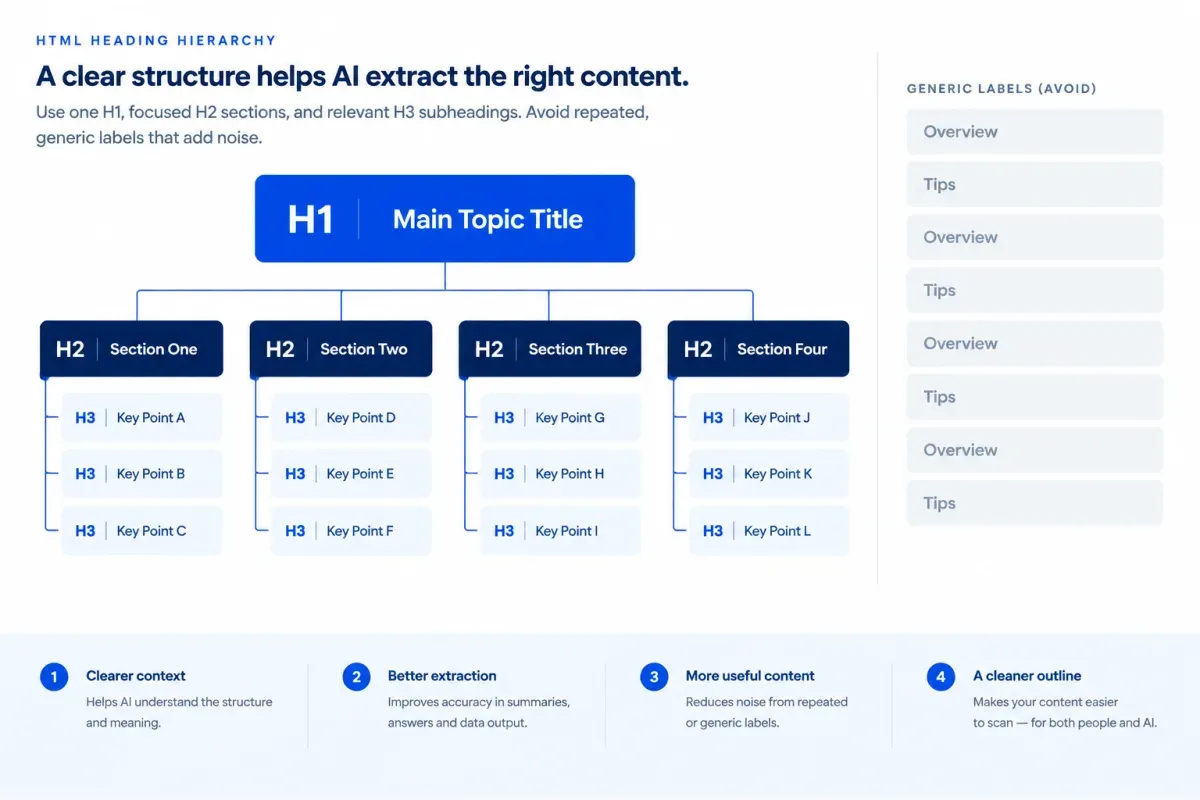
A heading labels the chunk beneath it. When a passage is extracted, that label is often the only context that travels with it, so the heading should say exactly what the passage covers.
A clean HTML heading hierarchy gives each chunk the right scope:
- Set one H1: Name the full page topic, not a slogan or campaign line.
- Use H2s for the major jobs: Give each H2 one question, decision or task the page has to cover.
- Use H3s for supporting detail: Keep every H3 inside the subject of the H2 above it.
- Keep the order: Move from H1 to H2 to H3 without skipping a level.
Don’t use heading tags to make text bigger. CSS controls appearance, while heading elements define structure for crawlers and assistive technology.
Replace vague labels with headings that name the subject, the action and, where it helps, the outcome:
| Vague heading | Descriptive replacement | Why it holds context |
|---|---|---|
| Overview | How Structured Sections Help AI Interpret Page Content | Names the mechanism and the page topic |
| Key Considerations | Factors That Decide Whether a Section Stands Alone | States what the reader will evaluate |
| The Process | Steps for Rewriting a Dense Paragraph Into Extractable Chunks | Names the task and the expected output |
Question-based headings work when they mirror a question readers actually ask. “What makes a content section self-contained?” tells readers and systems what answer follows. Statement headings usually fit tasks and steps better. “Separate competing intents into distinct sections” is more direct than “How should you separate competing intents?” when the reader needs a procedure. Don’t force every heading into a question.
Repeated generic labels cause a quieter problem. Several sections called “Tips,” “Examples” or “Next Steps” all carry the same context-free label, even when their body copy covers different subjects. Clever or branded labels fail for the same reason: they make the reader decode the topic.
Finish with a scan test. Read only the H2s and H3s from top to bottom, as if they were the table of contents. The outline should show what the page argues, in order, and each heading should accurately predict the section under it.
Keep One Idea Per Paragraph and Define Terms in Place
A paragraph that carries one idea and its support can be lifted out whole. A paragraph that mixes two points forces a system to split them or blur them together, so one idea per paragraph keeps each passage intact.
Write plain declarative sentences with a clear subject and verb. “A descriptive heading identifies the section’s subject” is easier to interpret than “The subject is made clearer through headings that are descriptive.”
Split a paragraph where the idea changes, not at a target length. A paragraph can run long when every sentence supports the same claim. If removing a sentence would leave a separate point behind, that point needs its own paragraph.
Definitions in context keep extracted passages from losing their meaning. Spell out an acronym on first use in each section likely to be read alone, not only once at the top of the page. A one-sentence definition should say what the term includes and how it differs from the closest related concept.
Keep terminology consistent across the page. If “section,” “content block” and “chunk” mean the same thing, pick one primary term or state the relationship once. An unexplained switch between synonyms gives an extracted passage one more thing to resolve, with fewer cues around it.
Here’s a mixed paragraph, labeled as an example:
- Before: “Use specific headings because they tell readers what follows, and define CMS because writers may not know the acronym when they see it in a brief.” Heading guidance and terminology guidance share one paragraph, and CMS is never defined.
- After, paragraph 1: “Specific headings state the subject of the content that follows. They help readers and AI systems identify the purpose of an extracted section.”
- After, paragraph 2: “A content management system (CMS) is software for creating, organizing and publishing website content. It differs from a content brief because it manages the published asset rather than directing what the content says.”
Each revised paragraph now has one complete job. The CMS definition says what the term means and how it differs from a nearby concept, so it still works after extraction.
Use the same check in editorial review. Read each paragraph without its heading and confirm that its subject, claim and key terms still make sense. If it depends on text elsewhere on the page, add the missing context or split off the competing idea.
Match Information to Lists, Steps and Tables
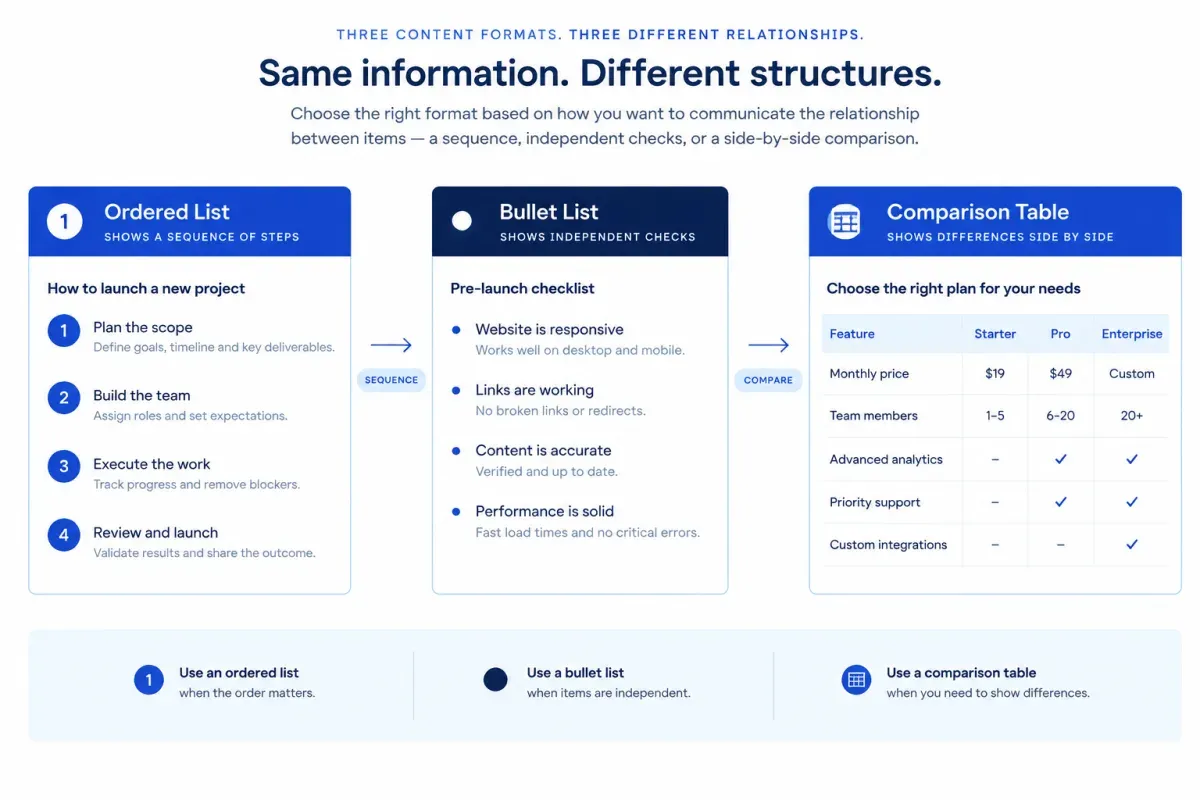
Choose a format by how the facts relate, not for visual variety. Numbered steps fit sequences where order changes the outcome. Bullet lists fit independent items. Comparison tables fit the same attributes compared across several options. Question-and-answer blocks are another format, and when a whole page of questions is the right container, FAQ pages built for AI answers covers that choice.
For numbered steps, introduce the task and any prerequisite in one sentence. Start each step with an action verb and keep it to one primary action. Put any decision condition inside the step so it still works when extracted. Here’s an example of formatting multi-step processes for extraction:
- Open the published-page template: Confirm that it renders real heading tags before you change the content structure.
- Replace visual labels with headings: Use an H2 or H3 when a label introduces a distinct subject. Keep the existing hierarchy if it already reflects the page’s logic.
- Check the next section: If the following paragraph changes subject, give it its own heading before publishing.
The order matters here. Editing labels before checking template support can produce text that looks like headings but isn’t marked up as headings.
Use bullet lists for features, requirements, examples, and checks that have no required order. Give the list a descriptive lead-in and write parallel items that each stand on their own. These independent checks belong in one list:
- Heading labels: Each heading names the information that follows instead of saying “More details.”
- Paragraph focus: Each paragraph develops one claim, explanation or example.
- Definitions: Technical terms say what they include and how they differ from related concepts.
- Sentence clarity: Active voice and the necessary background make the meaning clear without padding.
When a list mixes content, markup and publishing checks, split it by relationship instead of forcing them together.
Use native HTML tables, not screenshots, when readers compare specifications, prices, limitations, or timelines across options. A single fact reads better as a sentence. State what the table compares and on what basis, use explicit table headers and keep cells short. Apply the same labeled fields to every option.
<table> <caption>Content review options by output and limitation</caption> <thead> <tr> <th scope="col">Option</th> <th scope="col">Output</th> <th scope="col">Limitation</th> </tr> </thead> <tbody> <tr> <th scope="row">Manual review</th> <td>Editorial judgment</td> <td>Harder to standardize</td> </tr> <tr> <th scope="row">Template check</th> <td>Repeatable markup checks</td> <td>Can't judge meaning</td> </tr> </tbody></table>Keep the takeaway in prose. State the main conclusion and any important limitation in the sentence before or after the list or table. Color, icons and position can’t carry a conclusion once the table is extracted without the page design.
Put Key Facts in Text, Not Images
Any fact that matters should exist as selectable HTML text near where it’s discussed. A number that lives only inside an image, chart, PDF, video, or interactive widget isn’t part of the page’s text, so text-based extraction can miss it. Key facts in text give readers and AI systems the same information.
Each format has its own fix:
- Charts and infographics: Restate the conclusion, key values, units, and date range in a caption or nearby prose. The chart then supports the text instead of holding the only copy of the fact.
- Screenshots of tables or text: Rebuild them as an HTML table or plain text. A screenshot of a pricing table keeps every price and plan limit out of the page text.
- Images: Write descriptive alt text for informative images and leave alt text empty for decorative ones. Alt text describes the image. It doesn’t replace body text for a key fact.
- PDFs and downloads: Publish the key points on the HTML page itself, even when the full report stays available as a download or behind a form.
- Video and audio: Provide an accurate transcript and descriptive chapter markers so the spoken content exists as text.
- Calculators and interactive tools: Show a worked example or default result as static text, so readers can see what an input produces without using the widget.
Keep the unit and date next to every number so the fact survives extraction. Label example values as examples, so nobody mistakes them for measured results when a passage appears without its chart legend.
Before publishing, read each section as if its images and widgets were gone. If a key fact disappears with them, move it into the text.
Use Semantic HTML That Mirrors the Structure
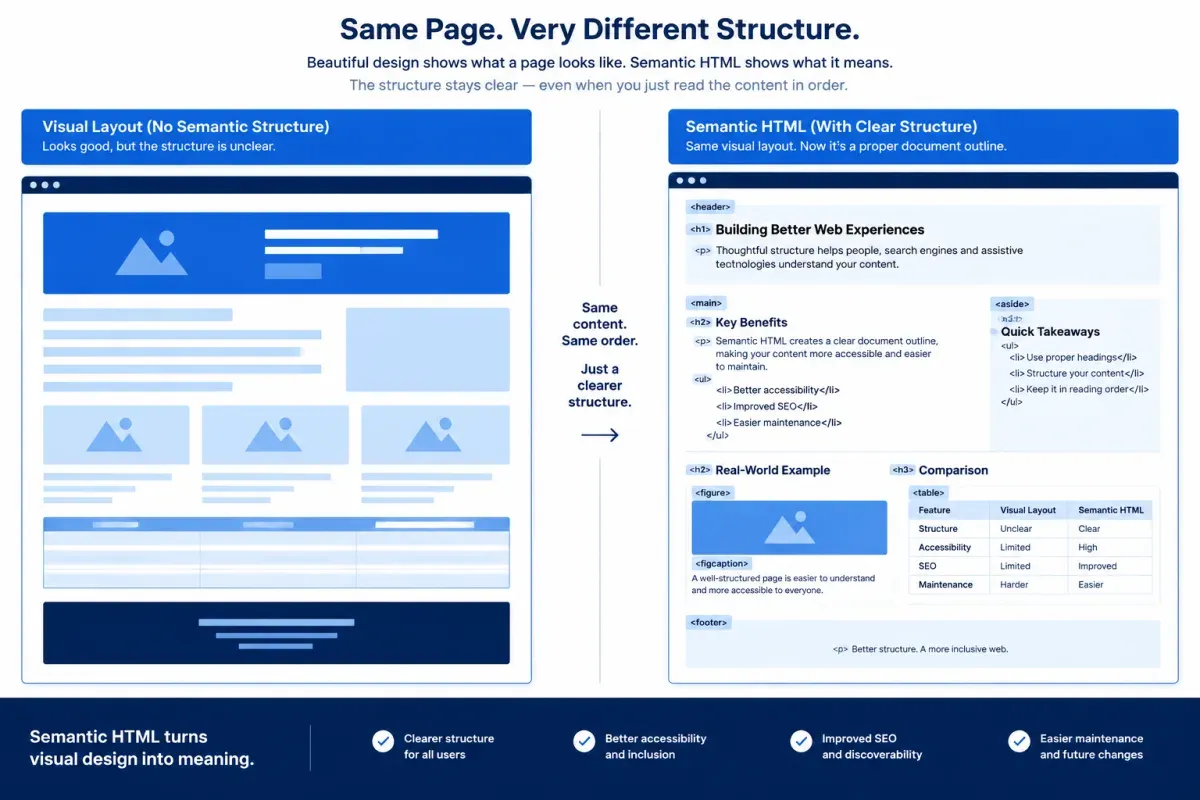
Semantic HTML turns the visible organization of a page into machine-readable content that crawlers, assistive technology and extraction systems can interpret. A layout built from generic <div> elements can look right in a browser while hiding which block is the guide, which is a topic and which is a step.
Build the page skeleton around each block’s role. Put the page’s unique content in <main>, a standalone guide in <article> and each distinct topic in a <section> with its own heading. Related resources or promotions that don’t contribute to the main answer go in <aside>.
<main> <article> <h1>How to Prepare a Technical SEO Content Brief</h1> <section> <h2>Define the Search Intent</h2> <p>Identify what the searcher needs to accomplish.</p> </section> <aside> <p>Download the technical brief template.</p> </aside> </article></main>Use real elements for real structure. Headings belong in heading elements (<h1> to <h6>), never in bold text or a styled <span> made to look like one. A styled label looks like a heading on screen but is missing from the document outline. These HTML5 semantic tags cover most content:
<p>: Explanations written as complete paragraphs.<ol>: Procedures where order changes the outcome.<ul>: Collections of items with no required order.<table>: Comparisons, with<caption>,<thead>and<th>cells so the relationships survive without the visual design.<dl>,<dt>and<dd>: Term and definition pairs or labeled values.<figure>and<figcaption>: Images and charts with their captions.<blockquote>: Quoted language, not ordinary copy styled as a quote.
Semantic HTML only helps if it reaches the document. Keep answers, steps, definitions, and table values in server-rendered or reliably rendered HTML. Client-side JavaScript can fail, load late or wait for a click. For tabs and accordions, native <details> and <summary> keep the hidden text in the HTML.
To check your work, view the page source and the rendered HTML with styles turned off. The headings, lists, tables, and captions should appear in reading order as real elements, and nothing important should be missing from the raw HTML.
Restructure One Section: A Before-and-After Example
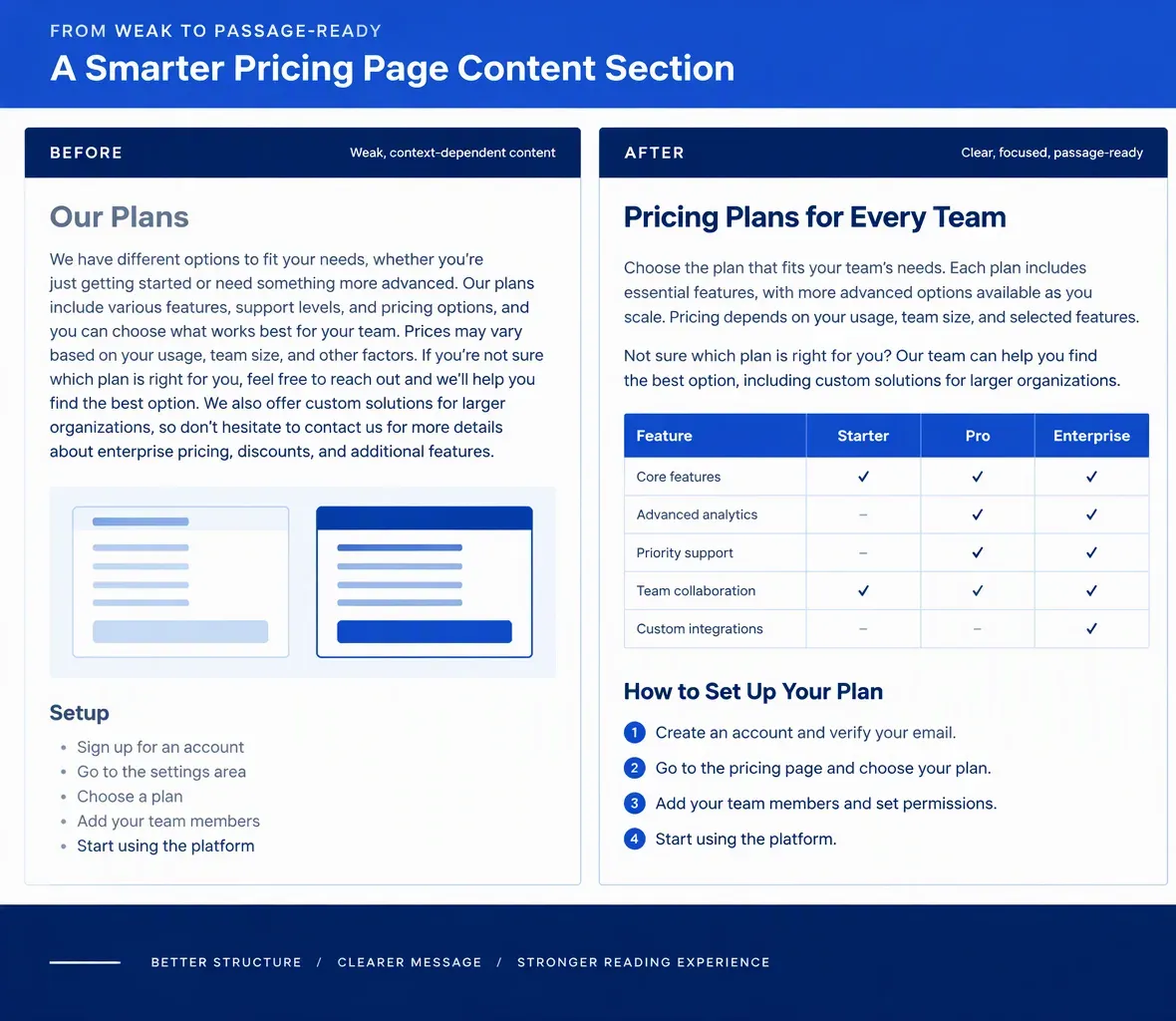
A practical way to learn how to structure content to improve AI extraction is to rebuild one real section before rolling the moves out across a site. Pick a section that answers a real reader question on a page that matters to the business, then use the rebuilt version as your model.
Here’s a weak pricing-page section, labeled as an example:
Things to Consider
This depends on the plan you need and whether your team uses a CRM. Our PPC package supports paid advertising, and the price differences appear below.
(Image: a screenshot of the pricing comparison table)
<div class="heading-large">Setup process</div>Start with account access, choose tracking, send the details, and wait for confirmation.
Everything that breaks extraction is here. The heading is vague, and “This” points back to copy the passage doesn’t include. Plan choice, CRM fit, pricing, and setup share one paragraph. PPC is never defined. The price comparison exists only as an image, the setup steps run together in one sentence and “Setup process” is a styled <div>, not a heading.
The rebuilt section applies each fix from this guide. It reads like this when rendered:
Compare PPC Management Plans by Campaign Support and Reporting
Pay-per-click (PPC) management plans differ by campaign support, reporting depth and monthly fee. In PPC advertising, the advertiser pays each time someone clicks an ad.
Choose a plan based on how many campaigns you run and how much reporting you need. CRM integration matters when paid-lead data has to reach your sales system without manual exports.
PPC management plan comparison
Plan Campaign support Reporting Monthly fee Starter Limited campaign support Standard monthly report Example price Growth Expanded campaign support Performance report Example price Set up your account in this order:
- Grant the required account access.
- Confirm conversion-tracking requirements.
- Send campaign and audience details.
- Review the implementation confirmation.
In the HTML, the heading is a real <h2>, each paragraph is a <p>, the comparison is a <table> with a <caption> and <th scope> header cells, and the setup sequence is an <ol>. That markup carries the structure even when the page design doesn’t travel with the passage.
Use this AI content extraction checklist on the rebuilt section before publishing:
| Check | What to look for | Fix |
|---|---|---|
| Heading | The heading names the subject and task. | Replace vague labels with headings that name the subject. |
| Self-contained opening | The first sentence names the subject without “this” or “above.” | Name the subject directly. |
| One idea per paragraph | Each paragraph covers one claim or explanation. | Split mixed ideas into focused paragraphs. |
| Terms defined in place | Acronyms and unfamiliar terms are defined at first use in the section. | Spell out or briefly define the term. |
| Format choice | Sequences, comparisons and explanations use a fitting format. | Use an ordered list, a table or prose. |
| Facts in text | Key details are selectable text, not image-only. | Convert screenshots into text, tables or captions. |
| Semantic HTML | Rendered content uses real heading, paragraph, table, and list elements. | Replace styled generic elements with semantic tags. |
Repeat the audit section by section.
To check the structure, paste the rebuilt section’s HTML or Markdown into Floyi’s free Content Structure Analyzer. It shows the H1 to H6 heading tree with word counts per section and flags a missing H1, duplicate H1s, skipped heading levels, and thin sections. The analyzer checks heading structure and section length. Whether each passage reads on its own stays a human review.
Structuring Content for AI Extraction FAQs
These questions cover common decisions when structuring content for AI extraction: chunk length, format choice, JavaScript rendering, and how much context to repeat.
1. How Long Should a Content Chunk Be?
No fixed length makes a chunk extractable, and AI engines don’t publish their chunk sizes. A chunk should be as long as it takes to answer one question completely, including the conditions that limit the answer. Let headings and changes of idea set the boundaries. Split a section when it starts answering a second question, and merge passages when one can’t stand without the other. Treat word counts in other guides as working conventions, not engine requirements.
2. Do Lists and Tables Extract Better Than Paragraphs?
Neither is better in general, because the right format follows how the facts relate. Paragraphs are the right container for reasoning: causes, trade-offs and the conditions behind a recommendation. Breaking that reasoning into bullet fragments strips out the “because” and “unless” that keep an extracted passage accurate. Use a list or table only when the facts form a sequence, a set of separate items or a comparison, and keep the conclusion in a full sentence beside it.
3. Can AI Systems Extract JavaScript-Rendered Content?
Not reliably. Some crawlers render JavaScript and others read only the HTML the server first returns. AI engines don’t fully document how their crawlers handle scripts, so text that appears only after client-side rendering can be missed. Server-render or statically generate key answers, steps and table values, then compare the page source with the rendered page to confirm nothing important appears only after scripts run.
4. Should You Repeat Context in Every Section?
Repeat only the minimum context a passage needs to be understood alone: the subject’s name, the condition that limits the claim and the expanded form of any acronym. Don’t copy whole paragraphs between sections. Full repetition bloats the page and creates near-identical passages that compete to answer the same question. A short restating clause keeps each section self-contained while the page still reads naturally from top to bottom.
About the author

Yoyao Hsueh
Yoyao Hsueh is the founder and CEO of Floyi, the topical authority platform, and the founder of Main Heading, an SEO and AI search agency. He is an expert in topical authority and topical mapping. He created Topical Maps Unlocked, a course studied by thousands of SEOs, content strategists and digital marketers, founded TopicalMap.com, a done-for-you topical mapping service for agencies and enterprise teams, and publishes the weekly Digital Surfer newsletter on SEO, content strategy and AI search.
About Floyi
Floyi is a closed loop system for strategic content. It connects brand foundations, audience insights, topical research, maps, briefs, and publishing so every new article builds real topical authority.
See the Floyi workflow