
How to Build FAQ and Q&A Pages for AI Search Visibility
Build FAQ and Q&A pages for AI search visibility from real customer questions. Pick the right format, write standalone answers and track mentions and citations.
FAQPage markup won’t make FAQ and Q&A pages visible in AI search. Visible answers to real customer questions can support AI search visibility, but they don’t guarantee a citation or a brand mention. Google no longer shows FAQ rich results, and it says no special schema is needed for AI Overviews or AI Mode.
Support tickets, sales conversations, internal site search, and Search Console queries expose the qualifiers customers actually use, such as “versus,” “how long” and “what happens if.” Give each question one owning page. Then choose an FAQ section for page-specific clarifications, a standalone FAQ page for business-wide policies or a Q&A page when the answer needs full context. Add markup only where it matches the rendered Q&A exactly.
Measurement needs the same discipline. Track brand mentions, AI citations, Search Console clicks, and identifiable AI referral traffic separately, against a baseline and a fixed prompt set. That record shows which pages need a clearer answer, a refresh or no change.
FAQ and Q&A Pages for AI Search Visibility Key Takeaways
- FAQ and Q&A pages support AI visibility through specific, visible answers to real customer questions.
- Google no longer shows FAQ rich results. AI Overviews and AI Mode need no special schema.org markup.
- Use support, sales, site-search, and Search Console data to find genuine questions.
- Group questions by reader goal: learn, compare, choose, and fix.
- Give every question one owning page to prevent duplicates and keep updates accurate.
- Mark up only visible, publisher-written Q&A, and validate it with the Schema Markup Validator.
- Measure brand mentions, AI citations, clicks, and referral traffic separately against a baseline.
What FAQ and Q&A Pages Do for AI Search Visibility
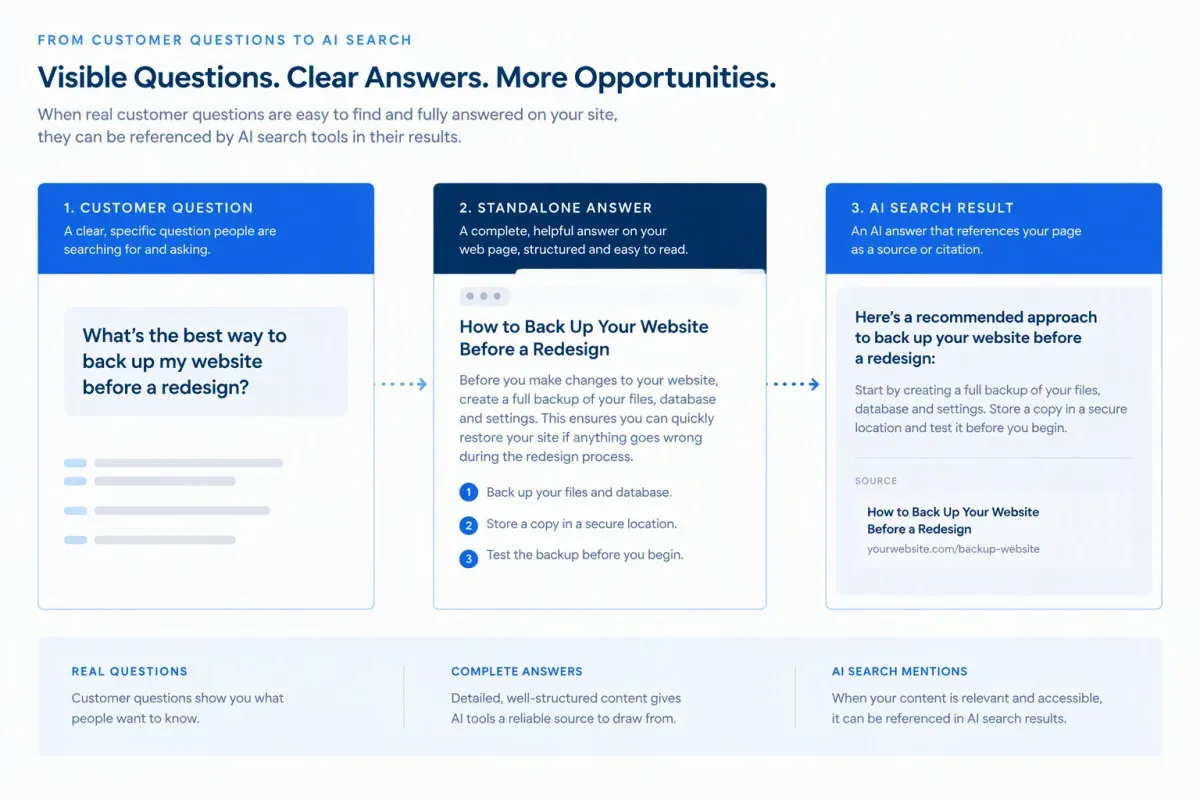
FAQ and Q&A pages can support AI search visibility when they publish visible, specific answers to questions your customers actually ask. AI search tools respond to conversational prompts, so structured Q&A content that pairs a real question with a complete answer is easier to match and quote. That’s an observed pattern, not a published rule. No format guarantees a brand mention or an AI citation.
The value now sits in the visible questions and answers, not in the markup. FAQPage markup is an optional extra, covered later, for pages where it matches the visible text exactly.
Several patterns leave search systems with little useful material:
- Generic questions with no evidence that customers ask them.
- One-line answers that lack the context to stand on their own.
- The same FAQ block copied across many pages.
- Answers hidden from crawlers or available only in markup.
The guide to answer generation in AI search covers how to write the opening answer itself. This one stays on choosing, placing and measuring Q&A content, in five steps:
- Find and prioritize questions in real customer language.
- Choose between an FAQ section, a standalone FAQ page and a Q&A page.
- Write standalone answers without creating thin or duplicate FAQs.
- Add FAQPage markup only to answers readers can see.
- Measure mentions, citations and clicks separately.
Find and Prioritize Real Customer Questions
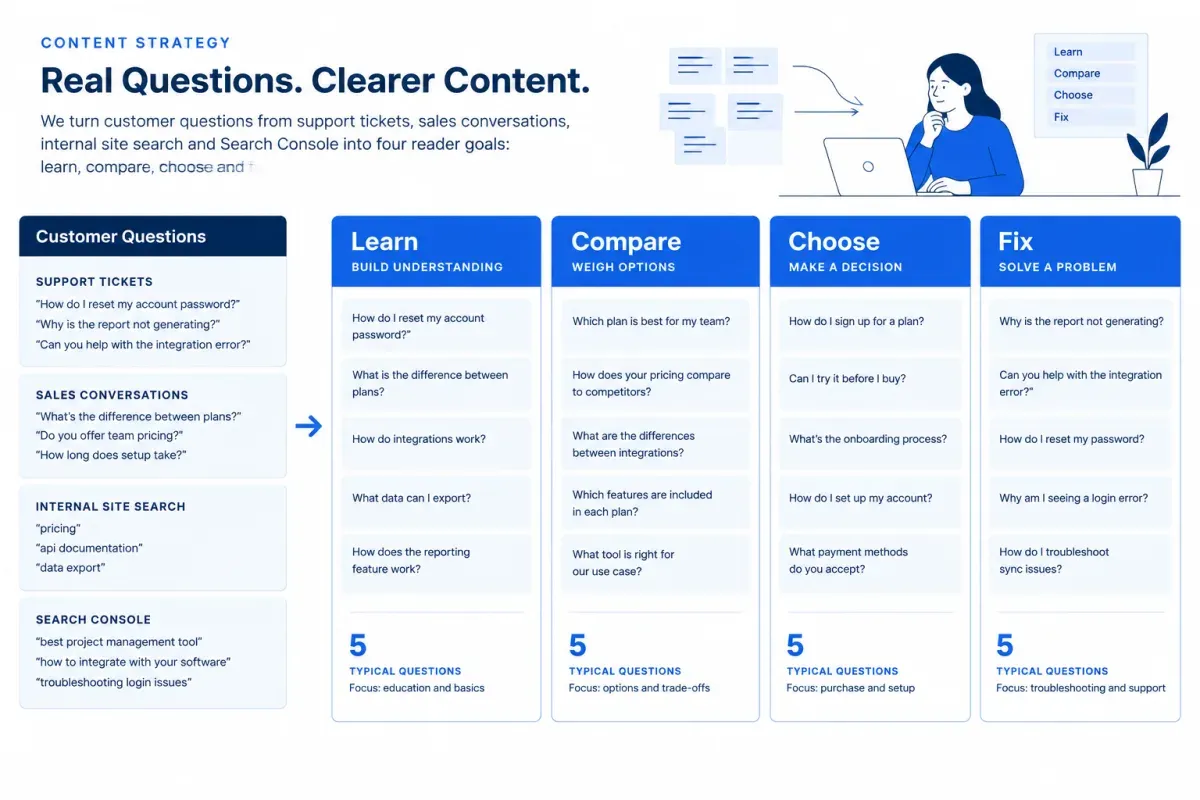
Good question research captures the words customers use when they decide, troubleshoot, compare, and buy. The goal isn’t the longest possible FAQ list. Qualifiers such as “for my use case,” “versus,” “how long,” and “what happens if” show the uncertainty an answer has to resolve. They also make stronger question-based headings than terse labels or marketing copy.
Start with first-party evidence. Support questions, sales questions, live-chat transcripts, contact forms, customer interviews, and internal site-search terms show where customers get stuck. Capture the exact wording, the related product or problem and the decision behind it. Give more weight to questions that repeatedly delay a purchase, setup, renewal, or resolution than to one-off requests.
Search Console queries reveal demand that existing pages answer only indirectly. Filter for question words and modifiers such as how, what, why, can, versus, and cost. Then look for pages that earn impressions for those queries but few clicks, or pages that rank for a question they never answer plainly. Internal site search is a useful cross-check, because it shows what visitors still can’t find after they arrive.
Question-driven keyword research expands the library without replacing customer evidence. Review Google’s People Also Ask questions and related searches for priority topics, then follow the questions that appear after each answer. Relevant Reddit threads, industry forums and communities show the depth readers expect. Use them to shape coverage, not to copy wording or answers.
AI answer follow-ups expose another layer of uncertainty. Test shortlisted questions in the AI search tools your audience uses, such as ChatGPT, Gemini, Perplexity, or Google AI Overviews. Note the follow-ups they suggest, what they get wrong about your offer and which sources they rely on. Treat these observations as a refinement signal. A follow-up with no support from customer language, Search Console queries or search behavior doesn’t belong in the library.
Group the shortlist by what the reader is trying to do:
- Learn: Questions that clarify a concept, process, requirement, or expected outcome.
- Compare: Questions that separate options, approaches, products, or service levels.
- Choose: Questions that help buyers assess fit, cost, constraints, or tradeoffs.
- Fix: Questions that help customers diagnose a problem, finish setup or recover from an issue.
Keep the questions that matter to the business and that you can answer with real expertise and evidence. Each one should help someone decide or solve a problem. Then give each keeper a proposed home. It might be a product or service page, a standalone FAQ page or its own Q&A page. That placement is the start of an FAQ content strategy, and it keeps the library tied to real customer decisions.
Choose an FAQ Section, Standalone FAQ Page or Q&A Page
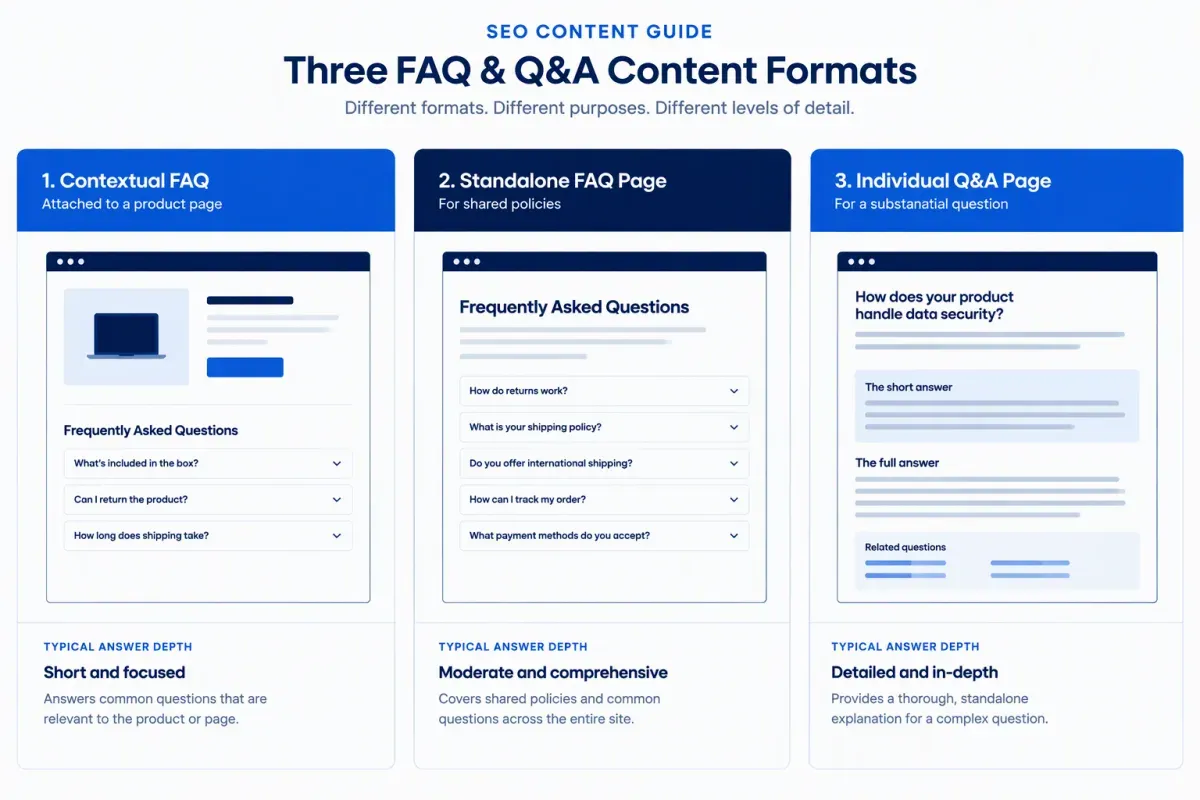
The right format depends on where the question comes up and how much answer it needs. Don’t send every question to a single FAQ page. A question tied to one offer belongs beside that offer, while a question that needs steps, conditions or examples needs its own page.
An FAQ section fits when readers need a quick clarification before acting on the page they’re viewing. Add contextual FAQs to a product, service or guide page for details such as compatibility, eligibility, setup requirements, pricing conditions, or policies that apply only to that topic. FAQ content for product pages and service pages works because the answer sits next to the content it supports. Readers don’t have to leave a decision page to find a basic detail.
A standalone FAQ page suits business-wide questions that span several offers. Account access, billing, shipping, returns, and support hours commonly belong here. Group the questions by reader goal, then link each short answer to the page that owns the full policy or process. Copying full answers across product pages and a standalone FAQ page creates drift when terms change.
Individual Q&A pages fit when a question has its own search demand and a short answer would drop important conditions. Comparisons, troubleshooting and “how do I” questions often need a full article with steps, examples, exceptions, and related resources. That’s the practical difference between an FAQ page and a Q&A page. The FAQ page routes readers through short answers, while a Q&A page resolves one substantial problem.
| Format | Use it when | Example question | Markup that fits |
|---|---|---|---|
| FAQ section | The question applies directly to the product, service or guide being viewed | “Which devices work with this product?” | Optional FAQPage |
| Standalone FAQ page | The answer applies across the business rather than one offer | “How can I update my billing details?” | Optional FAQPage |
| Individual Q&A page | The answer requires steps, context, examples, or troubleshooting | “How do I fix an account verification error?” | Article or none |
| Community Q&A page | Users post questions and other users can submit answers | “What setup worked for your use case?” | QAPage |
A community Q&A page isn’t a brand-written FAQ with a different label. Google’s QAPage guidelines limit that markup to pages where users can submit answers, such as forums and product support pages. An FAQ the site writes itself, with no way for users to submit answers, doesn’t qualify just because it uses a question-and-answer format.
Internal links connect these formats without repeating material. A short FAQ answer links to the Q&A page that owns the full explanation. The standalone FAQ page points readers to the relevant product, policy or Q&A page. Every Q&A page needs at least one contextual link from a relevant guide, service page or FAQ page so it isn’t orphaned.
Give each question one owning page. That keeps updates contained, prevents competing Q&A pages and gives readers one clear path to the answer.
Write Standalone Answers Without Thin or Duplicate FAQs
An FAQ answer has to make sense on its own, because a reader skimming the page or an AI tool quoting one answer sees only that question and its response. When writing FAQ answers, treat the surrounding page as unavailable. Name the product, service or policy. State the condition that limits the answer, then give the fact directly.
A weak answer says, “Yes, it does.” A usable version names the product and the condition, for example: “The Pro plan includes priority email support for active subscribers in the United States.” It identifies the offer, the eligibility rule and the region without leaning on “it” or “this.”
Completeness comes before formatting. Headings, lists and HTML structure belong to chunk-level structure for AI extraction, but clean HTML can’t repair an answer that lacks its subject or conditions.
Thin FAQ content usually means a page needed filler, not an answer. Remove, merge or replace these patterns with questions your customer research supports:
- Invented questions: Questions customers, prospects or support teams never raise add length without resolving anything.
- Question echoes: Answers that restate the question give no decision, instruction or detail.
- Promotional prompts: “Why choose us?” is sales copy, not an FAQ, unless it addresses a real comparison, limitation or purchase concern.
- Dead-end responses: “Contact us” and “See above” send readers away instead of answering.
Specific answers stay verifiable. Include the relevant steps, policy terms, version, plan, region, timeframe, or eligibility rule. Link to the policy, documentation or source page that supports the claim, and say when the outcome depends on the situation. Verifiable facts in FAQ answers come from your own documentation, not from added statistics. Label any example value as an example.
Duplicate FAQs need one canonical answer on the page that owns the subject. A shipping question belongs on the shipping policy page. A product page should repeat it only when that product has a materially different shipping condition. Template-generated FAQ blocks reused across product, service and location pages are a common source of near-duplicates and conflicting wording.
Before repeating a question, ask whether the answer changes for this page. If it doesn’t, link to the canonical answer. If it does, state the exact difference instead of writing a generic variation.
Give each FAQ group an owner who updates the visible answer when a product, price or policy changes. Outdated answers can keep getting quoted long after the facts move on.
Add FAQPage Markup Only for Visible Answers
FAQPage structured data is optional markup for visible, publisher-written Q&A. It won’t bring back FAQ rich results in Google, and it doesn’t guarantee rankings or AI citations.
Google’s Search Central changelog records the wind-down. Google limited FAQ rich results to well-known government and health sites in September 2023, and they stopped appearing in Google Search on May 7, 2026. Its AI features documentation adds that AI Overviews and AI Mode need no special schema.org structured data.
Google isn’t the only system reading the page, though. On a page of publisher-written questions and answers, FAQPage markup still labels which text is the question and which is the answer, and other search engines and AI systems can read schema.org markup. That may help them parse the page, but the visible answer is what readers and search systems assess.
Keep the markup tied to content visitors can see:
- Mark up only questions and answers that appear on the rendered page.
- Match the markup wording exactly to the visible Q&A, and update both together when an answer changes.
- Never put an answer only in structured data, and never mark up hidden text.
- Use accordions only when visitors can open them and read every answer.
Check the markup with the Schema Markup Validator against the rendered page, and recheck it after template or component changes.
Measure Mentions, Citations and Clicks for FAQ Content
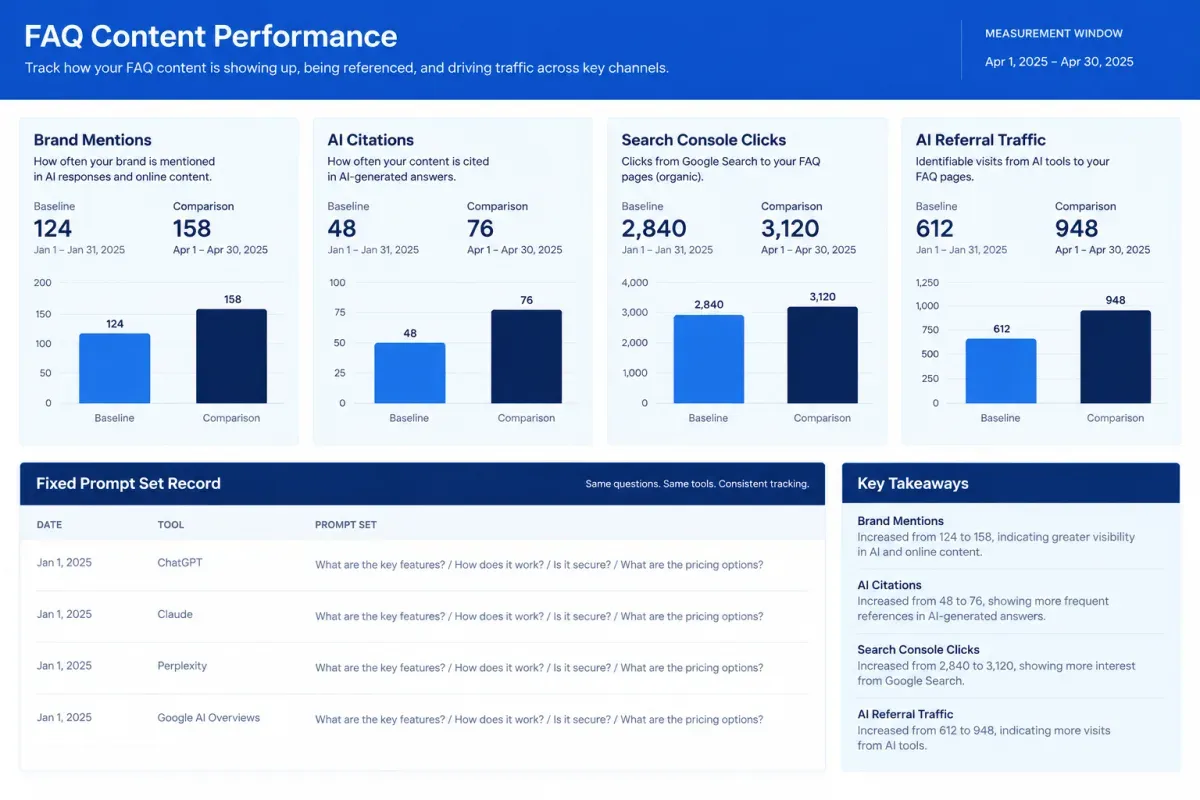
Measure FAQ and Q&A content by whether your answers get found, quoted and clicked, not by how many FAQs you published. Record a baseline before changing any page so later movement has something to compare against.
Record the baseline for each page:
- Search performance: Impressions, clicks and the question-style Search Console queries the page appears for.
- On-page engagement: Visits and engagement signals in analytics.
- AI referral traffic: Visits from AI tools where the referrer is identifiable.
Next, build a fixed prompt set from your question library, using the exact language customers use. Run it in the AI search tools your audience uses, then repeat the same set on a consistent schedule. AI answers change with wording, location, personalization, and time, so one run is only a snapshot.
Each prompt record should include:
- Prompt details: The date, tool, location, and exact prompt.
- Brand mentions: Whether the response names your brand, even with no link.
- AI citations: Whether the response links to one of your pages, which page it is and which other sources are cited.
- Page signals: Search Console data paired with analytics visits, engagement and identifiable AI referral traffic.
- Conversion context: Conversions that involve the page, noted without treating them as proof that the FAQ content caused them.
Mentions and citations are different measures. A response can name your brand without linking to your site, and a cited page can appear with no visible brand mention. Track them separately so a gain in one doesn’t hide a drop in the other.
Review results page by page, not as a total:
- Cited but rarely clicked: The AI response may already resolve the question, so check whether the page offers a useful next step.
- Mentioned but not cited: Check whether the supporting answer actually appears in visible text on the page.
- Neither: Check that the page can be crawled and indexed and that it answers the customer’s question directly.
Compare changed pages with similar pages you left unchanged over the same period. If both groups move in the same direction, the shift isn’t evidence that the FAQ edits caused it. Treat any difference as an observed pattern, not proof.
Turn the findings into a refresh backlog:
- Add: Follow-up questions that appear in AI responses and People Also Ask.
- Revise: Answers that earn mentions but not citations.
- Remove: Outdated answers, with the date of every update logged.
To feed the Add list, map follow-up questions with PAA Explorer. Floyi’s tool expands one seed query into a People Also Ask question tree up to five levels deep and exports it to PNG, XLSX, CSV, or Google Sheets.
FAQ and Q&A Pages for AI Search Visibility FAQs
These questions cover what teams most often ask about FAQ content for AI visibility, from traditional SEO value to using AI to draft answers.
1. Do FAQ Pages Still Help Traditional SEO?
Yes, as content rather than as a rich result. FAQ pages for SEO earn their value through useful answers that match question-style searches and handle objections close to the point of decision.
Keep the page selective. Questions with real customer demand can cut repeat support requests and help buyers decide. Long lists of generic questions add little for readers or search.
2. How Many Questions Should an FAQ Section Include?
There’s no right number. Include the real questions customers ask about that page’s product, service or topic when each one has a distinct, accurate answer. Stop when the remaining questions are generic, repeat information already on the page or belong to another topic. Move questions that need substantial context to their own Q&A page and link to it, rather than forcing a thin answer into the FAQ.
3. Should You Copy People Also Ask Questions Word for Word?
No. People Also Ask shows how people phrase a question and what they ask next. It isn’t a script to copy. Adapt each question to your audience and the page’s scope, and keep qualifiers such as “for small teams” or “versus” when they change the answer.
Skip questions your page can’t answer with real expertise, and never reuse the answer snippets, because they come from other sites. A copied question that doesn’t fit the page tends to produce a thin answer.
4. Should You Use AI to Write FAQ Answers?
AI can help draft FAQ answers, but it shouldn’t choose the questions or supply the facts. Draft AI-written FAQ answers from your own documentation, policies and support replies. Then have a subject expert check every claim, condition, exception, and policy detail before publishing.
FAQ lists generated without customer or search evidence tend to be generic and repeat across pages. That creates the thin and duplicate content this guide warns against. Publish only answers your team would stand behind.
About the author

Yoyao Hsueh
Yoyao Hsueh is the founder and CEO of Floyi, the topical authority platform, and the founder of Main Heading, an SEO and AI search agency. He is an expert in topical authority and topical mapping. He created Topical Maps Unlocked, a course studied by thousands of SEOs, content strategists and digital marketers, founded TopicalMap.com, a done-for-you topical mapping service for agencies and enterprise teams, and publishes the weekly Digital Surfer newsletter on SEO, content strategy and AI search.
About Floyi
Floyi is a closed loop system for strategic content. It connects brand foundations, audience insights, topical research, maps, briefs, and publishing so every new article builds real topical authority.
See the Floyi workflow