
See What Google Actually Sees.
Mapped to Your Strategy.
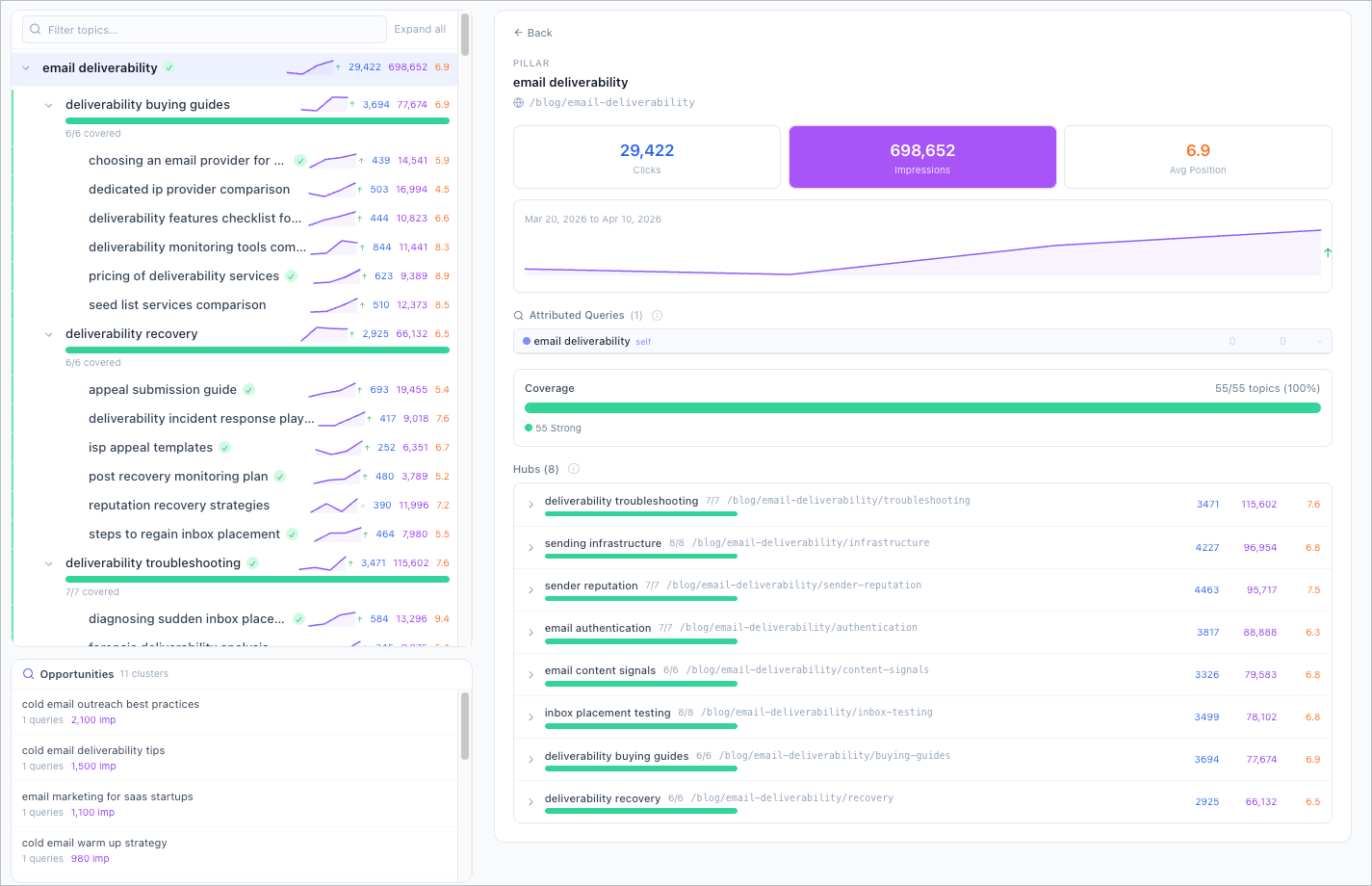
Connect Google Search Console and attribute real clicks and impressions to every topic in your map. Stop guessing which topics earn traffic — let the data show you.
Attribution Engine
Three Layers of Matching. Zero Blind Spots.
From Raw Queries to Strategic Insight
Google Search Console gives you thousands of queries. The Organic Audit maps every one of them to your topical hierarchy so you see traffic at the strategy level, not the keyword level.Phase 1 — Exact Match
Direct keyword-to-query matching for precise attribution. If your topic keyword appears in a GSC query, it is matched immediately.
Phase 2 — Stemmed Match
Stemmed keyword matching captures morphological variants. "Optimize" matches "optimizing", "optimizer", and "optimized" so no traffic slips through the cracks.
Phase 3 — Semantic Embeddings
Gemini semantic embeddings with cosine similarity ≥ 0.70 connect conceptually related queries to topics, even when the exact words differ.
Growth Discovery
Find Topics You Did Not Know You Needed
Your Audience Already Told You What to Write
Opportunity clusters surface real queries your audience uses that you have not covered yet. Expand your map with data, not guesses.Unmatched Query Grouping
GSC queries that do not match any topic in your map are automatically grouped into clusters based on semantic similarity.
Add as New Topic
Each opportunity cluster includes an "Add as New Topic" button. Expand your topical map directly from real search data in one click.
Data-Driven Expansion
Stop guessing which topics to add next. Your audience is already searching for these queries — now you can see them and act on them.

Hierarchy View
Browse Traffic by Pillar, Cluster, and Topic
Every Node. Every Query. One View.
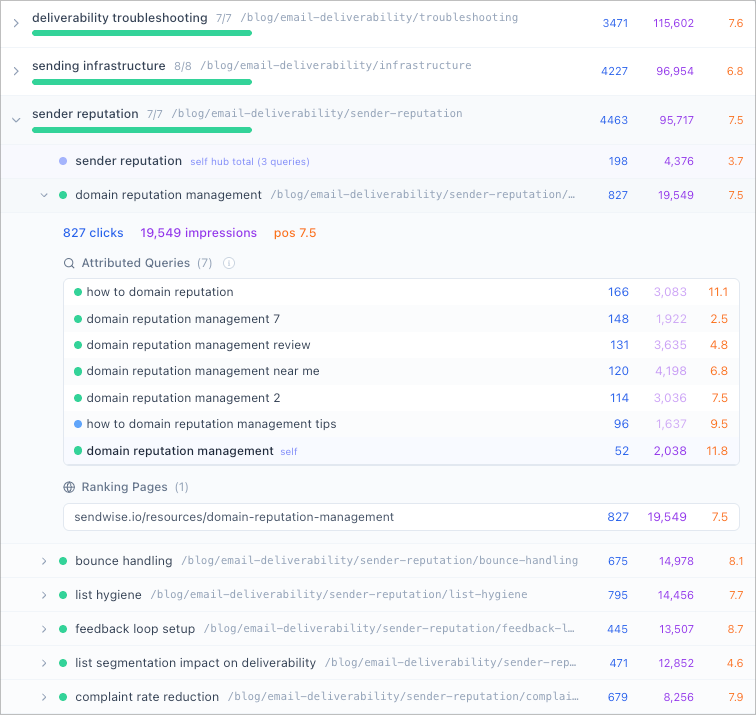
Drill into any pillar, cluster, or topic to see the exact queries driving traffic, the pages that rank, and the match confidence behind each attribution.Two-Panel Navigation
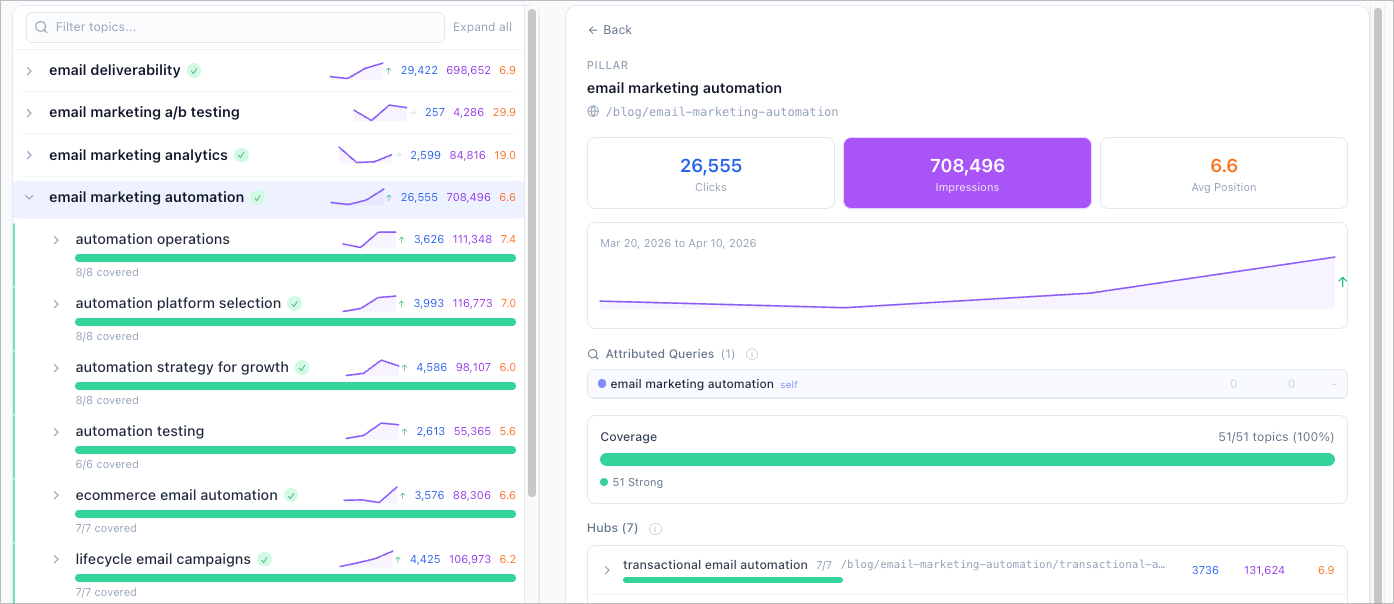
Left panel shows your topical hierarchy with per-node clicks, impressions, and coverage bars. Right panel displays detailed query lists, landing pages, and match confidence for the selected node.
Sparkline Trends
Run multiple imports over time to see per-topic impression trends as inline sparklines. Spot momentum shifts before they surface in aggregate rankings.
Full Data Export
Download query-level and page-level attribution data as CSV for reports, client deliverables, and offline analysis.
See Your Organic Traffic Through the Lens of Your Strategy
The Organic Audit maps Google Search Console data to your topical map so every metric connects to a strategic decision.
GSC Attribution Engine
Three-phase matching (exact, stemmed, semantic) maps every GSC query to your topical map nodes with confidence scores.
Performance Matrix
Classify topics as Strong, Emerging, Broad Reach, or Weak Signal. Filter the hierarchy to focus on what matters.
Opportunity Clusters
Unmatched queries are grouped into new topic suggestions. Add them to your map in one click from real search data.
Two-Panel Hierarchy
Browse your topic tree with per-node clicks, impressions, and coverage bars. Click any node for detailed query-level data.
Sparkline Trends
Per-topic impression trends displayed as inline sparklines. Spot momentum shifts at a glance across your entire map.
OAuth or CSV
Connect Google Search Console with one-click OAuth (read-only) or upload a CSV export. Your choice, same attribution engine.
Match Confidence
Every attribution shows its match phase and confidence score so you can trust the data and investigate edge cases.
CSV Export
Download query-level and page-level attribution data for reports, client deliverables, and offline analysis.
Strategy Validation
Confirm whether your topical map aligns with actual search demand. See which topics your audience cares about and which they do not.
How It Works
From Search Console to strategic insight in four steps.
Step 1: Connect Google Search Console
Authorize via OAuth with read-only access or upload a CSV export from GSC. Select your property and date range.
Step 2: Run the attribution engine
The three-phase engine matches GSC queries to your topical map using exact keywords, stemmed variants, and Gemini semantic embeddings.
Step 3: Read the performance matrix
Every topic is classified as Strong, Emerging, Broad Reach, or Weak Signal. Filter and sort to find the topics that need attention.
Step 4: Act on the insights
Double down on Strong topics, optimize CTR on Broad Reach, investigate Weak Signals, and add Opportunity Clusters as new topics to your map.
Common Questions
What is the Organic Audit?
The Organic Audit connects your Google Search Console data to your Topical Map. It attributes real clicks and impressions to each topic using a three-phase matching engine so you can see which topics earn organic traffic and which are invisible to Google.
How does the three-phase attribution engine work?
Phase 1 matches GSC queries to topics by exact keyword. Phase 2 uses stemmed matching for morphological variants. Phase 3 uses Gemini semantic embeddings with cosine similarity ≥ 0.70 for conceptually related queries. This layered approach maximizes coverage while keeping attribution accurate.
Do I have to connect Google Search Console via OAuth?
No. OAuth gives you one-click read-only access. Alternatively, export your data from Google Search Console and upload the CSV directly. Both methods feed the same attribution engine.
What is the Performance Matrix?
The 2×2 matrix classifies every topic into four quadrants based on clicks and impressions: Strong (proven winners), Emerging (growing momentum), Broad Reach (visibility without conversion), and Weak Signal (early stage or underperforming).
What are Opportunity Clusters?
GSC queries that do not match any topic in your map are grouped into opportunity clusters. Each cluster represents a potential new topic. Click "Add as New Topic" to expand your map directly from real search data.
How is this different from looking at GSC directly?
Google Search Console shows raw queries and pages. The Organic Audit maps that data onto your topical strategy. Instead of scanning thousands of queries, you see clicks, impressions, and trends organized by pillar, cluster, and topic.
Can I track trends over time?
Yes. Run multiple imports and each topic shows sparkline trends for impressions. Spot momentum shifts at the topic level before they appear in aggregate rankings.
How does this connect to the rest of Floyi?
The Organic Audit lives inside Topical Authority alongside the Scorecard, Silo Analysis, and Planner. Topics classified as Weak Signal or Broad Reach can be sent directly to Briefs and Drafts for immediate action.
Your Traffic Data Has the Answers. Map It to Your Strategy.
Connect Google Search Console and see which topics earn real traffic, which are invisible, and where your next growth opportunity is hiding.