
Schema Markup for AI Search: Evidence, Types and Validation
See which schema markup types matter for AI search, what the evidence says about AI citations and how to write and validate JSON-LD that matches your page.
Schema markup won’t earn an AI citation or a spot in AI Overviews on its own. JSON-LD gives machines explicit labels for facts that are already visible on the page, and it can’t make up for weak or outdated content.
Google says there’s no special schema.org structured data you need to add to appear in AI Overviews or AI Mode. What matters is picking types that match the page, such as Article, Product, LocalBusiness, or BreadcrumbList, and keeping every value accurate.
Markup that contradicts the visible copy can cost a page its rich-result eligibility through a structured data manual action. Check every property against the rendered page before you deploy and again after template changes.
Schema Markup for AI Search Key Takeaways
- Schema labels facts the page already shows. It doesn’t guarantee AI citations or rankings.
- Google says AI Overviews and AI Mode need no special schema.org markup.
- Choose types that match each page’s visible purpose and content.
- FAQPage and HowTo are still valid schema.org vocabulary, but Google no longer shows them as rich snippets.
- Every name, date, price, author, and availability value in your JSON-LD must match the rendered page.
- Test Google-supported types in the Rich Results Test and the wider vocabulary in the Schema Markup Validator.
- Revalidate after copy, template, plugin, or business-detail changes.
What Does Schema Markup Do for AI Search?
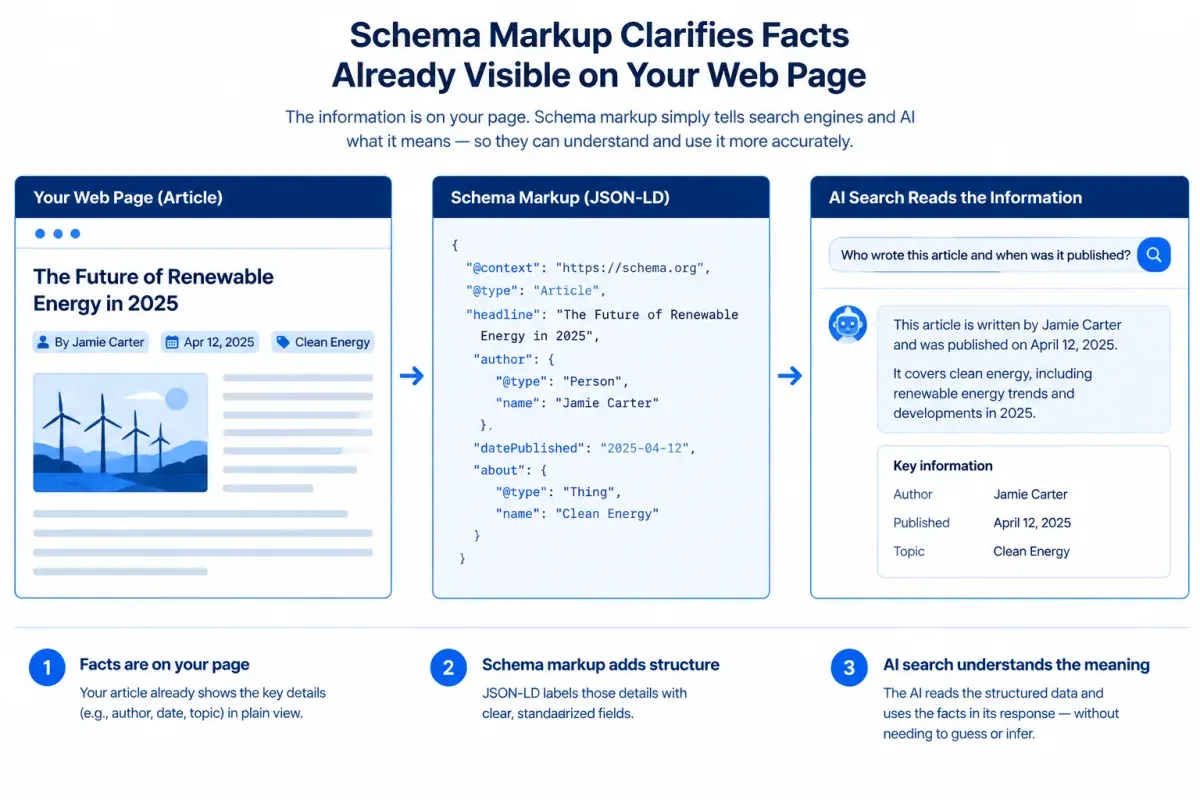
Schema markup is structured data, usually JSON-LD, that labels facts a page already shows. Those facts include the page type, who published it, who wrote it, when it changed, and which product or business it describes. It lets search and AI systems read those facts with less guessing. It can’t make an AI answer cite you.
In traditional SEO, structured data mainly made pages eligible for rich snippets in Google. In AI search, the more useful framing is clarity. Explicit types and properties remove ambiguity about entities, authorship, dates, prices, and locations that a system would otherwise infer from prose.
That clarity supports AI content extractability only when the visible page is worth extracting. Markup can’t repair thin copy, vague claims or outdated details. The visible page content is still the source material an AI system reads and decides whether to cite.
Google treats structured data as a description of the visible page, not a separate channel. Its guidance for AI features lists matching structured data to the visible text as a general best practice. Google isn’t the only reader, either. Other search engines and AI systems can read schema.org markup, so accurate markup serves more than one engine. Treat it as a supporting signal, not a citation lever.
Whether a page gets cited also depends on query fit, source trust, answer quality, and whether search engines and AI crawlers can reach and index it. The technical setup for AI search indexing covers that foundation, which has to be in place before markup adds anything.
What Does the Evidence Say About Schema and AI Citations?
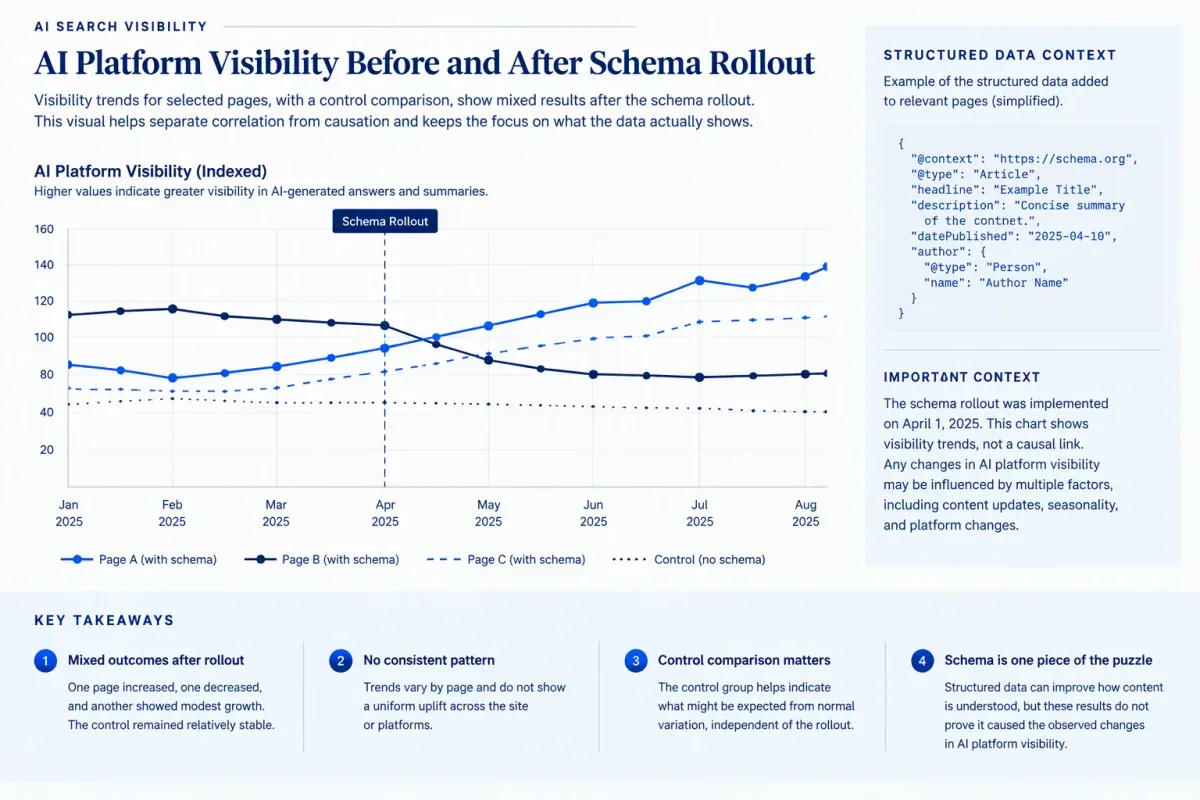
The evidence on schema markup and AI citations supports schema as a clarity aid, not as a citation lever. No AI engine publishes the rules it uses to pick sources, so any claim that schema multiplies citations is an inference, not a documented mechanism.
The most detailed public test is OtterlyAI’s single-site experiment. The team tracked its own brand across 319 prompts on seven AI platforms from December 2025 to March 2026. It’s one site, so treat the findings as observations rather than rules:
- Reading schema on request: Only Gemini returned the page’s schema when asked to fetch it. Google AI Mode described plausible schema types and included a Service schema that was never on the page.
- Schema-only facts: The team added an FAQ answer that existed only in FAQPage markup. None of the AI platforms used that markup to answer the matching question.
- Visibility after rollout: Brand coverage rose in Google AI Overviews and AI Mode but fell in ChatGPT, Gemini and Copilot. Competitors that made no schema changes saw equivalent or larger movements over the same period, so the team concluded the lift was algorithmic rather than schema-driven.
Correlation studies need the same scrutiny. Pages with careful schema often also have stronger content, better links and healthier technical SEO, so a pattern across those pages doesn’t isolate the markup as the cause. Use these questions to judge any schema study:
- Sample: Did it examine one site or a meaningful range of sites and page types?
- Comparison: Did it include a control group without schema changes?
- Confounding changes: Did content, links, templates, or technical fixes change during the same period?
- Visible evidence: Did the tested fact appear on the page, rather than only in markup?
Schema still earns a place in AI search optimization. It labels facts the page states clearly, which is where it’s useful. Build the direct answers, definitions and supportable claims first, then add markup that describes them.
Which Schema Types Matter Most for AI Search?
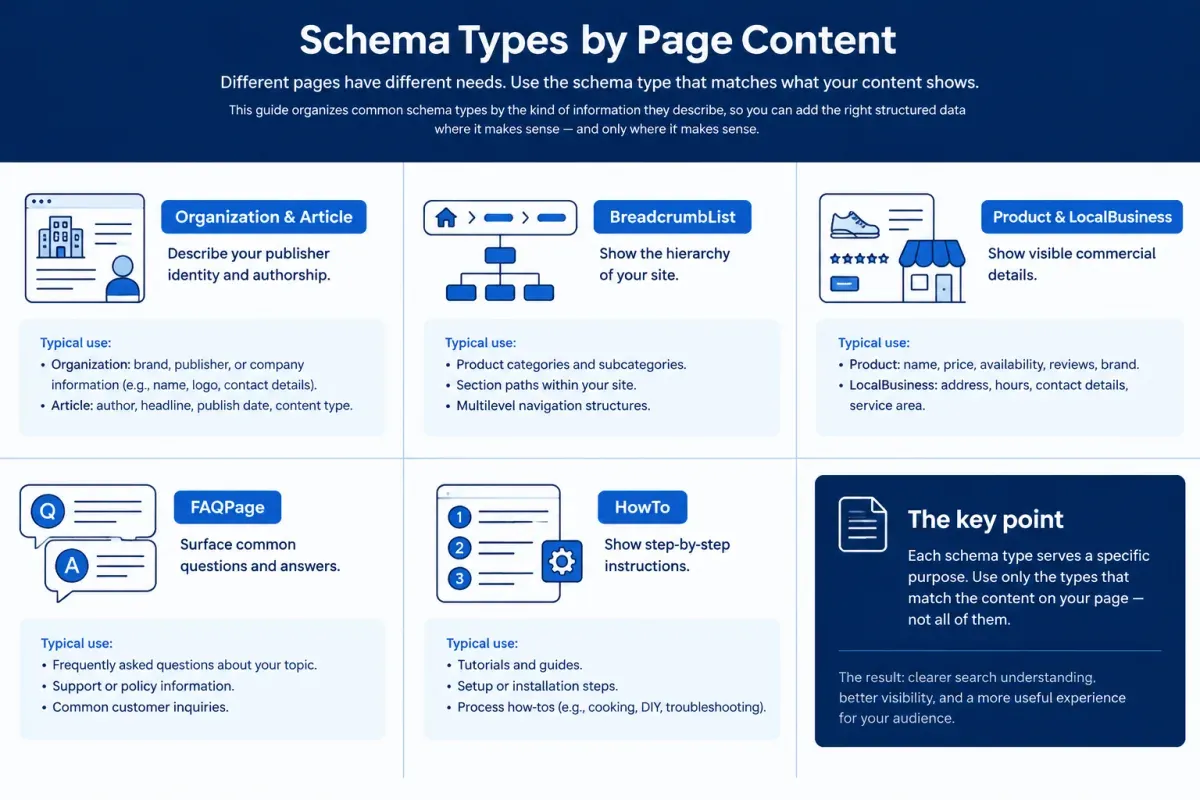
Choose from the schema.org types that truthfully describe what visitors can see on that specific page, not every type that might apply. Hidden, inaccurate or conflicting properties confuse parsers and can break Google’s structured data guidelines. The schema types for AI search worth adding are the ones your pages can back up with visible content.
| Schema type | Use it when | What must be visible on the page |
|---|---|---|
| Organization | The publisher or business is identified | Business name and brand details |
| Article or BlogPosting | The page is editorial content | Headline, body copy and publication details |
| Person | A named author appears | Author name and role or bio |
| BreadcrumbList | The navigation path appears | Matching visible breadcrumbs |
| WebSite and WebPage | You’re identifying the site and the URL | Site and page identity |
| Product | An item is for sale | Product details and purchase information |
| LocalBusiness | A real location is represented | Address and contact details |
| Service | The page describes an offered service | A clear service description |
| FAQPage | Visible Q&A pairs appear | Each question and answer |
| HowTo | Readers can follow published steps | Complete, ordered instructions |
The first five rows are the foundation most sites need. The rest depend on what the page actually contains. FAQPage and HowTo stay in the table because they’re still valid schema.org vocabulary, even though Google no longer shows them as enhanced results.
How Do Organization, Article and BreadcrumbList Help?
Organization, Article, Person, BreadcrumbList, WebSite, and WebPage markup tell systems who published a page, who wrote it and where it sits on the site. Together they improve entity clarity. They don’t guarantee rankings or citations.
Organization should describe one consistent publisher across the site, with its name, url, logo, and a short description. Use sameAs only for profiles that genuinely belong to the organization. Consistent identity details help systems tie the domain to a known brand.
Article structured data, or BlogPosting schema for blog posts, carries the headline, description, image, author, publisher, datePublished, and dateModified. Reserve NewsArticle for genuine news. Every byline, date and image in the markup must appear on the page and stay accurate. A stale dateModified or a missing author creates a mismatch between the page and its structured data.
Person fits pages with a real byline and an author bio or profile page. Point the Article’s author property at that Person so responsibility is clear to readers and machines. This is where E-E-A-T and structured data meet, and the limit matters: author markup makes accountability legible, but it doesn’t establish expertise on its own.
Page identity and hierarchy depend on markup that matches the visible site structure:
- Breadcrumbs: BreadcrumbList mirrors the trail visitors can see. Don’t add categories that exist only in the markup.
- WebSite schema: Identifies the site as a whole and its publisher.
- WebPage schema: Identifies the individual URL and what the page is about.
When Should You Still Use FAQPage or HowTo?
Use them to label visible content, not to chase a rich result in Google. HowTo rich results stopped appearing in 2023. FAQ rich results were limited to well-known government and health sites that year. They stopped appearing in Google Search on May 7, 2026, according to Google’s Search Central changelog. Neither appears in Google’s search gallery, so check it before trusting an older guide that promises FAQ dropdowns or how-to steps.
The markup can still be worth adding. FAQPage and HowTo remain valid schema.org vocabulary that labels question-and-answer pairs and ordered steps explicitly. That may help other systems parse the page. Treat it as a possible parsing aid, not as a documented ranking or citation signal.
Add FAQ schema markup or HowTo schema only when the page earns it:
- FAQPage: The page visibly contains genuine questions with complete answers.
- HowTo: The page teaches a task through steps a reader can follow in order.
- Content parity: Every marked-up answer and step appears in the visible HTML.
The OtterlyAI test shows why parity matters. A fact that lived only in FAQPage schema wasn’t used by any platform it tested. Publish the answer on the page first, then add markup that matches it.
When Do Product or LocalBusiness Apply?
Product applies to a page that presents a specific item for sale, and LocalBusiness applies to a page that represents a real customer-facing location. For Product schema, mark up the product’s name, description and image, plus an Offer with price, priceCurrency and availability. Do it only when the page shows those details and keeps them current. That gives systems exact commercial facts to read. It doesn’t turn a service page or an article into a product result.
Where the page visibly shows genuine ratings or reviews, AggregateRating and Review can express them. Keep the values identical to what visitors see and follow Google’s review snippet guidelines. Ratings clarify comparison inputs. They don’t prove an AI system will recommend the product.
For local business schema, match the visible business name, street address, phone number, and opening hours, then pick the most specific valid subtype, such as Dentist or Restaurant.
Keep markup scoped to the page:
- Product and Offer: Describe the item offered on that page.
- LocalBusiness: Describe the location represented on that page.
- Service: Describe a service the business visibly offers.
Don’t add these types just because the company sells products or runs locations elsewhere on the site.
How Do You Write JSON-LD That Matches Your Page?

Write JSON-LD from the rendered page, so every type and value in it describes something readers can see. JSON-LD schema markup lives in a <script type="application/ld+json"> block that holds @context (https://schema.org), an @type and that type’s properties. It sits apart from the visible HTML. Google recommends JSON-LD as the easiest format to implement and maintain at scale, though it also supports Microdata and RDFa.
Here’s a compact, valid Article example with ISO 8601 dates and example.com placeholder values:
<script type="application/ld+json">{ "@context": "https://schema.org", "@type": "Article", "headline": "How to Choose a Primary Schema Type", "image": "https://example.com/images/schema-guide.jpg", "datePublished": "2026-10-01", "dateModified": "2026-10-15", "author": { "@type": "Person", "name": "Jordan Lee", "url": "https://example.com/authors/jordan-lee" }, "publisher": { "@type": "Organization", "name": "Example Company", "logo": { "@type": "ImageObject", "url": "https://example.com/images/logo.png" } }}</script>Build the implementation in a narrow sequence:
- Choose one page: Start with a page whose purpose is clear, such as an article, a product page or a location page.
- Select the primary type: Match the page’s main purpose instead of adding every loosely related type.
- Add supported properties: Include only facts that appear in the visible page content.
- Add supporting types selectively: Add breadcrumb and Organization markup only where the page reflects those entities.
Parity sits at the center of schema markup best practices. Names, prices, availability, dates, authors, and publishers in the markup must match the rendered page exactly. Use real publication and modification dates. Never mark up hidden FAQ answers, unpublished product details or template-generated dates.
Write or paste the markup in a plain-text field or code editor. Rich-text CMS fields and word processors can swap straight quotes for curly ones, which breaks the JSON. When page content changes, update the markup, then check the rendered template for duplicate or conflicting blocks from themes and plugins.
How Do You Validate Schema Markup?
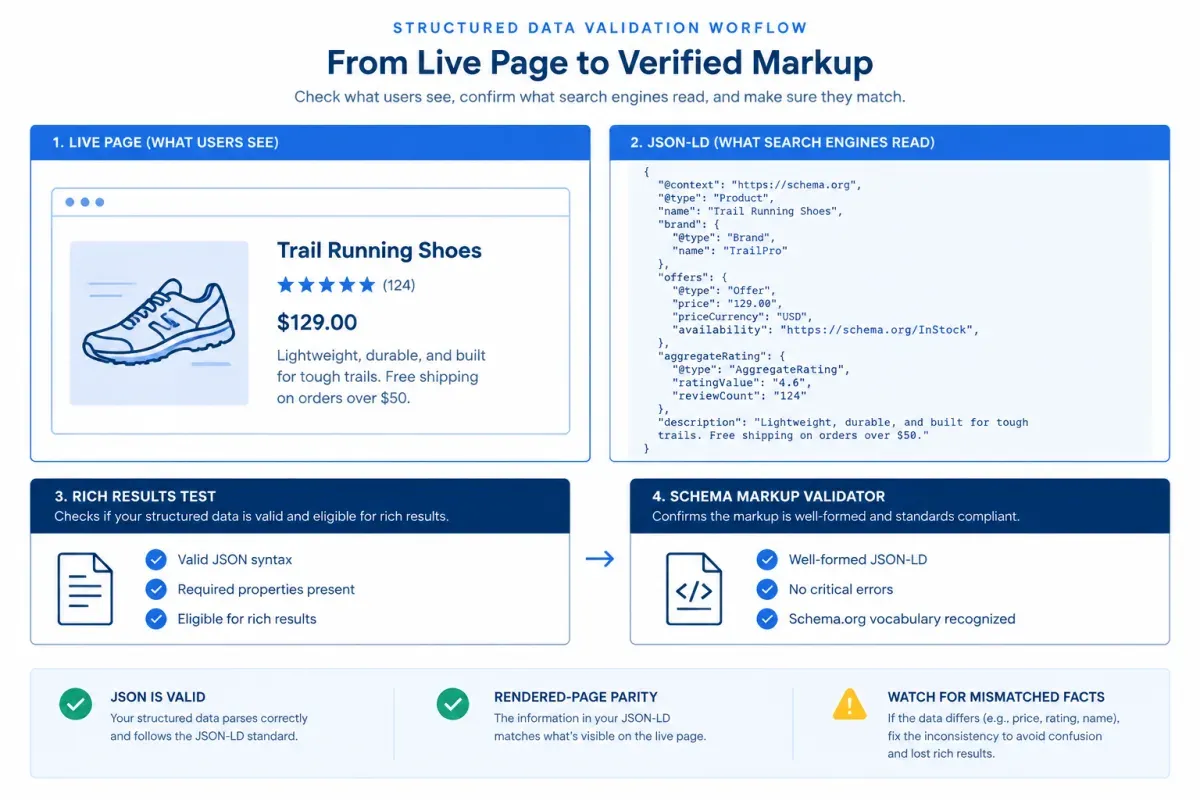
Validation starts with rendered-page parity, not a testing tool. Open the live page next to its markup and confirm that every marked-up name, price, availability value, date, author, and publisher is visible and current. Remove stale or unsupported properties rather than adding more types.
Then run the tools. The Rich Results Test shows which Google rich results your structured data can generate, so it covers only types Google supports, such as Article, Breadcrumb, Organization, Product, and Local business. A pass confirms parsing and eligibility. It doesn’t guarantee a rich result, a ranking or an AI citation. It won’t evaluate FAQPage, HowTo or other types Google doesn’t support as rich results.
For the full schema.org vocabulary, including FAQPage, HowTo and Service, use the Schema Markup Validator at validator.schema.org. It checks all Schema.org-based markup without Google-specific warnings. Fix errors first, then judge warnings against the rendered page. A recommended property is never a reason to mark up something visitors can’t see.
Before publishing, run these checks:
- Valid JSON: The block parses without syntax errors.
- Accurate type: Each
@typematches the page and the entity it describes. - Required properties: Google-supported types include the fields their rich result needs.
- Rendered parity: Every value matches the visible page.
- Clean output: Each entity has one intended block, with no duplicate plugin-generated markup.
After deployment, check Search Console’s rich result reports for errors and warnings across templates. Re-test the live URL whenever copy, templates or plugins change, because markup that passed on staging can break in production.
To draft the markup itself, the free Schema Markup Generator builds valid JSON-LD for FAQ, Article, HowTo, LocalBusiness, Organization, and BreadcrumbList. Fill it with the values your page already shows, then run the checks above before you publish.
Schema Markup for AI Search FAQs
These are the questions that come up most often about schema markup for AI search, from answer accuracy to manual actions.
1. Can Schema Markup Improve AI Answer Accuracy?
It can help. Explicit, machine-readable facts such as a price, opening hours, an author, or a publication date reduce the ambiguity a system would otherwise resolve from prose. That makes those facts easier to represent correctly.
It doesn’t guarantee that an AI system reads the markup or repeats it faithfully. A plausible AI answer about your schema isn’t proof the system read it, as the invented Service schema in the OtterlyAI test showed. Keep the same facts visible and current on the page.
2. Is JSON-LD Better Than Microdata for AI Search?
JSON-LD is the safer default. Google recommends it and also supports Microdata and RDFa, and no AI engine has published a preference for one format. JSON-LD sits in one script block apart from the visible HTML, so it’s easier to generate from templates, review and update without touching page layout. Whichever format you use, the values must match the visible content.
3. Can Schema Markup Cause Manual Actions?
Accurate schema markup doesn’t cause manual actions. The risk comes from structured data that misrepresents the page. Examples include marked-up content visitors can’t see, reviews that aren’t on the page or facts that conflict with the visible copy. Google can apply a structured data manual action in those cases. The affected pages lose rich-result eligibility, though Google says the action doesn’t affect how they rank in web search.
Keep every material property identical to what visitors see. Check the page against its markup before publishing, and update or remove schema when the visible facts change.
4. Should Every Page Include Schema Markup?
No. Add page-level schema only where a type accurately describes the page and what visitors can see on it. Site-wide basics such as breadcrumb markup on content pages and Organization on the homepage or About page are usually handled once at the template level.
A page with no fitting type is better left unmarked than given a generic or inaccurate one, and every block you add is one more thing to keep in sync. Validate templates once, then spot-check pages after updates.
About the author

Yoyao Hsueh
Yoyao Hsueh is the founder and CEO of Floyi, the topical authority platform, and the founder of Main Heading, an SEO and AI search agency. He is an expert in topical authority and topical mapping. He created Topical Maps Unlocked, a course studied by thousands of SEOs, content strategists and digital marketers, founded TopicalMap.com, a done-for-you topical mapping service for agencies and enterprise teams, and publishes the weekly Digital Surfer newsletter on SEO, content strategy and AI search.
About Floyi
Floyi is a closed loop system for strategic content. It connects brand foundations, audience insights, topical research, maps, briefs, and publishing so every new article builds real topical authority.
See the Floyi workflow