
AI Editing That Lives Where You Write
Stop copying text to ChatGPT. Simplify, expand, and optimize your content directly in your editor with full SEO context.
Inline Editing
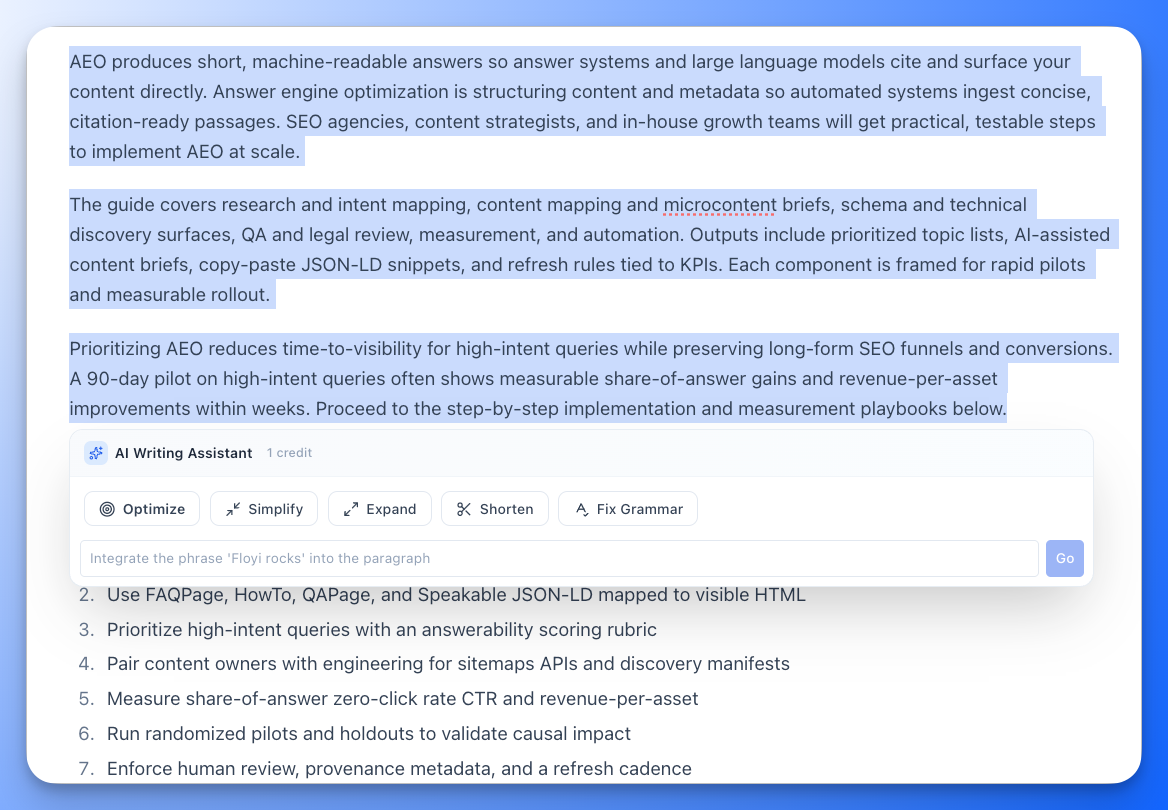
Transform Text Instantly
Your Editor, Supercharged
Select any text and let AI do the heavy lifting. Whether you need to shorten a wordy paragraph or clean up grammar, help is just a click away.6 Preset Actions
One-click access to the edits you make most: Simplify, Expand, Shorten, Fix Grammar, Optimize, and Custom.
Preserves Formatting
Unlike external tools, Floyi keeps your links, bold text, and lists intact during every transformation.
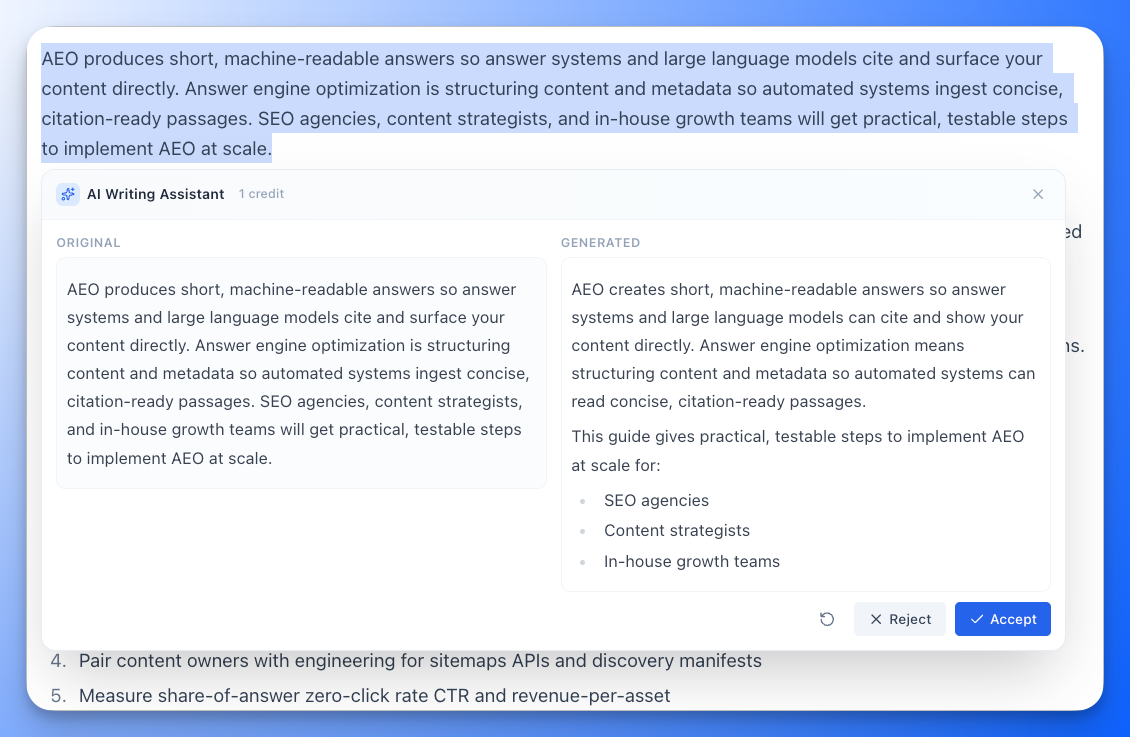
Preview & Control
See a side-by-side comparison of the Original vs. Generated text. Accept the change only when you’re happy.
SEO Aware
The Only AI That Knows Your Strategy
Write for Humans, Optimize for Search
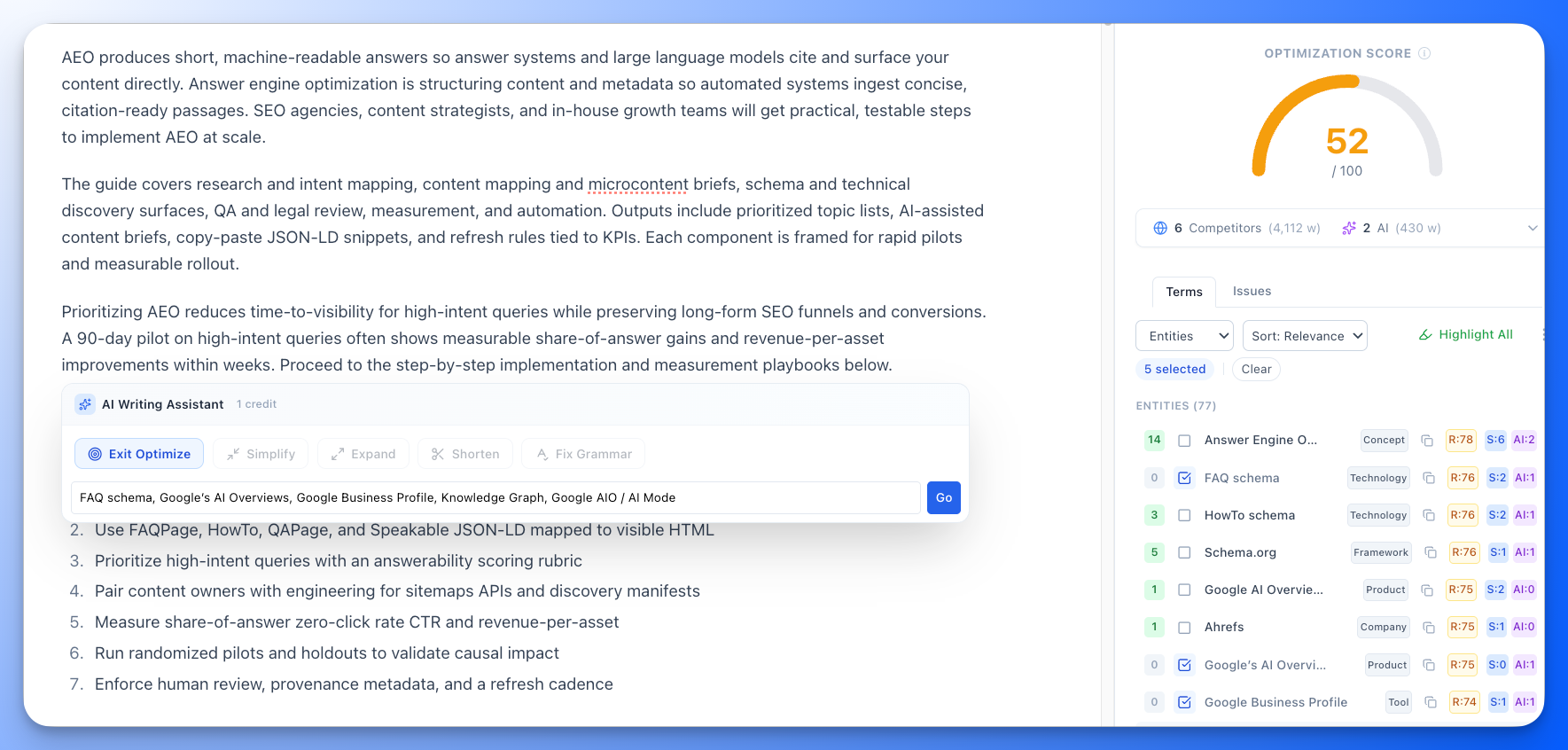
Most AI tools ignore SEO. Floyi is built for it. Use Optimize Mode to ensure every paragraph contributes to your topical authority.Optimize Mode
Connects directly to your Content Optimizer. Select missing terms from your brief, and the AI will naturally weave them into your text.
Context Awareness
Floyi reads between the lines. It looks at the text before and after your selection to ensure every edit flows perfectly and matches your tone.
Boost Authority
Fill content gaps instantly without breaking your writing flow. Perfect for hitting that 70+ optimization score.
Why Writers Love Floyi AI
Built for professional content workflows.
Transparent Pricing
Know exactly how much an action costs before you click. No surprise token usage or hidden fees.
Custom Instructions
Need something specific? Tell the AI exactly what to do: "Make it punchier," "Add a statistic," or "Use a bulleted list."
Zero Context Switching
Stop pasting into ChatGPT. Keep your focus on the document and let the AI come to you.
Smart Formatting
Existing links, tables, and headers are preserved so you don't have to re-format.
Fast & Responsive
Powered by optimized AI models to give you near-instant modifications.
Part of the Suite
Seamlessly integrated with Floyi's Topical Maps, Content Briefs, and Optimizer for a complete workflow.
Common Questions
Does it replace ChatGPT?
For editorial tasks, yes. It puts the power of LLMs directly in your editor so you don't need to switch contexts. For general research, you might still use ChatGPT, but for writing and refining, Floyi is faster.
Will it mess up my links?
No. We specifically trained our system to preserve internal and external links. You can rewrite a paragraph full of citations and the links will remain intact.
How does Optimize Mode work?
It connects to the Content Optimizer panel. You select a chunk of text, click Optimize, and then pick specific entities or keywords from the sidebar that you want to include. The AI rewrites the text to meaningful include them.
What is the character limit?
For best performance, we recommend selecting chunks of text under 2,000 characters (approx. 400 words) at a time. This ensures faster response times and higher quality output.
Can I undo a change?
Yes. Even after clicking Accept, you can use Cmd+Z (Mac) or Ctrl+Z (Windows) in the editor to undo the change and revert to your original text.
How is usage charged?
Floyi believes in no surprises. You will always see the exact credit cost of an action displayed in the AI bubble before you run it.
Related Tools
Content Editor & Optimizer
The editor where the AI Writing Assistant lives — optimize with live scoring.
Briefs & Drafts
Generate the first draft, then refine it with the AI Writing Assistant.
Content Plans
Prioritize and sequence topics before you write and edit.
Topical Maps
Build the content structure that guides every brief and edit.
WordPress Publishing
Publish your polished content directly to WordPress.
Topical Authority
See how your optimized content improves authority scores.
Experience the Future of Editing
Join thousands of writers using Floyi to create better content, faster.