
Research That Starts
With Strategy.
Generate entity-rich topics and subtopics that match your brand and buyers. View them in silo columns, collapsible outlines, or spreadsheets, then send them straight into clustering and topical maps.
Find Topics That Matter
Uncover high-volume keywords, long-tail opportunities, and question-based topics. View your outline in three formats, detect duplicates with semantic analysis, and export directly to Clustering and Topical Maps.
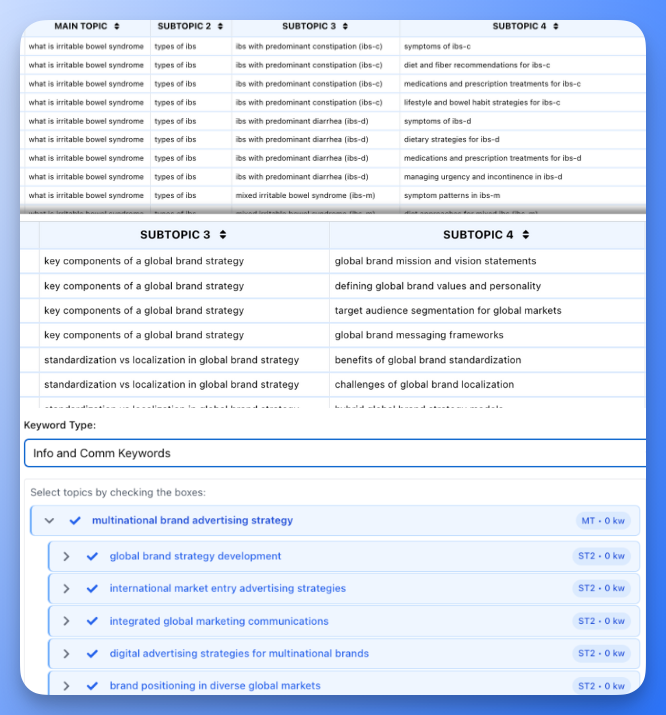
AI-Assisted Topic Research
Find topics that fit your brand identity and audience signals, not random keyword dumps.
Strategy-Aligned Topic Ideas
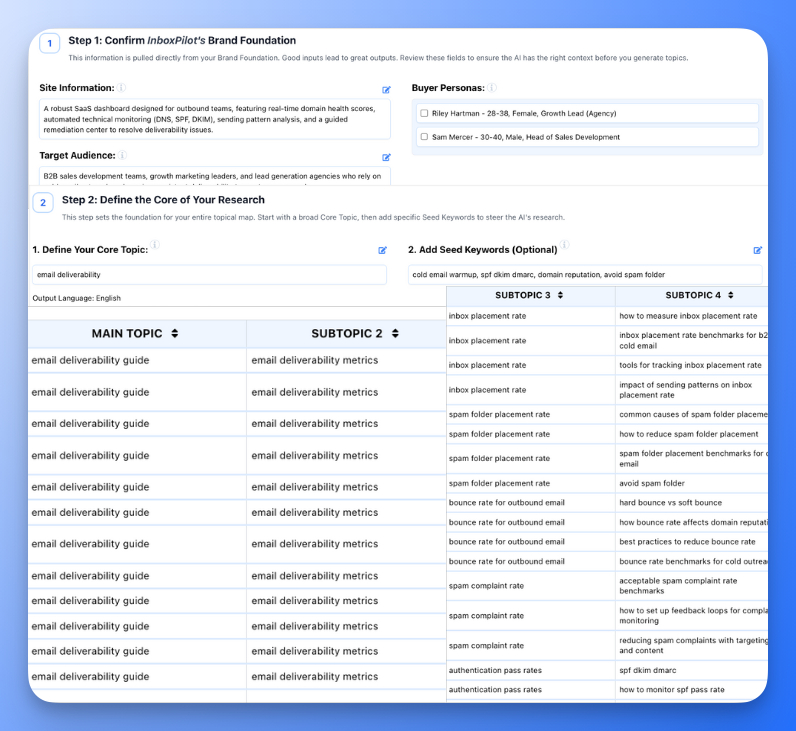
Turn a few seed phrases, product themes, or brand angles into hundreds of topics and subtopics that actually fit your positioning and audience. A four step Generate Bar walks you through MTs, ST2 + ST3, ST4, and keywords with credit estimates at every step.
Three Ways to View Your Outline
Switch between Silo columns for a Kanban-style pillar view, a collapsible hierarchical Outline with search, or a traditional Spreadsheet for row-by-row editing. Each view fits a different stage of your workflow.
Audience-Driven Suggestions
Guide research with buyer personas from Audience Insights. Surface topics tied to their pain points, goals, and use cases so every idea already has a real person behind it.
Semantic Duplicate Detection
Run one-click duplicate analysis to flag near-identical topics across your entire outline. Strong duplicates get a red warning, possible matches get amber, so you can merge or remove before wasting credits downstream.
Scoped Keyword Generation
Generate keywords for your entire outline, a single Main Topic pillar, or a specific ST2 branch. Scoped generation lets you add keywords to new branches without regenerating everything.
Import, Export, and Google Sheets
Import existing keyword lists from XLSX. Export your outline to Excel or directly to Google Sheets. Send selected topics into SERP Clustering with one click to validate with live SERPs.
From Raw Keywords to Authority Topics
Start with brand and buyer signals, expand through a four step generation flow, then feed the right topics into clustering, maps, and briefs inside Floyi.
Seeds
Start with core topics and brand context.
Generate and Shape
Expand MTs, ST2+ST3, ST4, and keywords step by step.
Clean and Deduplicate
Rename, delete, and resolve duplicates across views.
Cluster, Map, and Brief
Send clean topics into clustering, maps, and briefs.
Research That Feeds Real Strategies
Topical Research turned our messy keyword lists into a clean topic plan. The silo view made it easy to see which pillars were thin and which were ready for clustering.

Patricia Moore
SEO Manager, E-commerce
We build topics around personas first, not volume. The duplicate detection alone saved us hours of manual cleanup before we even touched clustering.

Ryan Cooper
Content Strategist, Agency
Having topics flow straight into the Topical Authority Planner is the game changer. Research, clustering, and mapping feel like one process instead of three separate tools.

Diana Foster
Marketing Director, B2B SaaS
Frequently Asked Questions
Clear answers on how Topical Research works inside Floyi.
Where do topic ideas come from?
Topical Research uses AI models and Floyi's prompts to expand your brand inputs, seed phrases, and personas into structured topic ideas. It does not scrape live SERPs at this step. Live SERP data comes later in SERP Clustering and the Topical Authority tools.
How is this different from traditional keyword tools?
Most keyword tools start with search volume and difficulty, then hand you a flat list. Floyi starts with your brand, audience, and positioning, then generates topics and subtopics that fit that strategy. Volume, competition, and gap analysis are layered on in Clustering and the Topical Authority Planner.
Can I still use my existing keyword lists?
Yes. You can import existing keyword or topic lists via XLSX upload, then reorganize them into pillars, clusters, and topics. Topical Research turns those lists into a hierarchy that is ready for clustering, mapping, and brief creation.
How many topics can I create?
Floyi is built for large topic sets. You can generate and organize thousands of topics with three different views, bulk actions, and scoped generation, which is ideal for SEO teams building full topic maps instead of one-off articles.
Does Topical Research support multiple brands or markets?
Yes. You can run separate research workspaces per brand, region, or language. Each workspace uses that brand's foundation and personas so topics stay aligned to the correct identity.
What happens after I finish my research?
Once you like the topic set, you send it into SERP Clustering. That is where Floyi fetches live SERPs, groups topics by intent, and adds competitive context. From there, you promote the best clusters into your Topical Map and generate briefs directly from the plan.
How does duplicate detection work?
Floyi uses semantic analysis to compare all topics in your outline and flag pairs that are too similar. Strong duplicates show a red warning, while possible duplicates show an amber warning. You can review each pair with its similarity score and decide whether to merge, rename, or keep them.
Can I generate keywords for just part of my outline?
Yes. The keyword scope selector lets you target all leaf nodes, a specific Main Topic pillar, or a specific ST2 branch. This is useful when you add a new branch and only want keywords for that section without regenerating your entire map.
Turn Loose Keywords Into a Real Topic Strategy.
Start with AI-assisted topic research that respects your brand and audience, then carry that structure into clustering, topical maps, and briefs.