Topical Audit
The Topical Audit tool discovers the content structure of any public website without needing a pre-existing Topical Map. It’s perfect for analyzing competitor sites or understanding a domain’s topical footprint.
What You’ll Learn
Section titled “What You’ll Learn”- How to run a topical audit on any website
- Pasting your own URL list when the sitemap or crawl misses pages
- Using CSV upload to save 50% on credits
- Understanding your audit results
- Reading AI-generated insights
- Navigating the discovered hierarchy in Tree View or the Visual Map
- Refining clusters that come out too broad or too granular
- Managing past audits
- Exporting your findings
Getting Started
Section titled “Getting Started”When to Use Topical Audit
Section titled “When to Use Topical Audit”Use Topical Audit when you want to:
- Analyze competitor content strategies: See how competitors structure their content
- Audit a new domain: Understand an acquired site’s topical coverage
- Reverse-engineer authority: Discover what topics a site has built authority around
- Benchmark your content: Compare your structure against industry leaders
Starting a New Audit
Section titled “Starting a New Audit”- Navigate to Topical Audit from the main menu.
- Enter the website URL you want to analyze (e.g.,
https://example.com). - Configure your scan settings:
| Setting | Description |
|---|---|
| URL | The website to analyze |
| Server Location | Country the pages are loaded from |
| Page Limit | Maximum pages to crawl (1-5,000) |
| Force Crawl | Enable if the site lacks a sitemap (uses 1.5x credits) |
- Review the estimated credits.
- Click Start Audit to begin.
Paste URLs (No Sitemap or Crawl)
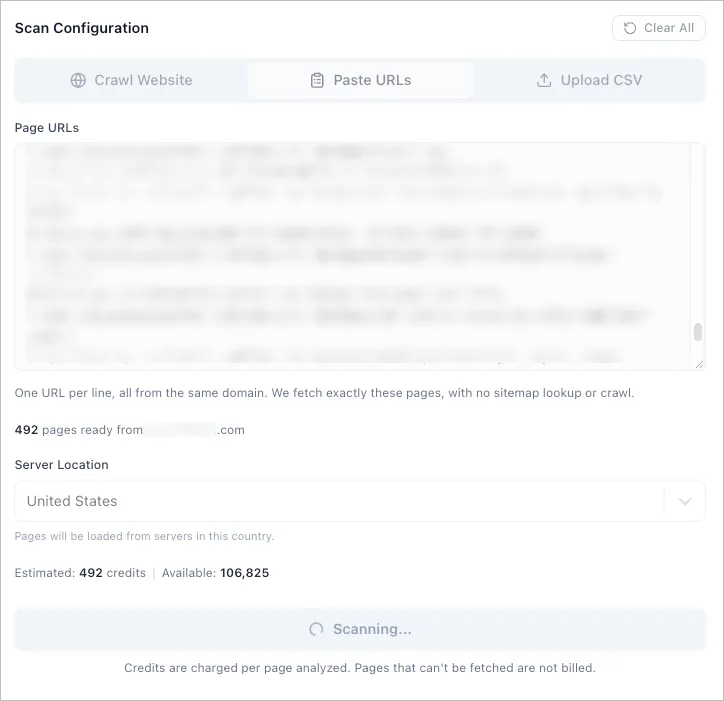
Section titled “Paste URLs (No Sitemap or Crawl)”Use Paste URLs when the sitemap is incomplete, Force Crawl still misses pages or a firewall blocks the sitemap and crawler. You list the exact pages to analyze, and Floyi fetches those pages directly. It doesn’t look for a sitemap or follow links.
- Click Paste URLs in the input mode toggle, between Crawl Website and Upload CSV.
- Paste the page URLs, one per line. A column copied from a spreadsheet works as is.
- Check the summary under the box:
- Pages ready is the number of pages Floyi will fetch
- Duplicates removed counts repeated URLs, which are fetched once
- Skipped entries lists anything that isn’t a valid URL, so you can fix typos before starting
- Select a Server Location.
- Review the estimated credits.
- Click Start Audit.
| Rule | Detail |
|---|---|
| Page count | 5 to 5,000 URLs per audit |
| Domain | Every URL must be from the same domain. www. and subdomains count as the same site |
| Homepage | Skipped. It covers the whole site, not one topic |
| Path filters | Not applied. Every page you paste is fetched |
| Credits | Standard crawl rate, with no Force Crawl surcharge. Pages that can’t be fetched aren’t billed |
When a Firewall Blocks the Sitemap or Crawl
Section titled “When a Firewall Blocks the Sitemap or Crawl”Firewalls and bot protection services often block sitemap requests and link-following crawlers, even when the pages themselves still load in a browser. The audit then returns No Sitemap Found or Crawl Found No Pages, or it finds far fewer pages than the site has.
Switch to Paste URLs when that happens. Floyi skips the blocked sitemap and crawl steps and requests each page directly from the Server Location you pick.
Get the URL list from any source that already has it: the sitemap opened in your own browser, a CMS export, Google Search Console, or your own crawler.
If the pages themselves are blocked too, the audit reports Pages Could Not Be Fetched. Try a different Server Location first. If that still fails, export the page content yourself and use Upload CSV, which doesn’t fetch anything.
Upload CSV (Skip Crawling)
Section titled “Upload CSV (Skip Crawling)”If you already have page content extracted from a competitor site or any public website, you can upload a CSV file instead of crawling. This method saves 50% on credits since Floyi doesn’t need to fetch and extract content from the pages.
Switching to CSV Mode
Section titled “Switching to CSV Mode”- Click the Upload CSV button in the input mode toggle (after Paste URLs)
- The form will switch to CSV upload mode
CSV File Requirements
Section titled “CSV File Requirements”Your CSV file must include:
| Column | Required | Description |
|---|---|---|
| url | Yes | The full page URL |
| content | Yes | The main content of the page |
| title | No | Page title (optional but recommended) |
| h1 | No | Primary H1 heading |
| meta_description | No | Page meta description |
- Minimum 5 pages required per upload
- Maximum 5,000 pages per upload
- Supported formats:
.csv,.xlsx,.xls
Using the CSV Template
Section titled “Using the CSV Template”- Click Download CSV Template to get a properly formatted file
- Fill in the page data you’ve collected
- Save the file and upload it
Uploading Your CSV
Section titled “Uploading Your CSV”- Click the upload area or drag and drop your CSV file
- Floyi validates your file and displays:
- Number of pages detected
- Any validation errors (missing required columns, etc.)
- Review the estimated credits (50% of standard crawl rate)
- Click Start Audit to begin analysis
Scan Progress
Section titled “Scan Progress”Once started, you’ll see real-time progress through four stages:
- Discovering: Finding pages via sitemap or crawling
- Crawling: Extracting content from discovered pages
- Analyzing: Processing content for semantic understanding
- Clustering: Grouping related content into topics
With Paste URLs, the Discovering stage finishes right away because Floyi already has your list.
You can navigate away during scanning. You’ll receive an email when complete.
Understanding Your Results
Section titled “Understanding Your Results”Overview Metrics
Section titled “Overview Metrics”After completion, you’ll see key metrics at a glance:
| Metric | Description |
|---|---|
| Topics Discovered | All topics found across every level of the hierarchy |
| Pages Analyzed | Pages successfully processed and clustered |
| Pillar count | Shown beside the results heading, with the total topic count |
The Topic Hierarchy
Section titled “The Topic Hierarchy”Content is organized into a 4-level structure:
| Level | Name | Description |
|---|---|---|
| 1 | Pillar | Broad topic categories (e.g., “Marketing”) |
| 2 | Hub | Major subtopics (e.g., “Content Marketing”) |
| 3 | Branch | Specific topic areas (e.g., “Blog Strategy”) |
| 4 | Resource | Individual content pieces |
Each topic shows:
- Topic name: The semantic theme of this group
- Topic Strength: How cleanly this topic separates from the others
- Page count: Direct URLs assigned to this topic, and the total including its subtopics
- Match %: Average similarity of pages to this topic’s own center
- Primary URL: The page that best represents this topic
Topic Strength vs. Match %
Section titled “Topic Strength vs. Match %”Topic Strength is the number to trust. It measures how cleanly a topic separates from its neighbors:
| Band | Value | Meaning |
|---|---|---|
| Strong | 0.25+ | Pages clearly belong here |
| Moderate | 0.10 to 0.25 | Overlaps a sibling topic |
| Overlapping | 0 to 0.10 | Sits on the boundary between topics |
| Misplaced | Below 0 | Pages are closer to a different topic |
Match % is the average similarity of pages to their own topic center. It is high by definition and climbs as topics get smaller, so a 97% match on a two-page topic is not evidence of a better topic than an 88% match on a forty-page one. Judge quality on Topic Strength. Read Match % as supporting detail.
Tree View
Section titled “Tree View”The default view. Each pillar is a card you can drill into.
- Click Arrows to expand/collapse sections
- Click Expand All or Collapse All to toggle the entire tree
- Click any URL to open it in a new tab
- View Included URLs to see all pages grouped under a topic
Visual Map
Section titled “Visual Map”Switch to Visual Map for the same results as an interactive picture of the site’s topical structure. The site sits at the center, each pillar radiates outward, and hubs and branches sit behind them. Depth always runs outward, so a topic’s subtopics are always further from the center than the topic itself.
The map opens showing topics only. Check Show pages to add every analyzed page as a small node fanned out from the topic it was grouped into. On a big site those page nodes are the large majority of the map, so read the structure and topic names first and turn them on when you want to see how the page volume is distributed.
| Control | What it does |
|---|---|
| Color by | Topic Strength shades every topic by band so weak and overlapping topics stand out. Level shades by depth |
| Show pages | Adds the individual page nodes. Off by default. Pages are usually most of the map, so the structure reads more clearly without them |
| Legend | Click a swatch to filter the map to that band. Click again to clear |
| Hover | Shows strength, match %, page count and the primary URL |
| Click | Isolates a topic and its connections |
| Double-click | Opens that page in a new tab |
| Drag / scroll | Rearrange nodes, zoom, and pan |
| Reset zoom | Frames the whole map again after you have zoomed or panned |
| Fullscreen | Expands the map to the full window. Press Esc to exit |
| Export PNG | Downloads the current map as an image, matching whatever is on screen |
Divergent and Excluded Pages
Section titled “Divergent and Excluded Pages”Two panels sit below the hierarchy:
- Divergent pages: pages that clustered with nothing else, usually one-off posts outside the site’s core themes. They are listed separately rather than posing as single-page pillars.
- Excluded from topic analysis: utility pages such as the homepage, contact, legal and cart. They carry no topical signal and would pull unrelated pages together, so they are held out of clustering and shown here for transparency.
Refine Clusters
Section titled “Refine Clusters”If the topics come out too broad or too granular, click Refine Clusters and adjust the sensitivity slider. Negative values produce tighter, smaller topics. Positive values produce broader groups.
This re-runs clustering on content Floyi has already stored, with no re-crawl and no additional crawl credits. Topic names are regenerated, so they will not be word-for-word identical to the previous run.
AI Insights
Section titled “AI Insights”After analysis, you’ll receive AI-generated insights about the site’s content strategy.
Topical Focus Score
Section titled “Topical Focus Score”A 0-10 rating measuring how focused the site’s content strategy is. This is a site-level judgment of the whole domain, distinct from Topic Strength, which scores one topic at a time:
| Score | Meaning |
|---|---|
| 8-10 | Highly focused, clear topical authority |
| 5-7 | Moderate focus, some topic drift |
| 1-4 | Scattered content, weak topical clustering |
Insights Categories
Section titled “Insights Categories”| Category | What It Tells You |
|---|---|
| Strengths | Topics where the site shows strong authority |
| Missing Topics | Semantically relevant topics not covered |
| Divergent Topics | Content that doesn’t fit the main strategy |
| Expansion Opportunities | Suggested subtopics to build out authority |
Managing Past Audits
Section titled “Managing Past Audits”Viewing Past Audits
Section titled “Viewing Past Audits”-
Click the Past Audits tab
-
Browse your audit history with:
- Domain name
- Scan date
- Pages analyzed
- Status
-
Click any audit to load its full results
Bulk Management
Section titled “Bulk Management”Select multiple audits using checkboxes to:
- Delete: Remove selected audits to keep your workspace clean
Pagination
Section titled “Pagination”Past audits are paginated. Click Load More to view additional history.
Exporting Your Data
Section titled “Exporting Your Data”Export your discovered hierarchy for analysis or sharing.
Export Formats
Section titled “Export Formats”Click the Export dropdown and choose:
| Format | Best For |
|---|---|
| Excel (.xlsx) | Spreadsheet analysis with multiple sheets |
| CSV | Database imports, custom tools |
| Markdown (.md) | Documentation, reports |
| Text (.txt) | Simple flat-file output |
| Client-ready reports | |
| Word (.docx) | Reports you want to edit before sending |
| HTML report | Opening the full report in a browser tab |
| Google Sheets | Collaborative analysis |
| Google Docs | Collaborative write-ups |
What’s Included
Section titled “What’s Included”Exports contain:
- Complete topic hierarchy
- Page counts, Topic Strength values and bands, and match percentages
- Primary URLs for each topic
- All grouped URLs
- AI Insights summary
Copy to Clipboard
Section titled “Copy to Clipboard”Click Copy to quickly copy the hierarchy as formatted text for pasting into documents or chat.
Frequently Asked Questions
Section titled “Frequently Asked Questions”Can I audit any website?
Section titled “Can I audit any website?”Yes, Topical Audit works on any publicly accessible website. Private or password-protected sites cannot be scanned.
How is this different from Organic Audit?
Section titled “How is this different from Organic Audit?”| Feature | Topical Audit | Organic Audit |
|---|---|---|
| Purpose | Discover structure of any site | See how Google Search sees your topics |
| Data Source | Website crawl | Google Search Console |
| Requires Map | No | Yes |
| Best For | Competitor research | Validating your strategy with real search data |
| Output | Discovered hierarchy | Clicks, impressions, position per topic |
Why do some topics show low Topic Strength?
Section titled “Why do some topics show low Topic Strength?”A low Topic Strength means the grouped pages don’t separate cleanly from neighboring topics. This can mean:
- The topic covers diverse subtopics
- It overlaps a sibling topic, and the two may really be one
- The topic name is a best-fit label for disparate content
A Misplaced score (below 0) is the strongest signal: those pages sit closer to a different topic than their own. Color the Visual Map by Topic Strength to see where the weak topics cluster.
How long does an audit take?
Section titled “How long does an audit take?”Typically 5-15 minutes for 100 pages, depending on site complexity. Larger audits (500+ pages) may take 30+ minutes.
Can I re-run an audit on the same domain?
Section titled “Can I re-run an audit on the same domain?”Yes! Run multiple audits over time to track how a site’s content strategy evolves.
When should I paste URLs instead of crawling?
Section titled “When should I paste URLs instead of crawling?”Paste URLs when:
- The sitemap is missing pages and Force Crawl doesn’t reach them either
- A firewall or bot protection blocks the sitemap or crawler, but the pages still load in a browser
- You want to analyze a specific set of pages, such as one product line or a list exported from another tool
- You want the audit to cover exactly the pages you choose, with no filters or page limit deciding for you
When should I use CSV upload vs. crawling?
Section titled “When should I use CSV upload vs. crawling?”Use CSV upload when:
- You’ve already extracted competitor content using your own scraping tools
- You have content exports from a CMS or database
- You want to save 50% on credits
- The target site has complex JavaScript rendering or bot protection
Use website crawling when:
- You want quick, automated analysis without manual data preparation
- The site has a standard sitemap the crawler can follow
- You don’t have pre-extracted content available